Editorial Note: I may earn a commission when you visit links that appear on my website.
How to Start Blogging on Instagram: The Complete Guide to Building, Growing & Monetizing Your Instagram Blog
You’re thinking about Instagram for your blog, aren’t you? Good. It’s a smart move. Everyone’s there, scrolling, double-tapping. So, let’s cut through the noise and figure out how to make this platform work for you.
I’ve been teaching social media strategy at Rutgers Business School and helping businesses grow their digital presence as a Fractional CMO for years now. I am also blessed to have Terri Nakamura, the author of Blogging on Instagram, as a friend and someone who I learned a lot from when I interviewed her on my podcast.
And here’s what I’ve learned: Instagram isn’t just another social platform. It’s become a legitimate blogging medium that, when done right, can build audiences faster than traditional blogs ever could. I dive deep into these visual content strategies in my book Digital Threads, and I’ve seen firsthand how creators are building six-figure businesses entirely on Instagram.
Key Takeaways
✅ Instagram blogging uses visual content and captions to share information, tell stories, and build community without needing a traditional website
✅ Switch to a Creator or Business account to access analytics, contact buttons, and monetization features essential for growth
✅ Consistency matters more than frequency, so find a posting rhythm you can maintain and stick with it
✅ Stories with Link Stickers are your primary tool for driving traffic to external content, products, or your email list
✅ Diversify beyond Instagram by building an email list and owned assets, since you’re operating on “rented land”
✅ Monetization options include brand partnerships, affiliate marketing, selling products, Instagram Shopping, and Live Badges
What Is an Instagram Blog, Anyway?
An Instagram blog is a collection of visually-driven micro-content that shares information, tells stories, and builds community around a specific niche, all without requiring a traditional website. Instead of long-form articles, you’re creating posts with compelling images or videos paired with detailed captions that deliver value in digestible formats.
Forget those long-form blog posts you slave over for WordPress. An Instagram blog is a different beast entirely. It’s about digestible, visually-driven content that still tells a story, shares information, and builds community. Think of it as blogging, reimagined for the swipe-and-scroll generation.
How Does Micro-Blogging on Instagram Work?
We’re talking micro-blogging here. It’s about delivering value in bite-sized chunks. A stunning photo or graphic, coupled with a well-crafted caption, becomes your “blog post.” It’s short, sharp, and impactful. You’re building a narrative, one post at a time, without the traditional website framework.
The format actually works in your favor. Published research in the National Library of Medicine suggests that approximately 65% of the population are visual learners, which explains why visual content generates significantly higher engagement rates than text-only formats. Instagram leans into this reality perfectly.
Should You Choose a Blog or Instagram? Do You Need Both?
This is the million-dollar question, right? And here’s my take: they serve different purposes.
| Aspect | Traditional Blog | Instagram Blog |
|---|---|---|
| Content Depth | Long-form, comprehensive | Bite-sized, visual-first |
| SEO Benefits | High (searchable content) | Limited (platform-dependent) |
| Audience Reach | Slower, organic growth | Fast discovery potential |
| Ownership | You own everything | “Rented land” |
| Monetization | Ads, affiliates, products | Partnerships, shopping, tips |
| Technical Setup | Hosting, domain, design | Account creation only |
A traditional blog is your home base, your digital archive, where you can deep-dive into topics. Instagram? It’s your megaphone, your discovery engine, your direct line to a massive audience.
Here’s the thing: Instagram is “rented land.” You don’t own the platform, and your account could be restricted or deleted without warning. A traditional blog gives you full ownership of your content and audience data. Do you need both? Ideally, yes, they complement each other beautifully. But you can absolutely start and thrive with just Instagram. It just depends on your goals and resources. I cover the relationship between blogging and social media extensively if you want to dig deeper.
Why Bother Blogging on Instagram?
Honestly, why wouldn’t you? The benefits are pretty undeniable, especially if you’re looking to reach a broad audience quickly.
The Reach Is Massive
Instagram boasts over 2 billion monthly active users. Your potential audience isn’t just large; it’s colossal. Traditional blogs can feel like shouting into the void sometimes, can’t they? Instagram puts your content in front of eyeballs, fast. I track these numbers closely in my Instagram statistics roundup.
It’s Built for Visual Storytelling
Instagram leans into how humans naturally process information, making it perfect for sharing ideas, demonstrating products, or simply capturing attention with beautiful aesthetics. If your message has a visual component, Instagram is your stage.
Direct Engagement with Your Audience
This is huge. Comments, DMs, Stories replies: it’s all immediate. You’re not just broadcasting; you’re conversing. This direct interaction builds loyalty, fosters community, and gives you invaluable feedback. It’s like having a perpetual focus group, right at your fingertips. Understanding how to boost your Instagram engagement becomes essential here.
How Do You Set Up an Instagram Blog?
Getting started requires more than throwing up a few pictures. A solid foundation is everything.
Step 1: Define Your Niche
What are you about? Seriously, what’s your unique angle, your passion, your area of expertise? “Everything” is not a niche. “Lifestyle blogger” is too broad.
Here are examples of specific, workable niches:
- Sustainable vegan baking for busy parents
- Minimalist home organization for renters
- Budget travel photography in Southeast Asia
- Vintage fashion styling for plus-size women
- Plant-based meal prep for athletes
This clarity will guide all your content decisions. Need help brainstorming? I’ve compiled tons of blog post ideas and topics that translate perfectly to Instagram.
Step 2: Switch to a Creator or Business Account
Switch immediately like I did. Why? Analytics, folks. You need to know what’s working and what’s not. Plus, you get access to features like contact buttons and shopping tags that are crucial for growth and monetization.
Is Your Digital Marketing All Over the Place?
My latest book helps small businesses, entrepreneurs, and marketers bring search, email, and social together into one digital marketing strategy that actually compounds.
Drawing on my work as a Fractional CMO, Digital Threads turns complicated tactics into a clear, practical plan you can follow, whatever your budget or team size.
Grab your copy on Amazon and start weaving your own digital threads. Click the cover or the button below to get started.

| Feature | Personal Account | Creator Account | Business Account |
|---|---|---|---|
| Analytics | ❌ | ✅ | ✅ |
| Contact Buttons | ❌ | ✅ | ✅ |
| Category Labels | ❌ | ✅ (Blogger, Personal Blog) | ✅ |
| Secondary Inbox | ❌ | ✅ | ❌ |
| Instagram Shopping | ❌ | Limited | ✅ |
| Branded Content Tools | ❌ | ✅ | ✅ |
| Scheduled Posts | ❌ | ✅ | ✅ |
Creator accounts are best for influencers, bloggers, and content creators. They offer category labels like “Blogger” or “Personal Blog,” secondary inbox filtering for requests versus general messages, and flexible contact options. This is what I have: https://instagram.com/nealschaffer
Business accounts are best for brands, shops, and those wanting full Instagram Shopping features.
To switch: Go to Settings → Account → Switch to Professional Account → Choose Creator or Business → Select your category (choose “Blogger” or “Personal Blog”).
Step 3: Optimize Your Profile
Your bio is prime real estate. It’s your elevator pitch. Tell people who you are, what you do, and why they should care, all within 150 characters. Use keywords, emojis, and a clear call to action.
And for goodness sake, pick a profile picture that’s clear and represents your brand. First impressions matter here. A lot. I’ve written extensively about Instagram bio ideas that convert visitors to followers.
Step 4: Master the Link-in-Bio Strategy
You’ve got one clickable link in your bio. That’s it. So, make it count.
Don’t just link to your homepage. Use a link-in-bio tool to create a mini-landing page. This lets you direct traffic to your latest blog post, a product, a newsletter signup, or even multiple links. It’s an absolute game-changer.
Popular link-in-bio tools:
| Tool | Free Plan | Best For | Key Feature |
|---|---|---|---|
| Linktree | ✅ | Beginners | Easy setup, familiar interface |
| Shorby | Trial only | Marketers | Messenger integration |
| Koji | ✅ | Creators | Interactive mini-apps |
| Taplink | ✅ | E-commerce | Built-in payment processing |
| Smart.bio | ✅ | Tailwind users | Analytics integration |
What Content Works Best for Instagram Blogs?
This is where the magic happens. Your content has to be scroll-stopping, valuable, and genuinely engaging.
How Do You Create Visual-First Stories?
Instagram is a visual platform. Your images and videos must be high quality. But beyond aesthetics, they need to tell a story. Don’t just post a pretty picture; post a pretty picture that illustrates your point, evokes emotion, or educates your audience.
Think about how the visual enhances your message. A recipe blogger showing the finished dish alongside ingredient prep shots. A business coach sharing behind-the-scenes of their workspace. A travel blogger capturing that golden-hour moment that makes viewers feel they’re there.
What Makes Instagram Captions Engaging?
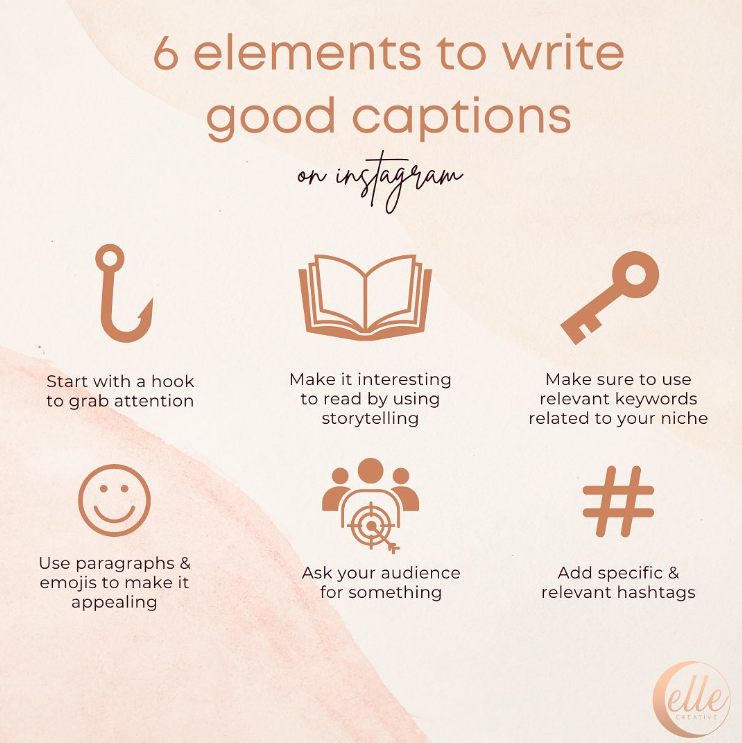
This isn’t just about pretty pictures; it’s about what you say with them. Your captions are your blog posts.
Anatomy of an engaging caption:
- Hook (first line visible in feed): Question, bold statement, or intriguing opener
- Value (middle section): Story, tips, insights, or education
- Engagement driver (end): Question, call to action, or conversation starter
Start with a hook. Ask a question. Share a personal anecdote. Break up your text with emojis and line breaks for readability. End with a clear call to action. Want people to comment? Ask them. Want them to visit your link-in-bio? Tell them. I’ve got caption writing strategies that go much deeper.
Which Instagram Content Formats Should You Use?
It’s not just static posts anymore. Each format offers unique ways to share your message:
| Format | Best Use Case | Ideal Length | Engagement Type |
|---|---|---|---|
| Reels | Quick tips, entertainment, trends | 15-90 seconds | Discovery, shares |
| Carousels | Tutorials, lists, deep dives | 5-10 slides | Saves, shares |
| Stories | Behind-the-scenes, polls, links | 15 seconds per clip | Direct replies |
| Guides | Curated collections, resources | 3-30 posts | Saves |
| Lives | Q&A, interviews, real-time content | 10-60 minutes | Comments, badges |
| Static Posts | Quotes, announcements, portfolio | Single image | Likes, comments |
Instagram Reels are fantastic for quick, engaging tips or behind-the-scenes glimpses. Carousels are perfect for multi-step tutorials or deeper dives into a topic. Stories excel at building daily connection with your audience.
Don’t limit yourself. Experiment! See what resonates with your audience.
How Do You Grow an Instagram Blog?
You can create the most brilliant content, but if no one sees it, what’s the point? Growth is strategic.
Why Is Consistency More Important Than Frequency?
Post regularly. The Instagram algorithm loves consistency. Your audience expects it. You don’t have to post five times a day, but find a rhythm you can maintain: daily, every other day, three times a week. Whatever it is, stick to it. Show up.
According to Later’s research, accounts that post consistently (at least 3-4 times per week) see significantly higher engagement rates than those posting sporadically. It’s not about volume; it’s about reliability. I’ve analyzed the best times to post for engagement if you want to optimize your schedule.
How Should You Use Hashtags for Discovery?
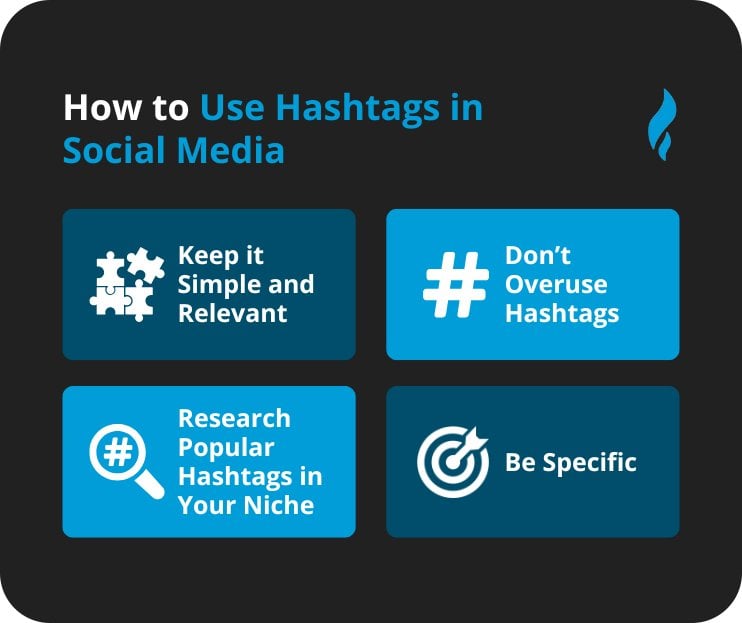
Hashtags are your discovery engine. They’re how new people find you. Don’t just slap on a few generic ones. Research relevant, niche-specific hashtags using tools like Hashtagify, All Hashtag, or Later’s hashtag suggestions.
Mix broad ones with super specific ones. Use them in your captions or in the first comment. And yes, you can use up to 30, but Socialinsider’s analysis found that 3-5 highly relevant hashtags often outperform 30 generic ones. Use them wisely. My complete guide on how to use Instagram hashtags breaks this down further.
What Engagement Strategies Actually Work?
This isn’t a one-way street. Respond to comments, reply to DMs, engage with other accounts in your niche. Be a part of the community, don’t just broadcast to it. The more you give, the more you get. It’s social media, after all.
You may encounter “Instagram Pods,” which are private groups where members coordinate to engage with each other’s posts immediately after publishing. While some swear by them, they can feel inauthentic and may violate Instagram’s terms. Focus on genuine engagement instead.
How Can Collaboration Accelerate Your Growth?
Find other creators in your niche, especially those with a similar audience size. Do joint Lives, share each other’s content, co-create Reels. It’s a fantastic way to tap into new audiences and build connections. A rising tide lifts all boats, right?
Looking to find potential collaborators on Instagram? Start by engaging genuinely with creators whose content you admire.
What Instagram Features Drive the Most Traffic?
Stories Link Stickers are your primary tool for driving traffic from Instagram. Use them to send viewers directly to your blog posts, products, or landing pages. This is one of the most effective ways to convert engaged Story viewers into website visitors.
Use Stories stickers like polls, quizzes, and question boxes to drive engagement. Use the “Add Yours” sticker. Tag relevant accounts. Explore Instagram Story ideas that encourage interaction.
Cross-posting expands your reach: Repurpose your Instagram content across other platforms. Share Reels to TikTok or YouTube Shorts, post carousels to LinkedIn, or share Stories to Facebook. This maximizes your content investment without creating additional work.
When Should You Consider Instagram Ads?
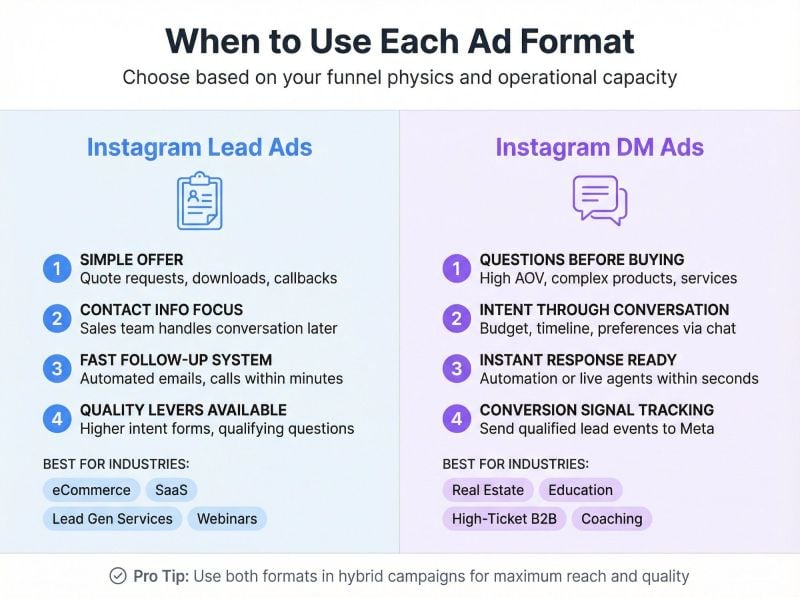
Once you have content performing well organically, consider boosting top posts or running targeted ads to accelerate growth. Start small, test different audiences, and track your ROI carefully. I cover the benefits of advertising on Instagram in detail, including when it makes sense to invest versus growing organically.
How Do You Make Money Blogging on Instagram?
This is often the ultimate goal, isn’t it? And yes, you absolutely can make money on Instagram.
How Do Brand Partnerships and Sponsored Content Work?
Once you have an engaged audience, brands will notice. You’ll create posts or Stories featuring their products or services, sharing your genuine experience. Be transparent about sponsorships; it’s crucial for maintaining trust.
Pricing your sponsored content: A common starting formula is $100 per 10,000 followers, but engagement rate matters more than follower count. It’s commonly known in the industry that nano-influencers (1,000-10,000 followers) often earn $10-100 per post, while micro-influencers (10,000-50,000 followers) can command $100-500. Factor in content creation time, usage rights, and exclusivity when negotiating. And don’t undersell yourself!
What Is Affiliate Marketing on Instagram?
Promote products or services you genuinely love using unique tracking links. When your audience makes a purchase through your link, you earn a commission. It’s a fantastic passive income stream, but authenticity is paramount. Only recommend what you truly stand behind. My guide on blogging and affiliate marketing covers this comprehensively.
Can You Sell Your Own Products on Instagram?
Got an e-book? Offer coaching? Sell handmade crafts? Instagram is a powerful sales funnel. Use your content to educate, inspire, and drive traffic to your shop or booking page. This is where your link-in-bio becomes indispensable.
How Do Instagram Shopping and Creator Tools Help Monetization?
Instagram is increasingly integrating e-commerce directly into the platform. If you sell physical products, explore Instagram Shop, product tags, and checkout features. These tools streamline the buying process for your followers.
Instagram Live Badges allow your followers to purchase badges during your Live videos as a way to support you directly, similar to tipping on other platforms. It’s another revenue stream for engaged creators, especially during Q&A sessions, tutorials, or behind-the-scenes content.
What Legal Requirements Apply to Instagram Bloggers?
Disclosure, disclosure, disclosure. If it’s a sponsored post or an affiliate link, you must disclose it clearly. According to the FTC’s Endorsement Guides, disclosures must be clear and conspicuous. Hashtags like #ad, #sponsored, or #affiliatelink are not optional; they’re legal requirements. Don’t risk your reputation or legal trouble for the sake of discretion. I cover blogging laws that every creator should understand.
What Mistakes Do Instagram Bloggers Make?
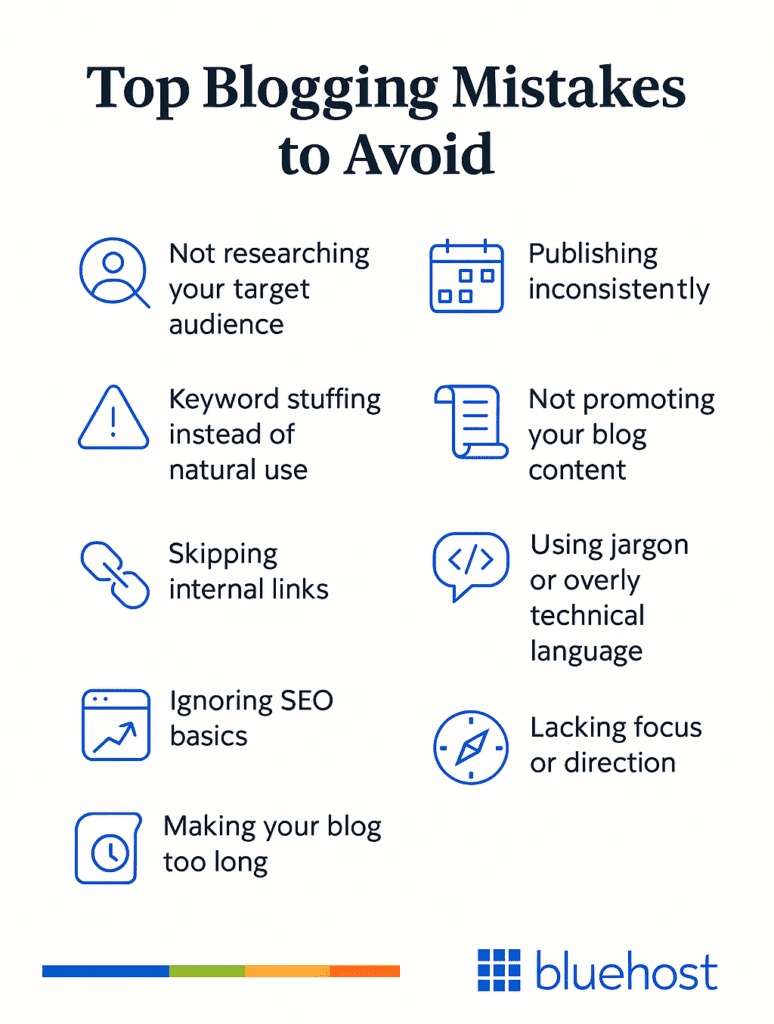
I’ve seen so many people stumble. Let’s make sure you don’t.
Ignoring Your Audience
The comments, the DMs, the Story replies: they’re not background noise. They’re your audience speaking. Listen to them. Respond to them. Ask them what they want to see. Ignoring them is a surefire way to kill your community. Use Instagram Insights to understand what resonates.
Lack of Authenticity
People can smell fakeness a mile away. Be yourself. Share your true opinions. Show your struggles alongside your successes. Authenticity builds trust, and trust builds a loyal following. It’s that simple. (Also? Beware of fake followers that can destroy your credibility.)
Chasing Trends Blindly
While staying current is good, jumping on every single trend without considering if it aligns with your brand is a recipe for a disjointed feed and a confused audience. Does that trending audio make sense for your message? If not, skip it.
Over-Reliance on Instagram Alone
Instagram is fantastic, but remember, you don’t own the platform. The algorithm can change tomorrow. Instagram could disappear.
Always try to move your audience to a platform you own. Your email list. Your website. Your podcast. Use your link-in-bio to promote a free resource (like a checklist or guide) in exchange for email signups. Mention your newsletter in Stories and captions. Your email list is the one audience you truly own. If you’re ready to expand, here’s how to start a blog that complements your Instagram presence.
What Tools Do Instagram Bloggers Need?
You don’t need a massive budget to get started, but a few tools will make your life easier.
Design and Editing Tools
| Tool | Type | Cost | Best For |
|---|---|---|---|
| Canva | Graphics | Free/Paid | Carousels, Stories, graphics |
| Lightroom Mobile | Photo editing | Free/Paid | Color grading, presets |
| Snapseed | Photo editing | Free | Quick mobile edits |
| VSCO | Photo editing | Free/Paid | Filters, film looks |
| CapCut | Video editing | Free | Reels, short video |
| InShot | Video editing | Free/Paid | Stories, vertical video |
Scheduling and Planning Tools
| Tool | Free Plan | Best Feature |
|---|---|---|
| Later | ✅ | Visual feed planning |
| Planoly | ✅ | Grid preview |
| Buffer | ✅ | Cross-platform posting |
| Tailwind | Trial | Smart scheduling |
You can schedule Instagram posts directly through Meta Business Suite too, but these tools offer better visual planning.
Analytics Tools
Instagram’s built-in insights are a great starting point. Learn to read your Instagram analytics properly. Tools like Later and Iconosquare offer more in-depth analytics for serious growth. Know your numbers.
For competitive research, Socialblade lets you track any public account’s growth over time.
Writing and Optimization Tools
Grammarly catches caption typos. Google Trends helps with content ideas. And yes, an emoji keyboard. Obviously.
Frequently Asked Questions About Instagram Blogging
What is an Instagram blog?
It’s a collection of visually-driven, micro-blog posts on Instagram, typically comprising an image or video and a detailed caption. You use it to share information, tell stories, and build a community around a specific niche, without needing a traditional website.
How do I start blogging on Instagram?
Define your niche, switch to a Creator or Business account, add a category label like “Blogger,” optimize your bio with keywords and a call to action, set up a link-in-bio tool, and consistently create engaging visual content with strong captions.
Can you make money blogging on Instagram?
Absolutely. Through brand partnerships, affiliate marketing, selling your own products or services, Instagram Shopping features, and Live Badges for direct support during broadcasts.
What’s the best link-in-bio tool?
Linktree is a popular, user-friendly choice for beginners. Shorby, Koji, Taplink, and Smart.bio also offer excellent features, often with more customization or specific integrations. Your best bet depends on your specific needs and whether you need payment processing, messenger integration, or analytics.
How many hashtags should I use on Instagram?
You can use up to 30, but quality beats quantity. A good strategy is 3-10 highly relevant hashtags mixing broad and niche-specific tags. Test different quantities and track which posts get discovered most through hashtag searches in your Insights.
Ready to Launch Your Instagram Blog?
You’ve got the roadmap now. This isn’t just another social media platform; it’s a dynamic, powerful tool for sharing your message, building your brand, and yes, making an income.
The key is starting. Pick your niche. Set up your account properly. Create your first carousel or Reel. Engage with others in your space. And most importantly, build that email list so you’re not entirely dependent on rented land.
If you want to dive deeper into building a sustainable digital presence beyond just Instagram, grab my free preview of Digital Threads for the complete playbook. Or if you’re ready for personalized guidance, my group coaching community is where I help creators and entrepreneurs build real businesses around their content.
So, what are you waiting for? The world’s waiting to hear what you have to say.
Actionable advice for your digital / content / influencer / social media marketing.
Join 13,000+ smart professionals who subscribe to my regular updates.