

Editorial Note: I may earn a commission when you visit links that appear on my website.

The 23 Best Video Marketing Tools for 2027
As nearly everyone in our industry knows, video marketing is hot. Really hot. In fact, video marketing has been slowly taking over multiple social networks due to its overwhelming popularity. Although at one time it was expensive to produce, nowadays, video marketing is a cost-effective option for most brands. If your company hasn’t tried this type of marketing, it should! Whether you’re looking to get into video marketing for the first time, or you just need new tools, here are some of the best video marketing tools to try for your next video marketing campaign.
Key Takeaways
✅ The 23 tools below are grouped by the job they do, not by brand: creation, editing, animation, hosting and analytics, screen recording, livestreaming, and YouTube SEO. Find the part of your video marketing that is actually stuck, then pick the tool.
✅ You can assemble a working video stack without spending anything. iMovie, Loom, Wistia, Vidyard, Vimeo, and VidIQ all have free tiers, and several other tools on this list offer limited free plans.
✅ Animation software solves a different problem than a footage editor. VideoScribe, Vyond, and Wideo are what you reach for when you have a message to explain and nothing to film.
✅ Hosting is a marketing decision, not just storage. Wistia and Vidyard gather viewer data and support retargeting, while Vimeo is the simpler option when you only need a video to embed anywhere.
✅ Getting found on YouTube is a separate skill from making the video. TubeBuddy optimizes titles and descriptions, VidIQ mines competitor videos for what is working, and both feed the same YouTube SEO work.
✅ If everything you make gets edited on a phone, a desktop suite is overkill. My roundup of the best video editing apps covers that case in more detail.
Video Marketing Software
Once you have a concept ready, you need some tools to bring that concept to life. More than just a camera, there should be a way to upload, digitally record, use stock video, and edit to create a video that is uniquely yours. Use a video marketing platform from this list to create an amazing video and you can’t go wrong.
1. Biteable

Whether you’re sending out a message to customers about the impact of a disaster on your business or trying to onboard employees, check out Biteable. It has a unique approach to video marketing, in that it’s intended to be fast and easy to create any kind of video. The company even says you can make something cool on your lunch hour and claims it’s the world’s simplest video maker. Choose from a variety of video templates and add the text/sound you want.
Pricing: This click-and-drag program offers a free trial, and paid plans start at $15 per month billed yearly.

2. Magisto

Showcasing your talent in video form is easy with Magisto. Like some of these best video marketing tools, you use actual footage from your cameras. However, what makes Magisto unique is its AI-based editing assistant that helps you all the way from uploading footage, to editing it, and even with distribution. The AI assistant asks you what “mood” you’re looking for and can detect emotions with ease. Everything is built into your video so that you project your intended message across your social media platforms. Don’t have music? No worries! Magisto software has licensed music available to pro and business customers. Business customers have access to Getty Images stock photos, too. As an added bonus, Magisto has built in video analytics, which help you see what’s working and where you can improve next time. The software is available as an iPhone or Android app, as well as through the computer-based web client.
Pricing: Magisto has a free Basic plan plus three paid tiers, with an annual billing option.
3. Powtoon

Powtoon combines animation and video clips to create high-quality video marketing for a variety of social media channels. Powtoon lays claim to providing video services for more than 96% of Fortune 500 companies, a number that is quite impressive if it is to be believed. Powtoon claims that it accomplishes this feat by offering a video service that eliminates communication issues regarding video marketing content and provides professional-grade templates to users in search of a simple, easy way to create quality and engaging video content. From promotional videos to be sent directly to existing clients, to animations announcing new initiatives, Powtoon offers an online editing service for companies of all types and needs.
Pricing: Powtoon has a free plan that adds a watermark and caps videos at three minutes. Paid plans billed yearly start at $15 per month for Lite, $40 for Professional, and $125 for Advanced, and Enterprise pricing is custom.
4. Movavi

Movavi Video Editor offers an intuitive interface for both brief clips and extensive projects. It features a wide range of video effects, music, and fonts, enabling the creation of professional-quality videos. Uniquely, Movavi Video Editor blends user-friendliness with advanced AI editing capabilities, perfect for beginners and experienced marketers, who are inexperienced with background removal and noise suppression. The Quick-video feature allows turning any marketing presentation slides into a complete video, with included voiceover. The free basic version comes with a watermark, while paid versions offer advanced, watermark-free features.
Pricing: Movavi Video Editor is sold as a subscription starting at $19.95 for one month, and Movavi’s store also offers 1-year and lifetime licenses.
5. VEED
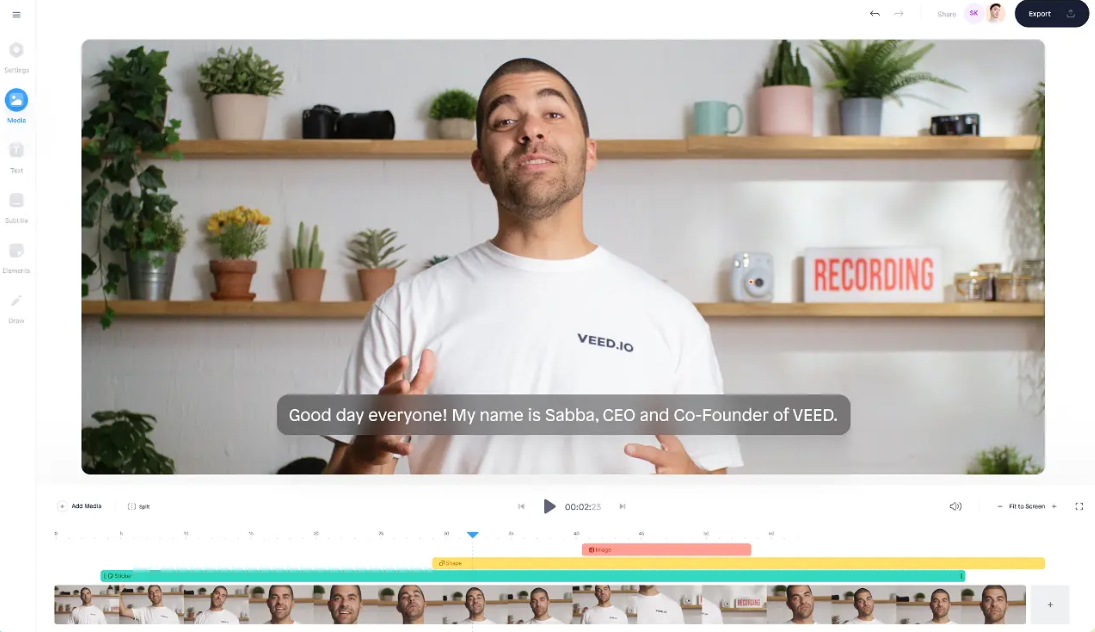
VEED is to videos what Canva is to graphics and images. In short, VEED lets users create animated videos and filmed videos alike, in order to further video marketing budgets with crisp, clear, and easily-identified lines. Like Canva, VEED offers ready-made templates to get you started, and provides different ready-to-go components to cover a wide variety of videos to suit your needs, including how-to videos, straightforward marketing videos, and more to place on your social channels, website, and more. This particular video marketing software is useful for its versatility; although it can be used to create targeted marketing videos, it can also be used by companies and brands to record and disperse meetings and training videos. VEED is perhaps best to support the video marketing efforts of those without an established video marketing approach, or those who are not comfortable with this format, as the features may be too simplistic or constraining for experienced creators.
Pricing: VEED has a free plan. Paid plans billed annually start at $19 per user per month for Lite and $49 for Pro, which adds the full set of AI tools, and Enterprise pricing is custom.
6. Videoshop

Videoshop is an app created for on-the-go, easy content creation to share across social media platforms. Although Videoshop is far simpler, it does still capture the power of social video messaging, and still allows companies, brands, and individuals to create a solid video marketing strategy. Videoshop is ideal for people who are just starting out, or eager to create quick snippets of video. Videoshop essentially functions as a basic video editor, with greater functionality and improved ease of use. Free videos do come along with a Videoshop watermark to illustrate to video viewers where the video was made, while a “pro” subscription, or paid subscription, removes these watermarks.
Pricing: Videoshop is initially free, but you can also select the “pro” version of the app. It costs $3.99 per month or $23.99 per year, or $99.99 for a lifetime license.
7. Wave Video

We like Wave Video because it has a nice mixture of templates and the ability to start from scratch. It’s also a great tool for using the same basic footage for different video formats. For instance, you can make a nice video for YouTube, and then later decide to repurpose it into a Facebook banner video or something Instagram friendly. Better yet, you don’t have to start over. The developers make a big point of the fact that Wave Video is built to support high volume video content production, which isn’t the case with many of its competitors. Another awesome feature is that you can easily upload branding items like logos to the platform for future use in videos. Wave isn’t a lone ranger, either: it features integrations with YouTube, Google Drive, Hubspot, Facebook, X, Dropbox, and more. In other words, there are plenty of ways to make Wave Video work within a team environment to bring the power of video to a marketing team. Best of all, Wave includes video hosting, a content calendar, video button, and landing pages.
Pricing: Limited free plan, then paid subscriptions from $16 per month billed annually.
8. WeVideo

If you want something that can handle the needs of business, education, and individual customers, this one’s a great option. In fact, WeVideo has dedicated plans for education. They are very proud of the features for students, such as video science reports. At the same time, business customers will love features such as screen recording. Individuals can enjoy a purpose-built YouTube video editor, along with the ability to make HD videos as an amateur. Maybe that’s why their advertising material refers to them as “the best ever.” Well maybe or maybe not, but this sure is a versatile application that can be used to create the type of content seen in a variety of venues, from video SEO campaigns to educational pursuits.
Pricing: Schools and instructors get separate education pricing. For individuals and small businesses, Creator costs $240 a year and Teams costs $624 a year, both billed annually.
Video Editing
Now that you have the basic footage, it’s time to edit your video and turn it into something nice. Sure, the resources mentioned under “creation” offer video editing, but sometimes you just need something more specialized. Here are a couple of options for video marketers who need a full-featured editing option.
The Digital Marketing Playbook for Small Teams
My latest book helps small businesses, entrepreneurs, and marketers bring search, email, and social together into one digital marketing strategy that actually compounds.
Drawing on my work as a Fractional CMO, Digital Threads turns complicated tactics into a clear, practical plan you can follow, whatever your budget or team size.
Grab your copy on Amazon and start weaving your own digital threads. Click the cover or the button below to get started.

9. Filmora

Unlike many of these best video marketing tools, Filmora is an application you have to install on your computer. It’s also one of those old-school traditional video editors. What does that mean? Well, for one thing it’s a great tool to use if you’re putting the video basics together using a webcam, GoPro, smartphone, or digital camcorder. Standards like voiceovers and the improvement of video quality are the reasons to buy this program. Also, there are several versions of the program available, depending on your needs. It’s available for Mac and Windows.
Pricing: Annual plans start at $49.99 per year, and a perpetual license costs $79.99 as a one-time payment.
10. iMovie

If you own any kind of Apple device that can run apps, this one’s for you. In fact, iMovie is one of those old school Apple apps that is built exclusively for their products. However, like GarageBand, it’s fully featured for free. Recent versions not only let you edit on your Mac, but on other devices as well. And, it doesn’t have to be limited to one device. Instead, you can upload the raw video to the cloud and work on it from any device with iMovie installed. Just sign into your Apple account.
Pricing: Free for Apple people. Unavailable for anyone else.
11. Async (formerly Podcastle)
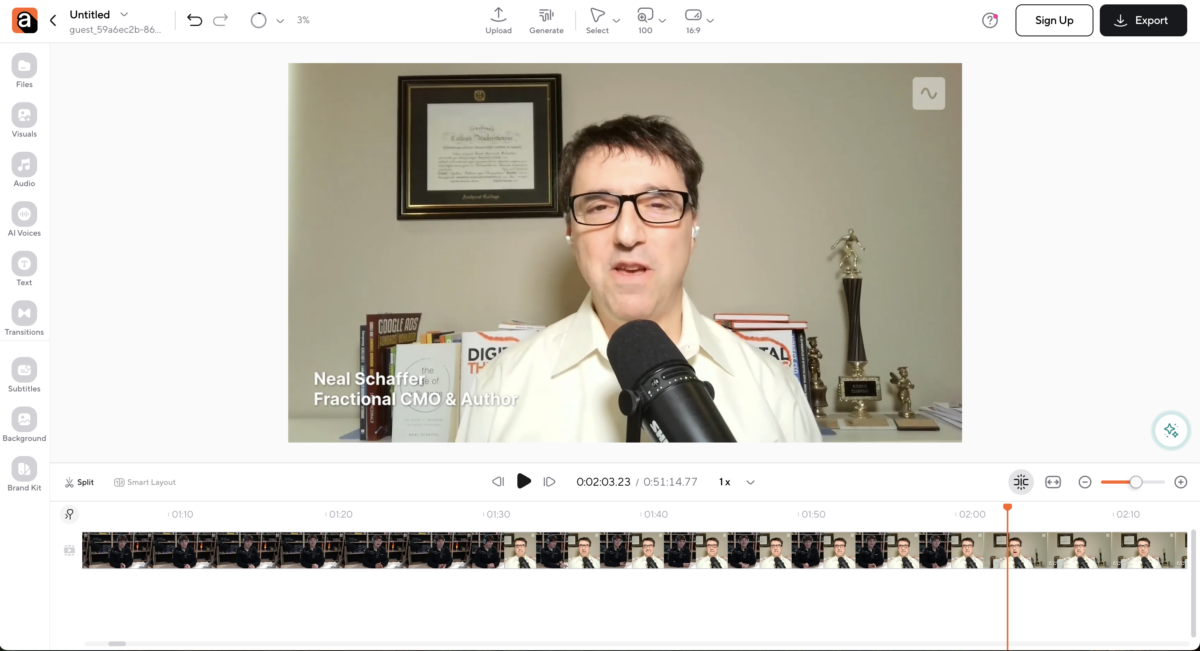
Async is an AI-powered video editor built for teams that need to create, edit, and repurpose video content at scale. Instead of focusing on animation, Async works with real video footage and brings editing, localization, and content repurposing into a single workspace.
The platform is designed to simplify modern video workflows, especially when content needs to be adapted for different audiences or formats. Features like AI dubbing, automatic subtitles, and auto-generated clips make it easy to localize videos with an AI video translator, improve accessibility, and create short-form content without relying on multiple tools. This makes Async a practical option for marketing teams, educators, internal communications, and social media managers.
One of Async’s strengths is its ability to turn long-form videos such as podcasts, interviews, webinars, or product demos into platform-ready clips or localized versions. This helps teams get more value from existing video content while maintaining consistency across channels.
Pricing: Async offers flexible pricing for individuals, teams, and organizations, with plans based on usage, collaboration needs, and access to features like dubbing, subtitles, and clip generation.
Video Animation
Not all marketing videos need to be made from live footage. In fact, lots of brands use animated video to draw in potential customers. While this video making method used to be a lot of work, nowadays it’s a snap with animation software. Here are some of the best animation offerings for video marketers.
12. VideoScribe
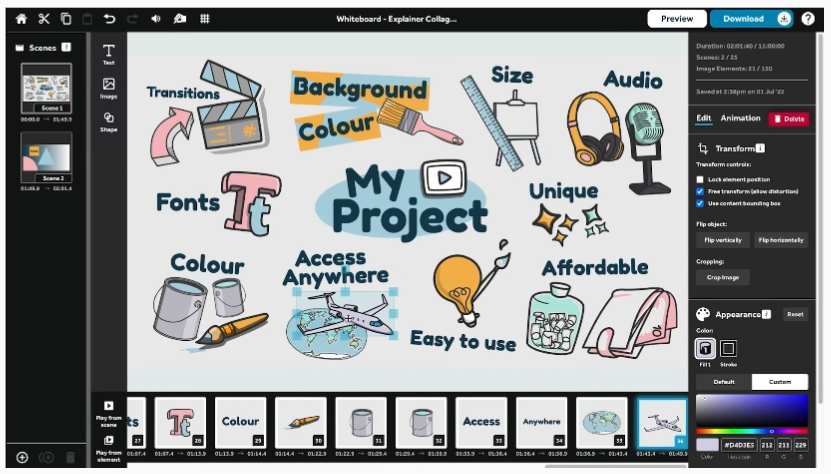
For simple, yet effective, video, check out VideoScribe. Unlike more general tools, this one makes one type of video: whiteboard animation. This is the type where you see hands drawing things, along with running commentary. There are several great uses for this tool: First, explainer videos can help consumers understand how your product can be used. Or, use the whiteboard model for corporate training purposes to create an engaging business video. Educational content is easily produced as a whiteboard, so VideoScribe is useful in higher education, too.
Pricing: After a 7-day free trial, plans start at $12.50 per month per license, billed annually at $150.
13. Vyond
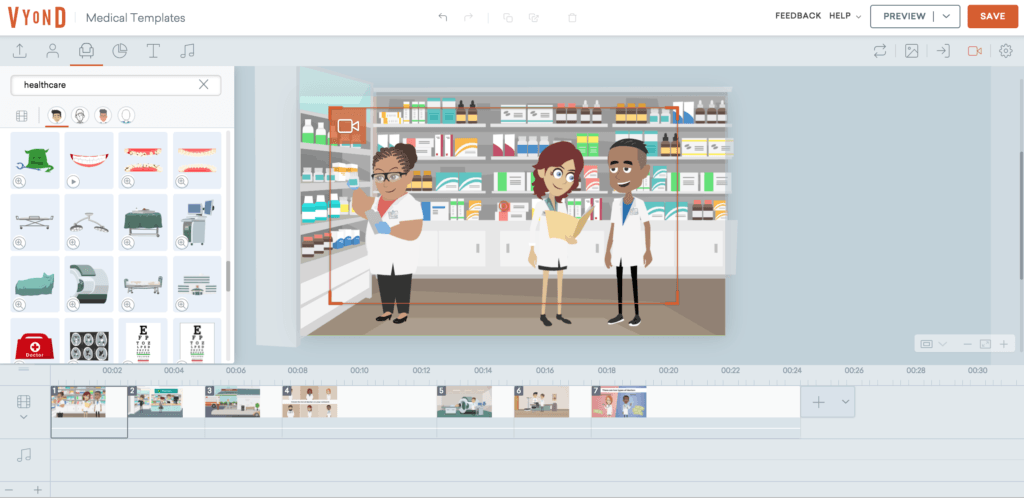
Vyond is a video animation tool designed to create an entire video designed for education or training purposes. Although Vyond can be used in other ways, and can come along with background music, sound effects, and other hallmarks of animation videos, its true strength lies in its focus on training, education, and straightforward delivery of information. Vyond does not require any advanced degrees or advanced knowledge of animation practices, and instead allows businesses and companies to create a piece of content that is dynamic and engaging, while using the expertise of Vyond creators. Training videos, whiteboard videos, educational videos, and more can all be created using Vyond, even in the absence of prior experience. Bear in mind that because Vyond is designed for high-quality, professional use, its pricing tiers are much steeper than many other options identified here.
Pricing: Vyond’s Starter plan is $58 per month, billed annually at $699. Professional is $100 per user per month and Enterprise $137, both billed annually, and Vyond quotes custom pricing for larger teams.
14. Wideo
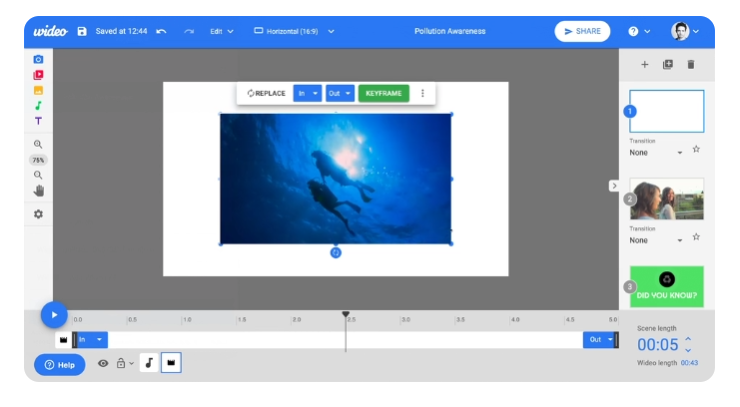
Another animation-only video creator, this one has pre-made templates. However, it also has more options for animation than just line drawings on a white board with added sound effects. Make an introduction video, explain a concept, or craft a slideshow presentation with drag-and-drop features. In other words, no video skills are required other than some creativity. Once your video has been made, download the mp4, upload it to YouTube, and embed it into websites. Web only. This program is about as easy as these things come.
Pricing: Limited free version, then paid plans starting at $19 per month billed annually.
Video Hosting & Analytics
It almost goes without saying that any video worth watching needs a host so you can share it with others. And, as with any effort, you want to make sure that your videos are performing as well as they should. Here are some of the best video marketing tools to make both things happen.
15. Vidyard
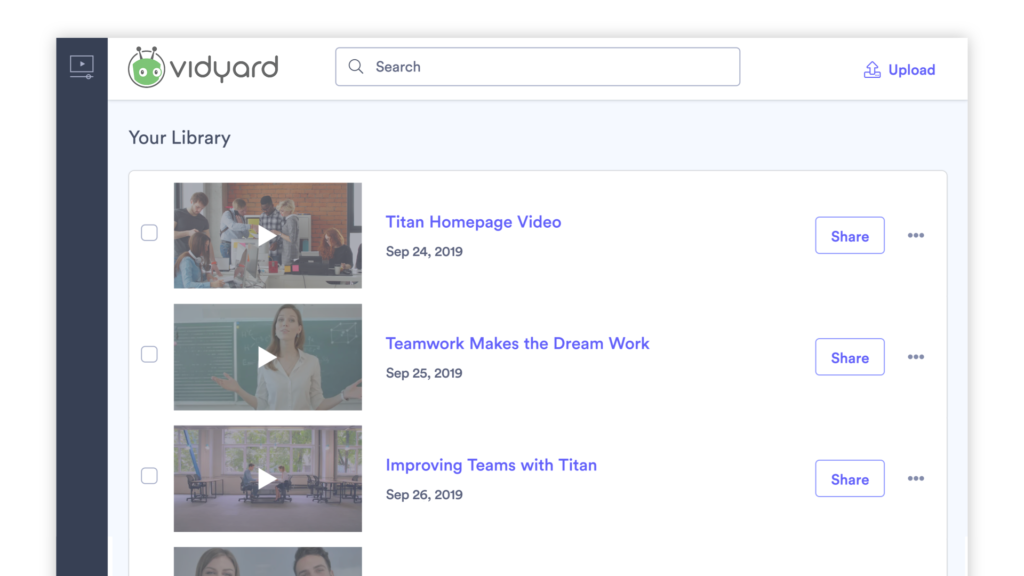
Vidyard is a commercial combined hosting and analytics service. It is focused on both business and educational use, and includes some video production tools. These include screen recording, personalization, basic editing, and platform optimization. For those who want to stream video, this service is provided through their online platform. Businesses and educational institutions can enjoy a wide variety of integrations. Finally, Vidyard offers analytics services to measure results.
Pricing: there’s a free version, and paid plans start with Starter at $59 per seat per month billed annually.
16. Vimeo

If you need a basic hosting provider, Vimeo is one of the oldest and best. Originally just a hosting platform, it now provides streaming with their top-level subscription level. You can embed Vimeo-hosted videos on just about any website other than YouTube. Set privacy restrictions or allow the video to be watched by anyone with a link. There are analytics features, as well. Vimeo can be used for a significant number of content types, and as one of the oldest social platforms for videos currently in use, it is one of the most reliable, powerful tools that a business can use.
Pricing: There’s a free plan, and paid plans start at $9 per month billed annually.
17. Wistia

Unlike the other services in this section, Wistia’s online tool provides some production features. For example, you can customize the video player and add interactive features such as clicking through to a web page. Then, it performs marketing-focused tasks like gathering information about viewers and then retargeting. A wide variety of integrations are available.
Pricing: Free plan, then $79 per month billed annually for the Business plan.
Screenshare Creation
Sharing your screen live on a video call is easy, but making a recorded screen share that someone can watch later is a bit more difficult. Fortunately, this type of video has become common enough that some of these best video marketing tools can help.
18. Camtasia

This is an easy-to-use tool for recording presentations and how-tos. First, you download the software onto your Mac or PC computer. Then, you turn it on and record your screen capture video from the computer screen. Add some special effects, then make sure the sound is OK. When you’re ready, just upload it to your video sharing platforms or distribute it any way you’d like. Simple.
Pricing: Camtasia is now sold as an annual subscription, starting at $179.88 per year for the Essentials plan.
19. Loom

With so many teams working remotely, it can sometimes be difficult to stay connected to the people we work with. Loom is a service that lets you record quick screen shares and then send them to other people as a link or you can download the original file – for free! Loom works as a Chrome extension and is probably one of the easiest ways to quickly record a screen share with or without your face appearing. Consequently, Loom can be used to create all types of video content.
Pricing: There’s a free version, with paid plans starting at $18 per user per month.
Livestream
Sometimes, the best way to connect with other people is through live video. While some video platforms like Facebook Live let you do streaming, sometimes you might want to broadcast over several different social networks at once. The platforms below will allow you to create and disperse premium video clips over several channels live simultaneously.
20. Streamyard

For those of you who would like to stream on multiple platforms at once, think about using StreamYard. This feature allows you to sit in one place and have your professional-looking livestream published across Facebook, LinkedIn and YouTube. However, that isn’t the only cool thing about StreamYard. You can invite more than one person into your livestream, and in this situation, their webcam picks up their image. Furthermore, using their impressive features, you can display comments that appear in social media directly on your livestream feed to increase engagement. Brilliant.
Pricing: Free plan, with paid plans starting at $14.99 per month billed yearly, or $18.99 billed monthly.
21. Riverside.fm

While Riverside.fm has primarily made its name as a podcast recording software, it can actually be used for a wide range of applications. That includes putting video to work in your marketing. This particular online video platform has been made popular as a high-quality video recording and management software that can be used to record both the audio and video portions of podcasts (think the video footage often accompanying podcasts), but can be used to create other types of video marketing, including standard marketing spots and advertising. This software can be used for larger commercial purposes and smaller, personal advertising efforts (think influencer marketing and podcast recording), making it a truly versatile tool for creative teams. Pricing: Riverside.fm has a free plan that adds a watermark and includes 2 hours of multitrack recording. Pro costs $24 per month and Grow $34 per month, both billed annually, and Business plans are custom-priced.
YouTube SEO
Most people don’t think about YouTube as a search engine. However, the truth is that YouTube is one of the more important places people look for information. Therefore, it pays to have sound SEO practices to ensure your videos are found on the platform.
22. TubeBuddy

Whether you have a personal YouTube channel or an elaborate enterprise account, TubeBuddy will help you manage it. They’ll help you with embedding, processing, promotion and analytics. However, the unique feature of TubeBuddy is its SEO capabilities. In particular, the program helps you optimize your title and description, along with helping YouTube classify for related content recommendations. Finally, they’ll help you insert subtitles in another language, which increases your reach.
Pricing: Pro costs $12 per month and Legend $26.39 per month, with a discount for annual billing.
23. VidIQ

VidIQ is a program built to help you take advantage of the powerful features of YouTube. Because YouTube has long ago surpassed its initial foray into the world as a simple video platform and has exploded into a hub of professional-quality video tutorials and animations, it pays to optimize your videos for your particular niche or market. VidIQ helps you optimize your videos as best as possible by gathering information from all corners of YouTube, including competitor videos, to make sure that your videos are not only being put on YouTube, but also reaching your intended audience and performing as you’d intended.
Pricing: VidIQ has a free plan. For one channel, Boost costs $19 per month or $199 per year, and Max costs $49 per month or $468 per year.
Frequently Asked Questions
What is the best video marketing tool for a beginner?
Start with a template-driven creator that runs in a browser, like Biteable, VEED, or Wave Video, none of which assume any editing background. If you are on Apple hardware, iMovie is already installed and fully featured for free. Move to a dedicated editor only once the templates start getting in your way.
Do I have to pay for video marketing tools?
No. iMovie, Loom, Wistia, Vidyard, Vimeo, and VidIQ all have free tiers, and Powtoon, Wave Video, Wideo, Videoshop, VEED, StreamYard, and Riverside.fm each offer a limited free plan. Free plans usually add a watermark or cap your exports, so treat them as a way to test the workflow before you commit any budget.
How much do video marketing tools cost?
Entry-level paid plans on this list generally start between $4 and $20 per month, which covers most solo marketers and small teams. Desktop software works differently: Camtasia is now an annual subscription from $179.88 a year, while Filmora still sells a perpetual license for $79.99. Animation is the expensive outlier, with Vyond starting at $58 per month billed annually.
Which tool lets me livestream to several platforms at once?
StreamYard publishes a single stream to Facebook, LinkedIn, and YouTube at the same time, and lets you bring guests in by webcam. Riverside.fm records separate high-quality audio and video tracks, which matters more when the recording will be edited afterward rather than watched live.
Which tool is best for short social videos?
Wave Video is built for taking one piece of footage and reformatting it for different channels, which is the daily task in social. Videoshop handles quick edits from a phone. For deciding what to post and where before you pick software, see my guide to social media videos.
How Do You Choose the Best Video Marketing Tools for Your Business?
Do not buy a stack. Buy the one tool that removes the thing currently stopping you from publishing.
If nothing is getting made, start in the creation group and give yourself a deadline to ship one video with a template. If videos are getting made but nobody sees them, the problem is distribution, and TubeBuddy or VidIQ will do more for you this month than a better editor would.
If you already publish regularly, move your videos onto Wistia or Vidyard and start reading the viewer data. That is the point where video stops being content and starts feeding your pipeline.
Whichever group you start with, pick one tool, run it for 30 days on the free tier, and only pay once you have hit a wall you can name.
If you want my wider list of what I actually run in my own business, grab my free Digital and Social Media Marketing Tools Buyer’s Guide. And if video is meant to drive real revenue rather than views, that is the sort of thing I build with clients as a Fractional CMO.
DIY your digital marketing with AI.
Practical advice on social, content, influencer, and search marketing, plus the AI tools that make each one easier. Join thousands of founders and business owners who read it.

Neal Schaffer
Articles: 5848 Comments
Comments are closed.

Hi Neal,
Great list, but I noticed that Synthesia did not make it, and it seems to make a lot of best video-making lists. Can I ask what you don’t like about it? Just curious.
Dani
I do my best to revise these on a regular basis, but Synthesia really focuses is on the AI side of things which is relatively new. I plan to be introducing AI tools in separate blog posts where I am sure Synthesia will be listed at some point.
Great article! I love StreamYard!
Thanks – and me too!!!
Hey Neal. Long time since we met at UCLA. Have you tried The Video Bot? It’s new and looks to be fantastic for marketers. [link edited by admin]
What’s going on my friend?
Thank You Neal. Very informative post. I’m a videographer from Canada and appreciate your updates.
Thank you Dan! Sorry I didn’t publish this earlier!