
In November 2020 I recorded a podcast episode about having too much content. Partway through it I started thinking out loud about three keywords on my own site: how to become an influencer, how to become a social media influencer, and how to become an Instagram influencer.
Here is what I said on an episode of my podcast published on November 19, 2020:
“So one piece of content can rank for three different keywords. So what you don’t want to do is to have competing blog posts that compete for the same keywords.”
Then I laid out the two ways to handle it, and I did not pick one. I said you were going to have to make the best decision there.
I made mine in July 2026. Almost six years later. This is what I did, what the numbers did afterward, and what I would do differently.
Key Takeaways
✅ Keyword cannibalization is two of your own pages competing for one query, which splits your backlinks, your internal linking and your engagement data across URLs instead of concentrating them on one.
✅ Google Search Console and GA4 find it for free. Every tool that sells a cannibalization report is selling you convenience, not access.
✅ A merge works faster at the index than in the rankings. Sixty days after mine, the absorbed keyword had moved to the surviving URL. The position had not moved at all.
✅ Picking which page survives is the real decision, and search demand plus business fit are better guides to it than current traffic.
✅ Winning the merge does not mean the topic deserves your attention. I merged these two pages and then took the survivor off my target list anyway.

What Is Keyword Cannibalization?
Keyword cannibalization is when two or more pages on your site target the same keyword and the same search intent, so they compete instead of reinforcing one page. Google generally shows one URL per site for a query, so your backlinks, internal linking and engagement data get split rather than piling up on one page.
Splitting backlinks is the expensive part. Backlinks are what build the authority that tips a ranking when two pages look similar to the algorithm, so two of your URLs each holding half a link profile is worse than one URL holding all of it. That definition sits on every page ranking for this term. What almost nobody publishes is what happens after you act on it.
The Merge I Spent Six Years Not Doing
I had two posts. One targeted how to become an influencer, which Ubersuggest puts at 3,600 US searches a month with an SEO difficulty of 39 as of September 6, 2026. The other targeted how to become a social media influencer, at 590 a month with a difficulty of 37.
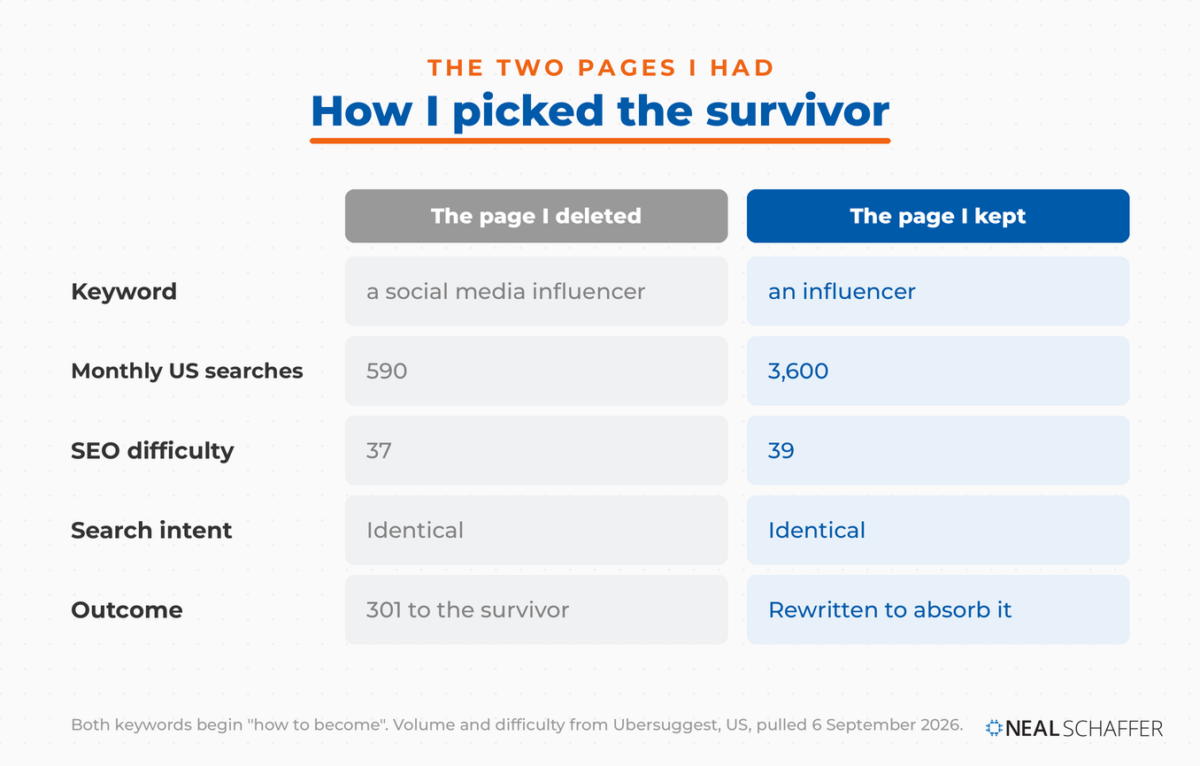
Same intent. Somebody wants to know how to become an influencer, and the words “social media” in the middle do not change what they came for.
On July 8, 2026, I rewrote the higher-demand page to absorb what the smaller one covered, republished it, deleted the smaller post, and pointed a 301 redirect from it to the survivor.
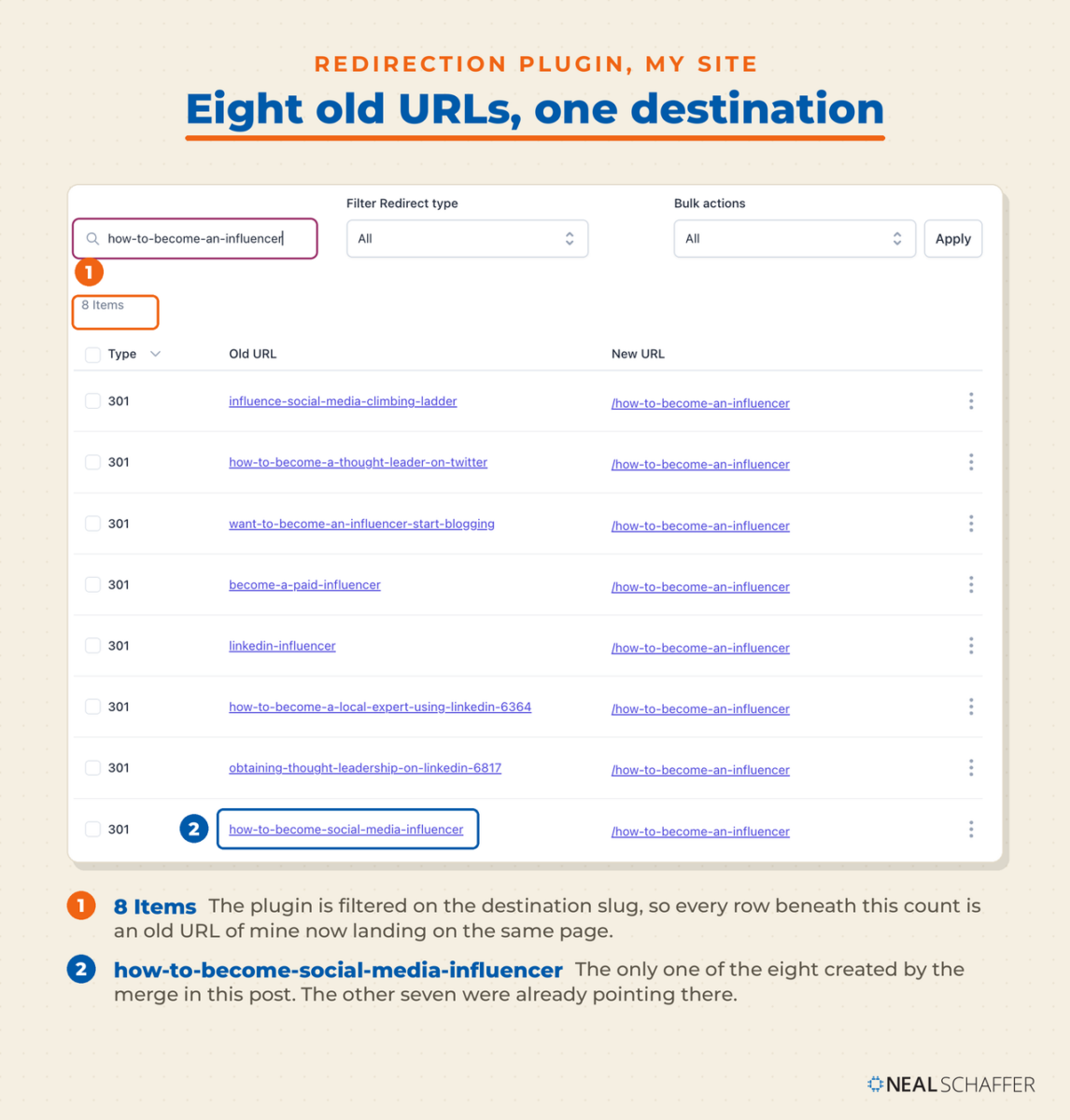
That page is now the destination for eight 301s. This merge added one of them. Consolidation on a site with any history is rarely a single event, and the survivor of one merge is usually the survivor of several, which is worth knowing before you decide a redirect is a big deal.
How I knew they were competing
Not from a cannibalization report, because Ubersuggest does not ship one and I have not bought a tool that does. I found the pair in Search Console using the page filter, then checked it against GA4 and against my own keyword map.
Both URLs were drawing impressions on the same phrase. That is the whole test.
What the data did in the sixty days after
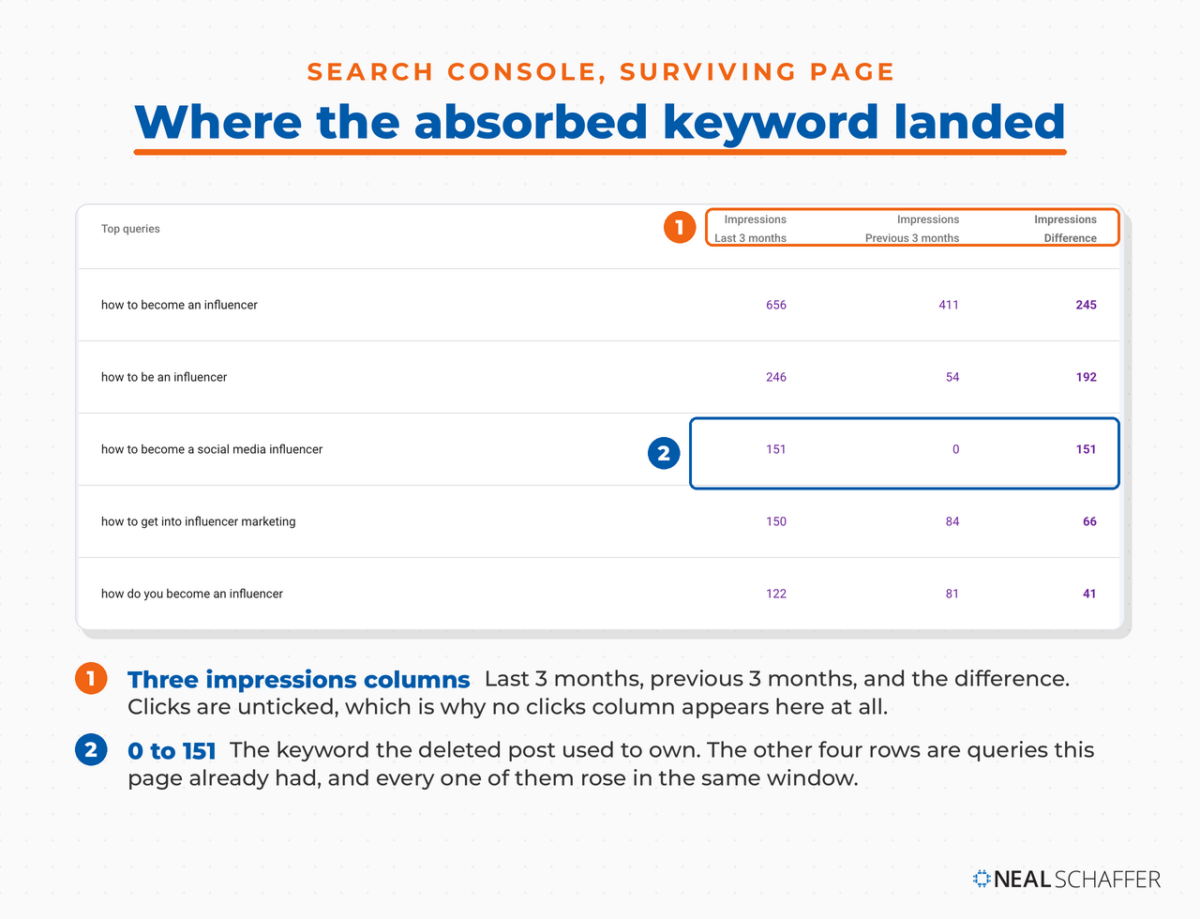
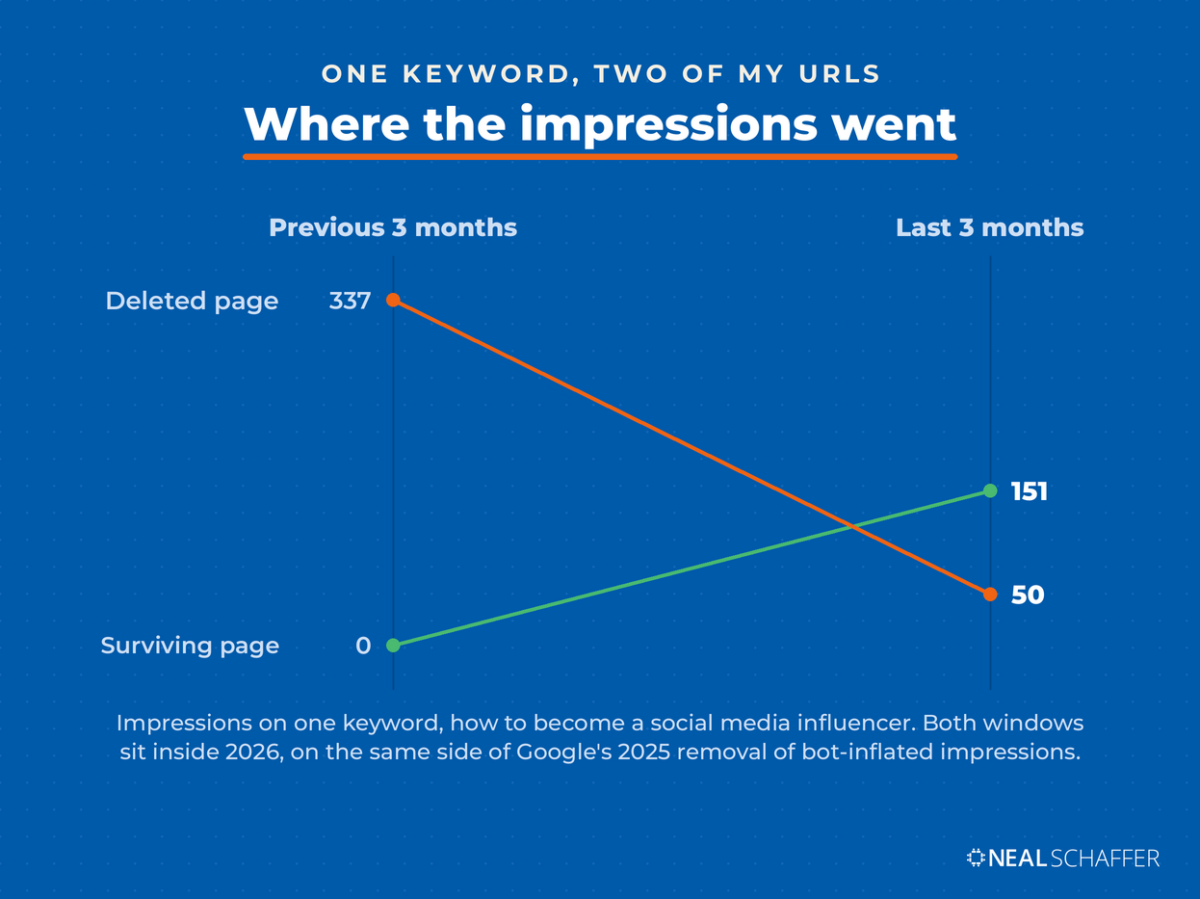
Here is the surviving page, comparing the three months after the merge against the three months before, on the keyword the deleted post used to own.
| Query | Impressions, prior 3 months | Impressions, last 3 months | Change |
|---|---|---|---|
| how to become a social media influencer | 0 | 151 | +151 |
| how to become an influencer | 411 | 656 | +245 |
| how to be an influencer | 54 | 246 | +192 |
| how do i become an influencer | 49 | 119 | +70 |
| how to get into influencer marketing | 84 | 150 | +66 |
And here is the deleted page across the same two windows.
| Query | Impressions, prior 3 months | Impressions, last 3 months | Change |
|---|---|---|---|
| how to become a social media influencer | 337 | 50 | -287 |
| how to be a social media influencer | 107 | 30 | -77 |
| how to become a social media influencer and get paid | 50 | 8 | -42 |
| how to become a social media influencer and make money | 50 | 6 | -44 |
| how to become an influencer and make money | 48 | 12 | -36 |
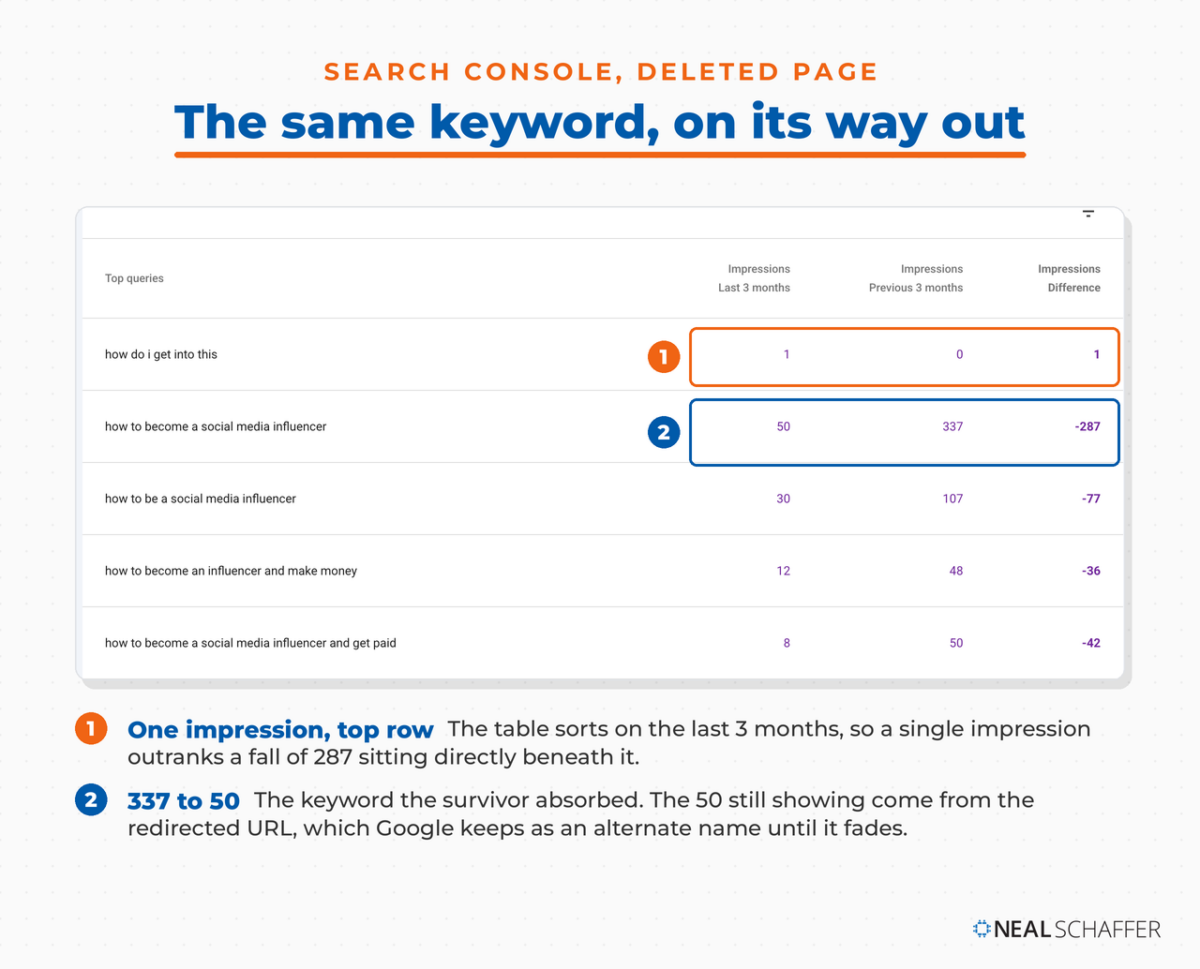
One page went from zero to 151 on a phrase it had never shown for. The other fell from 337 to 50 on that same phrase, in the same window. Google moved the query from one URL to the other.
Three things about those numbers before you take them at face value.
Both comparison windows sit on the same side of one important line, and the residual 50 impressions on the deleted page are expected, because Google documents why. When you redirect a URL, Google keeps track of both the source and the target, and the one that does not become canonical turns into an alternate name that can still appear in results when a searcher seems to trust the old URL. Those impressions fade on their own. Seeing them is a sign the move is working through, not a sign it failed.
The totals also do not balance. 337 plus 50 on one side against 151 on the other means some of that demand went somewhere other than my site during the handover.
Both comparison windows sit inside 2026, which matters because Google removed a large volume of bot-inflated impressions from deep positions during 2025. Compare across that cleanup and you get movement that has nothing to do with your pages. Keep both of your windows on the same side of it.
Is LinkedIn Actually Bringing You Business?
My latest book helps professionals, entrepreneurs, and business owners turn LinkedIn from a static profile into a real source of clients and growth.
Maximizing LinkedIn for Business Growth gives you clear, practical steps to build a profile that gets noticed and a network that actually sends business your way.
Grab your copy on Amazon and put it to work this week. Click the cover or the button below to get started.

What did not happen
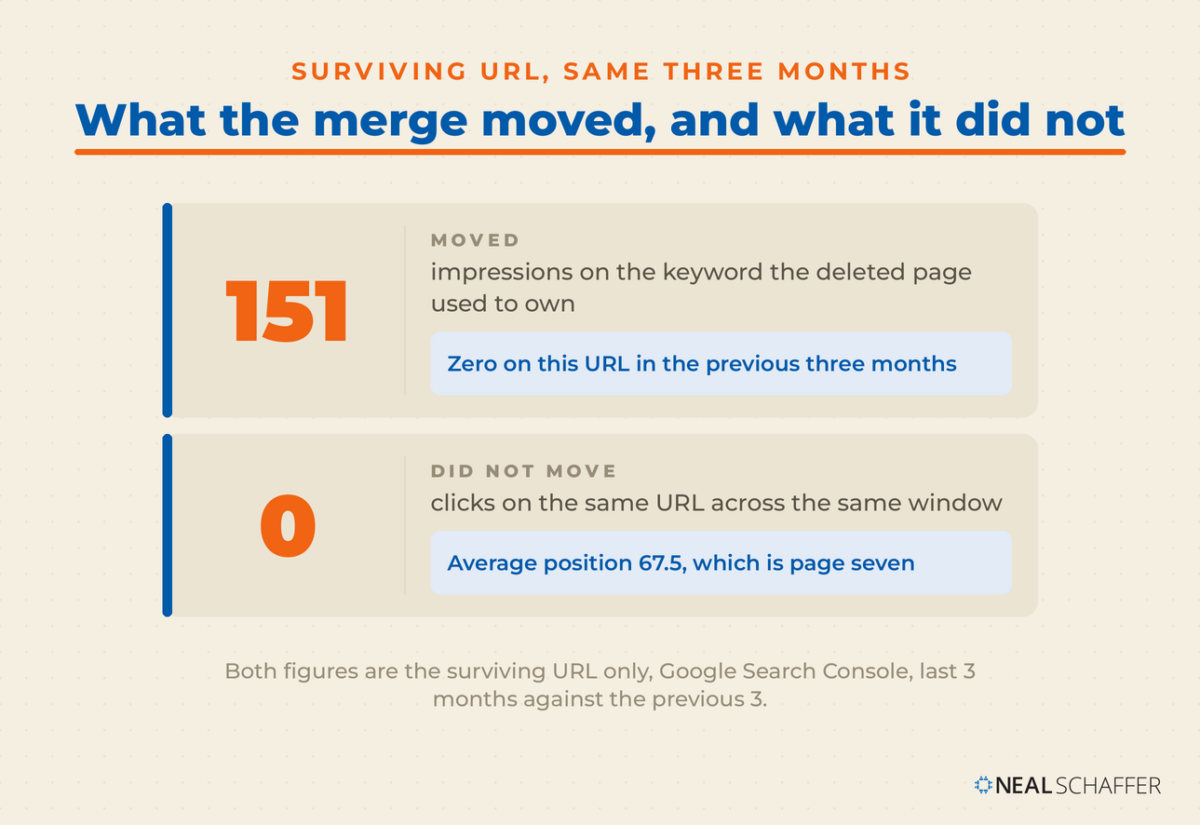
Clicks on the surviving page over those three months: zero. Average position: 67.5, which is page seven.
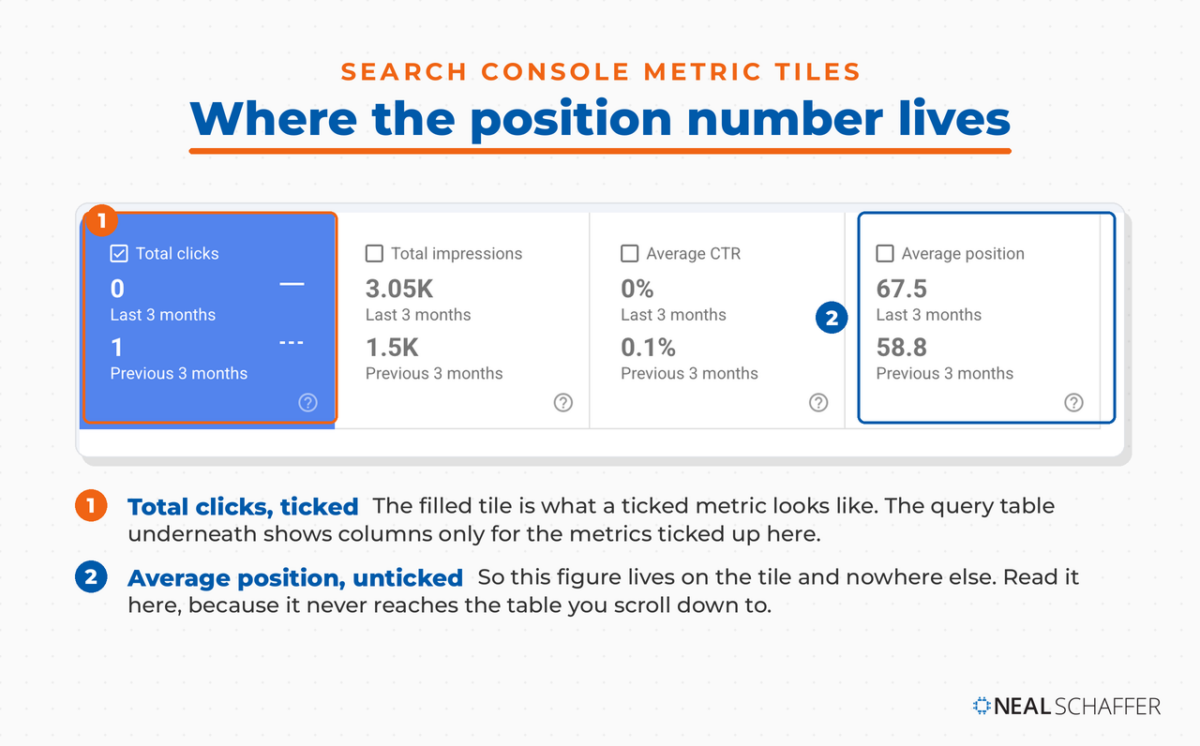
So the merge worked and the page still is not ranking. Those are two different things on two different clocks, and running them together is how consolidation gets oversold. Google reassigning which of my URLs answers a query took under sixty days. Moving that URL up the results is a slower job, and a redirect does not do it for you.
If somebody promises you a traffic lift from merging two pages, ask to see the position column.
How to Find Cannibalized Pages on Your Own Site
You do not need a paid tool for this. Two of your pages drawing impressions on one query, with the same intent behind it, is the whole test. Search Console gives you the query and the pages, GA4 shows what each page earns outside Google, and your keyword map says which one should own the term.
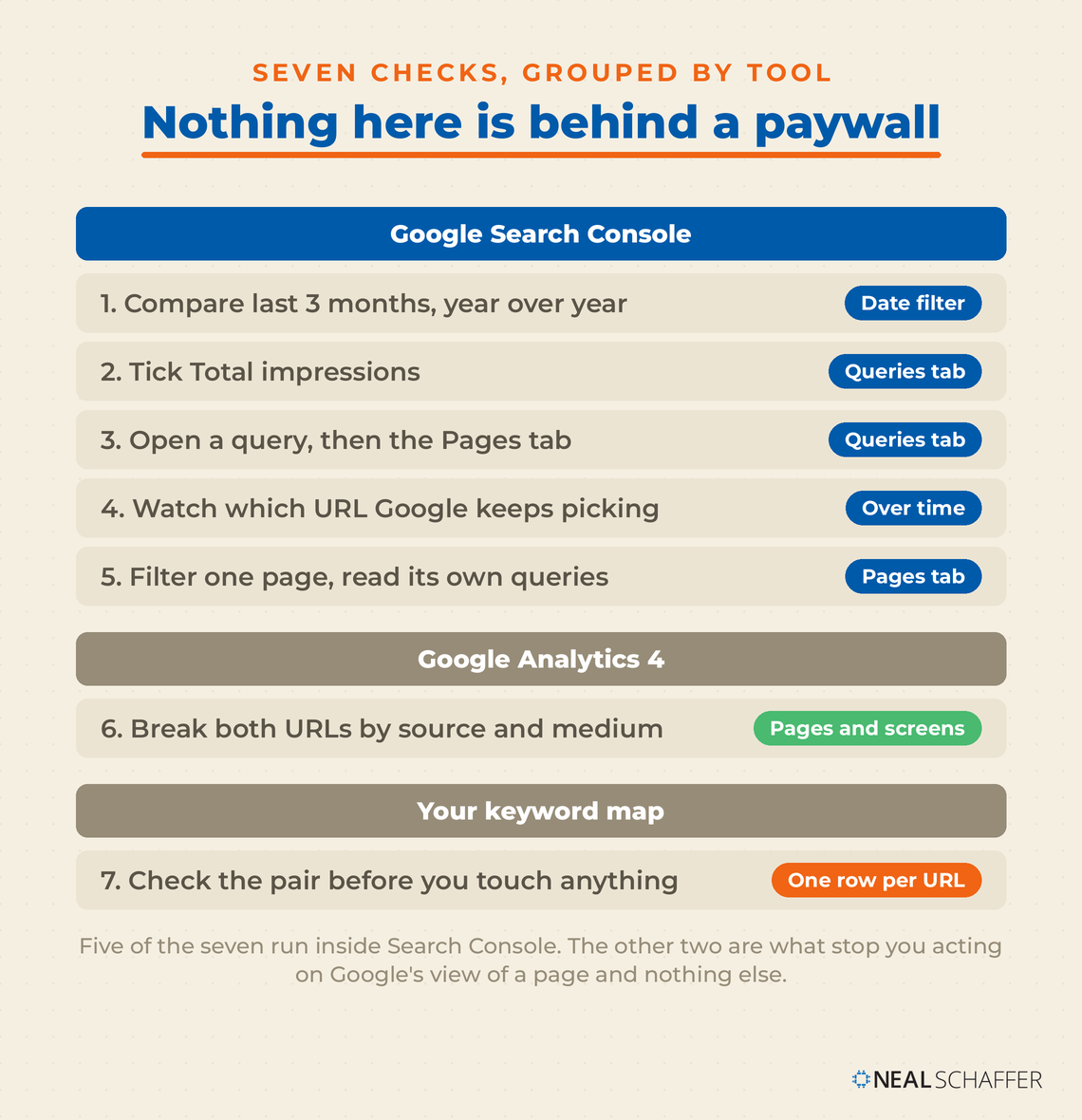
- Open Search Console, go to Performance, and set the Date filter to Compare, last 3 months year over year. Google recommends this exact comparison for working out what changed. Three months smooths out weekly randomness and the year-over-year view cancels seasonality.
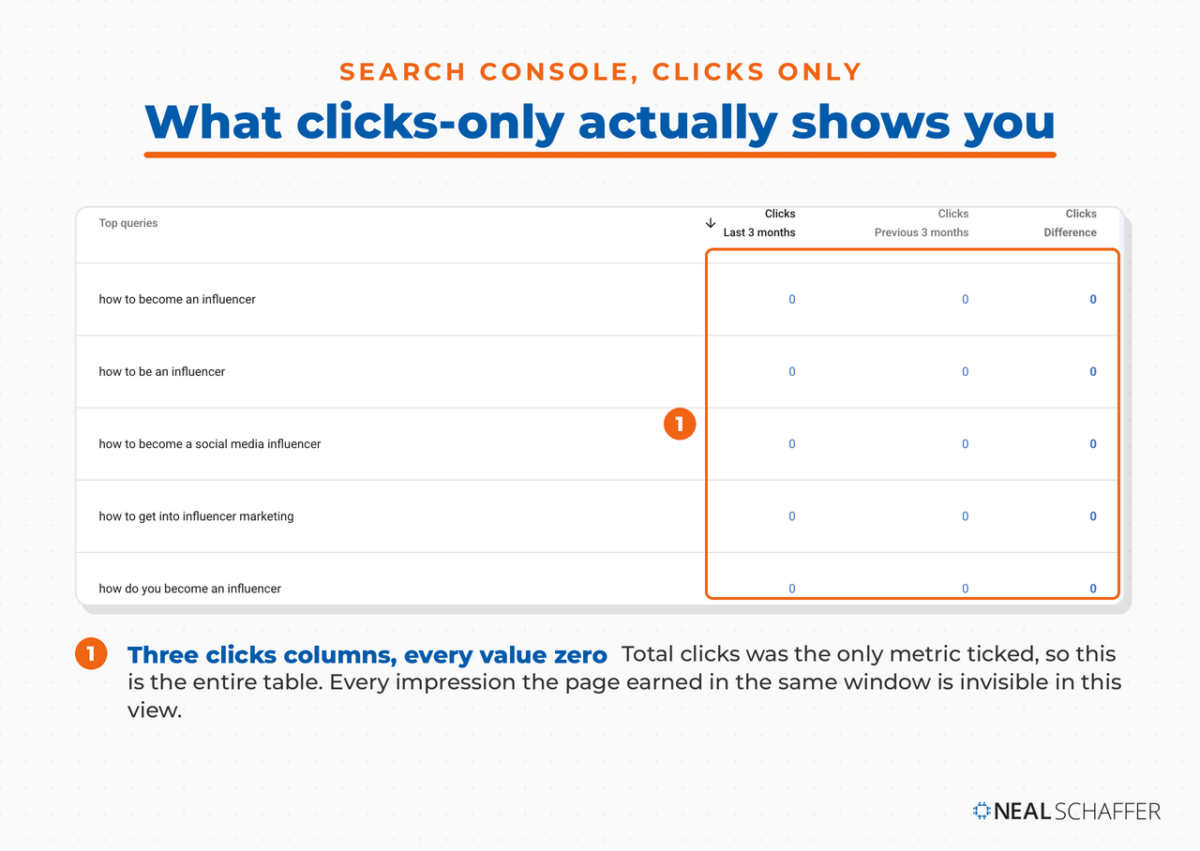
- Click the Queries tab and tick Total impressions above the chart. The metric tiles are checkboxes, and the table only shows columns for metrics you have ticked. Leave it on clicks alone and you get a wall of zeros, which is exactly what happened to me the first time I ran this.
- Pick a query that matters to your business, click it, then switch to the Pages tab. You are now looking at every URL on your site showing for that one query. Two or more of your URLs drawing real impressions is a cannibalization candidate.
- Watch which URL Google picks over time. SmartSites makes a point worth borrowing here: if the ranking URL keeps flipping between two of your pages, that instability is itself the evidence, because your site is sending mixed signals.
- Run it the other direction. Filter by a single page, open its Queries tab, and check whether the phrase in the slug is the phrase the page actually earns on. Sometimes it is not, and that is a re-targeting job rather than a merge.
- Pull both URLs in GA4 under Engagement, Pages and screens, and break the rows by session source and medium. Search Console only reports Google. GA4 shows you whether one of those pages is quietly earning from Bing, from direct visits or from AI assistants, and that changes which page you keep.
- Check the pair against your keyword map before you touch anything. If you do not keep one, a spreadsheet with one row per URL and its assigned keyword is enough to start. In Digital Threads I call this a Library of Content: a set built deliberately around your core topics, with one page owning each keyword you actually want. Cannibalization is what happens when that library stops being maintained, so the map is what stops you creating the next collision.
Step six is the one people skip, and from what I have seen it is the one that saves you from deleting the wrong page. A post can look dead in Search Console and still be doing steady work somewhere Google cannot see it.
Is It Always a Problem?
No, and treating every overlap as a defect will cost you pages worth keeping. Ahrefs argues the whole idea is overstated, because a page that ranks well usually ranks for hundreds of long-tail variations rather than one term. Merge on keyword overlap alone and you can lose more traffic from those variations than you gain from consolidating.
SmartSites puts the exception well: cannibalization is not worth fixing when one page clearly dominates and the other draws close to zero impressions, because the stronger page has already won. The same goes for two pages that share keyword phrasing but answer different questions.
The quick test is to search each phrase and look at the results. If Google returns a noticeably different mix of pages for each one, the intent differs and merging will cost you coverage. Seobility notes that the problem shows up most often on sites that grew quickly, which matches what I saw: mine came from years of guest contributors covering overlapping ground.
The cases actually worth acting on look like this: both pages stuck outside the top ten, or the wrong page ranking for a query where you would rather rank the other, or your internal links pulling in two directions at once.
How to Decide Which Page Survives
Keep the page with the higher search demand for the intent you are chasing, not the one with more traffic today. Traffic reflects what you happened to promote and link to in the past. Demand reflects what people are looking for going forward, and this is a decision about the future.
My choice was easy because the demand gap ran six to one. When it is closer, I work through these in order:
- Which URL is the better long-term home. A slug you would still be happy with in five years beats one built around phrasing that is already dated.
- Which page holds the backlinks. They pass through a 301, and the survivor keeping its own means you are not relying on the redirect being honored forever.
- Which page sits closer to what you sell. A page adjacent to your services earns its maintenance. A page that is merely popular does not.
- Which page already earns outside Google. This is the GA4 read from step six.
Then rewrite the survivor so it genuinely absorbs the other post before you redirect anything. A redirect with nothing behind it drops someone onto a page that does not answer the question they arrived with, and Google eventually reads that the way a reader does.
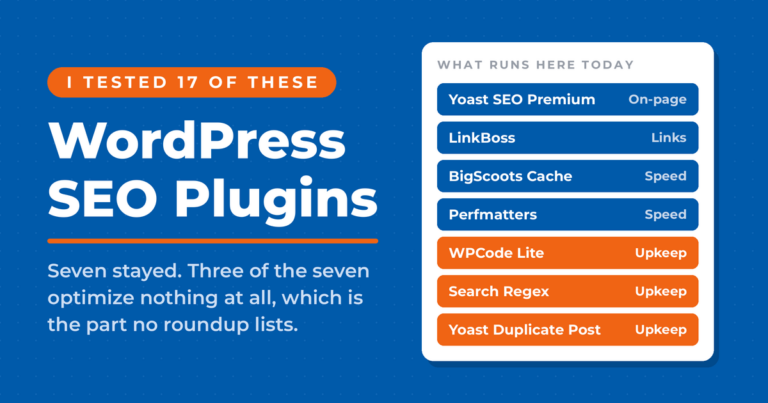
For the mechanics in WordPress, Yoast’s account of merging their own keyword research cluster recommends cloning the post with Yoast Duplicate Post so you can build the merged version without making live changes to either original. That is the workflow I use. Rewrite and Republish keeps the URL, keeps the comments, and swaps the whole body in one publish.
Use a permanent redirect rather than a temporary one. Google treats a 301 as a signal that the target should be the canonical URL, while a 302 leaves the old page as the one shown in results, which is the opposite of what a merge is for.
When Not to Merge
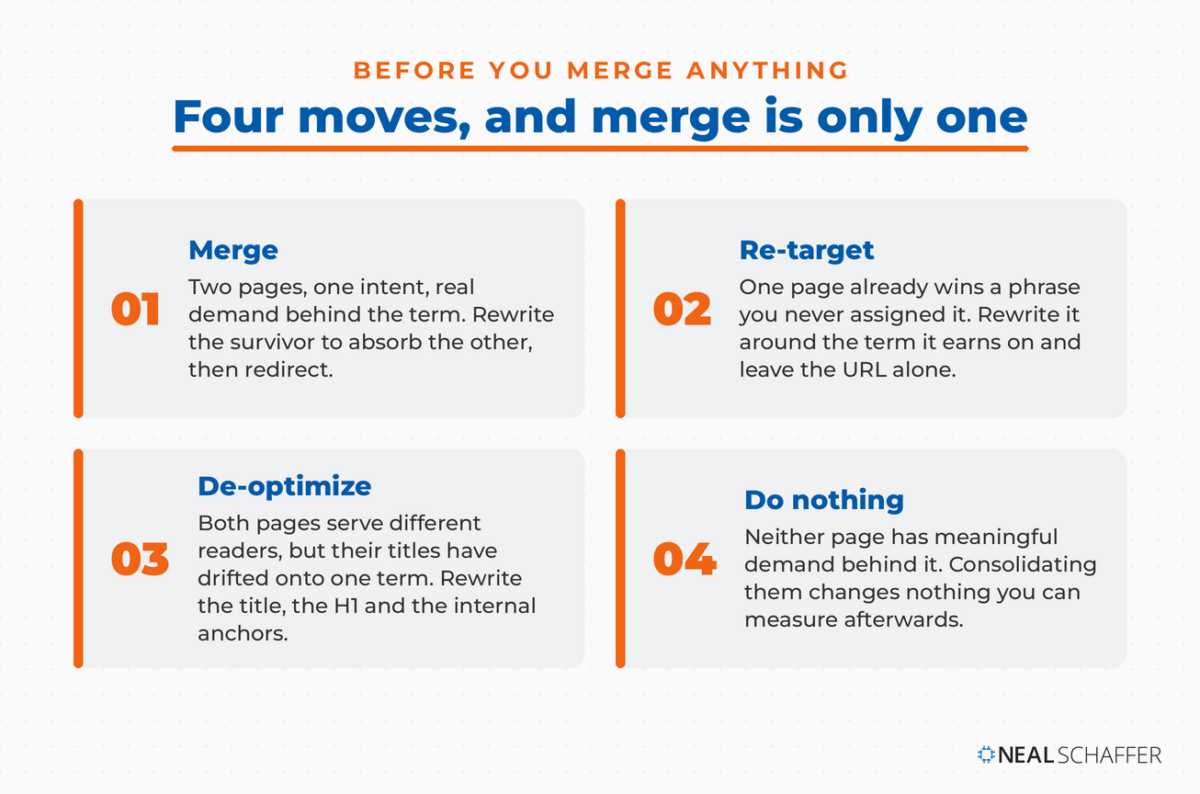
Merging is one of four moves available to you, and it should not be the default. Re-target when a page already wins a term you never assigned it. De-optimize when both pages serve different readers but their titles have drifted onto one keyword. Do nothing when neither page has real demand behind it.
Re-target instead when one page is already winning a phrase you never assigned it. Rewrite that page around the term it actually earns on and leave the URL alone. You keep the ranking history and you stop competing with yourself in the same edit.
De-optimize instead when both pages should stay live for different audiences but their titles and headings have drifted onto the same term. Rewrite the title and H1 of the secondary page, then fix the internal links pointing at it so the anchor text reinforces the new focus rather than the old one.
Do nothing at all when neither page has meaningful demand. Merging two pages nobody searches for produces one page nobody searches for, and you spent a weekend on it.
I would argue the most common mistake here is treating cannibalization as a defect to eliminate rather than a symptom worth reading. Two pages colliding usually means your keyword map has a gap, and fixing the map prevents the next three collisions. That is the same discipline behind good on-page SEO: one page, one job.
The Part That Surprised Me
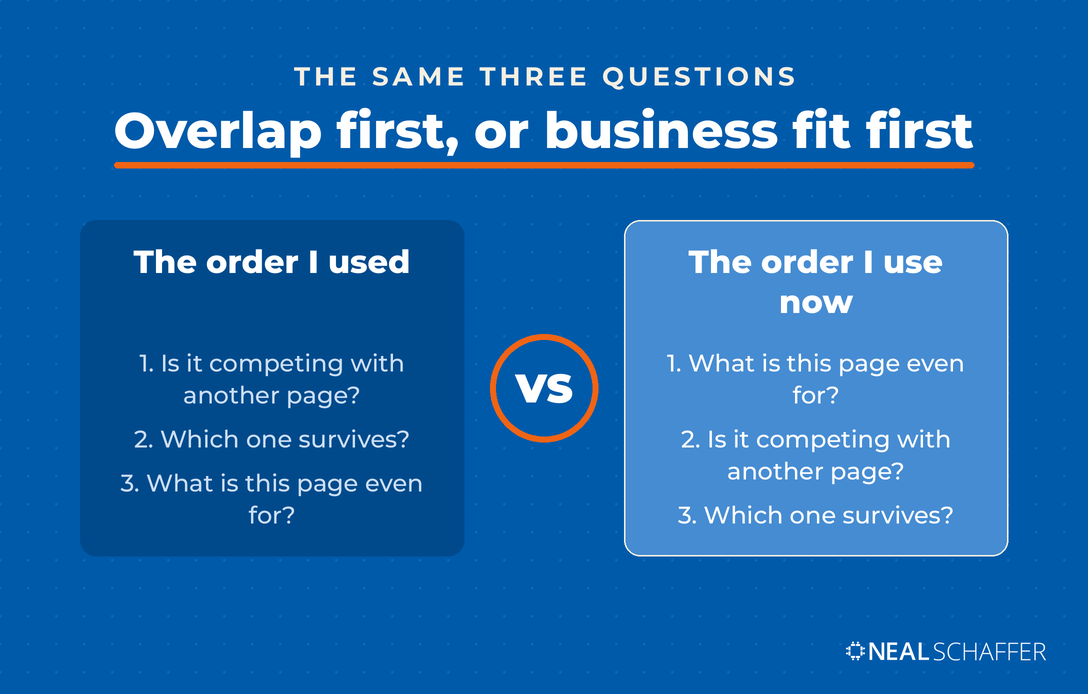
I merged those two posts successfully, and then took the surviving page off my target list anyway. The consolidation worked exactly as intended, and the topic still failed a different test that I should have run first. Those are two separate decisions, made on two separate kinds of evidence, and I ran them in the wrong order.
It came off during my category-by-category recovery work, for a reason that has nothing to do with the merge. The topic is consumer-facing. People searching how to become an influencer are mostly not people who hire a Fractional CMO or buy a book about digital strategy. The page is still live and still earning. It just no longer gets internal links or scheduled attention from me.
So a page can be worth consolidating and not worth maintaining. Ahrefs makes the same point from the other direction, arguing that once you are certain a page has no value to your business, losing some of its organic traffic to a redirect should not bother you. Had I checked business fit before I checked for overlap, I might have skipped the merge and put those hours into a page closer to what I sell.
That is why I now run SEO strategy decisions in this order: what is this page for, then is it competing with another page, then which one survives.
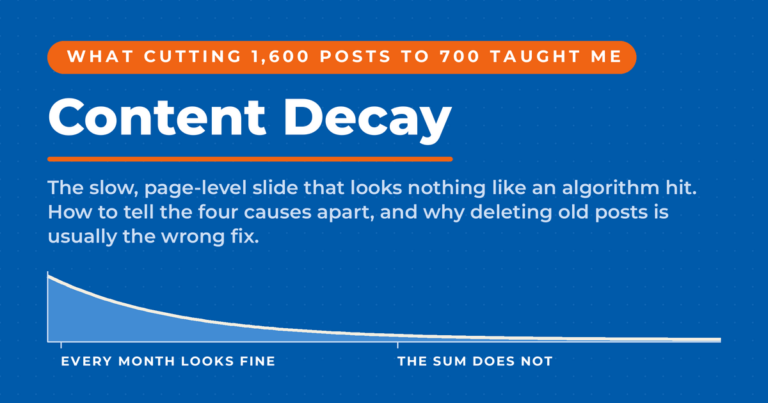
All of this sits inside the larger problem of content decay, where cannibalization is one of several reasons a page slides. Working out which reason you have is most of the job, and the numbers behind how search is shifting are in my running collection of SEO statistics.
Frequently Asked Questions About Keyword Cannibalization
Both have to show for the same query in Search Console, and that query has to represent the same intent. Filter Performance by the query, then open the Pages tab. If only one of your URLs appears, you do not have a cannibalization problem, whatever the topical overlap looks like on paper.
No. There is no penalty and no manual action for it. What happens instead is that your pages divide credit that could have gone to one URL, which usually shows up as both of them ranking lower than either might have alone.
Google reassigned the query to my surviving URL inside sixty days, while the ranking had not moved at all in that same window. Plan on a quarter before you judge a merge, and leave the page alone in the meantime, because a second edit destroys your ability to attribute anything to the first.
Only when both pages genuinely need to stay live, such as a filtered product listing you cannot remove. When one page exists only because you covered the topic twice, redirect it. A canonical leaves the weaker page in place for you to maintain forever.
You can, and I would not. The redirect carries the links and the ranking history over to the survivor, which is most of what a merge is for. Deleting throws that away and hands anyone following an old link a 404 instead.
No. Search Console and GA4 cover it, and they are what I used to find the pair in this post. Ahrefs and Semrush both ship dedicated reports that save time on a large site, but they do not show you anything the free tools cannot.
Start With One Pair
Open Search Console, set the compare window to last three months year over year, and tick Total impressions. Take the five queries that matter most to your business, click each one, and read the Pages tab. That is the entire first pass, it costs about twenty minutes, and it needs nothing you are not already paying for.
Most will show a single URL. That is a real result, and finding nothing means your keyword map is doing its job.
When you do find a pair, run the GA4 check before deciding anything, because the page that looks weaker in Google is sometimes the one earning everywhere else. Then ask what each page is for. If neither sits close to what you sell, the right move might be to leave both alone and spend the time on a page that pays. The rest of the groundwork this depends on is in my guide to blog SEO, and the broader picture is in SEO marketing.
If you want the strategy layer first, grab a free preview of Digital Threads, which covers how search, email and social reinforce each other rather than running as separate projects.
And if you would rather have somebody run this across your whole library, that is the work I do as a Fractional CMO.

Improve Your SEO Through Guest Blogging
We respect your privacy. Unsubscribe at anytime.