
A TikTok Duet is a split-screen video that plays your recording alongside someone else’s original, both at the same time. Making one takes about ninety seconds.
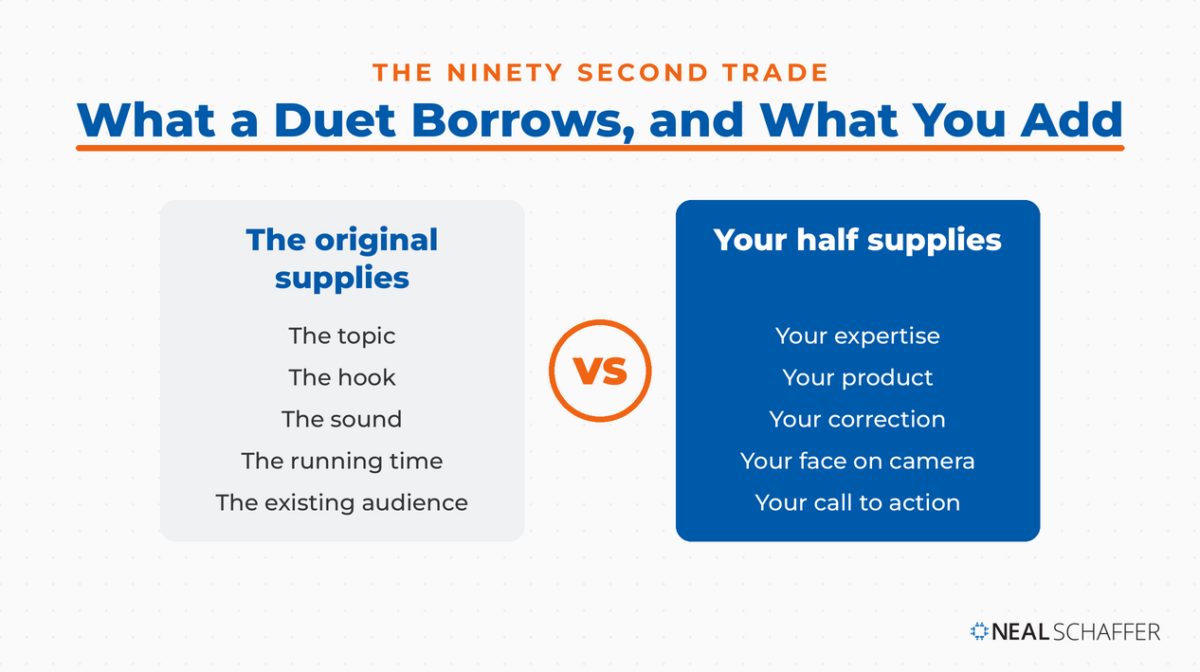
What you are really doing in those ninety seconds is borrowing a finished piece of content. The other creator already supplied the topic, the hook, and the sound. Your half only has to supply the thing they could not: your expertise, your product, your correction, your face. That is a different economics of content creation than staring at an empty camera roll every Monday, and it is why the format punches above its weight for a business.
It is also native to TikTok in a way its copies are not. The split screen started on Musical.ly, where Duets launched in March 2017, and came to TikTok with the acquisition. Instagram and Snapchat followed four years later with a version called Remix. TikTok is the platform where an original is meant to be built on, which is why standing next to one there reads as participation rather than piggybacking.
The proof I keep coming back to is a doctor. Dr. Brian Boxer Wachler told me on my podcast how he built a following of more than three million, largely by Duetting health misinformation and correcting it on camera, in scrubs, next to the claim. His method is repeatable in any field. Most people never test that, because Pew Research found that just over half of U.S. adult TikTok users have ever posted a video, and the most active quarter of users produced 98% of publicly accessible content.
I’m Neal Schaffer, and I teach social media marketing to executives at Rutgers Business School and personal branding and influencer marketing at UCLA Extension. I came to short-form video late and said so publicly, which is exactly why I pay attention to the parts of these tools that trip people up.
Below: how to make one, what to Duet and when, and how a Duet differs from a Stitch. Then the renamed privacy setting that controls who can Duet you, which is where most published instructions are still wrong.
Key Takeaways
✅ A Duet is a split screen, not a clip – Both videos play at once for the full length of the original, and the finished Duet lives only on your profile
✅ The format halves the work – The original supplies the topic and the sound, so your side only has to supply the expertise, product, or correction the original lacks
✅ The privacy setting was renamed – Duet permissions now sit under Privacy, then Reuse of content, not the old “Who can Duet with your videos” menu
✅ Turning Duet off turns off more than Duet – The same switch controls Stitch, stickers, and whether people can add your post to their Story
✅ You need a public account to be Dueted – Private accounts can create Duets but cannot receive them
✅ No documented reach shortcut exists – TikTok’s published explanation of the For You feed describes no mechanic that routes your Duet to the original video’s viewers
What Is a Duet on TikTok?
A Duet is a TikTok format that plays two videos side by side in a split screen at the same time. One side is another creator’s original post, unchanged and at full length. The other side is footage you record while it plays. TikTok describes it as posting your video side by side with a video from another creator.
The original creator controls whether this is possible at all. TikTok’s help center states that you must have a public account to allow others to Duet with your videos, and that not all videos have Duet turned on.
Two details surprise people. First, the finished Duet appears only on the profile of the person who recorded it. The original video stays on the original creator’s profile and picks up no new post of its own. Second, the person who recorded the Duet controls its privacy, so their settings determine who can watch, comment on, or download the result.
The original creator does keep one lever. TikTok lets you delete Duet videos associated with your post, though doing so removes your original along with them.
How Do You Duet Someone on TikTok?
You Duet by opening the share sheet on the video you want to respond to and tapping Duet. Record your side while the original plays, then edit and post like any other TikTok. The whole sequence lives inside the app. There is no desktop path and no way to upload pre-recorded footage into the Duet screen.
Here are the steps, straight from TikTok’s own instructions:
- Open the video you want to Duet and tap the Share button on the right side.
- Tap Duet at the bottom of the share sheet. Swipe left through the row of icons if you do not see it.
- Add effects, filters, or camera tools before you start rolling.
- Tap Record to start and stop, then tap the Continue ✓ button.
- Edit your side: filters, voice effects, text, stickers, and the advanced editing tools.
- Tap Your Story to post it to your Story, or Next to add a description, hashtags, people tags, a location, a link, and privacy settings.
- Tap Post to publish, or Drafts to sit on it.
One practical note from my own recording sessions. The original starts playing the moment you hit record, so whatever reaction you want has to be ready before your thumb comes off the button. Get your first line out in the opening two seconds or the split screen just looks like two people staring at each other.
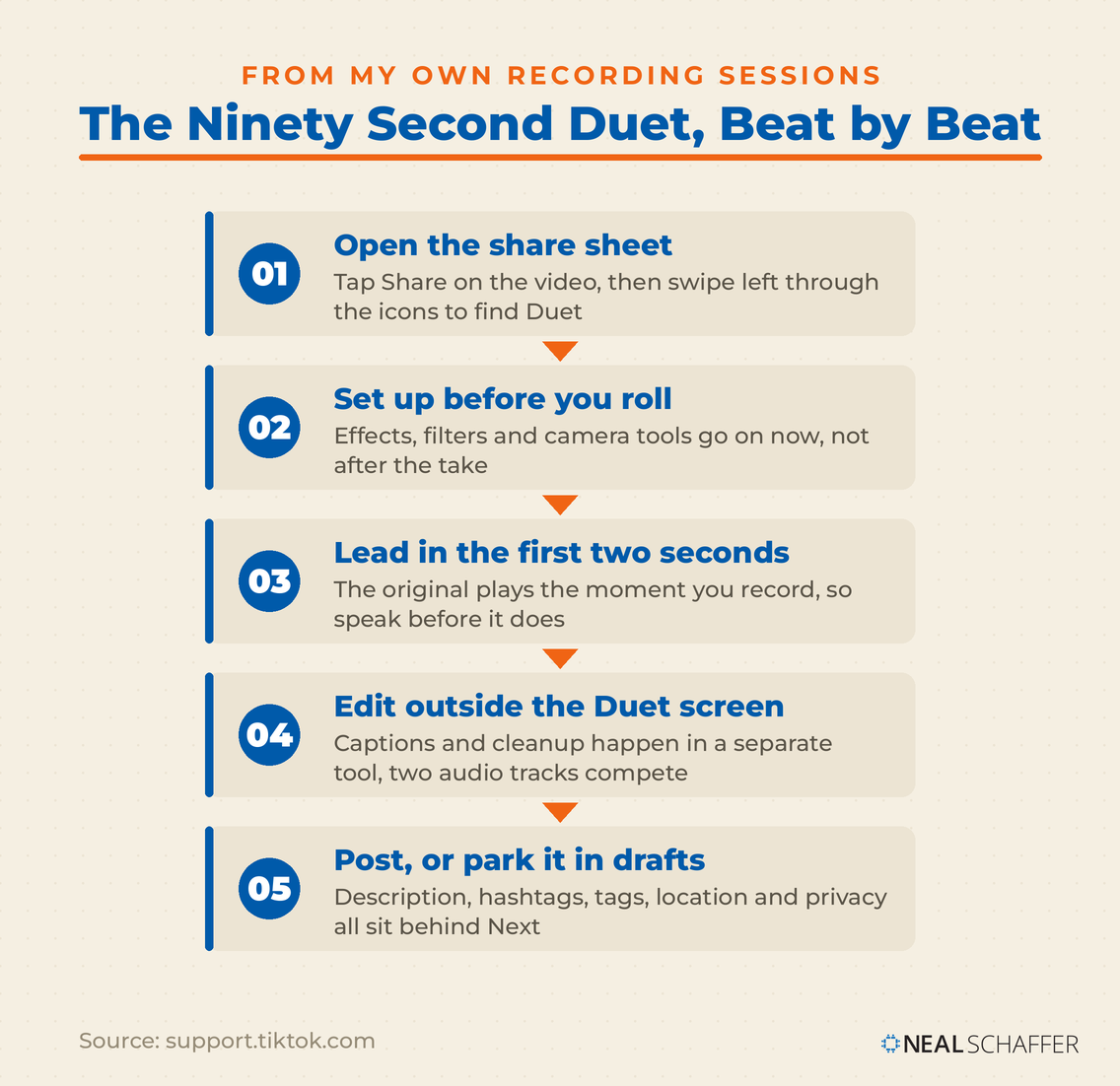
If your recording needs cleanup afterward, that work happens outside the Duet screen. I use Adobe Express for this, and its free plan includes an automatic caption generator that transcribes your audio and lets you edit the text before you export. Captions matter more here than on a normal post, because a Duet has two audio tracks competing for attention. A Verizon Media and Publicis Media study of 5,616 US consumers, reported by Forbes, found 80% of people were more likely to watch an entire video when captions were available.
The same discipline applies to the video itself. Still figuring out framing, pacing, and hooks? Start with editing TikTok videos and making a TikTok video. Your side of the screen should look deliberate, not accidental.
How Do You Turn On Duets for Your Own Videos?
Duet permissions now live under Profile, then the Menu button, then Settings and privacy, then Privacy, then Reuse of content. That last item is the renamed setting. Almost every set of instructions online still points to “Who can Duet with your videos” under Privacy and safety. That menu is gone, which is why people hunt and come up empty.
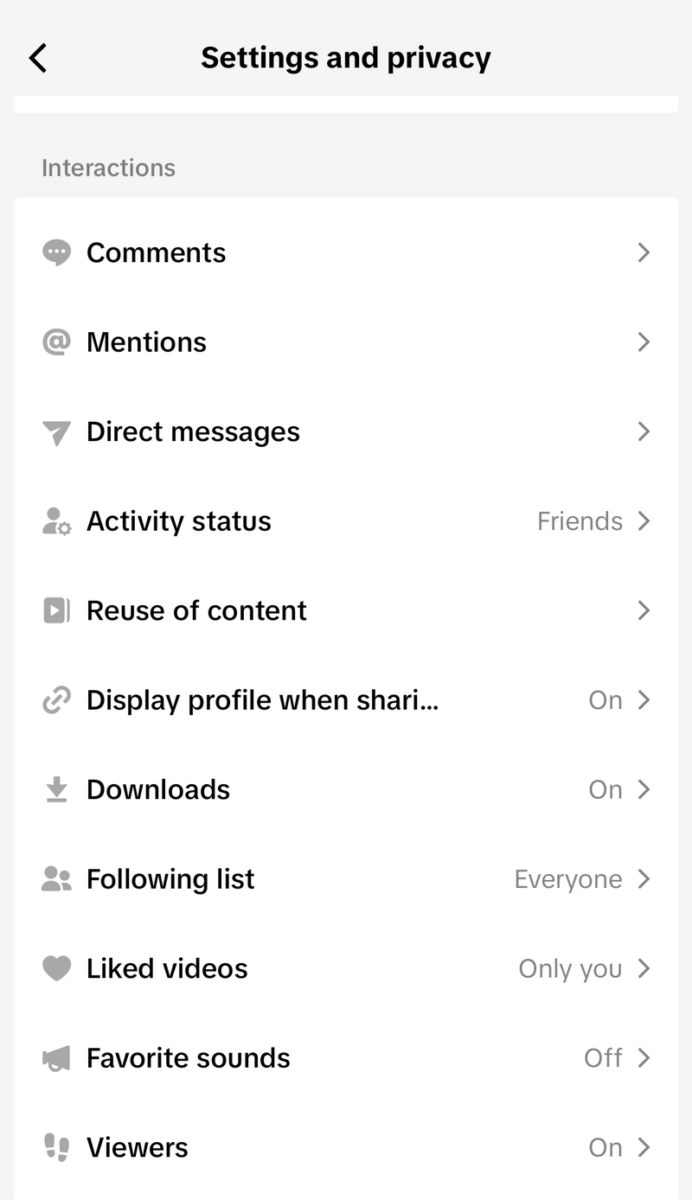
Notice what is not on that list. There is no Duet entry and no Stitch entry. If you are scanning for either word you will scroll straight past the setting that controls both.
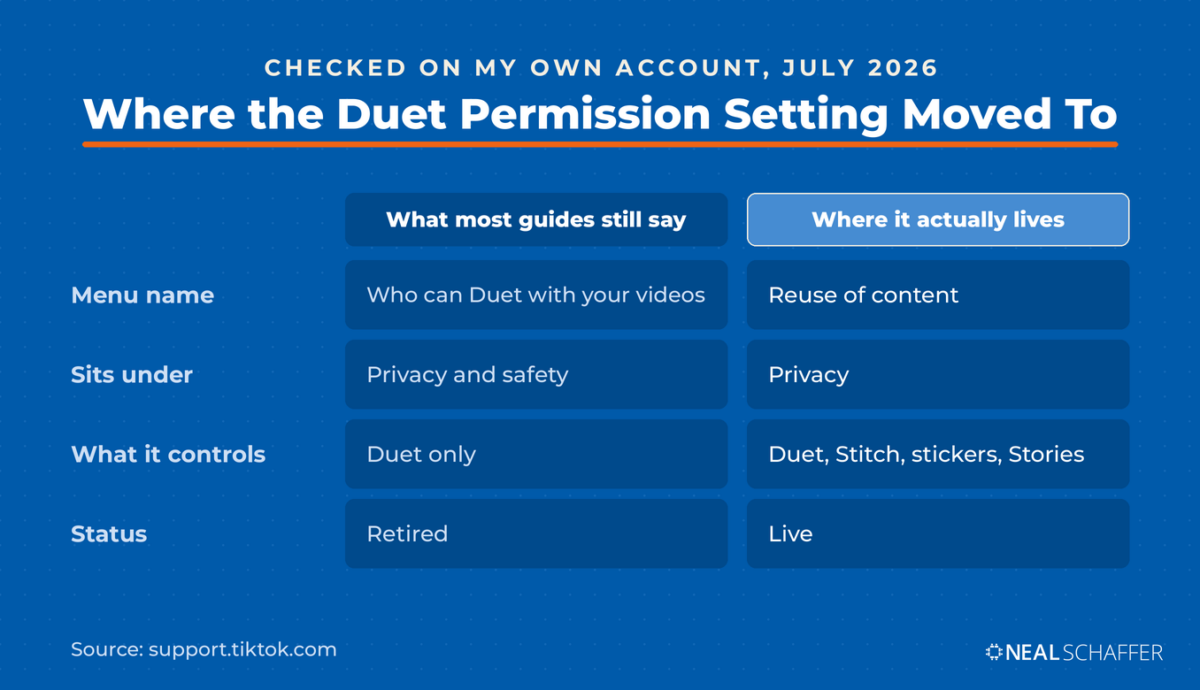
Tap it and you get two rows.
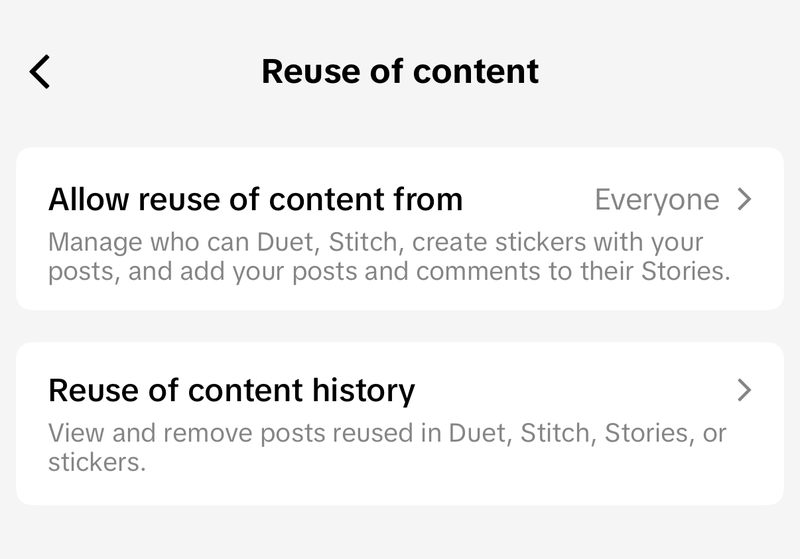
Once you are in Reuse of content, tap Allow reuse of content from and choose Everyone or Friends, meaning followers you follow back. Your account has to be public for either option to do anything. TikTok’s own description under that row spells out the scope: it manages who can Duet, Stitch, create stickers with your posts, and add your posts and comments to their Stories.
Make LinkedIn Your Best Source of Clients
My latest book helps professionals, entrepreneurs, and business owners turn LinkedIn from a static profile into a real source of clients and growth.
Maximizing LinkedIn for Business Growth gives you clear, practical steps to build a profile that gets noticed and a network that actually sends business your way.
Grab your copy on Amazon and put it to work this week. Click the cover or the button below to get started.

The consolidation carries a consequence worth knowing before you flip the switch. TikTok states that turning Duet off also affects who can Stitch or create stickers with your posts, and whether people can add your post to their Story. One toggle, four outcomes. Creators who disable Duets to stop reaction videos usually do not realize they just shut down every other reuse path at the same time.
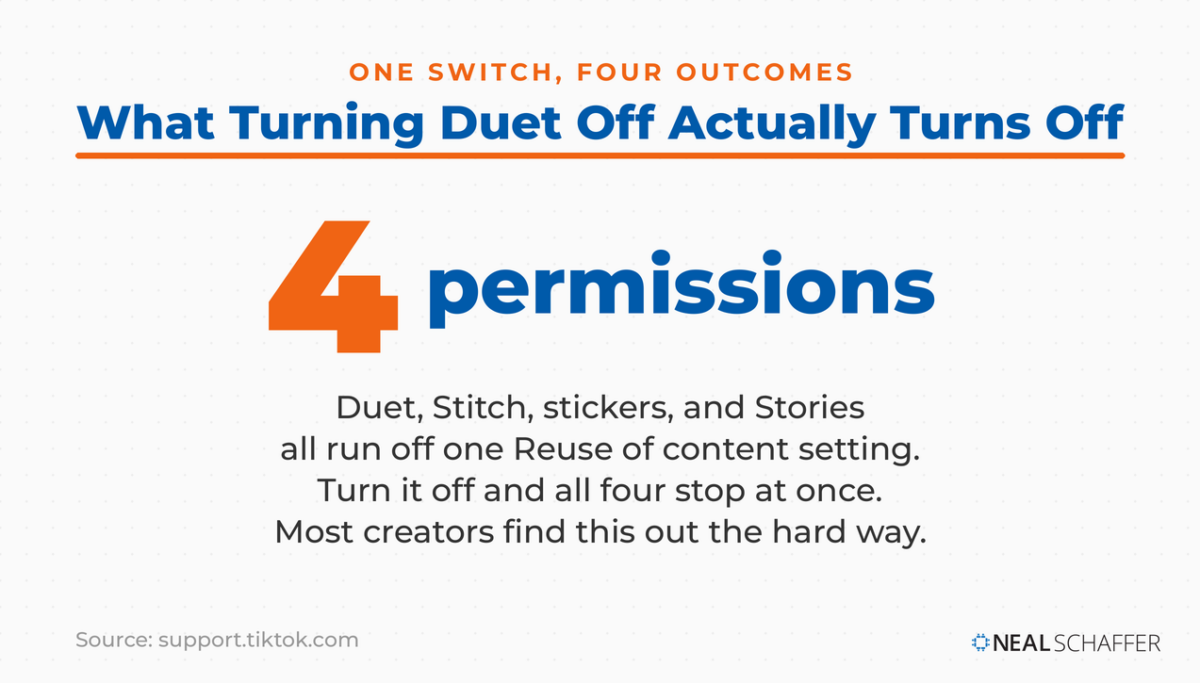
TikTok rolled this consolidation out without a public announcement. There is no newsroom post about it and no trade press coverage of it. That goes a long way toward explaining why so much published advice still describes retired menus. What TikTok did instead was put a one-time prompt inside the app.
I ran into it on my own account in July 2026. Opening Settings and privacy triggered a full-screen panel headed “Reuse of content setting.” It explained that permissions for Duet, Stitch, creating stickers, and adding posts and comments to Stories were being combined into one setting. Mine was set to Everyone.
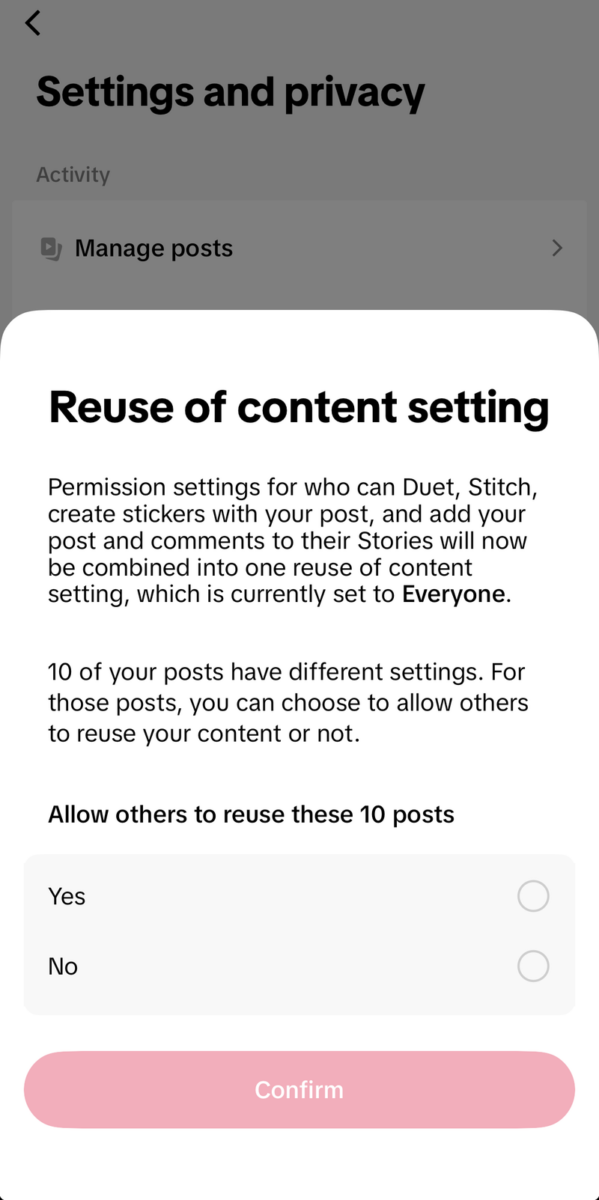
TikTok has been surfacing this panel account by account rather than all at once, which is why some creators saw it long before I did and others have not seen it yet. It also shows once. Tap Confirm and it does not come back, so if you have no memory of it, go open Privacy and check what your setting actually says rather than assuming.
Read the bottom half of that prompt before you tap anything. Mine reported that 10 of my posts had different settings, then asked one Yes or No question covering all of them. A single tap overwrites every per-post choice you made earlier. Did you ever turn reuse off on a specific video for a specific reason? That decision is on the table here. Answer deliberately rather than tapping through to clear the panel.
You can also set this per post. Before publishing, tap More options on the Post screen and switch Allow reuse of content on or off. For something already live, open the video, tap the More options button, tap Privacy settings, then find the same switch.
If you ever want to undo a Duet someone made with your video, that is the second row on the screen above. Reuse of content history shows the posts of yours that were reused in a Duet, Stitch, Story, or sticker, and lets you remove them. Read that one twice: removing them permanently deletes your original post too. Download your own video first if you want to keep it.
Why Is the Duet Button Greyed Out or Missing?
A greyed-out or absent Duet button almost always traces to the original creator’s settings rather than anything wrong with your account or your app. TikTok is explicit that not every video has Duet turned on. Before you troubleshoot your phone, check whether the video you are trying to Duet was ever eligible in the first place.
| What you’re seeing | Most likely cause | What to do |
|---|---|---|
| Duet is greyed out | The creator turned off reuse of content for that post | Pick a different video, or ask the creator directly |
| Duet is missing from the share sheet | The icons scroll horizontally and Duet sits further along | Swipe left through the row before assuming it is gone |
| Duet works for some of your followers, not others | Your permission is set to Friends rather than Everyone | Change Allow reuse of content from to Everyone |
| Nobody can Duet you at all | Your account is private | Switch to a public account, then re-check the setting |
| The creator is a teenager | Duet is limited by age, and 16 and 17 year olds default to Friends | Nothing to fix on your end, the age rule is not adjustable |
Age is the one cause people never guess. In its 2021 youth safety update, TikTok limited Duet and Stitch to content created by users age 16 and over. For 16 and 17 year olds, the default was set to Friends. If the creator is young, no setting on your side changes the outcome.
The pattern I see most often with clients is the third row. Someone sets reuse permissions to Friends years ago, forgets, then wonders why a collaboration partner cannot Duet the video they specifically made for that partner to Duet.
What’s the Difference Between a Duet and a Stitch?
A Duet and a Stitch both build on someone else’s video, but they combine differently. A Duet plays both videos simultaneously in a split screen for the original’s full length. A Stitch places a short clipped segment of the original at the front, then cuts to your footage. Parallel versus sequential.
The length rule is the sharpest dividing line. TikTok’s launch announcement for Stitch says you select up to five seconds from the video and can trim the clip to your preferred duration. A Duet has no such cap, because it runs against the original in full.
| Duet | Stitch | |
|---|---|---|
| How they combine | Split screen, both play at once | Original clip first, then your video |
| Original length used | Full video | Up to five seconds |
| Best for | Reactions, duets in the musical sense, before-and-after | Answering a question, correcting a claim, building on a setup |
| Where it lives | Only your profile | Only your profile |
| Permission source | Creator’s reuse of content setting | Same setting |
TikTok’s own framing when it launched Stitch was that, like Duet, it gives people a way to reinterpret and add to another user’s content. The two are siblings. Choose Duet when the original needs to keep playing for your response to make sense, and Stitch when you only need the setup line.
Which one fits also depends on the kind of content you are making. A dance or a transition works as a Duet. A question posed to the audience works better as a Stitch, and often better still as one of the TikTok challenges already circulating in your niche.
Did TikTok Invent the Duet?
Not quite, but close. The format came from Musical.ly, the app TikTok grew out of. Tubefilter covered the March 2017 launch, promoted with a Bruno Mars contest, which let users splice videos into a split screen for coordinated performances. ByteDance bought Musical.ly, folded it into TikTok, and the feature came along.
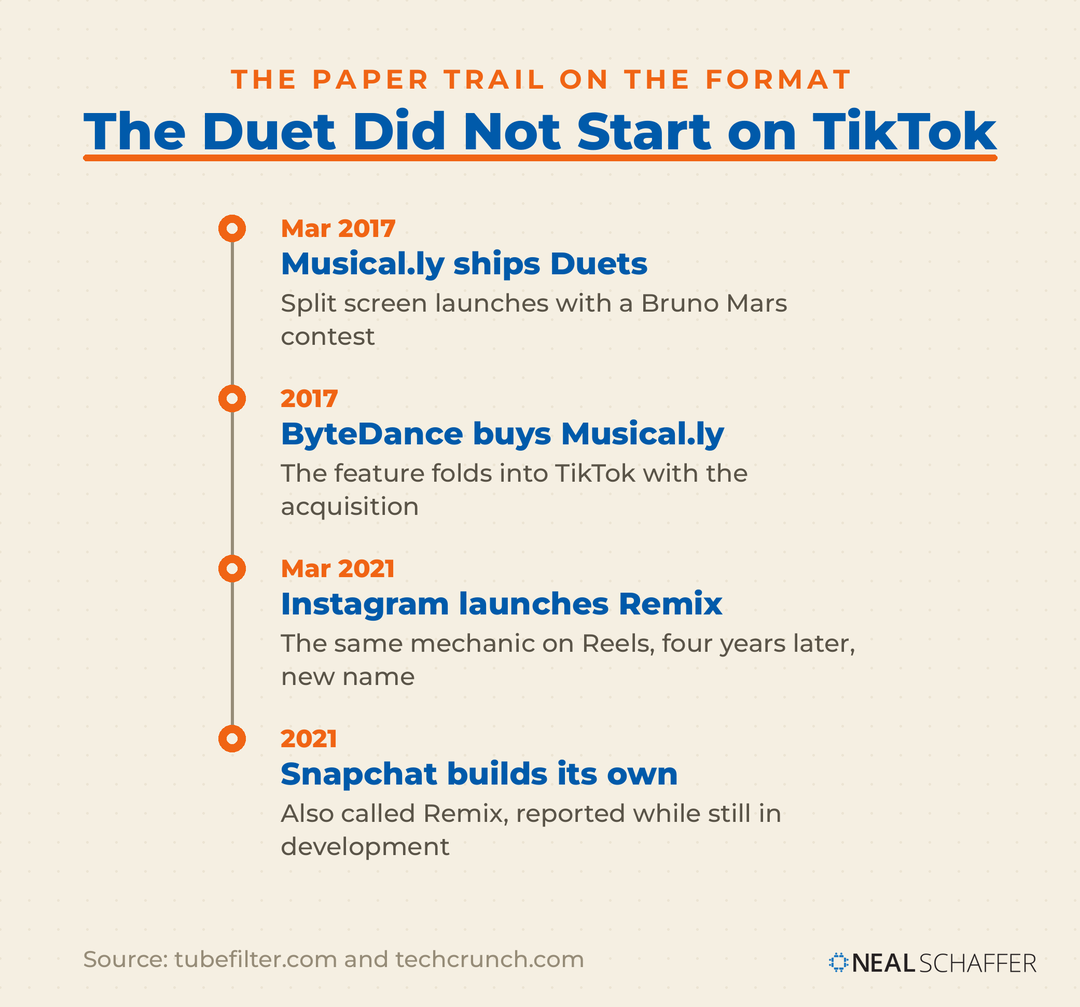
The copying went one direction after that. TechCrunch reported Instagram launching Remix on Reels in March 2021, described it as similar to TikTok’s existing Duets, and noted Snapchat was building a rival under the same Remix name. Four years after Musical.ly. That naming gap still trips people up when they work across platforms, because searching Instagram’s settings for “Duet” returns nothing.
Here is why I think the format never fit anywhere as well as it fits TikTok. A Duet requires the original to keep playing in full, which only makes sense when the original is the point. On TikTok the original usually is the point, because so much of the platform runs on a shared object everybody riffs on: a sound, a dance, a challenge, a format. The audio is the joke, and the joke does not survive being clipped. Instagram inherited the mechanic without inheriting that culture, which is why Remix reads as a feature there and Duet reads as a native behavior here.
That also explains the growth math, which is less romantic than the advice you usually hear.
Does Dueting Actually Help You Grow on TikTok?
Duets can help, but not for the reason most advice claims. The popular version says a Duet of a trending video gets pushed to people who already watched the original, giving you prepaid views. TikTok’s published explanation of the For You feed describes no such mechanic. Believing it will lead you to Duet the wrong videos entirely.
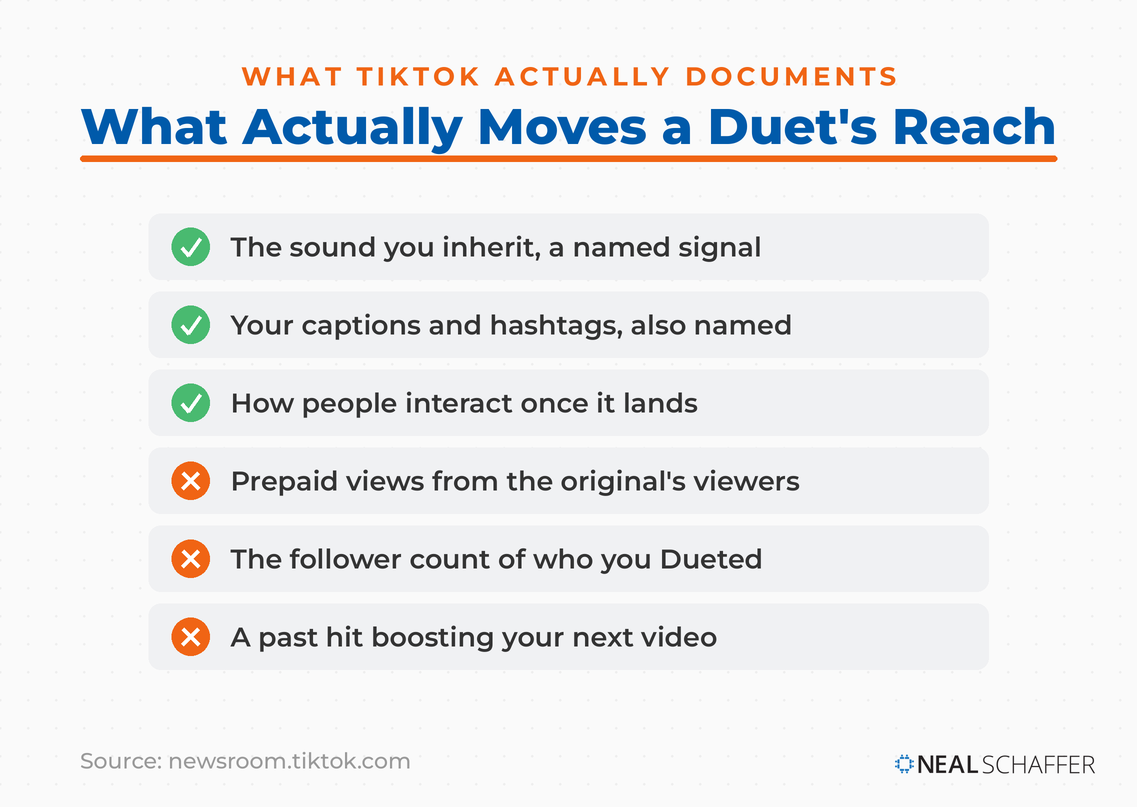
What TikTok does document is which signals feed recommendations. The company lists user interactions, video information such as captions, sounds, and hashtags, and device and account settings, and states that neither follower count nor whether an account has had previous high-performing videos are direct factors in the system. That last clause is the useful one. A Duet with a creator who has ten million followers inherits none of their follower count as a ranking advantage.
So where does the real lift come from? Your Duet inherits the original’s sound, and sound is named in TikTok’s own list of video information signals. Duetting a video built on a rising audio track puts your post into that audio’s pool. TikTok has also shipped a “Why this video” option that tells users why a specific video was recommended to them, citing reasons like their interactions or accounts they follow. Nothing in that list is “you watched the video this one was Dueted with.”
The audience is real either way. Pew Research reports that 37% of U.S. adults now use TikTok, up from 21% in 2021, and DataReportal’s analysis of TikTok’s own ad planning tools put the platform’s reported ad reach at 1.59 billion users in January 2025, with 25 to 34 the largest age band. Plenty of people to reach. Just reach them on topic and sound rather than on borrowed follower counts.
If reach is the actual goal, the levers that move it are covered in what I’ve written on getting more views on TikTok and how the TikTok algorithm works. The numbers behind all of this sit in my TikTok statistics page.
What Should You Actually Duet?
Duet content that gives the viewer a reason to watch both halves. A silent reaction face wastes the format. The strongest Duets add information, contrast, or a genuine skill the original lacks, so that the split screen is doing work rather than just filling space. Start by deciding what your half contributes.
The selection method I keep coming back to is one I’ve taught for years. On an episode of my podcast Your Digital Marketing Coach, I put it this way: “One of the concepts I teach is find a role model, find someone that you can emulate, you can be inspired by.” Duets make that concrete. Instead of studying a role model’s videos, you stand next to one.
I’ll be honest that I came to this late. In that same episode I admitted I had only done a few TikToks at the time. So I went to Upwork and searched for TikTok video editors, specifically to reverse-engineer what the accounts I admired were doing to their footage. Asking editors what was on their checklist taught me more about the format than watching a hundred videos did.
Back to the doctor from the introduction, because his method is the most repeatable one I know. Dr. Brian Boxer Wachler is an ophthalmologist who went from no real social presence to more than three million TikTok followers. He started during the pandemic, found that health misinformation was racking up hundreds of thousands of views, and built his account on correcting it. His posts are literal Duets, tagged as such, standing next to the video making the claim.
When I asked him for a repeatable strategy, his answer was to “do reaction videos,” and he laid out the mechanics: search a keyword in your field on TikTok, look at which videos pulled several hundred thousand or a million views, and react to those. He named Duet and Stitch as the two ways to do it, and pointed out that Instagram’s equivalent is called Remix.
Two things make that method work, and both are easy to miss. It removes the blank page, because the original supplies the topic and the sound. And it puts your credential on screen next to the claim, which is a faster demonstration of expertise than any amount of talking to camera about your qualifications. Dr. Brian is a Beverly Hills surgeon in scrubs standing next to somebody selling aloe vera juice. The format makes the argument before he says a word.
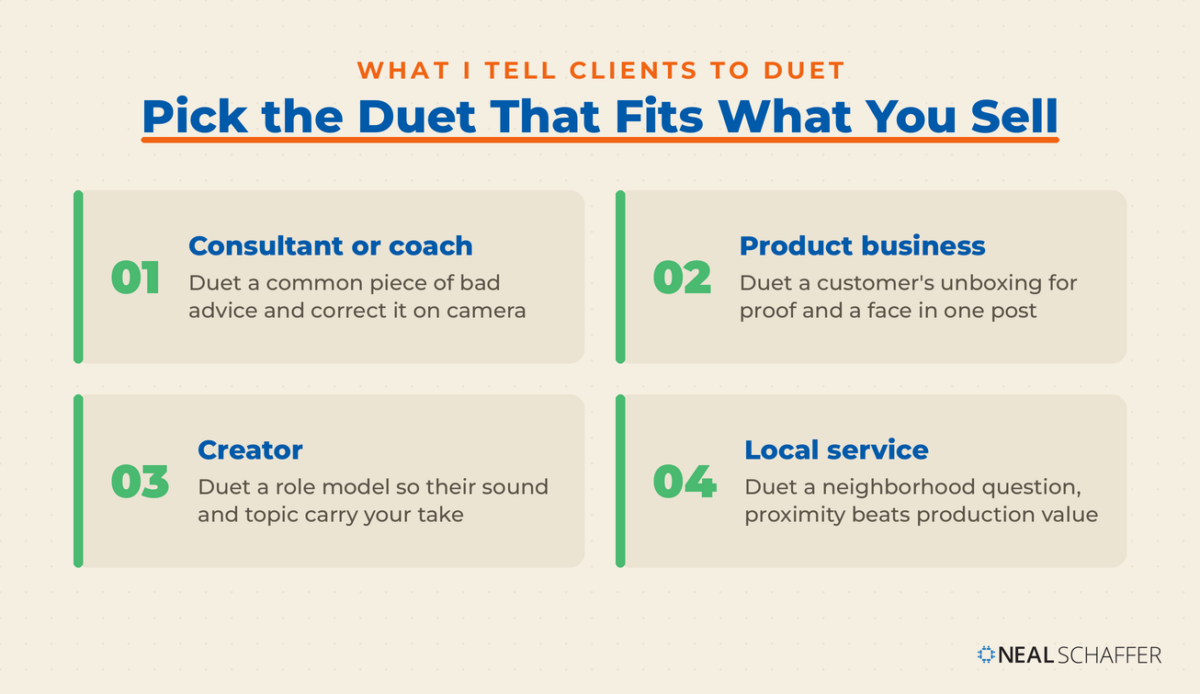
| If you are | Duet this | Because |
|---|---|---|
| A consultant or coach | A common piece of bad advice in your field | Correcting a claim on screen shows expertise faster than asserting it |
| A product business | A customer’s unboxing or review | You get social proof and a face-to-face format in one post |
| A creator building an audience | A role model in your niche | Their sound and topic carry the post, your take earns the follow |
| A local service business | A neighborhood question or complaint | Proximity plus a real answer beats production value |
| A musician or performer | A backing track or a duet partner’s half | The original musical use of the format still works best |
For more starting points, my running list of TikTok video ideas and current TikTok trends will tell you which sounds are worth standing next to this week. And if you are new to the platform entirely, start with how to use TikTok before worrying about collaboration formats.
When Is the Right Time to Post a Duet?
Duet a sound while it is climbing, not after it peaks. Your Duet inherits the original’s audio, and TikTok names sound among the signals feeding recommendations, so you are joining that sound’s pool. Join late and the pool is already full of better versions of your idea.
My TikTok trends page is where I track what is rising rather than what already went.
Pace matters as much as timing. Dr. Brian’s advice in that same interview was to post no more than once a day on TikTok, because a video does most of its work in its first 24 hours, and stacking a second post five hours later can cannibalize the first. So a Duet is not a thing you batch. One well-chosen Duet a day beats four in an afternoon.
Three moments are worth acting on quickly rather than scheduling:
- A claim in your field starts spreading and it is wrong. Correction ages badly. The value is highest while people are still seeing the original.
- A customer posts about you. Duetting a real unboxing or review within a day or two, while it is still live in their feed, converts far better than a thank-you comment.
- A creator in your niche asks for responses. Explicit invitations mean reuse is on and the audience is primed to watch both halves.
Everything else can wait for a slot in your normal calendar. My guide to the best time to post on TikTok covers that side.
How Should Businesses Handle Branded Duets?
Disclose the relationship inside the video itself. If a brand paid you, gifted you the product, or gave you a discount, a Duet is an endorsement and the same rules apply as any other sponsored post. Putting “#ad” in a wall of hashtags does not clear the bar, and neither does a note in your bio.
The Federal Trade Commission is specific about video. FTC guidance states that a disclosure in a video should be in the video and not only in the description, because some viewers watch without sound and others miss superimposed words. In a Duet, that means saying it out loud on your side of the screen and putting it on screen too. The FTC also warns against burying disclosures in a group of hashtags and against relying on a platform’s own disclosure tool by itself.
Two more points from the same guidance that matter for reaction-style Duets. You cannot talk about your experience with a product you have not tried, and if you were paid to talk about something you thought was terrible, you cannot call it terrific. A Duet reacting enthusiastically to a product you have never used is exactly the scenario that guidance describes.
Brand-side, the format is a natural fit for creator partnerships because both parties appear together. My thinking on structuring those relationships sits in what I’ve published on TikTok influencer marketing, and the same relationship-first principle runs through The Age of Influence.
Frequently Asked Questions About TikTok Duets
Yes. Your own posts follow the same reuse of content permissions as anyone else’s, so as long as the original has reuse turned on, you can Duet yourself. Before-and-after posts and progress updates are the common use.
The Duet appears only on your profile, and TikTok gives creators a Reuse of content history screen where they can view and manage Duets made with their posts. So the activity is visible to them through that screen.
No. The Duet screen records live while the original plays. TikTok’s instructions describe tapping Record to start and stop, with no upload option in that flow. Pre-recorded footage has to be posted as a standalone video instead.
Instagram’s Remix on Reels arrived in March 2021 and does the same thing under a different name. The split-screen format originated with Musical.ly’s 2017 Duets feature, which came to TikTok when ByteDance acquired the app. Snapchat built its own version afterward.
Check whether your account is public. TikTok requires a public account for others to Duet with your videos, so a private account blocks Duets regardless of what the reuse of content setting says.
Turning the setting off prevents new ones. To remove existing Duets, you use the Reuse of content history screen, and that action permanently deletes your original post along with every associated Duet and Stitch.
Put These Duets to Work This Week
Pick one creator in your niche whose audience looks like the audience you want. Find a video of theirs with reuse turned on. Record a Duet that adds something the original did not have. Then open your own Reuse of content setting and confirm it says Everyone, so the collaboration can run both directions instead of just one.
While you are in there, check the rest of your setup. My page on the best time to post on TikTok will help you decide when to publish the Duet you just made, and TikTok hashtags covers the discovery side.
Want TikTok connected to revenue instead of sitting off on its own? Take a look at my Fractional CMO services. Or grab a free preview of Digital Threads and see how the channels are meant to weave together.