


You already know email works. What you probably cannot say is which of the twenty things you have been told to do actually moved anything on your own list.
I can, for mine. Some of that advice held up against ten months of my own send data. One piece of it, the piece almost every guide leads with, did nothing at all.
Email is one of the three threads I built Digital Threads around, and it is the channel I end up fixing first in almost every Fractional CMO engagement. Not because clients ignore email. Because they run it on defaults nobody ever checked. If you want the deeper background on how I got here, more about my work is on my about page.
This guide is for the person who owns both the list and the results. A founder, a marketing lead, or a one-person team who wants to know which email marketing tips earn their effort.
Key Takeaways
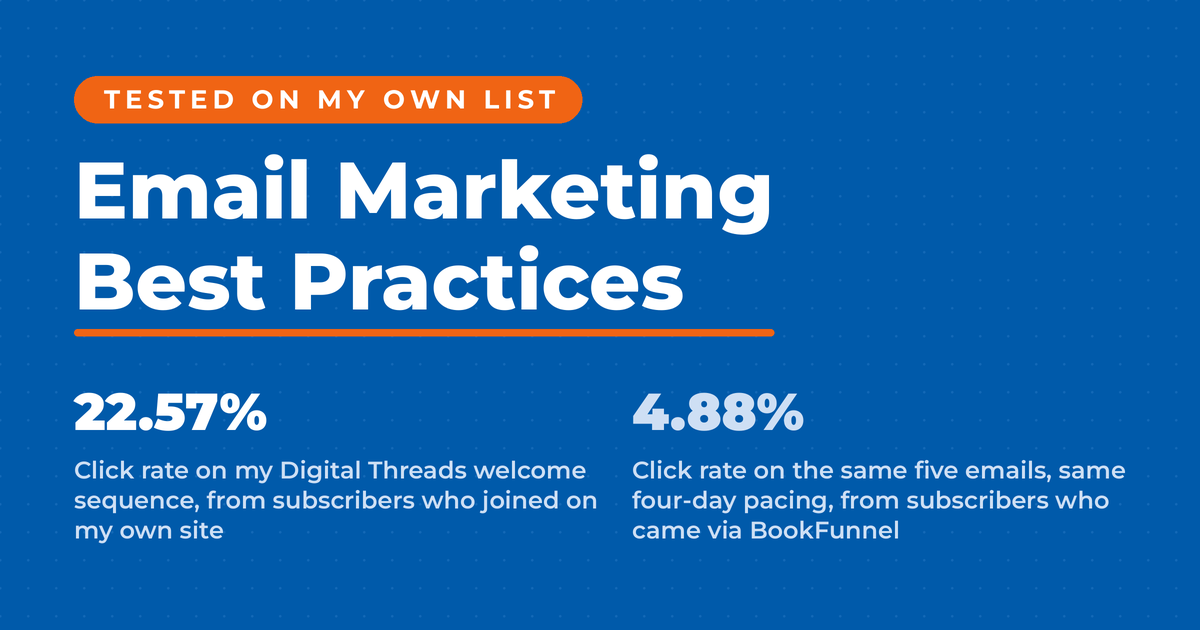
✅ How someone joined your list predicts clicks better than anything in the email. That covers the offer they took as much as the route they took it through. Holding the offer steady, two of my five-email sequences differing only in signup source produced a 4.6x gap in click rate.
✅ Send time did not move my open rate. Across 52 newsletter sends the correlation between send hour and open rate came out at negative 0.095, which is close to nothing.
✅ Never compare a per-send rate to a per-subscriber rate. The same 90 days on my account produces two very different open rates depending on which screen I read them from, and both are labeled the same way.
✅ Nobody on my list gets removed on a first miss. When someone stops engaging I move them to a lower sending frequency instead of deleting them. They only come off the list if they go quiet again at the lowest frequency, which is two rounds of re-engagement, months apart.
✅ Google’s sender rules are the floor, not the target. Send more than 5,000 messages a day to Gmail and you need SPF, DKIM and DMARC, a one-click unsubscribe, and a spam rate held under 0.10%, per the Google email sender guidelines.
Why Permission Decides Everything Downstream
Permission is the practice of only emailing people who took a deliberate action to ask for your email. It is the one input that changes every metric after it. M3AAWG, the industry body mailbox providers point to, calls informed opt-in consent the best practice for permission in its sender best common practices.
That document is from 2015 and it has aged well, because the mailbox providers built its recommendations into their own rules. It ranks three levels of opt-in and puts confirmed opt-in, the thing most people call double opt-in, at the top.
I have double opt-in switched on. I always have. And until this year I could not have told you what it was worth beyond a cleaner list.
What five welcome sequences showed me
I pulled the lifetime numbers on five of my welcome sequences and found something I did not expect. Two of them promote the same book, run the same five emails, on the same four-day schedule. The only difference is where the subscriber came from.
| Sequence (lifetime) | Emails | Open rate | Click rate |
|---|---|---|---|
| Digital Threads, signed up on my site | 5 | 53.05% | 22.57% |
| Digital Threads, via BookFunnel | 5 | 46.46% | 4.88% |
| Maximizing LinkedIn, signed up on my site | 5 | 43.71% | 9.13% |
| Maximizing LinkedIn, via BookFunnel | 5 | 39.48% | 0.98% |
| Maximizing LinkedIn, via Written Word Media | 5 | 24.44% | 1.04% |
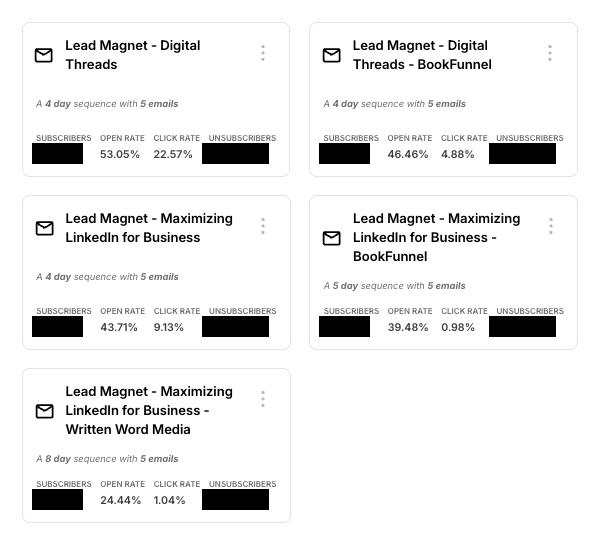
That is a 4.6x click gap on the first pair and a 9.3x gap on the second. The three Maximizing LinkedIn sequences run on four, five and eight-day schedules, so pacing is not identical there. Pacing does not plausibly explain nine times the clicks.
Everyone in that table opted in. They all wanted a free book. The ones who found me first, and took the book second, are the ones who click.
Bobby Klinck, author of Email Marketing That Doesn’t Suck, told me on my podcast that “if you’ll do the other stuff right, you can write a pretty mediocre or crappy sales sequence, and people are gonna buy because they’re ready to buy from you.” My data says the other stuff starts before the first email, at the form.
Source is only half of what acquisition means
How someone joined covers more than the referring channel. It also covers which offer brought them in, what the signup form promised, and how much of you they had already seen before they filled it out.
My five sequences hold the offer steady and vary only the source, so the source is what they isolate. I would argue the offer probably moves things just as hard. A lead magnet that solves one narrow problem should pull people who have that problem, while a free book with broad appeal pulls people who wanted a free book.
I have not run that test cleanly across lead magnets yet, so treat it as the thing I expect rather than the thing I measured. Either way the lever sits upstream of the email.
So put your effort into the offers and the sources that bring in subscribers who already know you, and be skeptical of any channel that hands you volume. Which raises the question of what to do with the ones who have already gone quiet.
What a Healthy Email List Actually Looks Like
A healthy list is one where the people still on it still want to be. Google’s own advice to senders is to periodically send messages confirming that recipients want to stay subscribed, and to consider unsubscribing people who do not open or read your messages. That sits in the subscription section of its sender guidelines, alongside the authentication rules.
Most of the published advice I read turns that into a blunt rule: no opens in 90 days, delete. I ran something slower, and I would argue it is fairer to the subscriber and better for the sender.
My six-step step-down ladder
My ladder runs in six steps, and you can rebuild it in any platform that supports segments and tags.
| Step | What happens |
|---|---|
| 1 | A segment catches anyone at the lowest engagement score, subscribed before a cutoff date, holding a given frequency tag |
| 2 | I update that cutoff by hand each month and bulk-add a prune tag to whoever matches |
| 3 | An automation sends one “still want to hear from me?” email, then waits seven days |
| 4 | A reply rescues them, and I pull them out by hand. Not an open. Not a click. A reply |
| 5 | No reply, and they drop one step in sending frequency rather than coming off the list |
| 6 | Only someone already at my lowest frequency, who fails the same test again, gets unsubscribed |
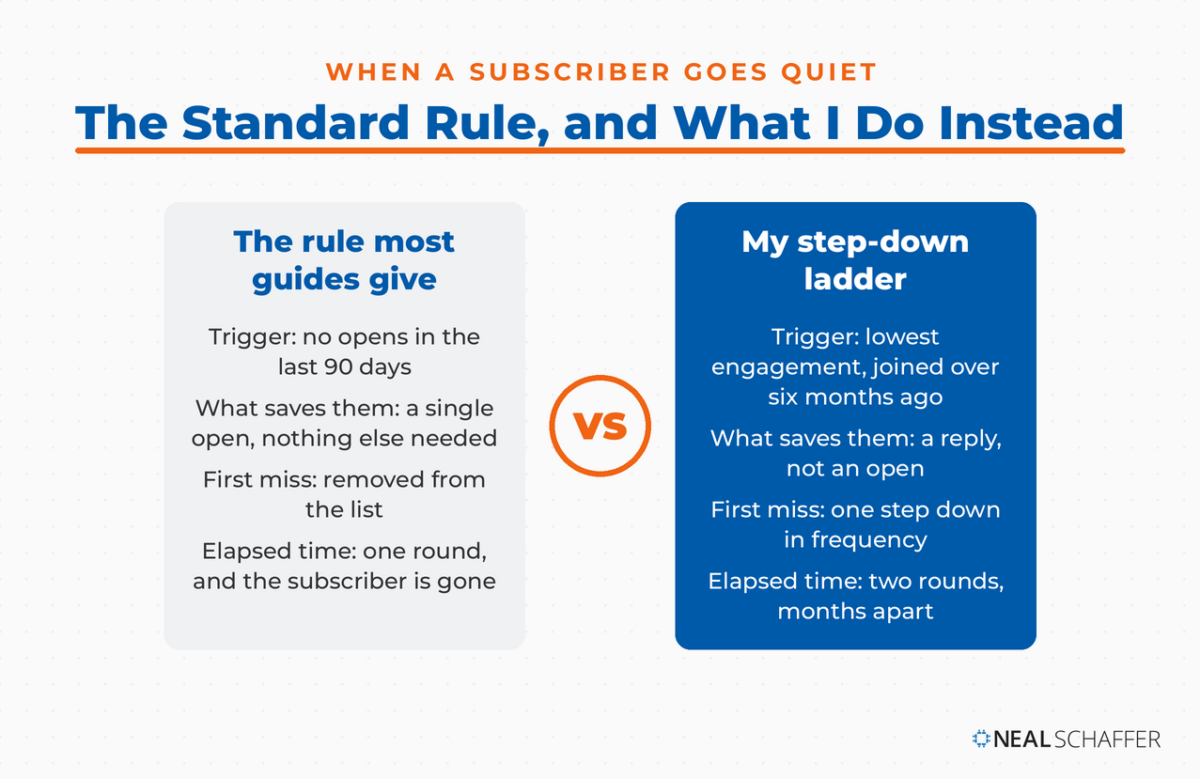
The cutoff sits six months back. My segment is still named “3 Months” from an older version of the rule, which is a good argument for reading the filter rather than the label.
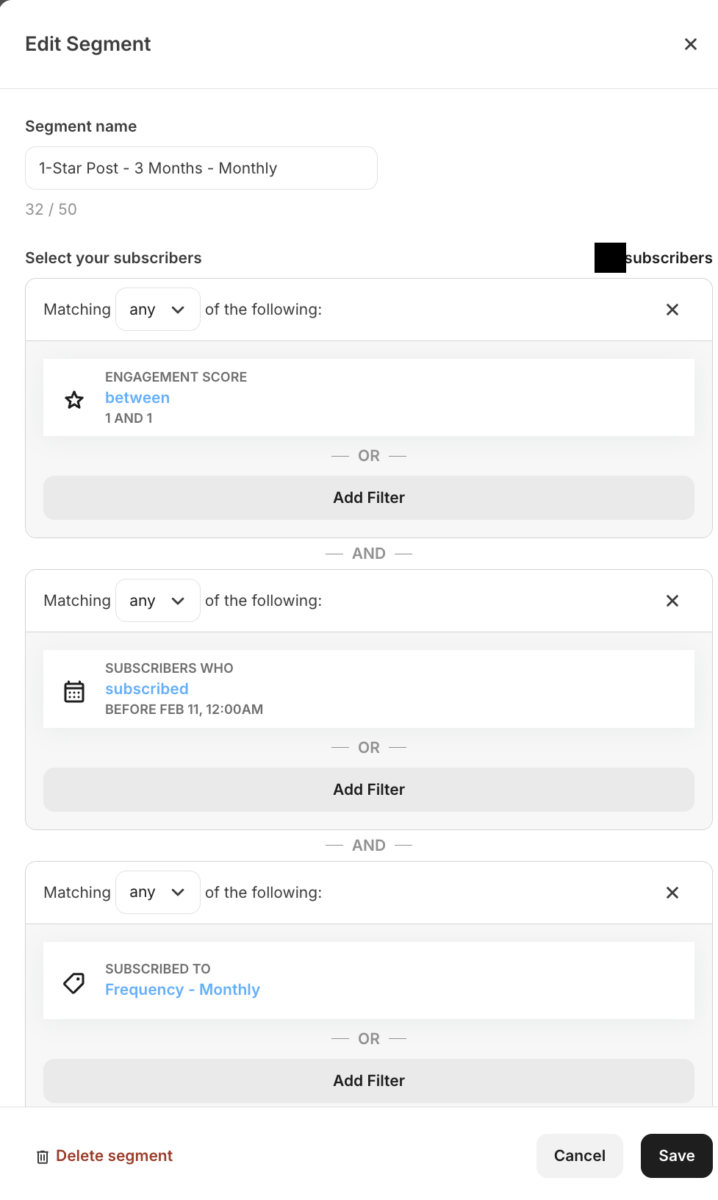
Subscribers pick how often they hear from me when they sign up, and fewer than one in ten choose the most frequent option. So for most people this runs two rounds, months apart: one step down in frequency, then off the list. Only that small group at the top frequency gets a third chance. I come back to how the frequency choice is built further down.
Is LinkedIn Actually Bringing You Business?
My latest book helps professionals, entrepreneurs, and business owners turn LinkedIn from a static profile into a real source of clients and growth.
Maximizing LinkedIn for Business Growth gives you clear, practical steps to build a profile that gets noticed and a network that actually sends business your way.
Grab your copy on Amazon and put it to work this week. Click the cover or the button below to get started.

And the people who do get removed really are gone. My prune segments open at 11.41% for monthly, 8.82% for weekly and 3.57% for daily, against a 43.43% account average on the same per-send basis.
That is what makes the removal defensible. The next question is what all of this buys you at the inbox.
How Do You Keep Your Email Out of the Spam Folder?
Deliverability comes down to three things: proving you are who you say you are, only mailing people who asked, and making it easy to leave. Yahoo’s sender requirements tell bulk senders to authenticate with SPF, DKIM and DMARC, support one-click unsubscribe, honor opt-outs within two days, and hold spam complaints under 0.3%.
Google’s requirements, linked in the takeaways above, line up almost exactly. Two of the biggest mailbox providers agreeing on the same short list is about as close to settled as this subject gets.
Authentication is a one-time job you hand to whoever manages your DNS. The ongoing work is list quality, which is why the pruning ladder above is a deliverability practice rather than a housekeeping one. Complaint rate is the metric that ends programs, and complaints come from people who forgot they signed up.
Legal compliance is a separate track that people mix up with deliverability. In the US, the FTC’s CAN-SPAM guidance requires a valid physical postal address in every commercial message, plus an obvious opt-out honored within ten business days. Penalties run to $53,088 per email, and there is no exemption for business-to-business mail.
Canada is stricter. Under CASL, express consent means the recipient took a proactive opt-in action. The sender carries the burden of proving it, according to the CRTC’s consent guidance. Notably, you cannot email someone to ask for that consent.
If you keep a timestamped record of how every subscriber joined, you satisfy all three regimes at once and you never have to think about it again. There is a deeper walkthrough of the technical side in my post on email deliverability.
Video in email: link the thumbnail, do not embed the file
Video in email is worth exactly one rule, and it is a deliverability rule rather than a design one. The setup I recommend to clients is always the same. Host the video somewhere, put a static thumbnail with a play button in the email, and link it out. Do not embed the file.
In-email video support has never been dependable, and it has moved in both directions. Litmus, whose business is testing how email renders, publishes pages that disagree with each other about whether Apple Mail plays HTML5 video. Its advice to host the video on a landing page and link a thumbnail to it sits on a page the company itself flags as more than two years old. When the testing firms cannot keep a current answer on the shelf, that is not a foundation to build a campaign on.
The cost of getting it wrong is the part people miss. A subscriber whose client cannot play what you sent is more likely to delete it or report it, which lands straight on the complaint rate those provider rules police. Heavy files and oversized animated GIFs push the same way.
A linked thumbnail sidesteps all of it. It adds almost no weight, it renders everywhere, and it moves the view onto a page where you can measure watch time properly. Keep the video short. People scroll an inbox the way they scroll a feed, so the same short-form video discipline applies. Your thumbnail is doing the job of a YouTube thumbnail in a more crowded place.
Delivery is the floor. Now for the advice that gets repeated hardest and held up worst.
What Most Email Marketing Guides Get Wrong About Send Times
Send time is the most confidently repeated recommendation in email marketing and, on my list, the least useful. I checked 52 newsletter sends between November 2025 and August 2026, spread across send hours from 2am to 8pm Pacific. The correlation between send hour and open rate was negative 0.095.
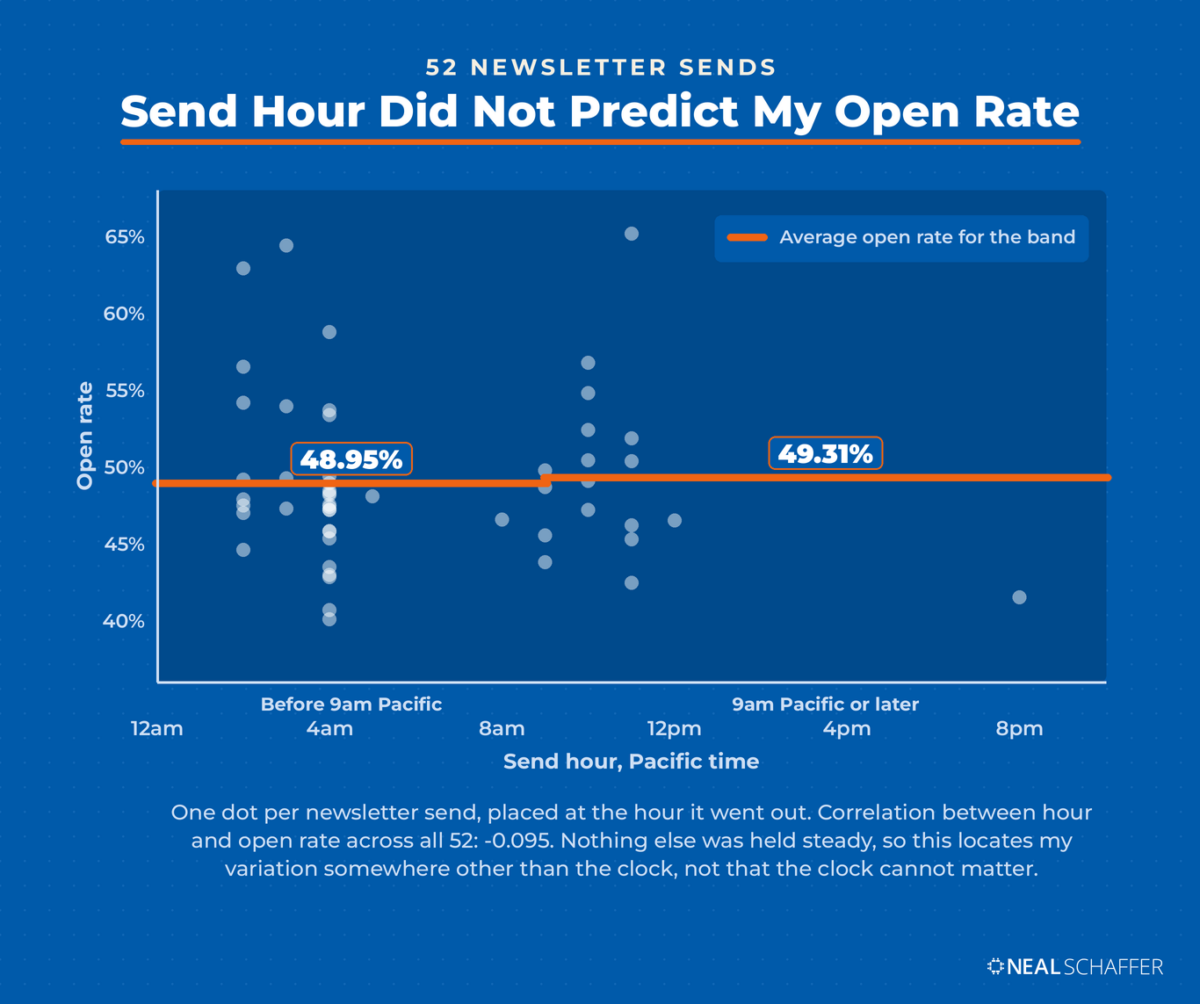
Squared, that is under one percent of the variation. Meanwhile open rates on those sends ranged from 40.06% to 65.16%, with a standard deviation of 5.53 points. So there was plenty of variation to explain. The clock just was not what explained it.
Splitting the sends at nine in the morning makes the point plainer. Before 9am Pacific the average was 48.95%. At 9am or later it was 49.31%. A gap of 0.36 points, in the opposite direction from the advice.
I ran the same test on a second group, my blog notification emails, across 126 sends. Correlation of negative 0.172, and a standard deviation of only 2.18 points. Same answer, tighter distribution.
Two caveats, and they are load-bearing. This is observational, not a controlled test: subject line, topic and audience all moved alongside send time, so I cannot isolate the hour. And it shows only that timing was not where my variation came from. That is a long way from showing timing cannot matter for anyone. Measurement is not causation.
What I would take from it is a reallocation. If you have been agonizing over send windows, that attention is probably worth more spent on the subject line and on who is receiving the email at all.
How Do You Test Subject Lines and Read the Results?
A subject line test compares two versions of the same email sent to matched halves of one audience. I run one on every weekly and monthly newsletter and on any broadcast that matters. The most useful result I have had this year moved clicks while leaving opens completely untouched.
The broadcast was titled “Google’s AI Cites Your Post, Then Recommends A Competitor.” The alternative was “Consultants Are Selling Their Frameworks As AI Tools Now.” Both cells were equal halves of the same segment.
Opens came in at 50.7% and 50.9%, two tenths of a point apart. Click rates were 6.9% and 3.6%, nearly two to one.
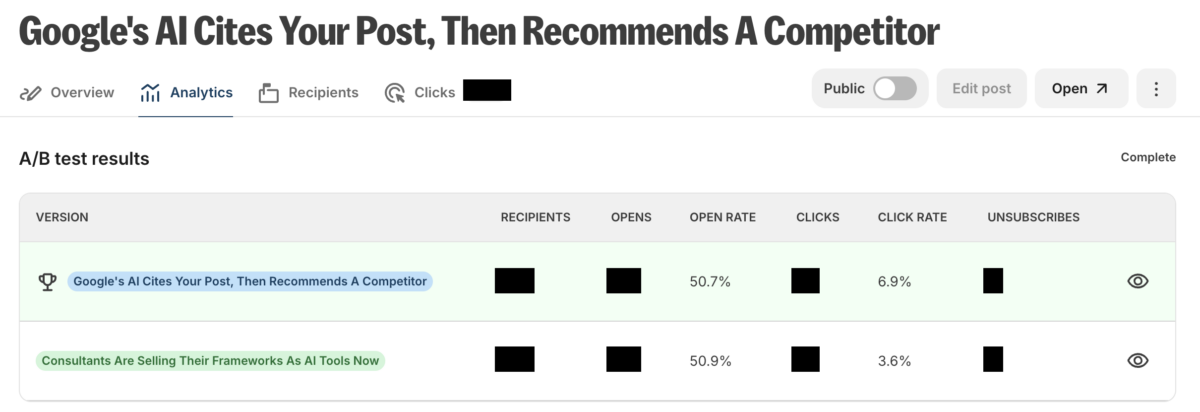
Same audience, same email body, same moment. The subject line did not decide who opened. It decided what they expected to find, and one promise paid off in clicks while the other did not. That is one test on a few hundred recipients per cell, so treat it as a direction to test in rather than a finding to bank.
Why your open rate needs an asterisk
Google states plainly in the guidance linked earlier that it does not track open rates and cannot verify the accuracy of open rates reported by third parties. Apple goes further: its Mail Privacy Protection downloads remote content in the background whether or not the recipient engages with the message.
Apple accounted for 62.26% of tracked opens in the July 2026 Litmus client market share report, with Gmail at 27.03%. So much of what gets counted as an open across the whole industry is a machine loading a pixel.
So open rate is a comparison tool between two subject lines sent at the same moment, and nothing more. Judge campaigns on clicks, replies and revenue. I go deeper on the metric itself in my post on email open rates. For the wider benchmarks, I keep a running set of email marketing statistics.
Two denominators, one label
There is a trap waiting for the people who do read their data. The platform I use reports “Opened” on two different screens using two different denominators, and both cover the same 90 days of my sending.
| Metric | Per send | Per subscriber, 90 days |
|---|---|---|
| Opened | 43.43% | 71.35% |
| Clicked | 3.11% | 11.50% |
| Unsubscribed | 0.41% | 3.99% |
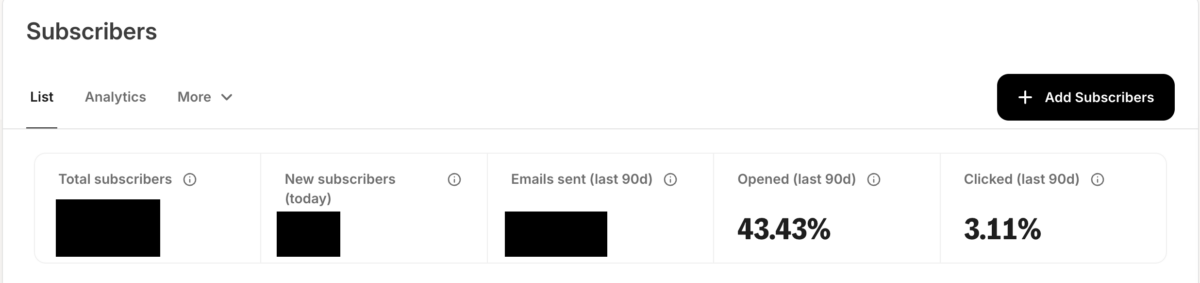
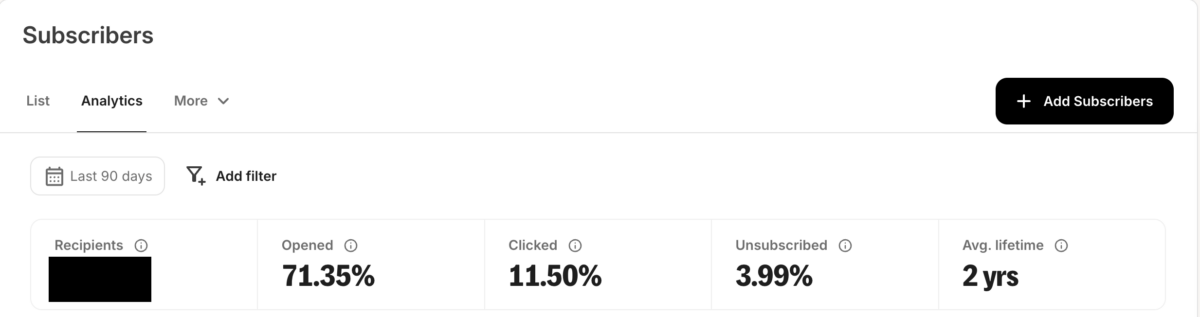
The List tab counts against emails sent. The Analytics tab counts recipients as the subscribers inside the window, as its help documentation sets out. Neither is wrong. Comparing one to the other, or to a published benchmark built on the third definition, is how people conclude their program is failing when it is fine.
Mailchimp’s much-quoted benchmark table puts all users at 35.63% open and 2.62% click. That same benchmarks page dates the data to December 2023 and carries its own privacy-change caveat. Use it for orientation, then benchmark against your own trailing months.
Once you trust your numbers, the next lever is who receives which email.
How Should You Segment, and How Often Should You Send?
Segmentation is grouping subscribers so the message matches what they asked for. I run roughly a hundred tags and send to tagged segments at the frequency each subscriber picked. Daily blog updates, a weekly newsletter that daily subscribers also receive, and a monthly digest for everyone else.
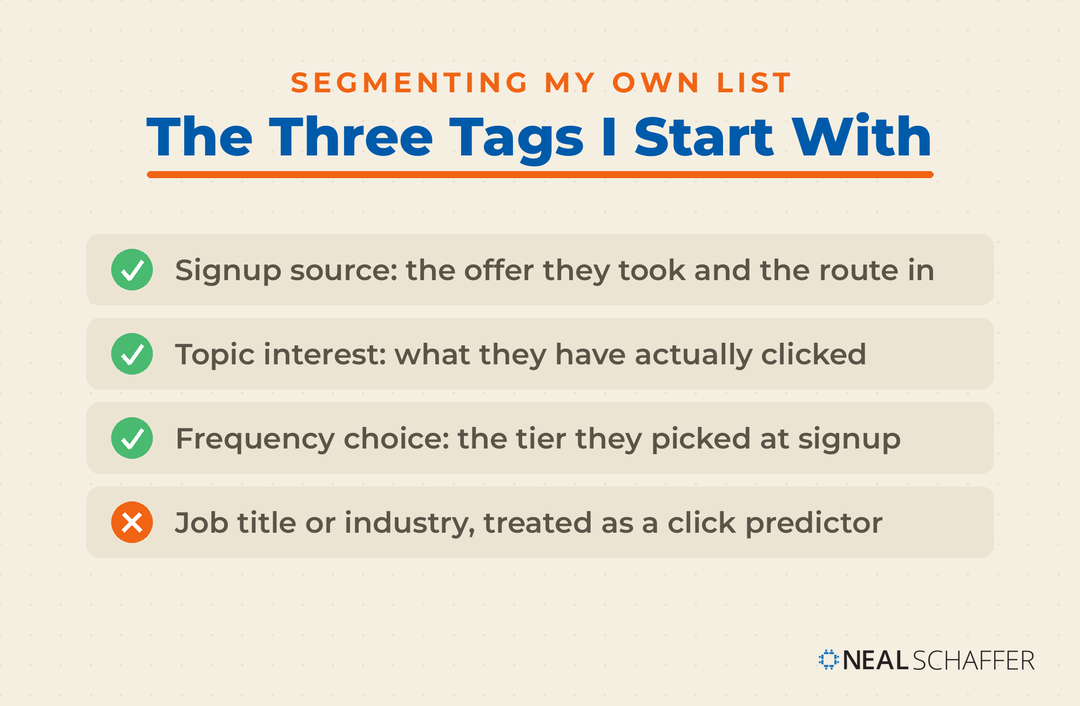
That frequency choice is the one behind the step-down ladder above, and letting people make it is the part most senders skip. Yahoo’s guidance, linked above, tells senders to honor the frequency of the list’s intent, and not to start sending daily email to people who signed up for a weekly one. My tiers make that structural rather than something I have to remember.
Tag by how someone signed up and by what they have clicked, because both of those are facts rather than guesses. Demographic segments are easier to build. In my experience they are also worse at predicting behavior than a record of what someone actually did.
The practical starting point is three tags: signup source, topic interest, and frequency choice. That is enough to stop sending ecommerce content to a B2B reader. If you are building this from scratch, my walkthrough of email list management covers the mechanics, and there is a fuller planning frame in my post on email marketing strategy.
Segments decide who gets what. Automation decides when.
Which Emails Should You Automate First?
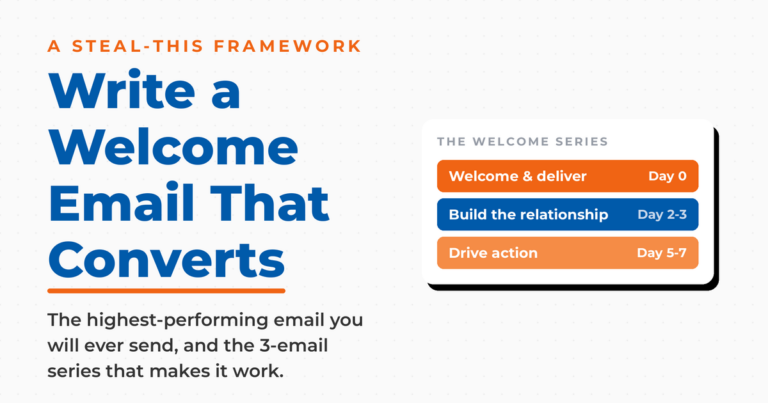
Automate in this order: welcome sequence, then behavior-triggered messages, then everything else. The welcome sequence goes first because it reaches people at the moment their interest peaks. It is also the only sequence you write once and never send by hand again. Mine run five emails on most lead magnets and seven on one.
Length is less important than sequencing. The first email delivers what was promised and sets the expectation for what follows. The middle emails answer the question that made someone hand over an address. The last one asks for something small.
Behavior triggers come second, and for anyone selling online the abandoned cart message is the highest-value one available. Baymard Institute’s meta-analysis of 50 studies puts the average cart abandonment rate at 70.22%. In its survey, 42% of shoppers said they were simply browsing.
That second number is the one people miss. Roughly four in ten abandoned carts were never a sale, so a recovery sequence is competing for the remainder rather than for the whole 70%. Build it, and size your expectations to the smaller number. I go through the sequence structure in my posts on the welcome email and the abandoned cart email.
Where AI actually helps
AI is genuinely useful in email for three jobs: drafting subject line variants to test, writing the first pass of a sequence you will rewrite, and summarizing what your reply volume is telling you. I use it for the first two and would not trust it with the third yet.
What it does not do is decide who should receive an email. That is a segmentation question your own tags already answer. A model guessing at intent from a name and a company field knows less than a record of last month’s clicks.
Treat AI output as a first draft that has never met your audience. The sequence still needs your specifics, your examples and your voice, which is exactly the part that made someone subscribe.
One question comes up more often than any of this, and it is about software.
What Email Marketing Tools Do You Actually Need?
You need one email platform that handles forms, tags, sequences and broadcasts, and almost nothing else. I pay for Kit’s top plan and run everything above inside it. Double opt-in, roughly a hundred tags, the frequency tiers, the segments behind the pruning ladder, and subject line testing on every newsletter.
One quirk worth knowing before you build on it. Kit does not offer send-time optimization, which is a feature competitors sell hard. Given what my own send-hour analysis showed, I have never missed it.
The real scope of a tool decision is smaller than the roundups suggest. Any platform in the mainstream tier will do tags, automations and split tests. What separates them is deliverability record, how their pricing scales as your list grows, and whether the automation builder makes sense to you. Those are the three things to compare.
If you want the sequence-building side in more depth, I have written it up under email marketing automation. Pick one, learn it properly, and spend the time you saved on the list itself.
Frequently Asked Questions About Email Marketing Best Practices
Permission, and specifically how it was given: which offer someone took, and through which route. On my own account the same sequence produced a 4.6x difference in clicks depending only on the signup source, as the table above shows. Everything downstream compounds off who is on the list.
Yes. It costs you some raw signups and buys a list of confirmed humans. M3AAWG ranks it the strongest of the three opt-in levels, in the practices linked earlier. Every subscriber on my list came in through a form or a lead magnet on this site, never a purchased list.
It is a comparison tool, not a scoreboard. Google does not track opens and cannot verify third-party open reporting, and Apple’s privacy protection loads images without anyone reading anything. Use opens to compare two <a href=”https://nealschaffer.com/email-subject-lines/”>email subject lines</a> against each other, then judge the campaign on clicks and revenue.
As often as you have something worth opening, and no more. Let subscribers choose a tier if your platform supports it. Yahoo’s guidance, linked above, asks senders to respect the frequency people signed up for. Remember that automated sequences count toward what a subscriber actually experiences.
You can, and I would not. Support has never been dependable across clients, so anyone whose inbox will not play it gets a broken experience that costs you a click or earns you a complaint. Link a thumbnail to a hosted video instead and it works everywhere.
The mechanics are identical and the cadence is usually slower. Buying cycles are longer, so sequences run further apart and content leans toward proof rather than offers. I cover the differences in my post on <a href=”https://nealschaffer.com/b2b-email-marketing/”>B2B email marketing</a>.
Put These Email Marketing Best Practices to Work
Start with the one that costs nothing. Look at how your last hundred subscribers joined, then compare click rates by source and by the offer they took. If one channel or one lead magnet is producing subscribers who never click, you have found the cheapest fix available.
Turn on double opt-in next, if it is off. Then build the frequency choice into your signup form so people tell you the cadence they want.
Leave send time alone until the other two are done. My own data says the hour is not where the difference lives, and your attention only stretches so far.
If you want examples of what these practices look like in finished campaigns, my collection of email marketing examples is a good next stop. If you would rather have someone audit the whole program with you, that is what my Fractional CMO services are for. You can also download a free preview of Digital Threads to see how email fits alongside search and social.
Get A High ROI From Your Email Marketing
We respect your privacy. Unsubscribe at anytime.
As you have told, don’t purchase an email list because they don’t allow (permission) you to send them mail. This should be the first priority for a new email marketer. On the other hand, rewarding your subscribers is the best way to feel them good and memorable.
Solid tips my friend – thanks for your comment!