


Once upon a time, YouTube was primarily known as a source of amateur video. For instance, people showed off their pets and the latest teenage pranks. You could log onto YouTube and have a few good laughs before switching to more serious TV.
While this kind of video is still important on YouTube, the platform as a whole has become much more sophisticated. Even if a YouTuber isn’t a professional per se, they still put a lot of effort into making their content highly engaging. Monetization is a factor here, since higher viewer counts can result in creators getting more money. To that end, branding for YouTube has become a major part of building a successful channel.
However, branding is just the beginning. That’s because many creators have become effective influencers. Google and Kantar found that among surveyed Gen Z viewers in the US, 79% trust the recommendations they get from creators on YouTube, and 74% say those creators give them the context or expertise to buy with more confidence. That actually shouldn’t come as a surprise as 80% of people prefer videos over written text.
The net-net is that there’s lots of opportunity for YouTube creators to exercise and monetize their influence. Branding for YouTube is an important part of this.
Key Takeaways
✅ Branding is what makes a channel recognizable before anyone reads the title. A consistent look, a consistent voice, and a consistent set of assets are what separate your videos from the look-alike channels covering the same niche.
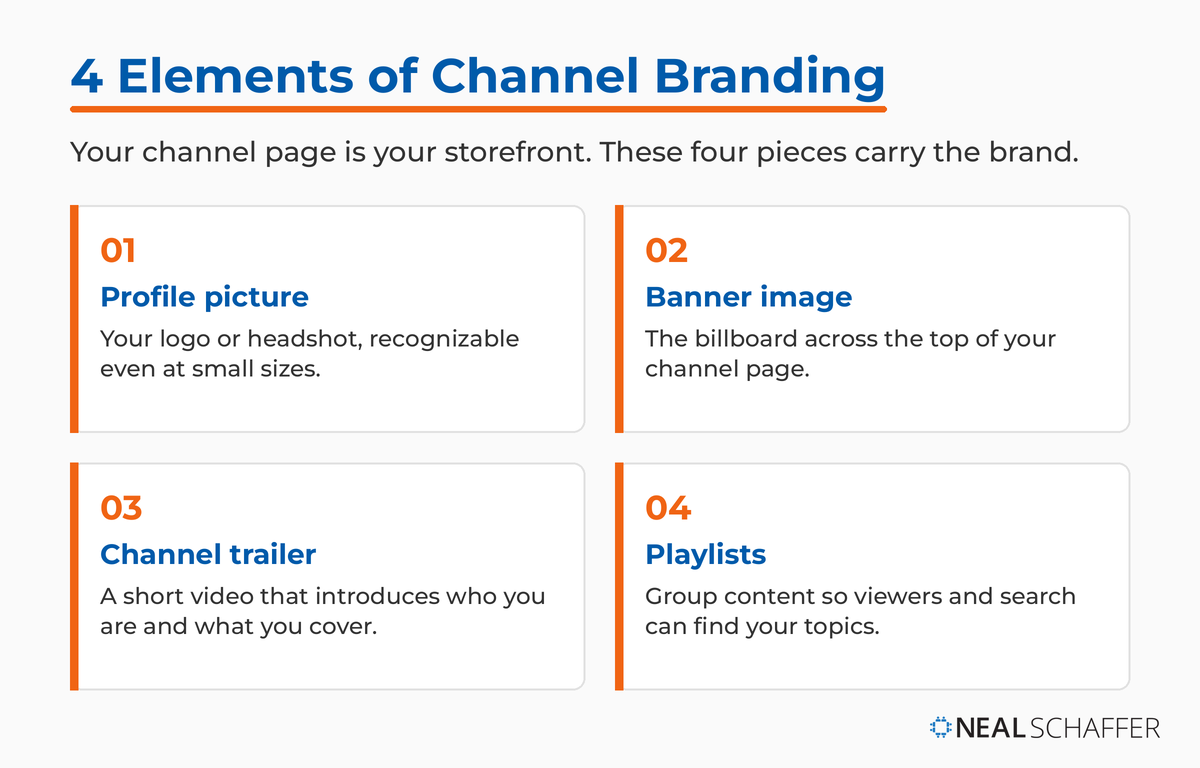
✅ There are two layers here, and they are separate jobs. Video-level branding is your intro and outro, your style and voice, your watermark, and your thumbnails. Channel-level branding is your profile picture, banner, trailer, and playlists.
✅ A brand account is free, and it is the better container for a channel you plan to grow. It keeps the channel off your personal Google identity, and it lets you add a manager or transfer ownership later. That is a decision worth making when you start the channel, not after it has an audience.
✅ Custom thumbnails do more work than any other branding asset you control. Whatever YouTube suggests for you is a frame from the video. A custom thumbnail is a first impression you designed on purpose.
✅ Consistency across platforms beats any single asset. Someone who found you first on your website, your podcast, or another social profile should recognize your channel page the moment it loads.
How Important is Branding for a YouTube Creator?
If you create any kind of content, branding for YouTube is essential. Let’s go back to the question of pet videos: if you’re a pet person, which channels did you watch? Chances are that it was the ones which appealed to you the most. Feeds are useful for discovering new creators or learning about a topic. But that isn’t where the opportunities for influence lie. Opportunities are maximized when your content is remembered.
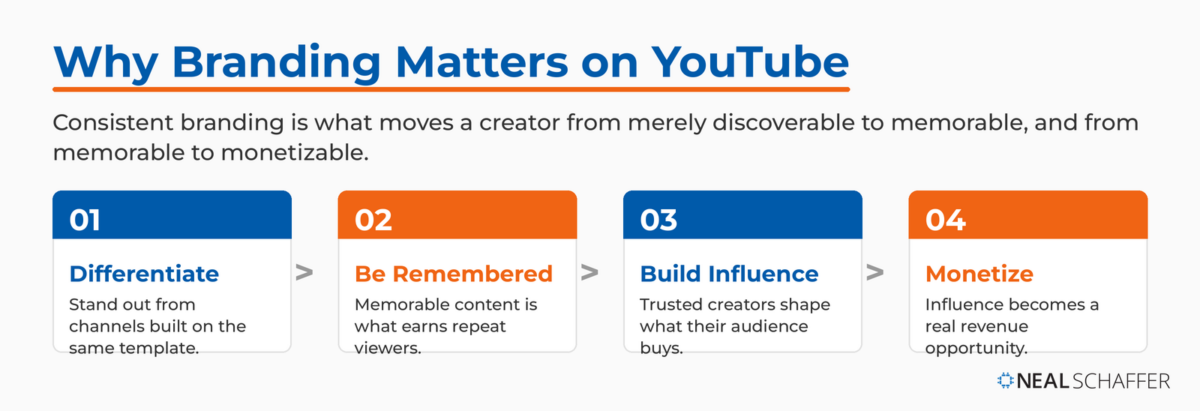
Branding is essential for differentiation and being remembered
For the average consumer, branding is important. Nike, for example, has the famous “swoosh” logo on most of their products. Likewise, competitor Adidas has the “three stripes” and “trefoil” aspects of their branding. Although a pair of sneakers from each company serves the same purpose, they aren’t the same. Your Nike shoes might have a certain styling in addition to the branding that’s different from the Adidas. But here’s the thing: you’ll know for sure which one is which because of the branding.
It’s the same thing with branding for YouTube. Whether you want to be an influencer, share your hobby, or engage in personal branding for professional gain, you need to ensure the content is memorable. To that end, you should ensure that your content has some form of consistency. Influencers have a unique way to build rapport and trust with their viewers. Professionals showcase their knowledge. And hobbyists tend to specialize in certain areas within their hobby.
Do YouTubers use brand accounts?
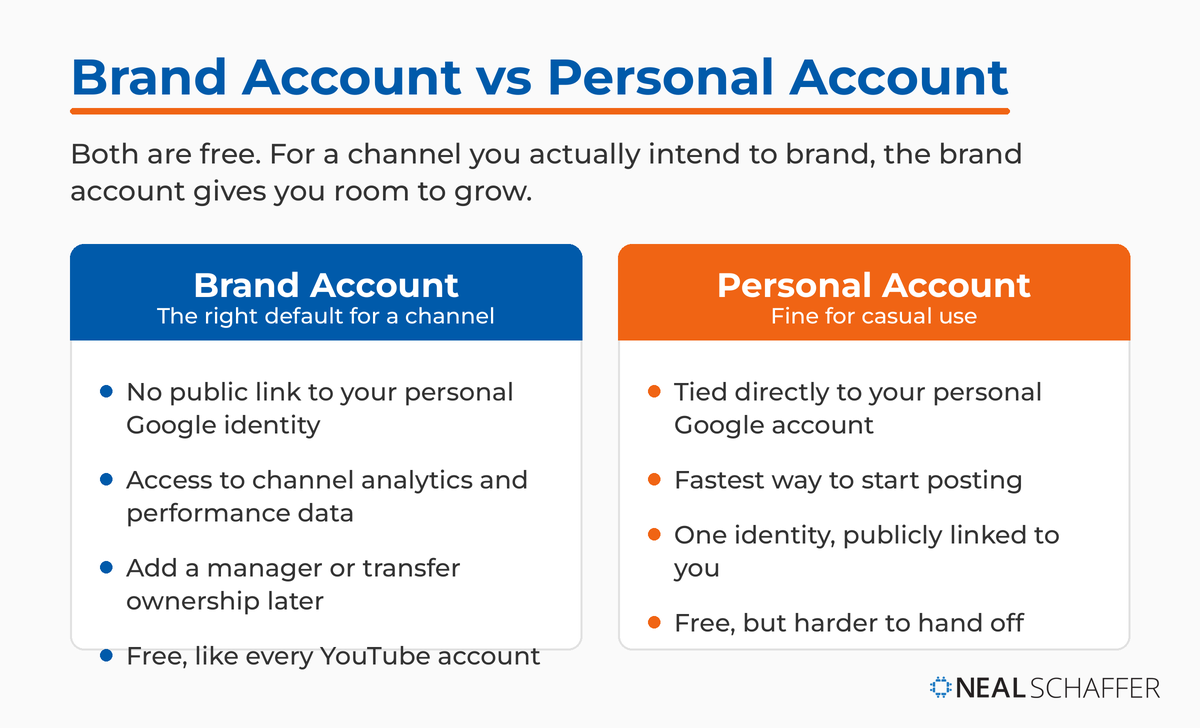
In a word, yes. YouTubers have two basic options when creating a channel: brand and personal. However, it isn’t as simple as you might think, because everyone must start out with a Google account. If you already have a Google account, then you’ll navigate to YouTube and go to your channel page. From here, you can click on “create a channel.”
Most of us think of our account page as a channel page. This is technically true, but you can also have a second or third channel. Or even more. The advantage here is that even though your brand channel is privately associated with your personal Google account, there’s no public linkage. This means that your activities on a brand account won’t be associated with your personal account. Just like using a personal and business email address, you can be either the branded persona or the individual persona.
Besides privacy, there are other advantages to a brand account. Every YouTube channel gets YouTube Analytics, so the reporting is not the differentiator. What a brand account gives you is shared ownership, since more than one Google account can manage and own it, which lets you hand access to an assistant or transfer the channel later. Be deliberate about who you add, because any owner you grant can take full actions on the channel, including deleting it and removing other owners.
Is a YouTube brand account free?
Yes. The brand account is free, just like any other YouTube account. That isn’t to say, however, that managing it is always free. For instance, like any other YouTuber you’ll need to pay for the tools you use to produce those videos. Smartphones can easily record basic video, but branding for YouTube will ultimately require some cool gear. Since a brand account is used for marketing, these video marketing tools can be useful on YouTube. Many of them cost money.
How to Brand Your YouTube Videos
It’s one thing to have a brand account, and another to do branding for YouTube properly. Every channel is built on the same basic platform, so you’ll need to work hard at differentiating yourself from the competition. In particular, the basic formatting is the same throughout, so you can’t just add different sections like you would on a website. To that end, here’s how you can brand effectively.
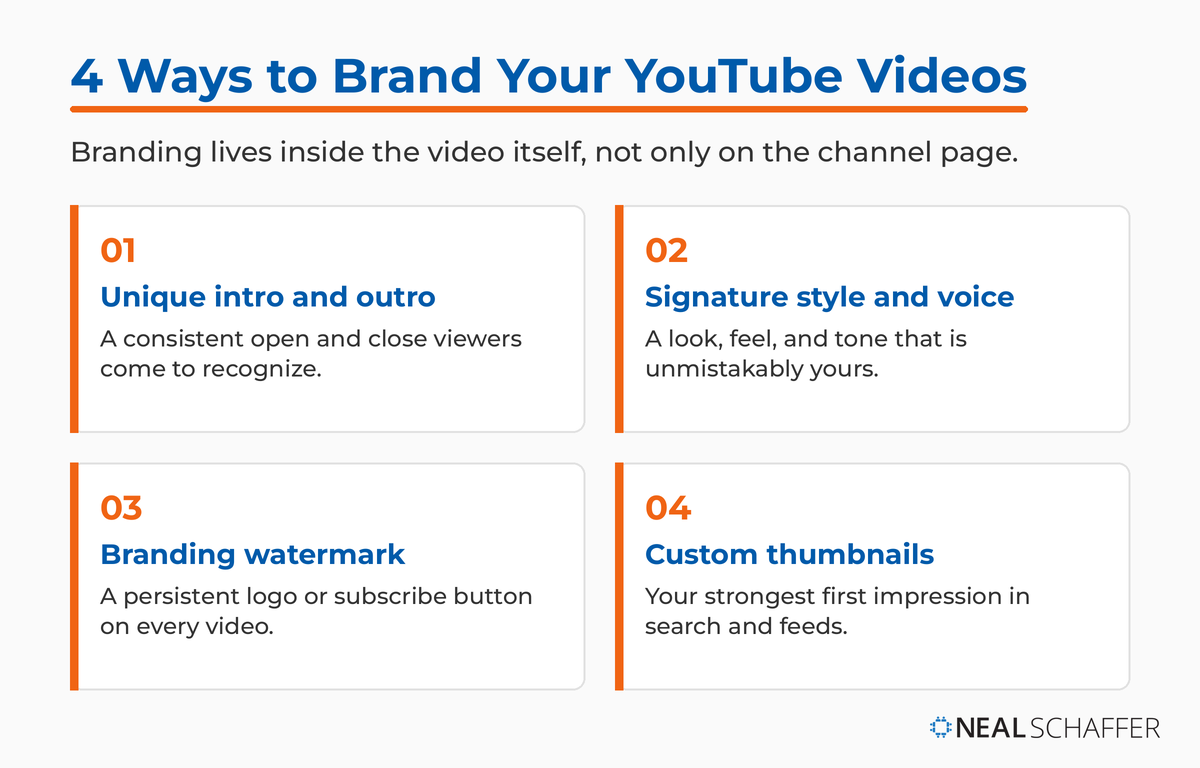
Unique intro and outro
Making awesome videos is much more complicated than just pointing a camera at your subject and letting it roll. While this is fine for the old-fashioned hobbyist cat video, if you’re going to do branding for YouTube then this won’t cut it. Not only will the video look amateurish, but it probably won’t be memorable.
Instead, you need to do what Hollywood and other video producers have been doing for decades: customizing your intro and outro. This doesn’t need to be complicated: sometimes just a “talking head” that introduces the channel content is enough for an intro. Likewise, something similar calling on viewers to like and subscribe can be enough.
With that said, depending on your niche the intro and outro may need to be more memorable. For instance, there’s a very popular YouTube channel that features a pet celebrity. Here, the outro features the pet vocalizing, along with a picture of its paw with “the end” on it. This is simple, yet effective, branding for YouTube. The pet’s personality is the big draw.
Need some inspiration? Watch your favorite YouTube channels to see what they use for intros and outros. A common option on vlogs is humorous moments. Or, it could be a preview of the video combined with some other forms of branding that show the channel name. The options are endless. In the end, you’ll want to go with something which is suitable for your channel and its goals.
Unique style / look and feel / voice within your video
Just like the logos of sporting goods companies, branding for YouTube always requires being unique. Depending on your niche, this can take many different forms. However, the important thing is that your brand is something different from whatever other people are doing. If your brand account really revolves around a line of products, this is somewhat easier because you’ll use the brand standards for the offline operations. However, even here there are some considerations.
Look and feel, style
True, you can’t do a custom layout too easily. But that isn’t to say that your branding for YouTube can’t take look and feel into account. Rather, you can change the look of your videos. Using goofy icons, capitalizing on language tricks, and other strategies can give your channel a unique vibe. One way to do this is by letting your channel reflect the contents of your videos. Travel channels, for instance, can use pictures of an exotic getaway. They might also use a stylized symbol of the niche, such as an airplane, to get the point across.
Brand voice
Every successful brand has a “voice” that appeals to their audience and sets them apart. Some niches, such as legal education and commentary, require a very formal brand voice. Legal topics are serious business, and the channel must reflect this. On the other hand, a cosmetic company for hipsters might choose branding for YouTube that is very fashionable and up to date. My best advice here is to know your intended audience. Then, find out what is most likely to appeal to them.
Watermark your YouTube videos
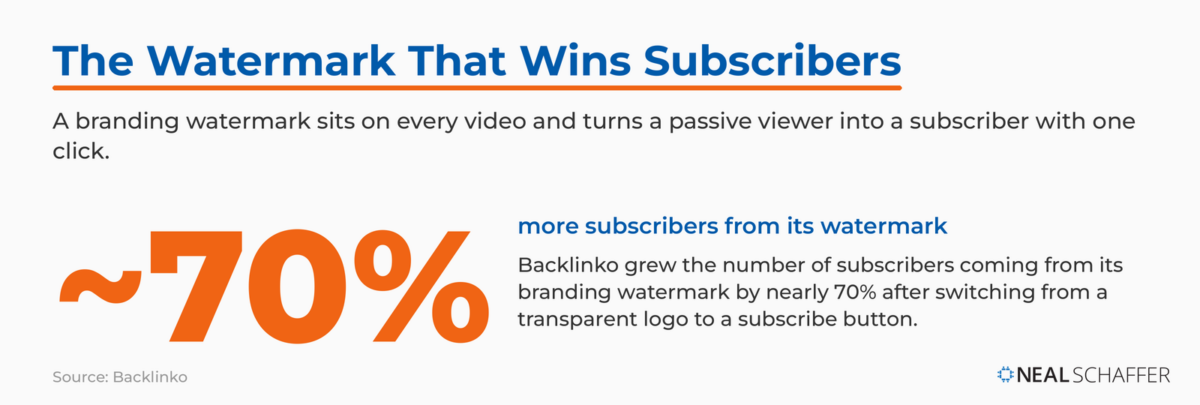
Another aspect of branding for YouTube can include watermarking your videos. Unlike watermarks on stationery that disappear without light, they’re always visible on video. There are several options here. One is to use your channel or brand logo. These can be more or less transparent based on taste and purpose, but you won’t want them to obscure the main content.
Make LinkedIn Your Best Source of Clients
My latest book helps professionals, entrepreneurs, and business owners turn LinkedIn from a static profile into a real source of clients and growth.
Maximizing LinkedIn for Business Growth gives you clear, practical steps to build a profile that gets noticed and a network that actually sends business your way.
Grab your copy on Amazon and put it to work this week. Click the cover or the button below to get started.

Another option is to use a subscribe button as a watermark. This can be the standard “subscribe” button on every channel, or it can be added to a different image. According to Backlinko, using a subscribe button is a highly effective way to get subscribers. Their experience was that 70% more people subscribed when this was used rather than a custom option.
Use custom thumbnails
Finally, I recommend using custom thumbnails. Thumbnails on YouTube are the image which appears next to or over the name of your video. Just like any other social media picture, the thumbnail serves as the “first impression” of your video. For that reason, it helps people decide if they want to watch that piece of content.
YouTube allows for two kinds of thumbnails: custom and auto generated. If you do nothing, YouTube picks one for you, and YouTube Studio can also generate suggestions based on the video itself. Uploading your own is the better move, and it requires a verified account, which takes a phone number and a few minutes.
However, branding for YouTube is often easier if you use a custom thumbnail. In this case, you’ll upload an image file that reflects what’s in the video. Many experts have found that the best-performing videos on YouTube have custom thumbnails. Remember, unlike the auto generated ones, these aren’t random, so you can put your video’s best foot forward.
How to Brand Your YouTube Channel Homepage
Of course, branding for YouTube is similar to website branding when the homepage itself is concerned. To that end, you’ll need to have a level of consistency with other brand assets, if applicable. For instance, my channel uses the same picture of my The Age of Influence book as my website and other social media channels. Let’s break down the customization options.
Change your profile picture
First, change your profile picture. YouTube automatically provides a profile picture that’s a letter inside a colored circle. While this is fine for a personal account, it won’t work for a brand channel. After all, everyone else has essentially the same thing. If you have a corporate entity, then branding for YouTube will probably mean using the corporate logo as your profile picture. Other content creators make something special for their channel, then use it for this purpose.
Change your banner image
As with a website, your banner image is the border on top of the channel page. These allow for a lot of branding and creativity. If you are trying to promote something in particular, you can place a picture of that item into the banner. Mine, for instance, is several copies of my latest book.
If your “product” is your personal brand, then you might choose something else for a banner image. Beauty influencers will often use pictures of beauty projects, or they might pick a glamor shot. You’ll need to make sure that you choose something that’s both unique and free of legal barriers to publication. No matter what you pick, make sure it reflects the topic of your channel.
Your Channel Trailer
A channel trailer is a short video that describes your channel and talks about your brand. If you are an influencer, then the channel trailer would likely be on the order of “Hi I’m Neal and this is my channel. We talk about marketing here.” In other words, introduce yourself and then describe the subject matter of the channel.
Another option when using the trailer as branding for YouTube is to preview the kind of content you’re offering. A travel person might do this by doing a slide show of places where they have been in recent years. This lets people decide if it’s for them. A channel trailer is a brand video in miniature, so the ten types of brand video are a useful place to find your angle before you script it.
Your Playlists
Finally, you can use playlists as a way to further your branding. An easy use of this is grouping videos that are on a certain topic within your niche. I might have a playlist on influencer marketing, and another one about paid social. Beauty creators might have one on skincare, and another devoted to makeup tutorials. Playlists have the advantage of helping people find the right content fast. They also can pop up as individual search results, drawing even more people.
Finally, you can use playlists as a way to further your branding. An easy use of this is grouping videos that are on a certain topic within your niche. I might have a playlist on influencer marketing, and another one about paid social. Beauty creators might have one on skincare, and another devoted to makeup tutorials. Playlists have the advantage of helping people find the right content fast. They also can pop up as individual search results, drawing even more people.
Frequently Asked Questions About Branding for YouTube
Upload at a minimum of 2048 x 1152 pixels in a 16:9 ratio, or at 2560 x 1440 if you want it to hold up on a television screen, and keep the file under 6 MB. At that minimum size, the safe area for text and logos is 1235 x 338 pixels in the middle of the image, because YouTube crops the same banner differently on phones, desktops, and TVs.
The same YouTube branding guidelines ask for a square image of at least 150 x 150 pixels, under 1 MB in size. You also choose when it shows: across the last 15 seconds of the video, from a start time you set yourself, or for the entire runtime.
Use your face if the channel is a personal brand, and a logo if it stands for a company. Either way keep it simple, because YouTube renders that image at 98 x 98 pixels, and detail that reads well on your website disappears at that size.
You can brand either one. Pick a brand account for ownership rather than appearance, for the reasons in the brand account section above: shared management, and the ability to transfer the channel later. If this is a hobby channel you will never hand to anyone else, a personal channel is fine.
The branding itself is free. The account, the banner, the watermark, the custom thumbnails, and the playlists all come with the channel. What costs money is production: the gear you shoot and edit with, and the design tool you build graphics in. For the graphics, Adobe Express covers banners and thumbnails on its free tier, which is where I would start.
Start Branding Your YouTube Channel This Week
Branding for YouTube might seem like a daunting task. However, with a little bit of thinking ahead it’s actually quite easy. Many of the branding items used are only created once, while others are easy to make each time. By branding your channel, you stand to gain a lot of regular viewers, which is good for both monetization and content marketing objectives.
Work through it in the order the assets get seen. Fix the profile picture and the banner first, because those are what a new visitor lands on. Set the watermark once and leave it alone. Then build a thumbnail template you can reuse, since that is the one asset you will touch on every single upload. The intro, the outro, and the channel trailer can wait until the rest is in place.
Before you design anything, it helps to know how people are actually using the platform right now, and my roundup of current YouTube statistics is the fastest way to get that picture. If you want the channel to pull its weight alongside your website, your email list, and your other social profiles, grab a free preview of Digital Threads, or work on it with the creators and entrepreneurs inside my Digital First Mastermind.
Thanks Kathy ;-)
Thanks Kathy ;-)
Great post Neal and right on!
Thanks for the comment. Yes, YouTube, like Facebook, is easy to use for personal entertainment. But there is a lot of un-boring videos that you could create should you want to do so as part of your personal brand. Just doing a YouTube search will give you some ideas as to the great content that exists out there…
I'm on youtube. 'Alconcalcia' – for comedy (Dave's rubbish interviews + the world's most wooden stand up) and my children (the snowman video appeared on national tv). Not work stuff though, that would be way too boring.