Stop Chasing Opportunities on LinkedIn. Make Them Come to You.
Get the complete first edition of Maximizing LinkedIn for Business Growth free.
Looking to optimize your LinkedIn profile? You can learn a lot by spending a little time analyzing some of the compelling LinkedIn summary examples that real professionals have published.
It’s one thing to hear about the importance of having a great LinkedIn summary and another to understand what that means. Sure, you can read all kinds of blog posts about what to write, including my own LinkedIn profile tips. But seeing these principles in action is different. And because your LinkedIn summary is such an important part of your professional online presence, it’s something you want to write carefully.
I picked the five examples below because I’ve spent years studying what actually pulls people into a profile, and these get it right in five different ways. As someone who has helped thousands of professionals work on their LinkedIn presence, I can tell you the blank “About” box stops more people than any other part of the profile. After the examples, I’ll walk you through the same nine prompts and the tips I give clients for writing your own.
✅ Examples teach faster than theory. Studying real LinkedIn summary examples shows you what works before you write a word of your own.
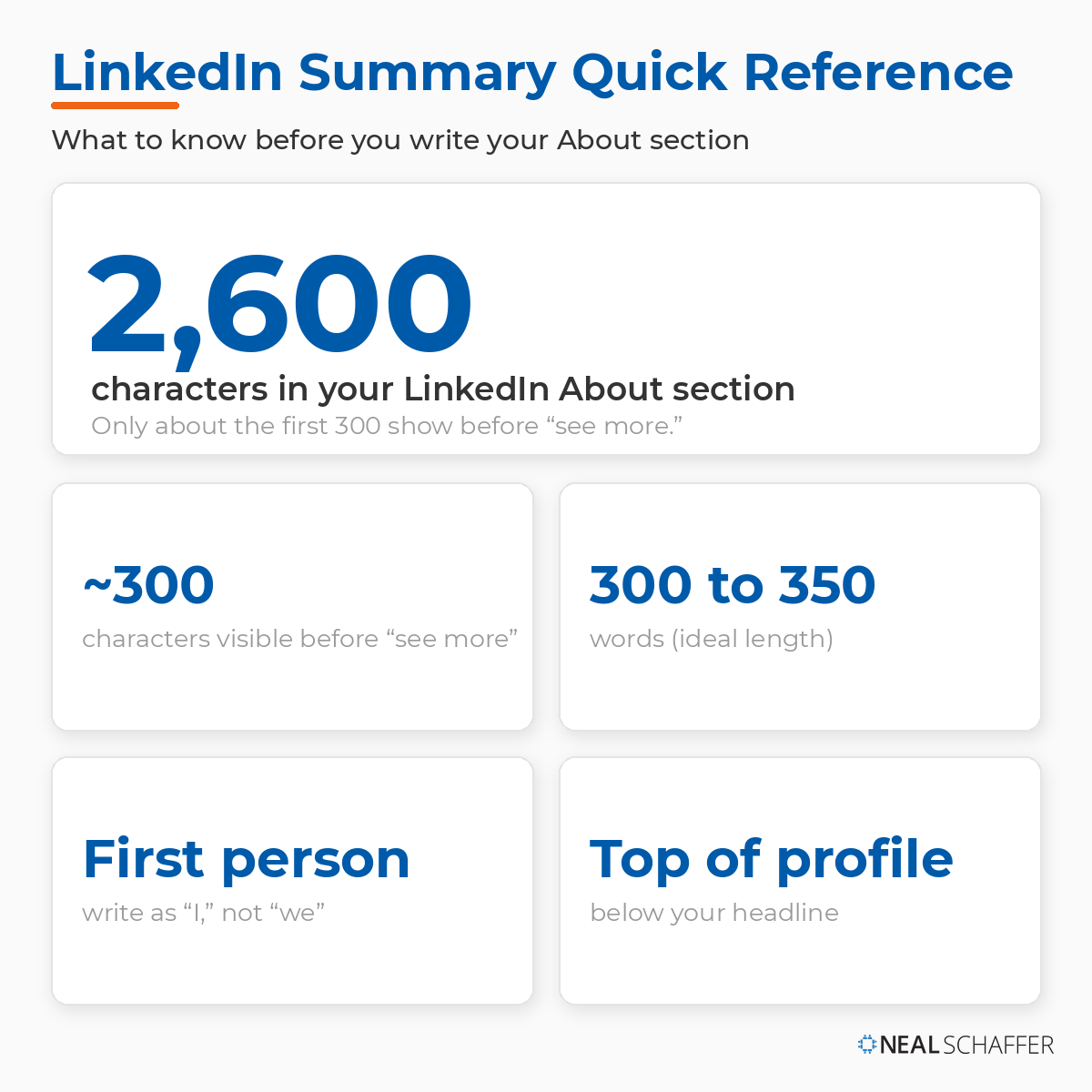
✅ You get 2,600 characters, and your first few lines do the heavy lifting. LinkedIn’s About section caps at 2,600 characters, with only about the first 300 visible before the “see more” cutoff, so the opening earns the read.
✅ Write in the first person. “I help businesses…” sounds like a person. “Neal Schaffer is an expert in…” sounds like a press release.
✅ Lead with a hook, close with a call to action. Open with a story or a sharp line, and end by telling readers exactly what to do next.
✅ Keywords get you found. Your summary is searchable, so the words your audience types are the words you want in your About section.
✅ Keep your summary current. The best profiles evolve. Treat your About section as living copy and revisit it as your role, your wins, and your goals change.
A LinkedIn summary is the “About” section of your profile, a synopsis of who you are professionally that covers your experience, skills, accomplishments, and what makes you worth contacting. In the better examples, the writer tells a story rather than listing facts. You get up to 2,600 characters, roughly 300 to 350 words, to introduce yourself in your own words.
If you’ve been on LinkedIn for a while, you’ve heard it called the bio, the summary, or the About section. Same thing. What it does is turn you from a generic professional into somebody with a personality, talents, and a point of view.
One quick correction worth making, because way too many people get this wrong: the section is not 2,000 characters anymore. LinkedIn gives you 2,600 characters in the About section, and only about the first 300 show before the reader has to click “see more.” That cutoff is the single most important thing to design around, and we’ll come back to it in the tips.
| Quick reference | LinkedIn summary (About section) |
|---|---|
| Character limit | 2,600 |
| Visible before “see more” | About the first 300 characters |
| Ideal length | Roughly 300 to 350 words |
| Voice | First person |
| Placement | Top of your profile, below your headline |
Your LinkedIn summary matters because it’s often the first real impression you make on more than 1.3 billion members and the people hiring from among them. If your headline earns the click, your summary earns the connection. It tells a prospect, recruiter, or potential client who you are, what you’ve done, and how you can help, all before any conversation starts.
Recruiters and hiring managers routinely check your profile before reaching out, and your About section is the centerpiece of that read. But it isn’t only recruiters. Potential clients, partners, journalists, and old colleagues all land on your profile, and the summary is where they decide whether to keep reading. A strong one does a few specific jobs:
It builds your personal brand and generates leads. People reach out because your brand resonates with them. For a salesperson or recruiter, that is the whole game, which is why a strong summary feeds your LinkedIn lead generation directly.
It makes your profile stand out. Even in a tight market, getting noticed is hard. A strong summary means that when your profile turns up in a search, people take a closer look and remember you.
It highlights your expertise. LinkedIn is where people go to find expertise, not just names. Use the space to make yours clear so people get to know you before they reach out.
It helps you rank in LinkedIn search. People search by talent and skill, so the right keywords help the right people find you. Do a little keyword research first. SEO applies to LinkedIn, not just your website.
It shows your personality. Your personality helps someone decide you’re a good fit, and it makes you more memorable and more likable.
The best way to understand a great LinkedIn summary is to read a few. Below are five LinkedIn summary examples I keep coming back to, each strong for a different reason. Notice that some people are better at selling their company and generating leads, while others are better at selling themselves. Both have plenty to teach you. (If you want to study whole profiles instead of just the About section, my LinkedIn profile examples post is a good companion.)
One note before we start: these are screenshots I captured at a point in time, chosen because each one shows a principle clearly. Each of these professionals have already rewritten their About sections since, which is the lesson hiding in plain sight. A great summary is never finished. Study what these captures do well, then plan to revisit your own as your career moves.
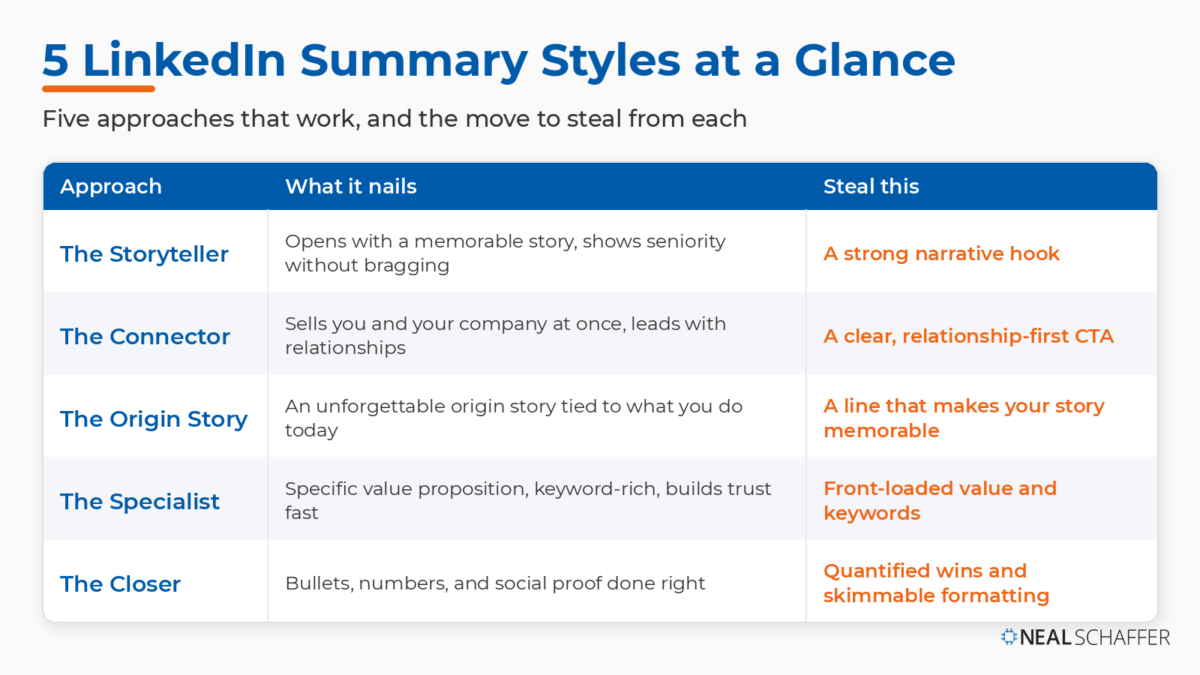
Here’s how the five compare, based on the versions captured in this post.
| Example | What they nail | Steal this for your summary |
|---|---|---|
| David Armano | Opens with a memorable story, shows seniority without bragging | A strong narrative hook |
| Mike Allton | Sells himself and his company at once, leads with relationships | A clear, relationship-first CTA |
| Phil Mershon | An unforgettable origin story tied to what he does today | A line that makes your story memorable |
| Steve Fox | Specific value proposition, keyword-rich, builds trust fast | Front-loaded value and keywords |
| Eddie Shleyner | Bullets, numbers, and social proof done right | Quantified wins and skimmable formatting |

What can you learn from David’s summary?

What should inspire you from Mike’s summary?


What should inspire you from Phil’s summary?
My latest book helps small businesses, entrepreneurs, and marketers bring search, email, and social together into one digital marketing strategy that actually compounds.
Drawing on my work as a Fractional CMO, Digital Threads turns complicated tactics into a clear, practical plan you can follow, whatever your budget or team size.
Grab your copy on Amazon and start weaving your own digital threads. Click the cover or the button below to get started.


What’s good about Steve’s summary?


What’s good about Eddie’s summary?
To write a LinkedIn summary, answer these nine prompts in order:
Together they give you most of a first draft.
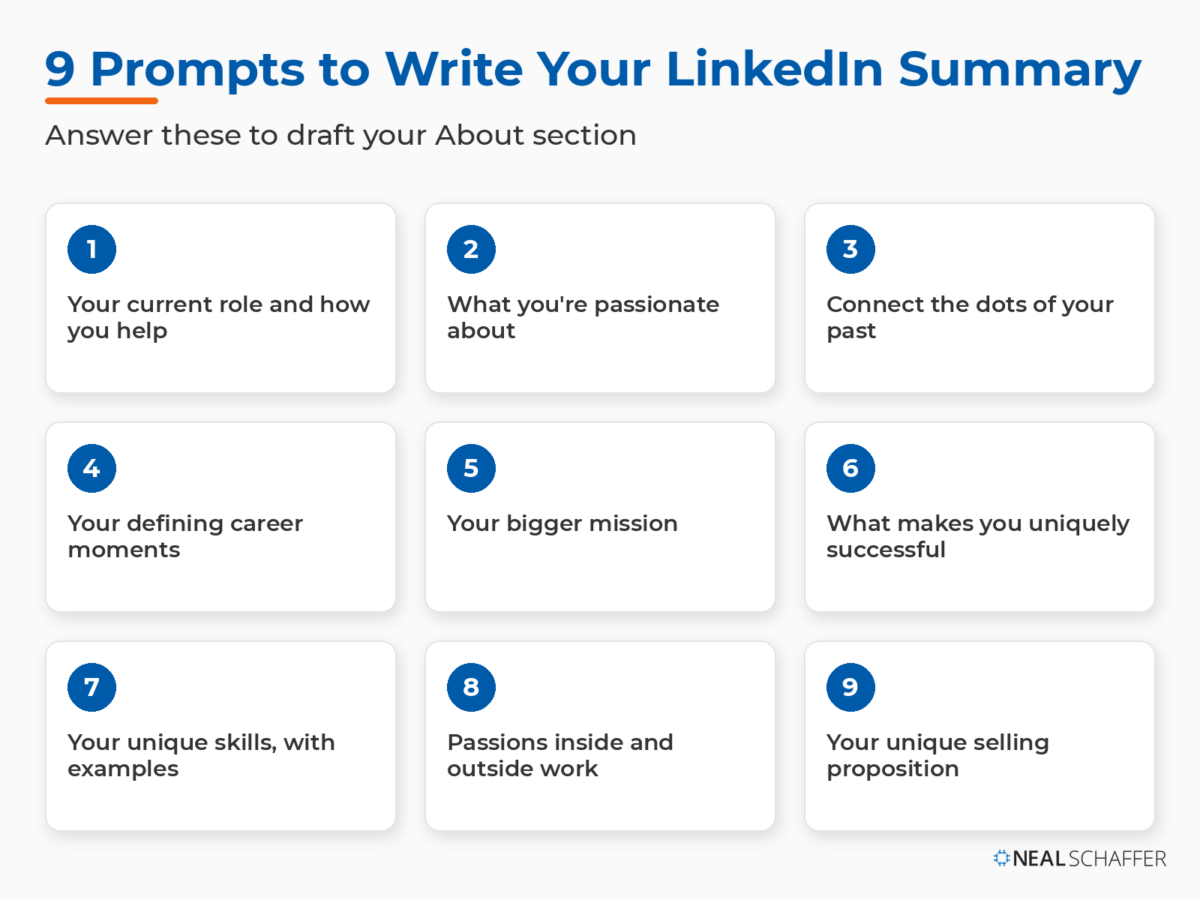
As career coach Chelsea Jay puts it, you should “approach your LinkedIn summary just like you would a conversation with a new friend.” That’s the spirit behind these prompts. There’s a yin and yang to personal branding on LinkedIn. You want to showcase your strengths, but you also want to connect with the reader as if they were in the room with you. People buy from people, not companies. These prompts blend both.
People are conditioned to recite facts: the title they hold, the degrees they earned, the conferences they’ve spoken at. That’s only part of the picture. People want to know the impact your work has. Take mortgage bankers. They get a bad rap for interest and foreclosures, but they also help families become homeowners, and many have grateful clients as a result. Describe the impact, not just the title.
Most people have a favorite part of their job. The mortgage banker above probably loves handing a first-time buyer the keys. Teachers and social workers often choose their work out of passion. Showing where your work and your passion meet defines your personal brand.
For most of us, our work and education history tells a story. Maybe you switched careers, took time out for family, or took a “survival job” during a downturn. Part of writing a great summary is showing readers how each piece of the puzzle fits together. It’s all part of building and defending your brand.
We all have wins we’re proud of. Early on, it might be that first great performance review. Later, it could be growing sales, earning recognition, or landing a competitive promotion. The skill here is knowing which wins to feature and which to save for the interview. <!– BOOK CTA BLOCK (Digital Threads): existing secondary CTA placement, re-insert here if you keep two –>
This one is about values. Maybe you believe in selling the right product to the right person rather than whatever’s trendy. For the right company, that philosophy is a selling point. Salespeople always have quotas, but there are different ways to hit them, and yours says something about you.
Even in regimented jobs, most of us have a special way of doing things. A chef has a technique for the perfect omelet. A salesperson has a way of connecting with prospects. A customer service rep has a way of calming an angry caller. Whatever your “special sauce” is, work it into your summary.
A big part of writing a summary is convincing people your brand is genuinely unique, and specific skills are often the proof. Sometimes a recruiter seeks you out for one. A special education teacher with autism-spectrum expertise, for instance, is in high demand and should say so plainly.
Everybody has a life outside of work, or at least they should. How do you spend your free time? Plenty of professionals mention a sport or a passion for food. Sharing those interests gives someone with the right opportunity a personal reason to connect with you.
Simply put, why are you better than the alternative? Or as an interviewer might ask, “why should I hire you over the other candidate?” Stating your USP answers that almost upfront and, ideally, earns you the message you’ve been waiting for. Even if you consider yourself a “soft” candidate, showing your value is essential.
Once you’ve answered these, you’ve got the raw material for your summary. Now shape it. Don’t paste your answers in as a question-and-answer list. Pull them into three or four short paragraphs that read like you talking:
Write the whole thing in the first person, front-load your hook into the first few lines, and cut anything that could have been written about anyone else. If you’d rather start from a structure, the template further down maps these same prompts into a fill-in-the-blank format.
The best LinkedIn summary tips come down to seven moves: open with a hook, state your experience, propose a clear value proposition, back claims with numbers, break up the text with bullets, weave in keywords, and end with a call to action. Get those right and your About section will read like a person, not a resume.
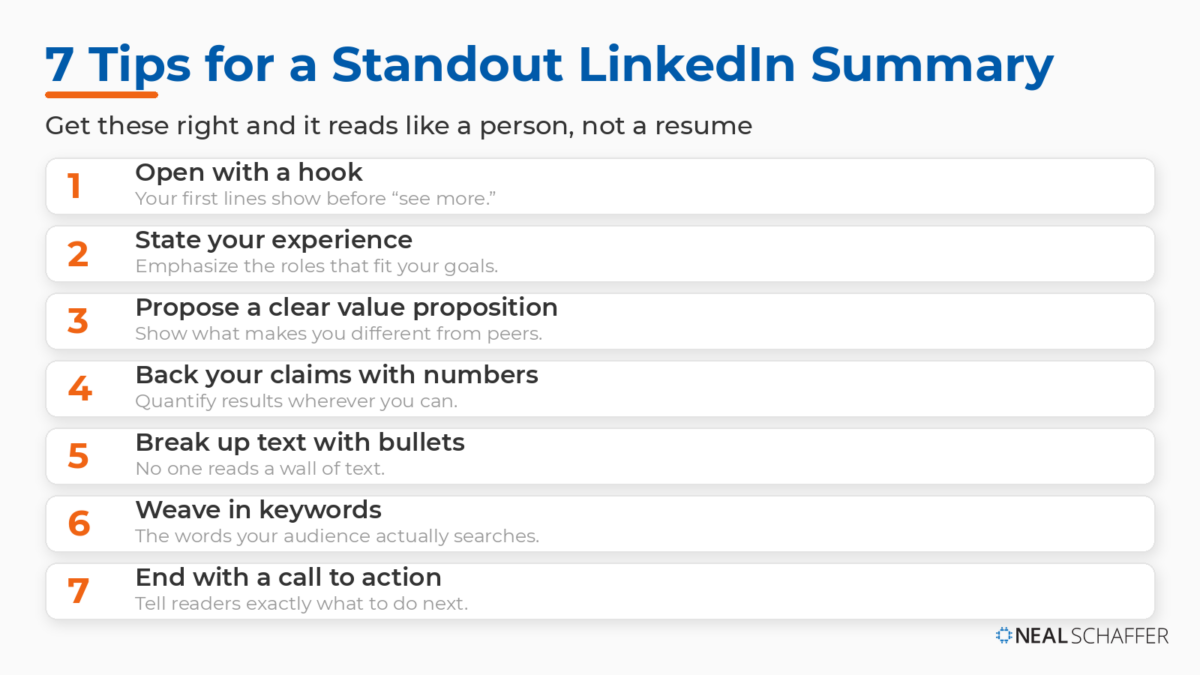
There’s an art to this: part word choice, part substance. Sometimes how you say something matters more than what you say. Here are my tips.
Writers use this trick all the time. Your first sentence or two should give people a reason to keep reading. In some of the examples above, the hook is funny. Others simply describe, crisply, what the person does. Either way, only the first few lines show before LinkedIn cuts to “see more,” so make them count.
This sounds obvious, but there’s room to think creatively. Almost everyone lists their job history, but you can emphasize the roles that fit your current goals. The summer lifeguarding job probably isn’t relevant at 40. Nontraditional experience, like volunteering, independent certifications, or caregiving, can be exactly what makes you the right person.
In most fields, plenty of people share similar skills. The best summaries show what makes each person different. Maybe you’re known as a team player where that’s rare. Maybe, as an attorney, you have an unusually high success rate against insurance companies and clients find you a pleasure to work with. That kind of attribute creates real value.
In some fields it’s hard to quantify success, but most of us can. A teacher can point to test scores. A sales or marketing professional can cite revenue or dollars raised. Numbers make your effectiveness concrete. Just don’t reveal confidential data.
Nobody wants to read one giant block of text. If every point runs together, some readers decide your profile isn’t worth their time. Use bullets and short paragraphs to separate one thought from another. You can use more than one bulleted list, as long as there’s a paragraph in between.
Like every search engine, LinkedIn relies on keywords, and they help people find profiles. Including the right ones improves your odds of the right people finding you. Sometimes they’re obvious, like industry terms and job titles. Other times you’ll need a little research so your language matches what people actually search for.
Every great summary has a CTA. Sometimes it’s as simple as noting what people can message you about. Other times it’s “check out my website” or “see my portfolio.” You’re on LinkedIn for a reason, so make that reason easy to act on.
Once your draft is done, run it through this short checklist. These four points are easy to overlook and make a real difference.
Yes, an AI generator can give you a first draft, but it cannot give you a finished summary. When I reviewed the leading LinkedIn summary generators, tools like Taplio and Scalenut all produced a serviceable draft in seconds once I fed them a role, an audience, and a few accomplishments. The output was generic, and generic is the opposite of what a personal brand needs.
There’s a better way to use AI here, and it starts with the work you just did. Take your answers to the nine prompts above and paste them into an LLM like ChatGPT. Ask it to draft a few different summary options from your material: one that opens with a story, one that opens with results, and one that’s short and punchy. Because you’re feeding it your real answers instead of a blank request, the drafts come back far less generic, and you get several angles to react to rather than a single take.
Then treat whatever it gives you as raw clay. Put it firmly in your own first-person voice, add the specific numbers and stories only you can tell, and cut anything that could have been written about anyone. AI is fine for the scaffolding and for showing you options. You are the part that makes it yours.
If you already have an About section, get a read on it before you rewrite a word. Resume Worded’s free LinkedIn Review benchmarks your profile against top LinkedIn profiles and hands back fixes section by section. Careerflow’s LinkedIn Optimizer runs as a free Chrome extension. It scores 14 parts of your profile and gives feedback in real time while you edit on LinkedIn itself. ResumeCoach’s LinkedIn Profile Analyzer takes a different route. You paste in your public profile URL along with a target job title. It then scores your headline, About, experience, skills and languages against 21 criteria. No password and no browser extension needed. All three were built for people who want recruiters to find them. If you are writing to attract clients instead, read their advice with your own audience in mind.
You can also do this with a general AI tool. Copy your About section into Claude or ChatGPT and tell it who you want to reach. Then ask where your summary sounds like everyone else in your field. Neither one can read your profile from a link, so paste the text in yourself. Used this way you get a critique of the summary you already have, which I would argue is more useful than another draft written from nothing.
If you’d rather start from a structure than a blank page, here’s a fill-in-the-blank template that follows everything above. Paste it into a document, swap in your details, then tighten until it sounds like you.
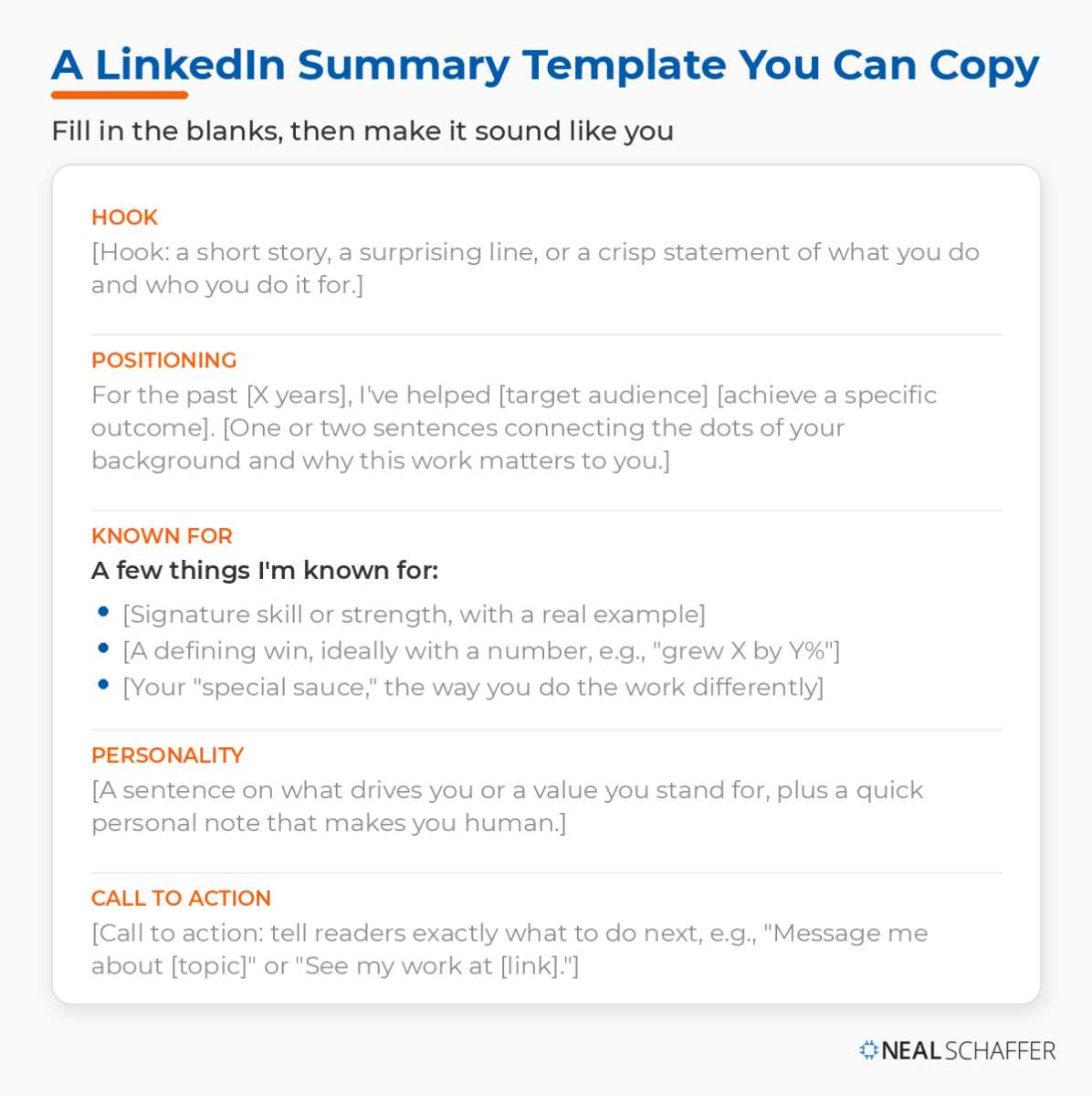
[Hook: a short story, a surprising line, or a crisp statement of what you do and who you do it for.]

For the past [X years], I've helped [target audience] [achieve a specific outcome]. [One or two sentences connecting the dots of your background and why this work matters to you.]

A few things I'm known for:
- [Signature skill or strength, with a real example]
- [A defining win, ideally with a number, e.g., "grew X by Y%"]
- [Your "special sauce," the way you do the work differently]

[A sentence on what drives you or a value you stand for, plus a quick personal note that makes you human.]

[Call to action: tell readers exactly what to do next, e.g., "Message me about [topic]" or "See my work at [link]."]
Keep it in the first person, front-load your hook into the first few lines, and weave in the keywords your audience actually searches.
The About section allows up to 2,600 characters, which is roughly 300 to 350 words. You don’t have to use all of it, but a few solid paragraphs beat a single line, and the first 300 characters are what show before “see more,” so put your best material there.
First person. Because you’re describing your own brand and accomplishments, “I” reads as more authentic and approachable. Third person can sound like a press release and puts distance between you and the reader.
At minimum: who you are, what you’ve done, and how you help. Layer in a hook, your unique value proposition, a few concrete numbers, relevant keywords, and a clear call to action. The nine prompts above walk you through each piece.
Yes, as a starting point. The best results come from feeding your answers to the nine prompts above into an LLM like ChatGPT and asking for a few summary options to react to, rather than starting from a blank request, which is what makes most AI output generic. Take the version you like best, rewrite it in your own first-person voice, and add the specific stories and numbers only you can provide.
Your headline is the single line under your name that shows up almost everywhere on LinkedIn. Your summary is the longer About section. The headline earns the click; the summary earns the connection. If you need to sharpen the first half of that pair, start with my LinkedIn headline examples.
You’ve now seen five LinkedIn summary examples that work, a nine-prompt process for drafting your own, the tips I give clients, a copy-paste template, and answers to the questions that trip most people up. Open your profile, draft your hook, and build out from there. If you get stuck, the patterns from the LinkedIn statistics behind the platform are a good reminder of why this small block of text pulls so much weight.
If you want the rest of your profile working as hard as your summary, read my guide on how to create a LinkedIn profile that gets you noticed next, and once the profile is solid, my LinkedIn marketing strategy guide covers turning all that attention into results. For a deeper playbook, my book Maximizing LinkedIn for Business Growth walks through the whole system, and if you’d rather have a community working on this alongside you, my group coaching membership is built for exactly that.

We respect your privacy. Unsubscribe at anytime.
Practical advice on social, content, influencer, and search marketing, plus the AI tools that make each one easier. Join thousands of founders and business owners who read it.