Editorial Note: I may earn a commission when you visit links that appear on my website.
How to Write LinkedIn Articles That Rank: A Strategic Guide for 2026
You’ve got expertise. You’ve got insights. You’ve got a story to tell that can genuinely help others in your professional sphere. But how do you get those valuable thoughts beyond your immediate network and into the hands, or rather screens, of the people who need them most on LinkedIn?
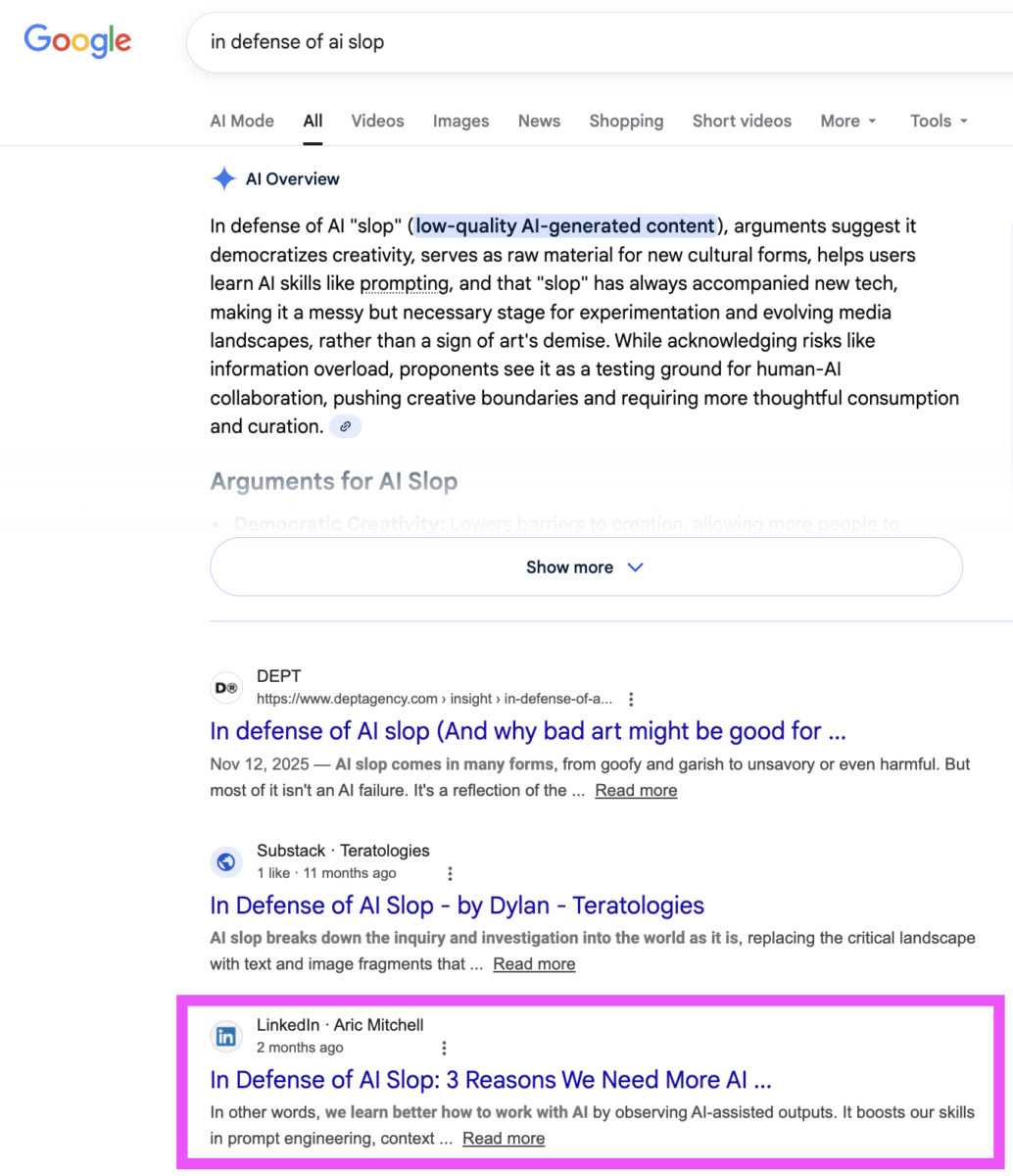
The answer lies in mastering the art of writing LinkedIn articles that don’t just sit there, but actually rank. The goal is not to game an algorithm, but to craft content so compelling and strategically optimized that LinkedIn’s platform actively wants to show it to the right audience. Think of LinkedIn articles as your long-form professional blog, hosted directly on the world’s largest professional network: LinkedIn has over 1.1B members worldwide, with 22.3% growth projected by 2028.
As the author of 3 books on LinkedIn, including my latest Maximizing LinkedIn for Business Growth, I have seen how articles published in the form of newsletters consistently get more impressions than other content types on LinkedIn. I also teach social media marketing at Rutgers Business School, where LinkedIn strategy is a core topic. Now I want to share all of my experience and advice so that you too can reap the benefits of sharing your expertise through this type of content on LinkedIn.
This guide isn’t just a collection of tips. It’s a roadmap to transforming your ideas into influential articles that engage and build your professional brand. I’ve been publishing on LinkedIn for years, and I’ve seen what works and what falls flat. Let me show you exactly how to create articles that get results.
Key Takeaways
✅ LinkedIn articles live permanently on your profile, building a portfolio of evergreen thought leadership content that continues working for you long after publication
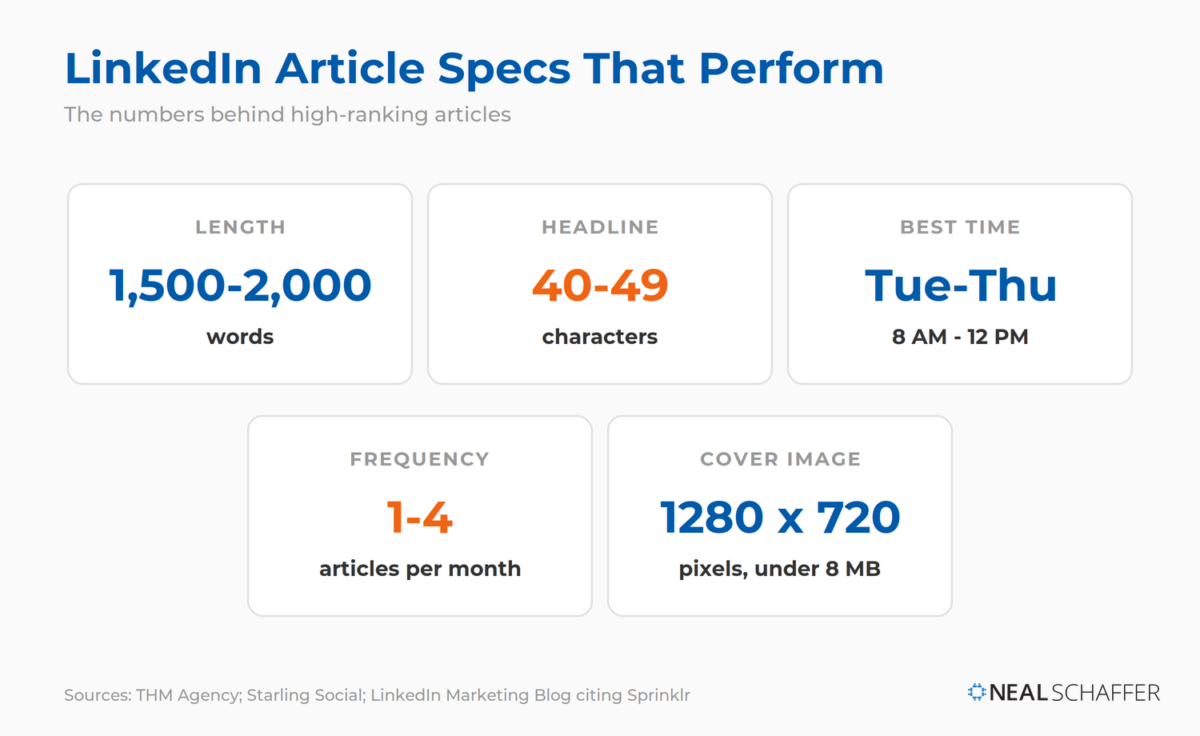
✅ Optimal article length falls between 1,500 and 2,000 words, long enough to prove expertise without padding.
✅ Publish Tuesday through Thursday during morning hours for peak engagement from your professional audience
✅ Repurpose existing blog content strategically by publishing on your site first and customizing the LinkedIn version
✅ The algorithm prioritizes dwell time and meaningful engagement, so create scannable yet compelling content that keeps readers engaged
Why LinkedIn Articles Matter
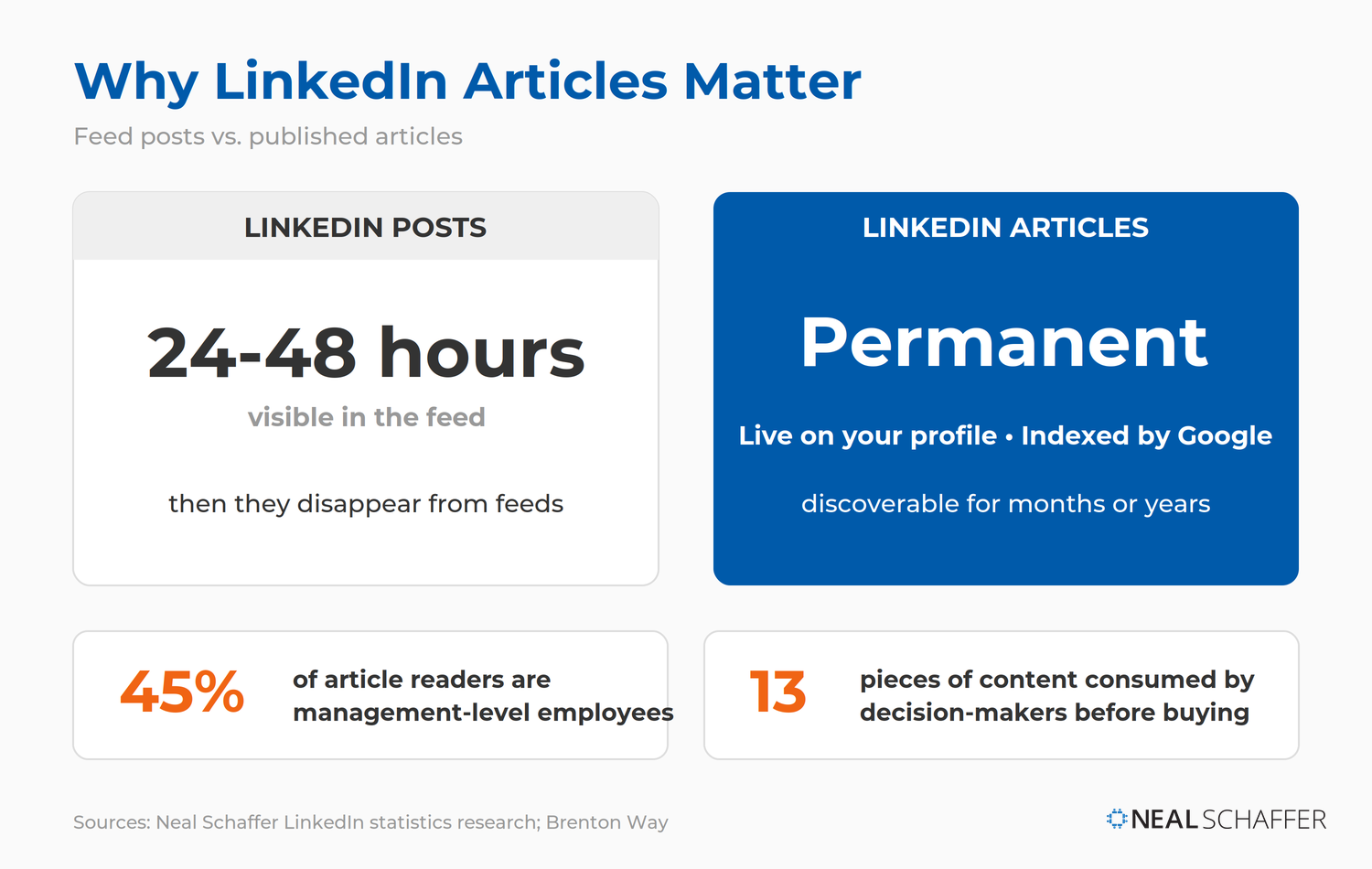
Unlike posts that disappear from feeds within 24-48 hours, articles live permanently on your profile and get indexed by Google. They’re discoverable for months or years. 45% of article readers are management-level employees per research, and decision-makers consume an average of 13 pieces of content before buying. Articles are proof of expertise that keeps working while you sleep.
What’s the Difference Between LinkedIn Articles and LinkedIn Newsletters?
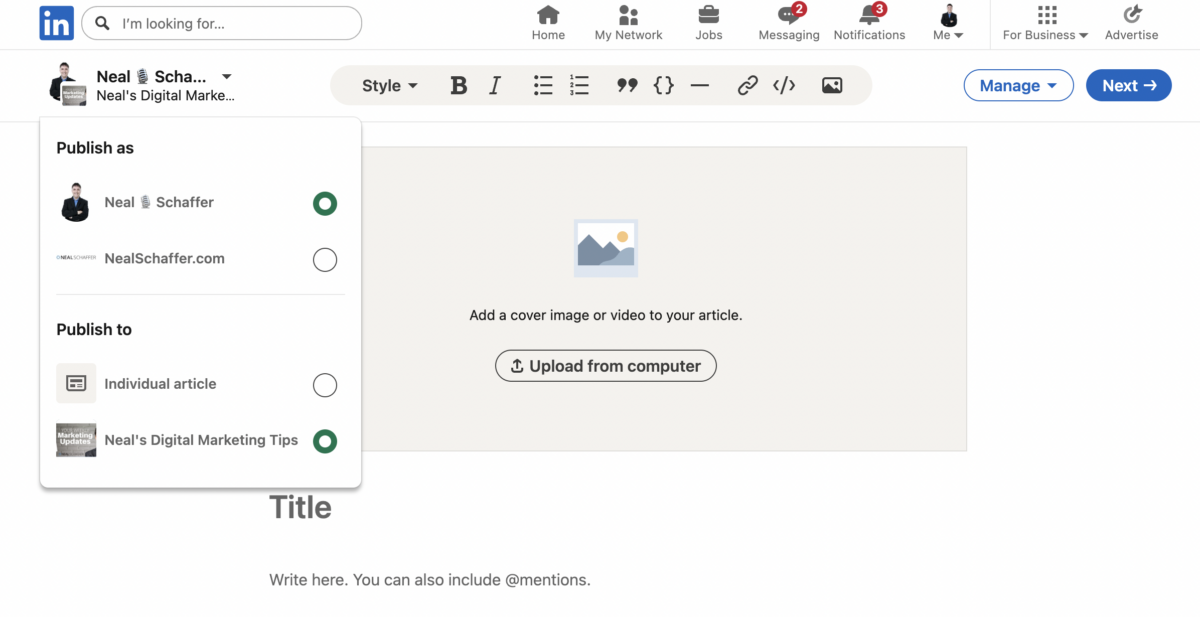
A LinkedIn newsletter is essentially a recurring LinkedIn article that people can subscribe to, receiving email notifications when you publish new editions. You can create up to five newsletters and unlimited editions within each. Articles are standalone pieces; newsletters build an ongoing relationship with subscribers. For a deeper look at newsletters specifically, check out my LinkedIn newsletter guide.
Understanding the Relationship
| Feature | LinkedIn Article | LinkedIn Newsletter |
|---|---|---|
| Subscriber notifications | No | Yes (email + in-app) |
| Lives on profile | Yes | Yes |
| SEO indexed | Yes | Yes |
| Recurring format | No | Yes |
| Subscriber count visible | No | Yes |
| Requires 150+ followers | No | Yes |
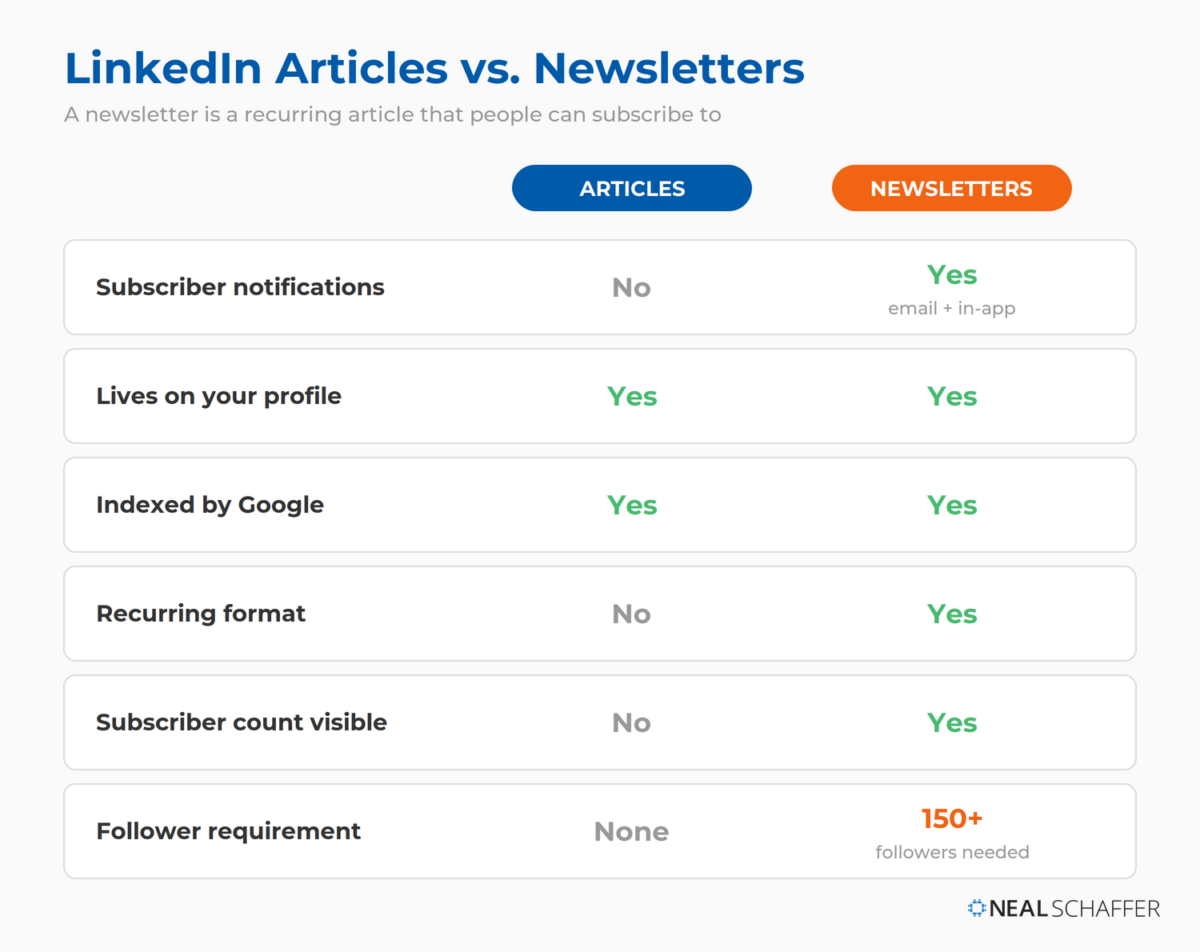
The newsletter feature essentially turns your articles into a distribution machine. When you publish a newsletter edition, LinkedIn sends notifications to all your subscribers, something that doesn’t happen with standalone articles.
Which Should You Choose?
If you’re just starting out, begin with articles. They let you test topics, refine your voice, and build a content library without the pressure of a recurring schedule. Once you’ve identified what resonates with your audience and can commit to regular publishing, create a newsletter to maximize reach.
How They Work Together
The smartest strategy? Use both. Your newsletter can be your flagship content with a consistent publishing schedule (weekly, bi-weekly, or monthly), while standalone articles cover timely topics, one-off deep dives, or experimental content. This approach gives you both the subscriber-building power of newsletters and the flexibility of individual articles.
Can You Repurpose Content for LinkedIn Articles?
Yes, and it’s actually smart content marketing when done strategically. Want to know the biggest time-saver for LinkedIn article creation? You don’t have to start from scratch every time.
Why Repurposing Works
A fact that surprises many marketers: a lot of people still believe that you will be penalized by Google if you post the exact same content on multiple platforms. According to Google’s John Mueller, 25-30% of web content is duplicate, so there are no penalties for harmless cases. Google simply filters it out instead of punishing sites.
This means you can absolutely repurpose your blog content for LinkedIn without SEO disasters. The key is doing it strategically.
Sources You Can Repurpose
| Original Content | LinkedIn Adaptation |
|---|---|
| Blog posts | Full article with LinkedIn-specific intro |
| Podcast episodes | Written summary with key insights |
| Webinar content | Educational article with takeaways |
| Email newsletters | Expanded article version |
| Video scripts | Text-based deep dive |
| Conference presentations | Multi-part article series |
How to Maximize SEO Value When Repurposing
According to THM SEO Agency’s LinkedIn article research, most SEO experts agree that it’s safe to repost your blog articles on LinkedIn. It’s advisable to link to your original blog article to give another hint to Google about which article it should prioritize when it comes to ranking it in the SERPs.
Best practices for repurposing:
- Publish on your website first to establish your site as the canonical source
- Wait 1-2 weeks to give Google time to index your original
- Customize the opening with a LinkedIn-specific introduction
- Add platform-native elements including LinkedIn-relevant examples or calls-to-action
- Consider a teaser approach by publishing 300-500 words on LinkedIn with a link to the full article on your site
How Does the LinkedIn Algorithm Work?
The LinkedIn algorithm uses three primary ranking signals to determine content visibility: relevance, expertise, and engagement. Understanding these signals is essential for creating articles that actually reach your target audience rather than disappearing into the feed void.
The Power of Dwell Time
Dwell time, how long someone spends reading your content, is one of LinkedIn’s most important ranking factors. According to Hootsuite’s analysis of the LinkedIn algorithm, the platform is placing more weight on dwell time, meaning posts that keep users engaged for longer will see better distribution.
Research from Cleverly confirms that the 2025 LinkedIn algorithm is prioritizing content that sparks meaningful engagement, such as longer dwell time, quality comment threads, and interactions between close connections. What this means for you: Create content that’s not just clicked, but actually read. Hooks that deliver on their promise, scannable formatting that keeps readers scrolling, and depth that rewards the time invested.
Engagement Signals: Comments, Shares, and Reactions
Beyond dwell time, LinkedIn evaluates multiple engagement signals:
| Signal | Weight | What It Indicates |
|---|---|---|
| Comments | High | Content sparks conversation |
| Shares | High | Content worth spreading |
| Reactions | Medium | Quick acknowledgment of value |
| Saves | High | Reference-worthy content |
| Click-through rate | Medium | Compelling hook/headline |
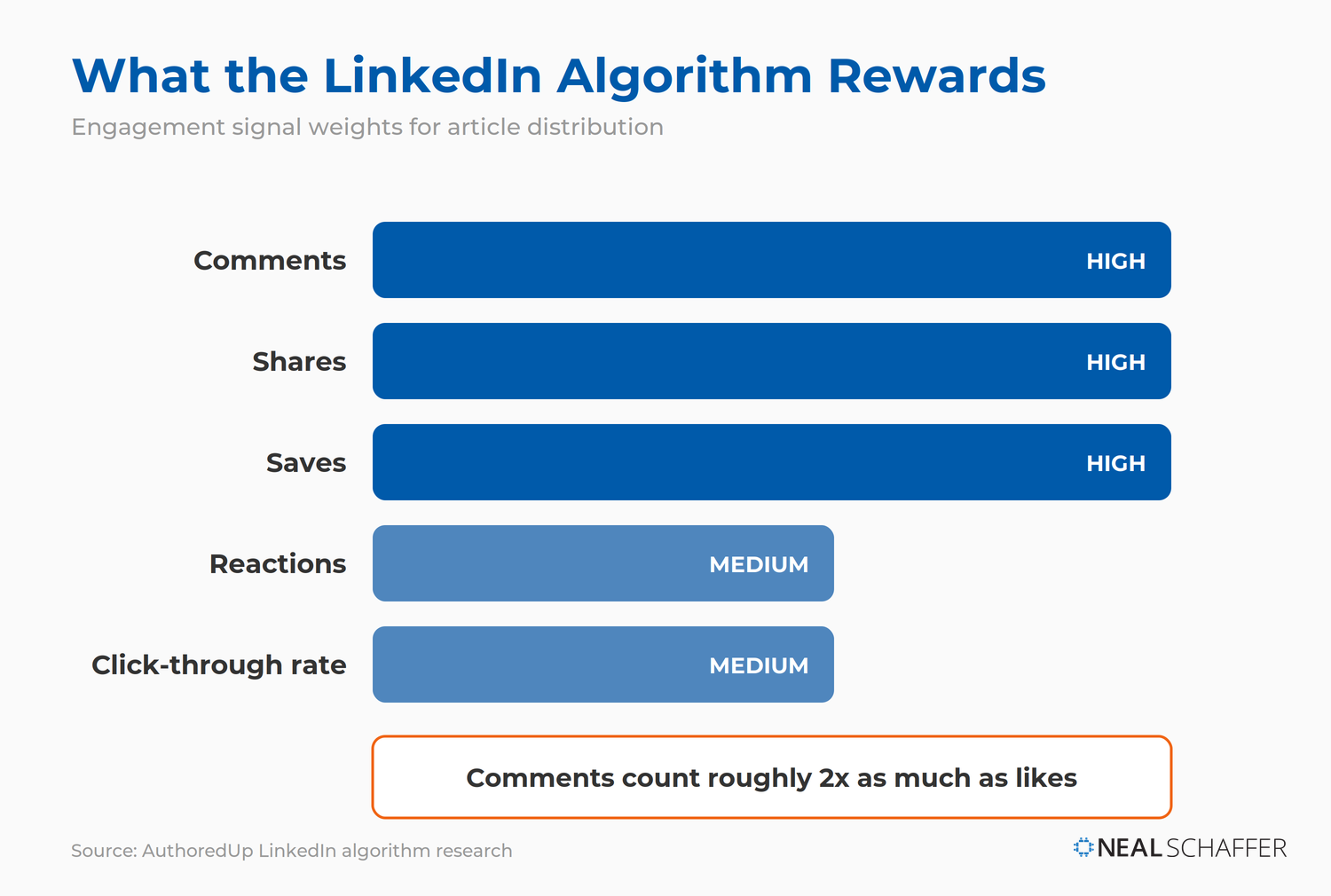
According to AuthoredUp’s research, different types of engagement carry different weights, with comments counting twice as much as likes. An article with 50 thoughtful comments will outperform one with 500 likes but no discussion. This is why ending with questions and actively responding to comments matters so much.
How to Create Compelling LinkedIn Article Content
Pinpoint Your Niche and Audience
Before you type a single word, ask yourself: Who am I trying to reach, and what problem am I trying to solve for them? Your “niche” isn’t just your industry. It’s the specific intersection of your expertise and a particular challenge faced by a segment of your professional network.
The LinkedIn Playbook for Real Business Growth
My latest book helps professionals, entrepreneurs, and business owners turn LinkedIn from a static profile into a real source of clients and growth.
Maximizing LinkedIn for Business Growth gives you clear, practical steps to build a profile that gets noticed and a network that actually sends business your way.
Grab your copy on Amazon and put it to work this week. Click the cover or the button below to get started.

For instance, if you’re a marketing professional, your niche might not be “digital marketing.” It could be “sustainable digital marketing strategies for B2B SaaS companies” or “using AI for hyper-personalized email campaigns in the FinTech sector.” The more specific you are, the easier it is to attract the right readers, and the more valuable your articles become.
Brainstorm Irresistible Topics
With your niche defined, brainstorm topics that directly address your audience’s needs. Don’t just list broad subjects. Think about specific questions people are actually asking.
Instead of “AI in business,” consider:
- How AI-powered chatbots are transforming customer service in e-commerce
- Ethical considerations for implementing generative AI in content creation
- Why your sales team is resisting AI tools (and how to fix it)
Use LinkedIn’s search bar to see what autofills or related searches appear. Observe trending LinkedIn hashtags in your industry. Pay attention to questions in comments on other people’s content, these are goldmines for article ideas.
Structure Your Article for Readability and Impact
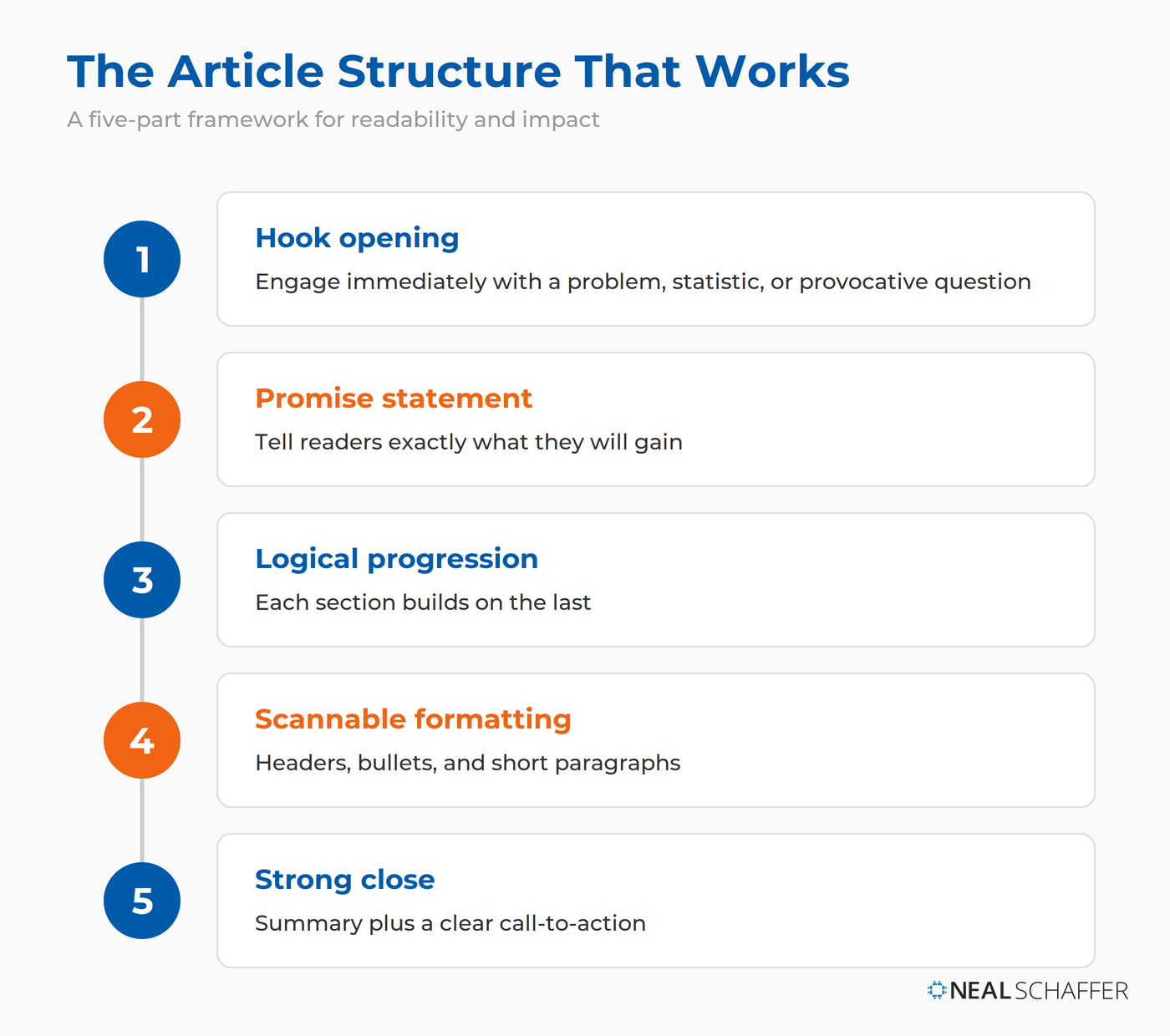
A well-structured article is a joy to read. The framework I use:
- Hook opening that immediately engages with a problem, statistic, or provocative question
- Promise statement telling readers exactly what they’ll gain
- Logical progression where each section builds on the last
- Scannable formatting with headers, bullets, and short paragraphs
- Strong close with summary + clear call-to-action
The Art of Storytelling in Professional Contexts
What separates forgettable articles from memorable ones is stories. Humans are wired for narrative. Instead of simply stating facts or offering advice in a dry manner, illustrate your points with:
- Personal anecdotes sharing your own experiences, challenges, and lessons learned. This builds trust and makes your advice relatable.
- Case studies showing how a particular strategy worked (or didn’t work) for a client or past project. Real examples carry more weight than theory.
- Vivid analogies explaining complex ideas by comparing them to something familiar.
When I was looking for a realtor on LinkedIn, I found three good-looking profiles. One had zero recommendations, another had two, and another had more than 30. Who do you think I contacted first? That story illustrates a point far better than simply stating “recommendations matter.” For more on this topic, see my guide on LinkedIn recommendation examples.
What Makes a High-Ranking LinkedIn Article?
Crafting a Compelling Headline (40-49 Characters)
Your headline is your article’s storefront. According to Starling Social research, articles with titles between 40-49 characters earned the greatest number of post views overall.
| Headline Type | Example | Why It Works |
|---|---|---|
| How-to | “How to Double Your LinkedIn Engagement” | Promise of practical value |
| List | “7 LinkedIn Mistakes Killing Your Reach” | Clear, scannable expectation |
| Question | “Is Your LinkedIn Profile Costing You Jobs?” | Creates curiosity gap |
| Contrarian | “Why LinkedIn Posts Are Overrated” | Challenges assumptions |
Avoid: Clickbait that doesn’t deliver, vague titles, and all-caps shouting. For help crafting the perfect headline, study these proven LinkedIn headline examples.
Writing a Strong Opening Hook
Your intro needs to hook the reader immediately. You have maybe 2-3 sentences before someone decides to keep reading or scroll past.
Effective hooks include:
- Surprising statistic: “91% executives rate LinkedIn top for relevant content.”
- Provocative question: “What if everything you’ve been told about LinkedIn engagement is wrong?”
- Relatable problem: “You spend hours crafting the perfect article, hit publish… and hear crickets.”
- Bold statement: “Most LinkedIn articles fail. Here’s why yours doesn’t have to.”
Structuring the Body for Scannability
LinkedIn readers are often skimming, especially on mobile. Make your content easy to consume:
- Short paragraphs: 2-4 sentences maximum. Walls of text are intimidating.
- Descriptive subheadings: Each H2 and H3 should tell readers exactly what that section covers.
- Bullet points and numbered lists: Break complex information into digestible chunks.
- Bold key phrases: Help scanners find the most important insights.
- White space: Don’t fear empty space. It improves readability dramatically.
Supporting Your Claims with Data
Articles with specific statistics and data points perform better, both with readers and with AI systems that may feature your content. Always link to your sources.
Instead of: “LinkedIn is really popular for B2B marketing.”
Write: “According to my research, there are 65M decision-makers on LinkedIn, and 96% executives prefer it for content.”
Closing with a Strong Call-to-Action
Never let your article just… end. Tell readers exactly what you want them to do next:
- Start a conversation: “What’s your biggest challenge with LinkedIn articles? Share in the comments.”
- Drive connection: “If this was helpful, let’s connect. I share tips like this weekly.”
- Promote resources: “Want my full LinkedIn content checklist? Grab it at [your link].”
- Encourage sharing: “Know someone who’d benefit from this? Hit that share button.”
How Should You Use Visuals in LinkedIn Articles?
Choosing the Right Hero Image
Your cover image appears in the feed when your article is shared. It’s prime real estate for capturing attention. According to THM SEO Agency’s technical specifications for LinkedIn articles, best practices include:
- Dimensions: 1280 x 720 pixels (16:9 ratio) for optimal display
- File size: Under 8MB
- Style: Professional, relevant to your topic, with minimal text overlay
- Avoid: Generic stock photos that scream “I spent 30 seconds on this”
Consider using tools like Adobe Express or Canva to create custom graphics that reinforce your headline and brand. This is similar to optimizing your LinkedIn background photo for maximum impact.
Integrating Images, Videos, and Infographics
Break up text with strategic visual elements:
| Visual Type | Best Use | Pro Tip |
|---|---|---|
| Screenshots | Software tutorials, examples | Annotate with arrows/circles |
| Charts/graphs | Data visualization | Keep simple, cite sources |
| Infographics | Process summaries | Create shareable snippets |
| Embedded videos | Demonstrations, interviews | Keep under 2 minutes |
| Quote graphics | Expert insights | Brand with your colors |
Each image should serve a purpose: illustrate a point, provide evidence, or give readers’ eyes a rest from text.
How to Optimize LinkedIn Articles for Search
Keyword Research for LinkedIn
While LinkedIn’s search isn’t as sophisticated as Google’s, keywords still matter for discoverability. Here’s how to research them:
- LinkedIn search autocomplete: Type your topic and see what LinkedIn suggests
- Competitor analysis: What terms do high-performing articles in your niche use?
- Google Keyword Planner: Gives you search volume context
- Comment mining: What language does your audience use to describe their challenges?
Focus on 1-2 primary keywords and 3-5 secondary phrases per article. For advanced search techniques, explore my guide on LinkedIn Boolean search.
Strategic Placement of Keywords
Include your primary keyword in:
- Headline naturally integrated, not forced
- First 100 words establishing relevance immediately
- At least one H2 subheading reinforcing topic focus
- Final paragraph closing the loop
- Image alt text for accessibility + searchability bonus
The goal is natural integration. If your keyword placement feels awkward when reading aloud, revise it.
Using Tags and Hashtags
LinkedIn allows you to add up to 3 tags to articles. Choose wisely:
- Use tags that match your target audience’s interests
- Select tags with active communities (check follower counts)
- Combine broad and specific tags (e.g., #Marketing + #B2BContentStrategy)
For posts promoting your article, include 3-5 relevant hashtags. Research shows this sweet spot maximizes reach without looking spammy. For detailed guidance, see my post on LinkedIn hashtag best practices.
What’s the Ideal LinkedIn Article Length?
Word Count: What the Data Says (1,500-2,000 Words)
What’s the optimal length for a LinkedIn article? According to THM SEO Agency’s comprehensive research, optimal length is 1,500-2,000 words, though deviations are acceptable if content demands.
| Word Count | Best For |
|---|---|
| 500-800 | Quick takes, news commentary |
| 1,000-1,500 | Standard thought leadership |
| 1,500-2,000 | In-depth guides, tutorials |
| 2,000+ | Definitive resources, pillar content |
According to Hootsuite analysis, “1900-2000 word posts perform best” on LinkedIn.
That said, length should serve content, not the other way around. A tight 800-word article that delivers value beats a bloated 2,500-word piece padded with fluff.
When Is the Best Time to Publish LinkedIn Articles?
When should you publish LinkedIn articles? Multiple studies converge on similar findings:
| Day | Best Times | Engagement Level |
|---|---|---|
| Tuesday | 8-11 AM | Highest |
| Wednesday | 9 AM – 12 PM | Highest |
| Thursday | 8 AM – 12 PM | High |
| Monday | 11 AM | Good |
| Friday | 9-11 AM | Moderate |
According to LinkedIn’s official marketing blog citing Sprinklr’s research, posting on weekdays delivers the highest results, with mid-morning (10 to 11 am) and lunchtime (12 pm to 1 pm) on Tuesday, Wednesdays and Thursdays standing out.
AuthoredUp’s posting time research confirms that Tuesday is consistently the top performer. It gets strong engagement across industries and tends to give posts the longest “lifespan” in the feed.
Avoid weekends. Engagement drops significantly when professionals are in personal mode. For more detailed timing strategies, check out my guide on the best time to post on LinkedIn.
How to Promote Your LinkedIn Articles for Maximum Reach
Publishing is just the first step. The real work of amplification begins now.
Sharing on Your Personal Feed
Immediately after publishing, share your article as a regular post on your LinkedIn feed. This is crucial because your article won’t automatically appear in your connections’ feeds.
Write a compelling caption that works as a standalone post:
- Lead with a hook that makes people want to read more
- Include 2-3 key takeaways or a provocative question
- Add 3-5 relevant hashtags
- End with a clear CTA: “Link in comments” or “Read the full guide below”
Cross-Promotion on Other Platforms
Your network extends beyond LinkedIn:
- Email newsletter: Feature your latest article prominently (your most engaged audience)
- Twitter/X: Share with a captivating snippet and link
- Facebook groups: If relevant to professional communities you’re in
- Slack communities: Share where appropriate and valuable
- Your website: Link to your LinkedIn articles from relevant blog content
Engaging with Comments and Feedback
The conversation doesn’t end when someone finishes reading.
Respond to every comment within the first hour if possible. Early engagement signals to LinkedIn that your content is sparking conversation, triggering additional distribution.
Ask follow-up questions to keep discussions going. A thread with 10 back-and-forth comments from 5 people outperforms 10 standalone comments.
Tag relevant connections who might add valuable perspectives (but don’t spam—only tag people who’d genuinely appreciate it).
What Metrics Should You Track for LinkedIn Articles?
Views and Engagement Rates
LinkedIn provides detailed article analytics worth monitoring:
| Metric Category | Metric | What It Tells You |
|---|---|---|
| Discovery | Impressions | Total times your article appeared in feeds |
| Discovery | Members Reached | Unique LinkedIn members who saw your article |
| Profile Activity | Profile Viewers from Post | Readers who clicked through to view your profile |
| Profile Activity | Followers Gained | New followers acquired from this article |
| Social Engagement | Reactions | Likes, celebrates, supports, and other emoji reactions |
| Social Engagement | Comments | Direct responses and discussions |
| Social Engagement | Reposts | Shares extending your reach to new networks |
| Social Engagement | Saves | Readers bookmarking for later reference |
According to Social Insider analysis, LinkedIn engagement increased by 44% year-over-year, averaging 3.85%. A good engagement rate to aim for is 2-5%, with anything above 4% being excellent.
Here is a sample of what the analytics look like from one of my recent articles. Note that the email sends and open rate appear because this article was sent as part of my Neal’s Digital Marketing Tips Newsletter.
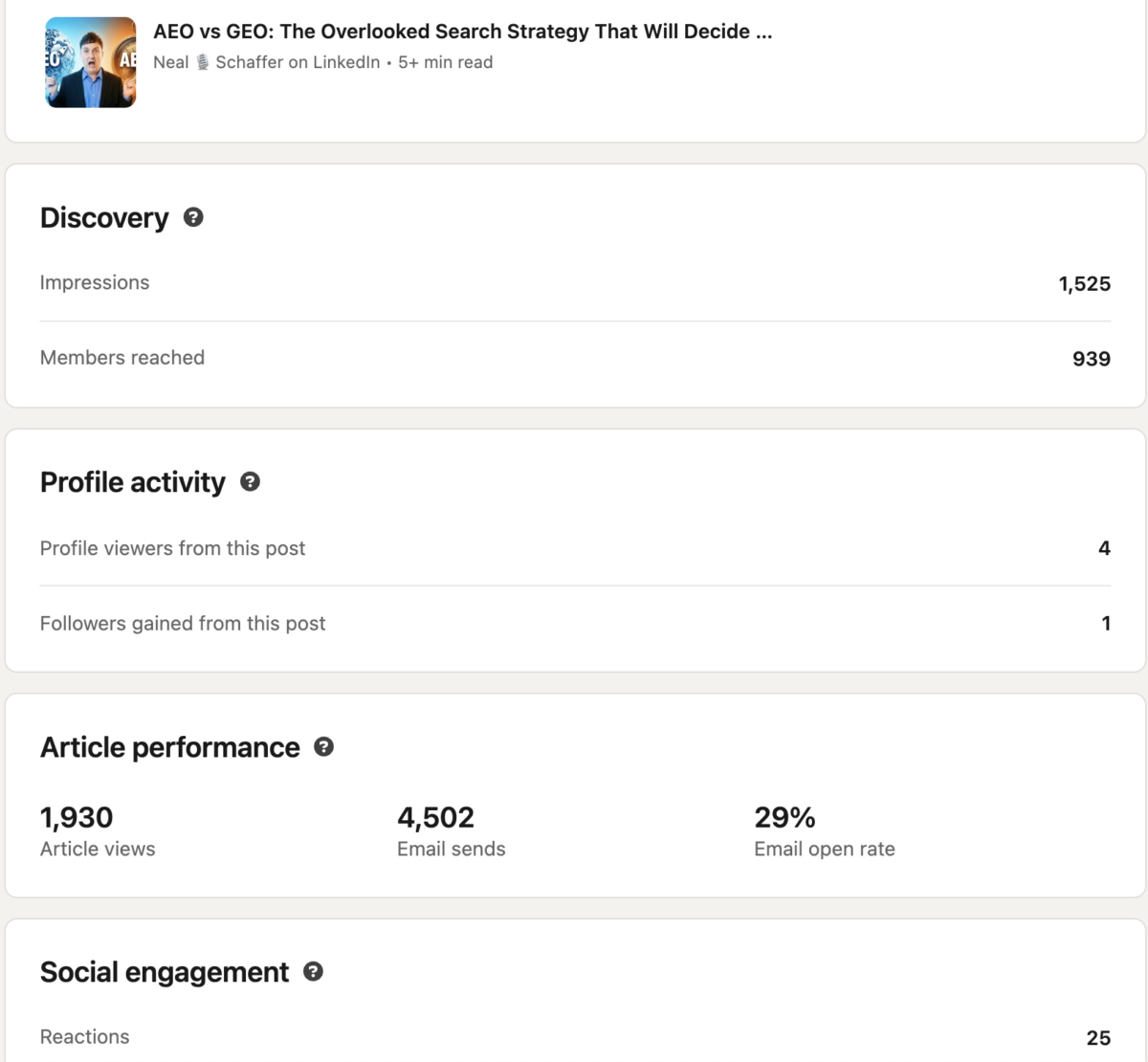
For deeper analysis, review my guide on LinkedIn analytics to measure your ROI.
Follower Growth and Profile Visits
Beyond individual article metrics, track:
- New followers after publishing: Are articles attracting your target audience?
- Profile visits: Are readers wanting to learn more about you?
- Connection requests: Quality indicator for thought leadership
A single viral article can generate hundreds of new followers. But consistent publishing that generates steady growth often matters more for long-term brand building. Understanding your LinkedIn SSI (Social Selling Index) can help you benchmark your overall LinkedIn effectiveness.
Conversion to Leads or Connections
Ultimately, most professionals want articles to drive business results:
- Website clicks: If you include links, track traffic via UTM parameters
- Direct messages: Are prospects reaching out after reading?
- Meeting requests: The ultimate conversion metric
- Newsletter signups: If you have an external list
Track these over time. A single article rarely generates immediate ROI, but a library of valuable content creates compounding returns. For more on this topic, see my LinkedIn lead generation strategies.
Frequently Asked Questions About LinkedIn Articles
How long should a LinkedIn article be for maximum engagement?
The optimal length for LinkedIn articles is 1,500-2,000 words. This range provides enough space to demonstrate expertise and provide genuine value while respecting readers’ time. Articles in this range consistently outperform shorter pieces for engagement and shares, though quality always trumps length.
Can I republish my blog posts as LinkedIn articles without hurting SEO?
Yes, you can safely republish blog content on LinkedIn without SEO penalties. The “duplicate content penalty” is largely a myth. Best practice is to publish on your website first, wait 1-2 weeks, then customize 20-30% for LinkedIn with platform-specific content.
What’s the difference between LinkedIn articles and LinkedIn newsletters?
LinkedIn articles are standalone long-form posts that live on your profile. LinkedIn newsletters are recurring articles that people can subscribe to, receiving email and in-app notifications when you publish new editions. Newsletters require at least 150 followers to create and are better for building ongoing relationships with subscribers.
How often should I publish LinkedIn articles?
Quality beats frequency. Aim for 1-4 articles per month if you can maintain high quality. A single well-researched, valuable article will outperform multiple shallow pieces. Consistency matters more than volume; pick a schedule you can sustain and stick to it.
What’s the best day and time to publish LinkedIn articles?
Tuesday through Thursday between 8 AM and 12 PM in your audience’s timezone consistently shows the highest engagement. Tuesday is generally the top performer across industries. Avoid weekends when professional engagement drops significantly.
Your LinkedIn Article Action Plan
The professional world is waiting to hear what you have to say. Your expertise matters. Your insights can help others work through challenges you’ve already solved. And LinkedIn gives you a platform to share those insights with exactly the right audience.
Stop waiting for the perfect moment. Your next LinkedIn article won’t write itself. If you want to dive deeper into maximizing LinkedIn for business growth, download a free preview of my book Maximizing LinkedIn for Business Growth, where I cover everything from profile optimization to content strategy to lead generation. And if you’re ready for hands-on guidance with your LinkedIn strategy, consider joining my Digital First Group Coaching Community where I help entrepreneurs and business owners build effective digital marketing systems.
What’s stopping you from publishing your first LinkedIn article this week?

Actionable advice for your digital / content / influencer / social media marketing.
Join 13,000+ smart professionals who subscribe to my regular updates.