Editorial Note: I may earn a commission when you visit links that appear on my website.
15 Magical AI YouTube Video Makers
With an AI YouTube video maker, you can create incredible posts for your website and social media. These tools can cut down your daily video production by several hours allowing you to focus on other, more profitable activities. I run my own YouTube channel, so I know how much of that time goes to editing rather than to ideas. And if you look at the YouTube statistics, the reason marketers keep reaching for these tools is obvious: the platform runs on volume, and volume is the thing most of us cannot produce by hand.
Key Takeaways
✅ Pick the tool that matches what you already publish, not the one with the longest feature list. A podcaster who needs clean interview edits wants Descript. Someone producing explainer videos wants Synthesia or DeepBrain.
✅ Avatar tools and text-to-video tools solve different problems. Synthesia, DeepBrain, Synthesys, Colossyan, and HeyGen put a presenter on screen. Pictory, InVideo, FlexClip, and Filmora build a video out of stock footage and a script.
✅ Repurposing is where the time savings show up fastest. Lumen5 turns published blog posts into video, and Descript turns recorded footage into short clips worth posting.
✅ Language coverage is the quiet differentiator for anyone selling outside a single market, and it varies widely across these platforms.
✅ AI gives you a draft, not a finished video. Plan on an editing pass for pacing, captions, and transitions before anything goes live, which is why I treat making AI videos as a process to build rather than a button to press.
Is It Possible to Generate YouTube Videos With AI Tools?
Nowadays, there’s little you can’t do with AI generative tools. For example, you can create long and short videos by tapping into massive stock libraries and applying voice avatars. Many of these tools can also generate scripts from scratch by relying on brief descriptions.
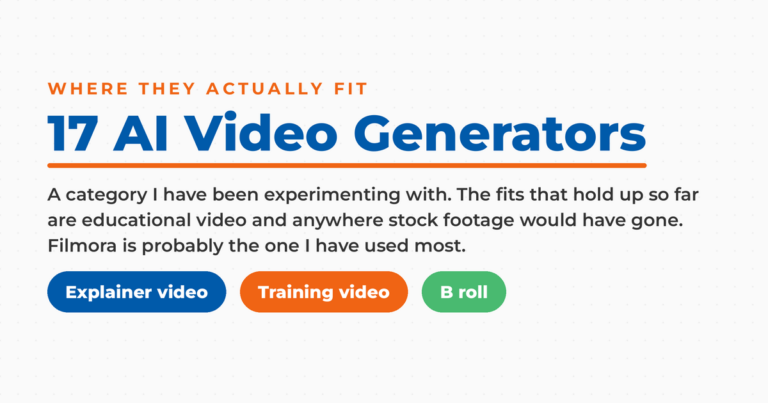
Some of these programs make automatic adjustments and edits, which is another great way to save time. While the end results might be a bit generic, these videos can still serve various business purposes, from creating social media content to generating training videos. The same technology powers the wider category of AI video generators, which marketers use for ads and product demos as much as for YouTube.
What to Look For in an AI YouTube Video Maker?
First of all, it’s worth mentioning that the tools on this list significantly differ in terms of their features and purpose. With that out of the way, these are the main things you need to consider when choosing the right program for your YouTube channel:
- Text-to-video generation
- Quantity and quality of stock images and videos
- Quantity and quality of AI voices
- Digital avatars
- Editing features (focus on features that help create YouTube videos)
- Other repurposing features
- Speed of video creation
- Ease of use and interface quality
The 15 Best AI YouTube Video Maker Tools
Whether you’re looking to create educational videos, marketing videos, or music videos, these tools can help you out. Most of these programs can create professional videos in minutes, saving your company a lot of time and effort. Even better, they require minimal experience in video editing, making them a perfect choice for teams that don’t have graphic designers.

Creating Videos with Speaking Avatars
This type of video generator uses digital avatars to deliver compelling video content. The avatars resemble real humans and can mimic our gestures. On top of that, the AI-powered tools support various foreign languages and come with numerous presets.
Synthesia
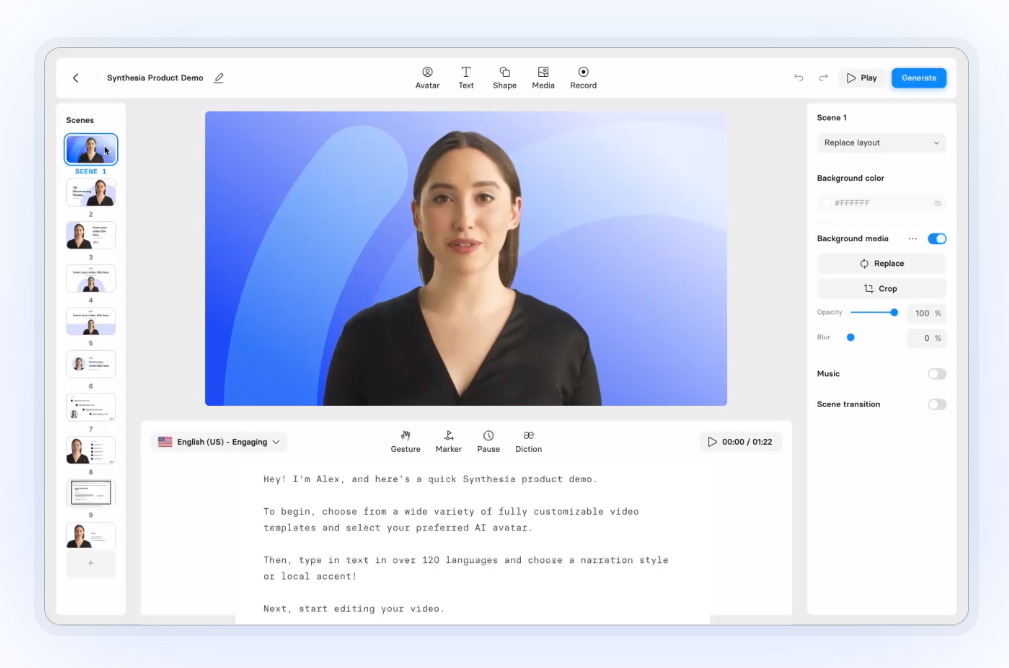
The text-based video editing tool uses basic textual inputs to generate video scripts for its avatars. The software supports 120+ languages and comes with a massive library of voices, making it a perfect solution for training videos, explainer videos, and various other creative and generic content. It also has a screen recording feature, which can always come in handy.
If you don’t want to use premade high-quality AI voices, you can always clone your own. During the video editing process, you can add text to the initial script, insert various elements and media, and record your own voice. Synthesia gives you full control over all elements, allowing you to move them around as you please. Voice quality is the part people underestimate. Compare what you get here against a dedicated AI voice generator before you commit to one platform for everything.
DeepBrain

DeepBrain AI is a great alternative to Synthesia, using ChatGPT technology for its speech video generation. After explaining the topic, the program will generate a straightforward video script and send it to the editor. Here, you can choose one of the 100+ avatars, speaking 80+ languages, that will deliver the message to your audience.
After that, you can utilize an extensive media library to add various background images, elements, and other accurate assets. Like other tools on the list, DeepBrain AI has highly customizable subtitles, allowing you to change text’s position and appearance. Besides generating long and short-form videos from prompts, the online video editor can also use PowerPoint files and URLs.
Synthesys

From adding a background in video creation process to changing subtitle settings, there’s little that Synthesys can’t do. The video tool comes with a large content library of voices that speak 140 languages. You can also choose from 70+ realistic avatars and 50+ customizable templates, allowing you to create high-quality videos for your business.
The thing that makes this AI-powered tool stand out is its image generator. You can insert creative backgrounds into your content, which makes it an excellent option for people with limited editing experience. A long list of customization options, a massive library of templates, and a drag-and-drop interface make Synthesys a great choice for avatar-based AI videos.
Colossyan

Colossyan can utilize just about any text for its content creation. Besides generating a video script from scratch, the flexible video editor can also tap into PDFs and PPTs. If you wish to modify the output, you can always change your default language to one of the 120+ alternatives.
The reason why Colossyan can produce engaging videos lies in the avatar options. Not only do you have a large library of animation templates to choose from, but you can also create your digital clone. On top of that, you can modify the gestures of your humanlike avatars and change their clothing to create even more intricate video clips.
HeyGen

The thing I like the most about HeyGen is its diverse content library. You can choose between 100+ humanlike avatars, each with noticeably different clothes and appearance. Marketers can also create a custom avatar from scratch, making these AI-generated videos more suitable for their respective industry or niche.
If you want to expedite the content creation process, you can choose from a large library of templates with presets tailor-made for different industries. As if that wasn’t enough, you can record your own voice and insert high-quality AI voices, background music, and other accurate assets.
Text To Video YouTube Video Makers
The following tools are much more flexible in terms of their editing features. They feature numerous video styles suitable for different industries and formats. As such, this makes them perfect for YouTube videos but also product demos, movie trailers, onboarding videos, and other formats. These belong to the text to video AI category, where you hand the software a script or a published blog post and it assembles the footage for you.
Pictory

Pictory is one of the better AI-powered tools for generating professional-looking videos from scratch. The software comes with an enormous video library and numerous stock images that you can use for the background. Content creators can also change the color of every element, including text and background.
Speaking of text, Pictory comes with an auto-subtitle generator, which makes your content more accessible. I also liked that the video tool can use just about any text; besides generating scripts with the power of ChatGPT, the software can also utilize blog posts and other written content. Lastly, I need to mention a feature that extracts highlights from all your screen recordings.
InVideo

If you’re looking for a YouTube shorts maker, you should definitely check out this flexible AI video tool. When creating new content, marketers can choose their desired platform (YouTube, Instagram, or Facebook). After that, they can modify video style and target audience, giving them much more granular control over the output.
Make LinkedIn Your Best Source of Clients
My latest book helps professionals, entrepreneurs, and business owners turn LinkedIn from a static profile into a real source of clients and growth.
Maximizing LinkedIn for Business Growth gives you clear, practical steps to build a profile that gets noticed and a network that actually sends business your way.
Grab your copy on Amazon and put it to work this week. Click the cover or the button below to get started.

Besides providing lots of stock footage, the software allows you to tinker with subtitles, media, and transitions. When editing videos, you can tap into an extensive library of voices and other advanced features. InVideo also provides numerous creative suggestions, thus streamlining your video creation workflow.
FlexClip

FlexClip is a perfect solution for just about any video creator as it combines AI text-to-video, image generator, and AI script features. One of the things I love about it is the intuitive, user-friendly interface allowing you to turn any video idea into reality.
The video tool comes with a plethora of stock footage appropriate for different businesses. By utilizing over 1,000 animation templates, creators can simplify their video editing process for more compelling storytelling. With 4 million elements and numerous fantastic transitions, Flex Clip can help users generate marvelous graphic design for video content.
Wondershare Filmora

When listing professional-grade video editing tools, we should omit Wondershare Filmora. Recently, the video generator has introduced numerous artificial intelligence features, which are ideal for YouTube Shorts and other social media content.
My favorite thing about the software is the copilot editor, which provides you with interesting suggestions for improving your content. Filmora can also produce hours of transcriptions, generating text files for your video projects. Of course, you can also use the program to turn text into videos by tapping into the platform’s massive content library.
Designs.ai

Designers.ai is one of the most comprehensive AI tools for marketers. Aside from generating cinematic videos from scratch, the software can also help with logos, text, voiceovers, images, and other formats. All these tools work well in conjunction, streamlining your content creation and content repurposing routine.
Like other entries from this category, the tool comes with a large library of high-quality stock videos and various video polishing features. The software can create scripts from scratch, and it can utilize premade blog posts. Its resizing feature makes it perfect for YouTube but also other video content channels like TikTok, Facebook, and Instagram.
GliaCloud
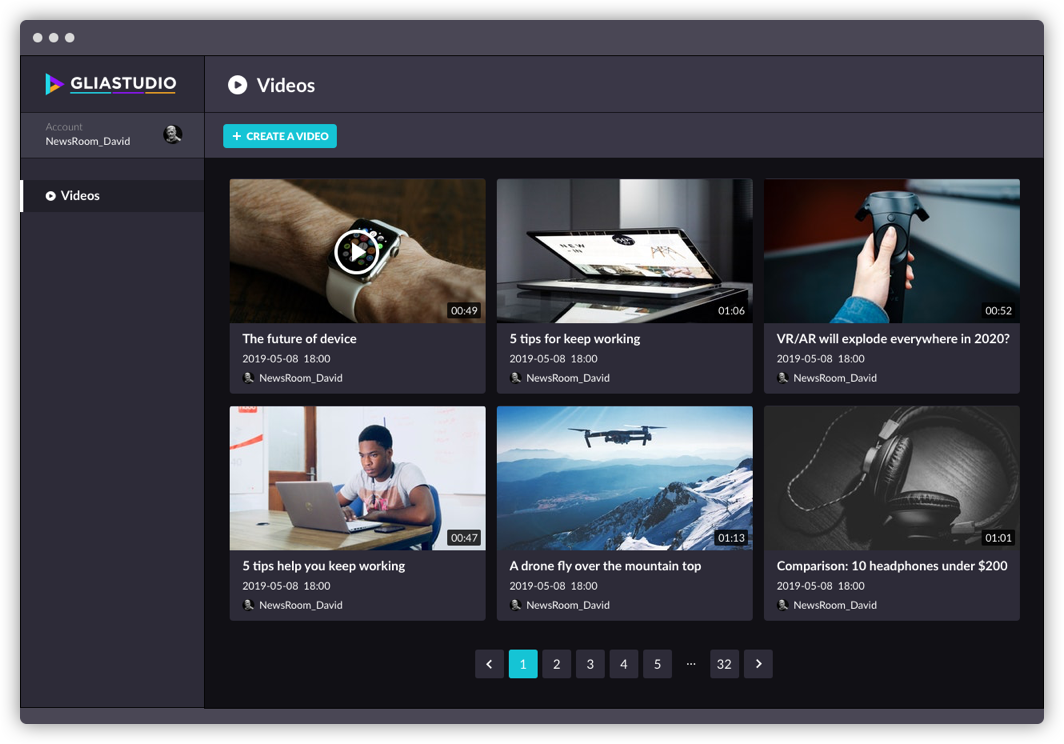
GliaCloud is one of the better professional-grade video editing tools for bloggers that utilizes your existing posts to generate compelling content. Alternatively, the software can create scripts based on simple descriptions, streamlining your usual marketing process.
The thing I liked about the tool is the freedom it gives you. Besides having a fantastic library of relevant assets, the software also allows you to insert sound effects and audio effects, trim and resize content, add external media, perform montages, and introduce other modifications. Automatically styled subtitles are one of the things I especially enjoyed and a feature that can significantly boost your conversions.
AI YouTube Video Makers for Repurposing
Although the following software is excellent for video production, it also has a few features that can help with content repurposing. This professional-grade video editing tool can use any raw footage and turn it into instructional and training videos and other content formats.
Lumen5
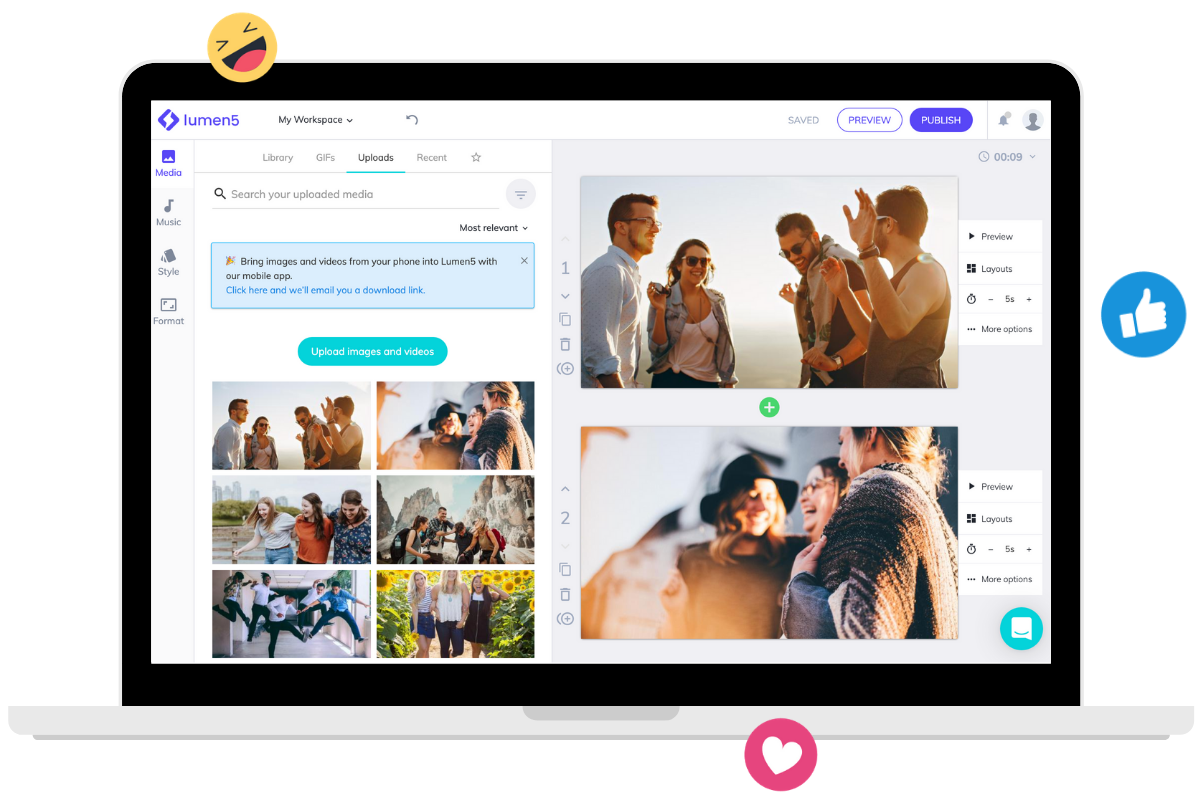
Lumen5 might have the best user interface out of all AI tools. The software’s drag-and-drop functionality makes it perfect for beginners as well as marketers who want to reduce the time spent creating content. When you buy one of the premium plans, you’ll gain access to millions of high-quality stock videos and images, sound effects, and other assets.
As for its repurposing features, Lumen5 can turn old blog posts into quality videos for your YouTube channel. I also loved the feature that converts video meetings into short clips, allowing you to create training videos, meeting recaps, and other in-house content.
AI Video Editors
The thing that distinguishes these tools from the rest is their advanced editing features. By using these programs, you can alter video style, make various modifications to sound and visuals, and even repurpose content for other platforms. If editing is your bottleneck rather than generation, a dedicated AI video editor will serve you better than a generator with editing bolted on.
VEED

VEED is a platform that provides a bit of everything. Among others, it includes an AI speech generator, video and image generators, and humanlike avatars. Its screen recorder is one of the more prominent features, allowing you to capture and modify live videos and business meetings.
As for its editing suite, you can benefit from a subtitle generator, text formatting, filter and sound effects, background removal, and a transcription tool. If we also consider its vast stock library, it quickly becomes evident that VEED can automate just about any content creation process.
Descript
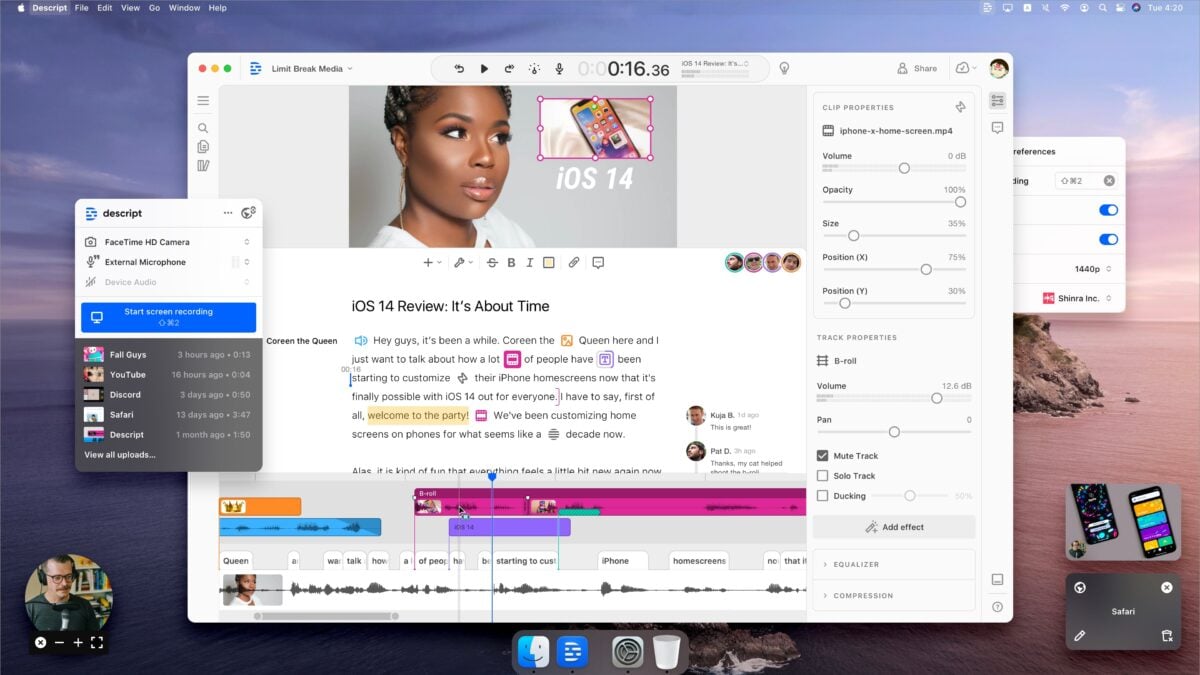
Descript is a digital solution for podcasters and other marketers who often create live videos. With it, you can repurpose and transform content with minimal effort. For example, Desript allows you to create video transcripts, remove filler words, shorten word gaps, and detect other grammar errors. That way, you’ll get a well-polished copy that can be repurposed for other channels.
On top of that, the software comes with a vast library of image and video templates that you can combine with the original sound files. Additional features I’d like to recommend include voice cloning, green-screen effects, and sound quality improvements.
Wisecut

With Wisecut, you can make many automatic adjustments to your content, such as creating background music depending on the content, generating subtitles, and removing annoying pauses. The software is ideal for social media posting, as it can turn long videos into content that barely lasts a minute.
Frequently Asked Questions
Can you make a YouTube video entirely with AI?
You can go from a text prompt to a publishable video without filming anything, and the avatar tools on this list do exactly that. What you cannot skip is the review pass. Pacing, captions, and transitions are still where AI output gives itself away.
Which of these tools is best for YouTube Shorts?
InVideo lets you choose the target platform before it generates, and Filmora and Wisecut are both built to cut long footage down to something short enough to post. If Shorts are your main format, sort out how to make YouTube Shorts first, then pick the tool that fits that workflow.
Do AI video makers work for faceless channels?
They are one of the reasons faceless channels became viable at all. Avatar tools give you a presenter without putting you on camera, and text-to-video tools build the whole thing out of stock footage. That is the production model most YouTube automation channels run on.
Can these tools generate subtitles and transcripts?
Most of them can. Synthesia, DeepBrain, Pictory, VEED, and Descript all produce captions, and Descript and Filmora will hand you a usable text transcript of your footage. If the transcript itself is what you are after, a standalone YouTube transcript generator gets you there faster than a video maker.
Conclusion
While all of these AI YouTube video maker tools can be used to create YouTube videos, they are significantly different in terms of their focus. So, my suggestion is to pick a tool based on your preferred content format. For example, if you’re a podcaster, you’ll gain much more value from Descript that some other platforms. On the other hand, Synthesia and DeepBrain are optimal for explainer videos.
DIY your digital marketing with AI.
Practical advice on social, content, influencer, and search marketing, plus the AI tools that make each one easier. Join thousands of founders and business owners who read it.