Editorial Note: I may earn a commission when you visit links that appear on my website.
WordPress SEO Plugins: The 7 I Actually Run, and the 10 I Tested Against Them
You installed WordPress, published a few posts, and somebody told you that you need an SEO plugin. So you searched the phrase and got a list of fifteen. Then you searched again and got a different list of sixteen, ranking a different plugin first.
Look at who publishes those lists. Rank Math, AIOSEO, and WP Rocket all run their own best-SEO-plugins roundup, and you can guess which plugin each one puts at number one.
I have run this site on WordPress since 2008, and I have been adding to the library ever since. Over the past year I have gone back through it category by category, which meant opening the plugin screen far more often than I would have liked. I have installed, tested, and removed a lot of these tools.
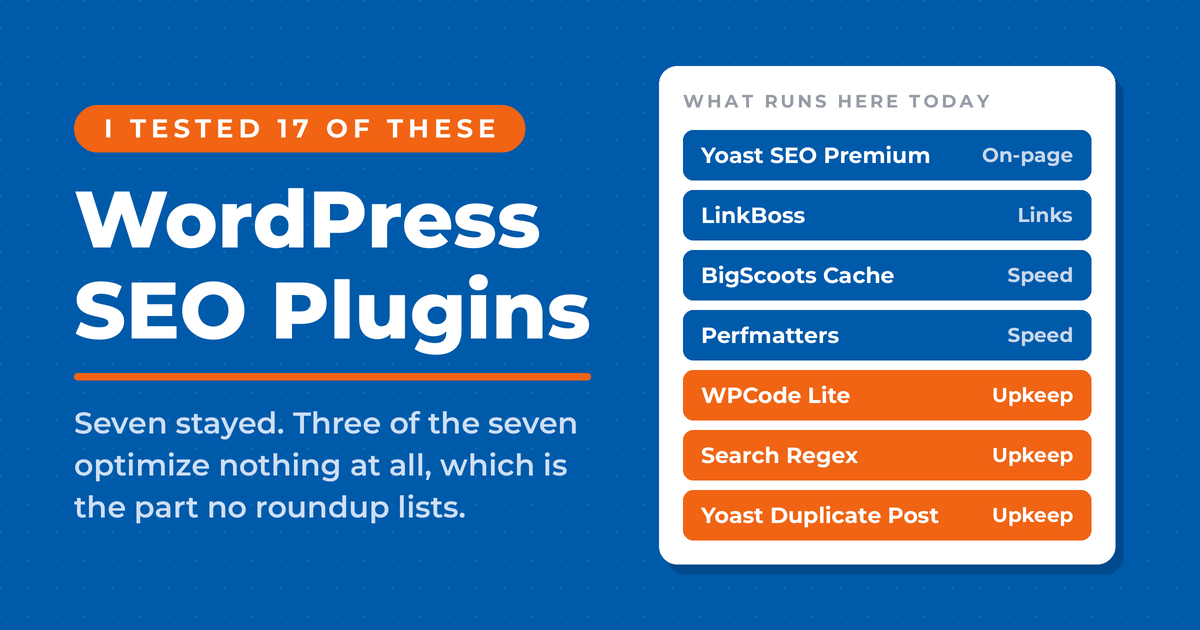
Seven plugins do the SEO work on nealschaffer.com today. Four of them do the optimizing: Yoast SEO Premium, LinkBoss, BigScoots Cache, and Perfmatters. The other three do the maintaining, and those are the ones no roundup ever lists, which I think is the biggest gap in every list you will read on this topic. Everything else on this page I have tried, evaluated for a client, or deliberately passed on.
Key Takeaways
✅ Three jobs cover almost everything a plugin can do for search: on-page work and schema, internal link structure, and page speed. Pick one plugin per job, and never run two all-in-one SEO plugins at once, because both will write your meta titles and your structured data and you get duplicate tags out the other end.
✅ Yoast SEO is what I run, and have run for more than a decade. Its readability analysis and schema output still hold up, and its automatic llms.txt file is free for everyone in one click, with no upgrade required.
✅ Rank Math’s free version lets you set five focus keywords per post where Yoast’s free version gives you one. If free-tier depth is your deciding factor, that comparison settles it.
✅ Speed is an SEO plugin decision, not a separate project. Google states that Core Web Vitals are used by its ranking systems, and no amount of on-page optimization will move them.
✅ Internal linking is the job I changed my mind about. I ran Link Whisper for years and moved to LinkBoss, because the work happens on cloud servers instead of inside my own WordPress admin, and on a library this size that difference is what I actually feel.
✅ The plugins nobody lists are the ones an established site needs most. Three of the seven running here optimize nothing, and two of those have become how a non-developer actually ships the code an AI assistant writes for them. The WordPress SEO fundamentals still matter more than any of it.
Do You Actually Need an SEO Plugin for WordPress?
Yes. WordPress is friendlier to search engines than most content management systems out of the box, but it gives you no way to edit a meta title or a meta description from the post editor. Those two fields decide what a searcher sees in the results. A plugin puts them where you write.
That single gap is the whole argument, and it is worth being clear that the rest is convenience. Once a plugin is installed, it also generates your XML sitemap, adds structured data, checks readability while you draft, and hands you a redirect manager when you move a URL.
Those extras save real time. On a site with a few hundred posts, generating sitemaps by hand is not a project anyone finishes twice. The publishing pace behind most business blogging statistics is only reachable, from what I have seen, once the mechanical parts run themselves.
But a plugin does not write your titles for you, and it does not know whether your post answers the question a searcher typed. The parts of on-page SEO that decide rankings are still yours to do. I said as much on my podcast years ago, and it has held up better than most things I said in 2020.
“If you thought Yoast SEO was enough to rank, I don’t think so. In fact, if you think content alone is enough to rank, I don’t think so either.” That is me on my podcast Your Digital Marketing Coach, back in December 2020.
So the plugin is table stakes rather than strategy. Which brings up the more useful question: which ones actually stay installed once the novelty wears off?
What WordPress SEO Plugins Do I Run on This Site?
Four plugins do the optimizing here: Yoast SEO Premium for on-page work and schema, LinkBoss for internal linking, and BigScoots Cache plus Perfmatters for speed. That is three jobs and four plugins, because the speed job splits between the cache my host supplies and the plugin that strips out what a cache cannot fix.
Yoast SEO Premium
I have been a faithful Yoast user for more than a decade. The traffic light system gets mocked, and some of that mockery is fair, but the readability analysis catches sentences I would have shipped and the schema output has never given me a problem.
Yoast has 10 million active installations and a 4.8 star rating on the WordPress plugin directory. Size alone is not a reason to pick software. It does mean that when something breaks, somebody has already written about it.
I run Premium for the redirect manager, which replaced a plugin I had used for years. Yoast Duplicate Post rides along with it, and its Rewrite and Republish feature is how every refreshed post on this site gets staged before it goes live.
LinkBoss
I ran Link Whisper for several years and switched to LinkBoss because of where the work happens. Link Whisper’s own documentation says nearly all of its processes run inside the WordPress admin, which is exactly where a large library starts to drag.
LinkBoss syncs content out to its own servers, runs the analysis there, and sends finished HTML back, so a scan across the whole archive costs my site nothing. It also matches on meaning rather than on keyword overlap, which on a library this deep produces suggestions I would not have found by searching for a phrase.
That is the whole reason I moved. A few years ago Link Whisper was the only serious option in this category, and it is still a good tool on a smaller site. On mine, the scans had started to cost me more time than the links were saving.
BigScoots Cache and Perfmatters
My host is BigScoots, which is built for speed and ships its own page caching plugin to its customers. BigScoots also recommends running Perfmatters alongside it, which I do, and the pairing is the part worth stealing even if you host somewhere else.
Perfmatters is not a cache. Its Script Manager switches off individual scripts and stylesheets on the pages that do not use them, so a contact form plugin or a slider stops loading site-wide. A cache serves the same heavy page faster. Perfmatters makes the page lighter before the cache ever sees it.
One Strategy to Connect All Your Marketing
My latest book helps small businesses, entrepreneurs, and marketers bring search, email, and social together into one digital marketing strategy that actually compounds.
Drawing on my work as a Fractional CMO, Digital Threads turns complicated tactics into a clear, practical plan you can follow, whatever your budget or team size.
Grab your copy on Amazon and start weaving your own digital threads. Click the cover or the button below to get started.

Worth admitting: I have never configured it. BigScoots bundles Perfmatters and tunes it, and the settings screen sits behind a gate warning that anything I change there is at my own risk. So I get the result and they own the decisions, which on reflection is the right split. Working out which scripts a given page can live without is exactly the sort of job I would get wrong.
The obvious caveat is that BigScoots Cache is only available to BigScoots customers. The pattern generalizes, though: use whatever server-level caching your host provides, then add a script manager on top rather than stacking a second cache plugin over the first.
That is the optimizing half of my stack. Three more plugins handle maintenance, which I come back to further down, because the reasoning behind the choice matters more than the brand names.
How Should You Choose a WordPress SEO Plugin?
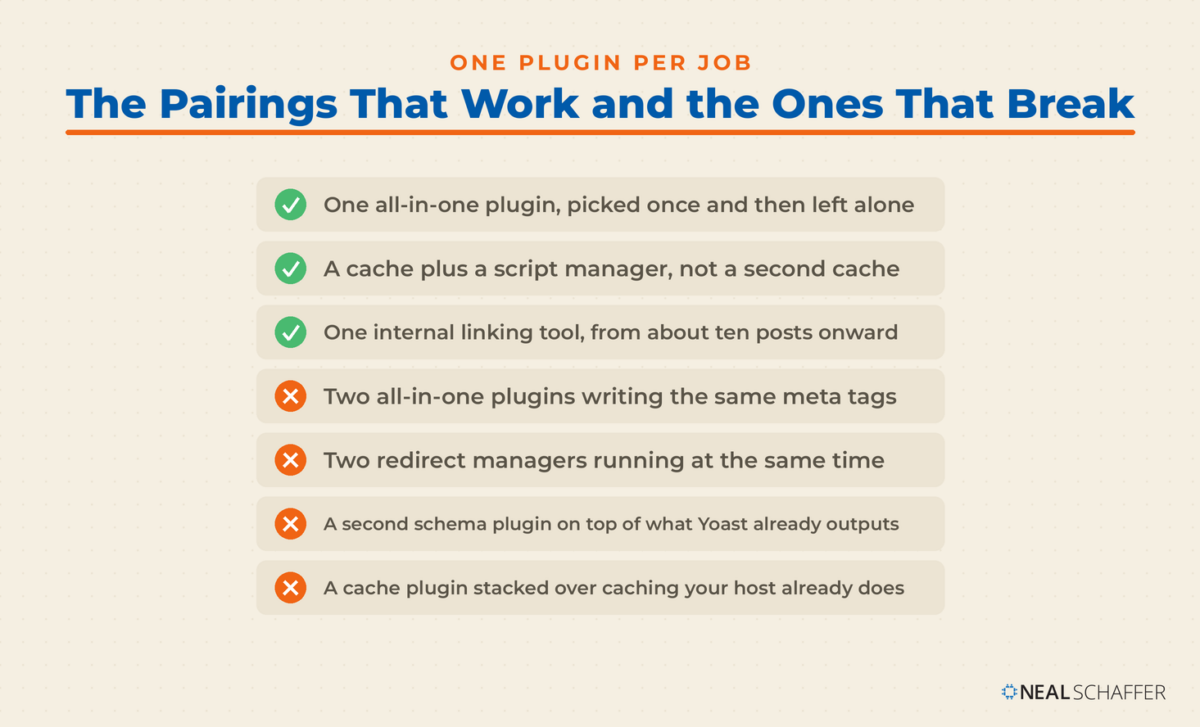
Choose by job, not by brand. Three jobs cover almost everything plugins can do for search: on-page optimization and schema, internal link structure, and page speed. Pick one plugin per job and stop. Every additional plugin adds load time and one more thing that can conflict during an update.
Working job by job rather than plugin by plugin buys you two things. You stop installing overlapping tools, which is where most bloated WordPress sites come from. And you can swap one plugin without touching the other two, because nothing you installed is doing two jobs at once.
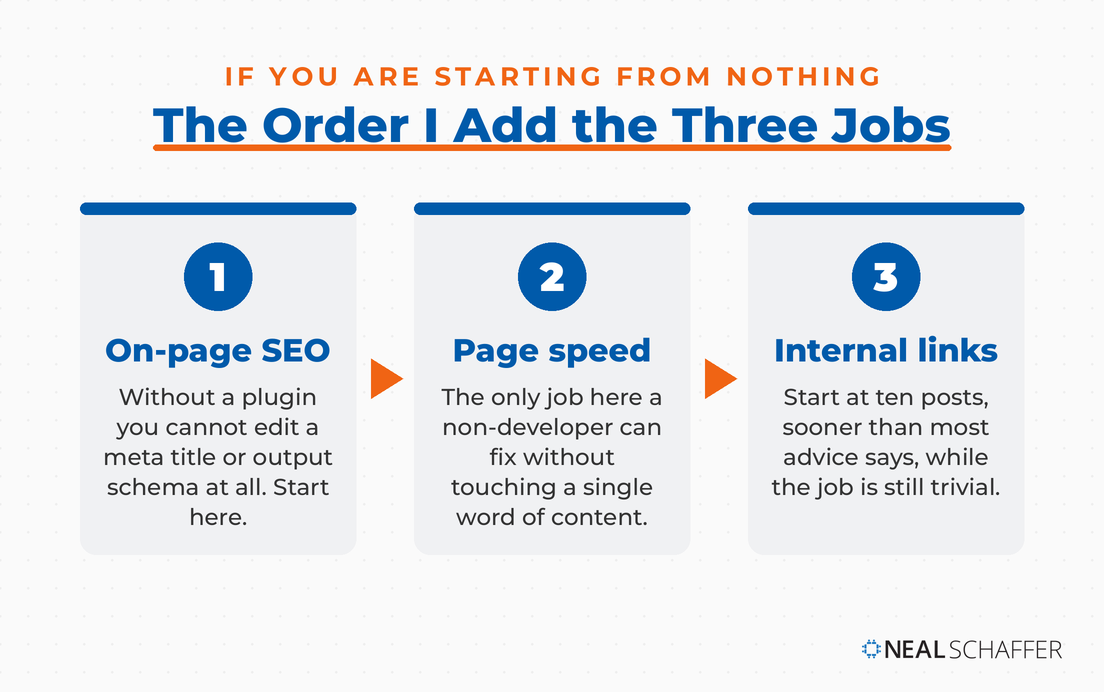
Rank the three jobs in this order if you are starting from nothing. On-page and schema first, because without a plugin you cannot edit a meta title at all. Speed second, because it is the only one on the list that a non-developer can fix without touching content. Internal linking third, but sooner than most advice suggests. Ten posts is enough to start, and starting that small is the point: the habit forms while the job is still trivial.
Measurement is the obvious thing missing from that list, and I have left it off deliberately. Analytics plugins optimize nothing, and most of the blogging tools I rely on for that sit outside WordPress anyway. Search Console and Analytics are better read in their own dashboards than through a plugin.
| Job | What you cannot do without it | What I run | Free or cheaper route |
|---|---|---|---|
| On-page and schema | Edit a meta title or description at all | Yoast SEO Premium | Rank Math free |
| Speed | Pass Core Web Vitals | BigScoots Cache plus Perfmatters | LiteSpeed Cache |
| Internal linking | See which posts have no inbound links | LinkBoss | Link Whisper free |
With the framework set, the specific tools sort themselves into those buckets fairly cleanly.
WordPress SEO Plugin Comparison Table
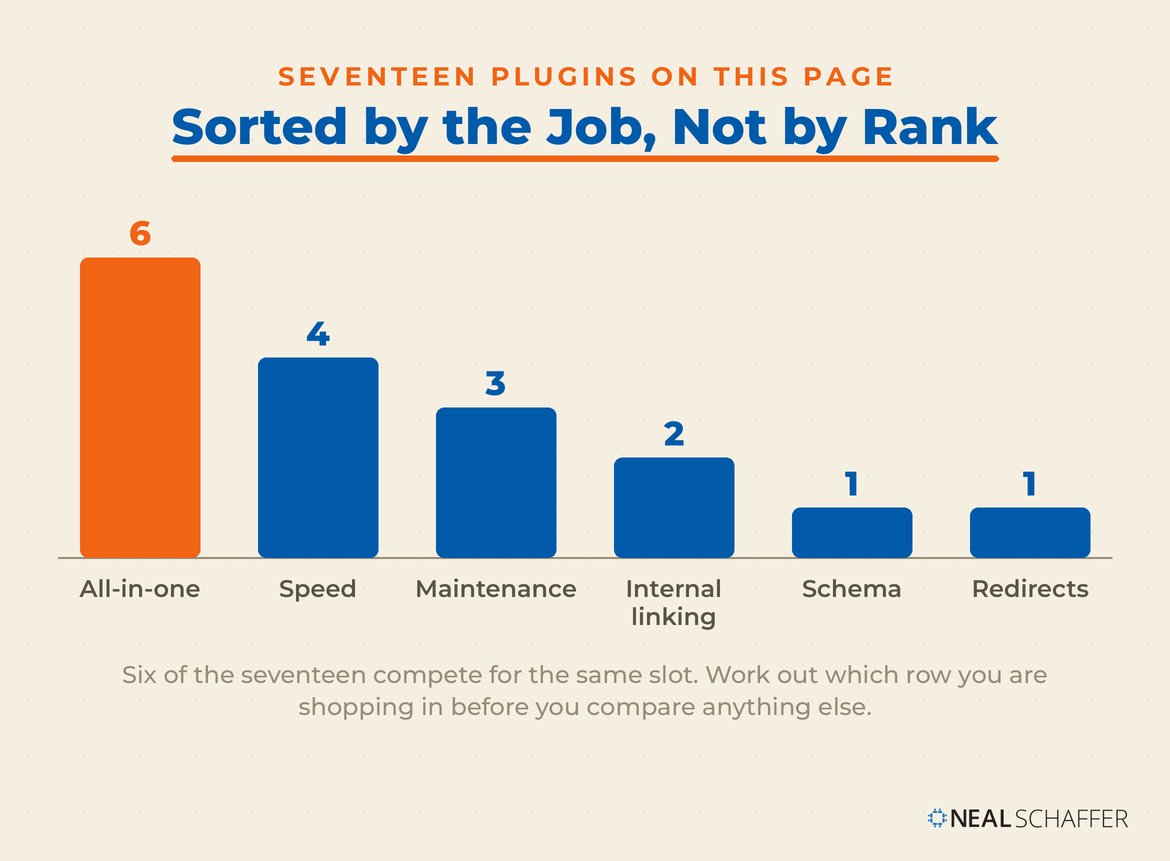
Seventeen plugins, sorted by the job each one does rather than by rank. Six compete for the all-in-one slot, and the rest handle internal linking, schema, speed, redirects, or maintenance. Use the job column to work out which row you are actually shopping in before you compare anything else.
| Plugin | Job | Free version | Notable strength |
|---|---|---|---|
| Yoast SEO | All-in-one | Yes | Readability analysis, schema, free llms.txt |
| Rank Math | All-in-one | Yes | Five focus keywords free, deep Google integration |
| All in One SEO (AIOSEO) | All-in-one | Yes | Local SEO, WooCommerce, role-based access (paid) |
| SEOPress | All-in-one | Yes | Unlimited target keywords free, ad-free, no tracking |
| The SEO Framework | All-in-one | Yes | No telemetry, preconfigured, lightweight |
| Slim SEO | All-in-one | Yes | Zero configuration, automatic schema, tiny footprint |
| LinkBoss | Internal linking | Trial credits | Cloud processing, semantic matching, bulk linking |
| Link Whisper | Internal linking | Yes | Orphan detection and inbound link reporting |
| Schema Pro | Schema | No | Automated structured data across content types |
| WP Rocket | Speed | No | Best-in-class caching with almost no setup |
| LiteSpeed Cache | Speed | Yes | Full performance suite, free, LiteSpeed servers |
| Perfmatters | Speed | No | Script Manager, unloads assets page by page |
| BigScoots Cache | Speed | Host-only | Server-level caching for BigScoots customers |
| Redirection | Redirects | Yes | 301 management with hit counts and 404 logging |
| WPCode Lite | Maintenance | Yes | Site-wide snippets, safe error handling, no theme edits |
| Search Regex | Maintenance | Yes | Regex find and replace across posts, pages and metadata |
| Yoast Duplicate Post | Maintenance | Yes | Rewrite and Republish for updating live posts safely |
Six of those seventeen are competing for the same slot, which is the one most people get wrong. So start there.
Which All-in-One SEO Plugin Should You Install?
Pick one and only one. Every plugin in this category writes meta titles, generates XML sitemaps, and outputs structured data, so running two means both write the same tags and your pages end up with duplicate meta descriptions and conflicting schema. The choice is about how much handholding you want and what you will pay for it.
Yoast SEO
Best for bloggers, publishers, and anyone who wants the safest default. The free version covers meta tags, sitemaps, breadcrumbs, readability, and schema. Premium adds redirects, internal linking suggestions, and up to five keyphrases per post.
What annoys me: the traffic lights push toward over-optimization if you treat green as the goal. Treat orange as fine and you will write better posts.
Rank Math
Best for people who want the most from a free plugin. Rank Math’s free tier is genuinely more generous than Yoast’s, and the five-keyword allowance is the clearest example. It also folds in Search Console data and a 404 monitor without asking for money.
The trade-off is how much there is. Rank Math ships a lot of modules, and beginners tend to switch things on without knowing what they do.
All in One SEO (AIOSEO)
Best for small businesses, WooCommerce stores, and teams with several contributors. AIOSEO bundles local SEO, video SEO, and Google News support. Its role-based access control is the reason to pick it over the others if more than two people touch your SEO settings, and it is worth knowing that this sits in the paid tier rather than the free one.
SEOPress
Best for agencies and developers. SEOPress runs ad-free with no tracking and no upsells in the admin, and its free content analysis takes unlimited target keywords rather than capping you at one or five. The white-label feature that strips SEOPress branding is Pro, from $49 a year, which is the number to check if you are pricing it for client work.
If neither of those appeals and you want something lighter, two options on the table above are built for exactly that. The SEO Framework ships preconfigured, runs no tracking, and puts no ads in the interface, at the cost of having no readability analysis. Slim SEO goes further still with almost no settings at all, which is either the whole appeal or a dealbreaker depending on how much you want to control your own titles.
Whichever of the six you land on, there is one 2026 question worth asking of it before you commit, and it is not a question any of these plugins could have answered two years ago.
Which WordPress SEO Plugins Handle AI Search and llms.txt?
Yoast, Rank Math, SEOPress, and AIOSEO all generate an llms.txt file now, and in each case it is a toggle rather than a paid upgrade. The file is a markdown list of the pages you most want AI assistants reading, served from your site root. Yoast Premium goes further with a bot blocker for GPTBot, CCBot, and Google-Extended.
From what I have seen watching these plugins ship updates, this is the part of the category that moved fastest. None of them had an AI search feature when I first set my own stack up. Now it is free in all four of the biggest ones.
| Plugin | llms.txt | Where the setting lives |
|---|---|---|
| Yoast SEO | Free | Yoast SEO → General → Site features → AI tools |
| Rank Math | Free | Rank Math SEO → Dashboard → LLMS Txt module |
| SEOPress | Free | Native llms.txt plus an Agent Readiness toggle |
| AIOSEO | Free | LLMs.txt generator in the plugin’s AI tools |
Switch it on. It takes one click and costs nothing, which is the entire argument for doing it.
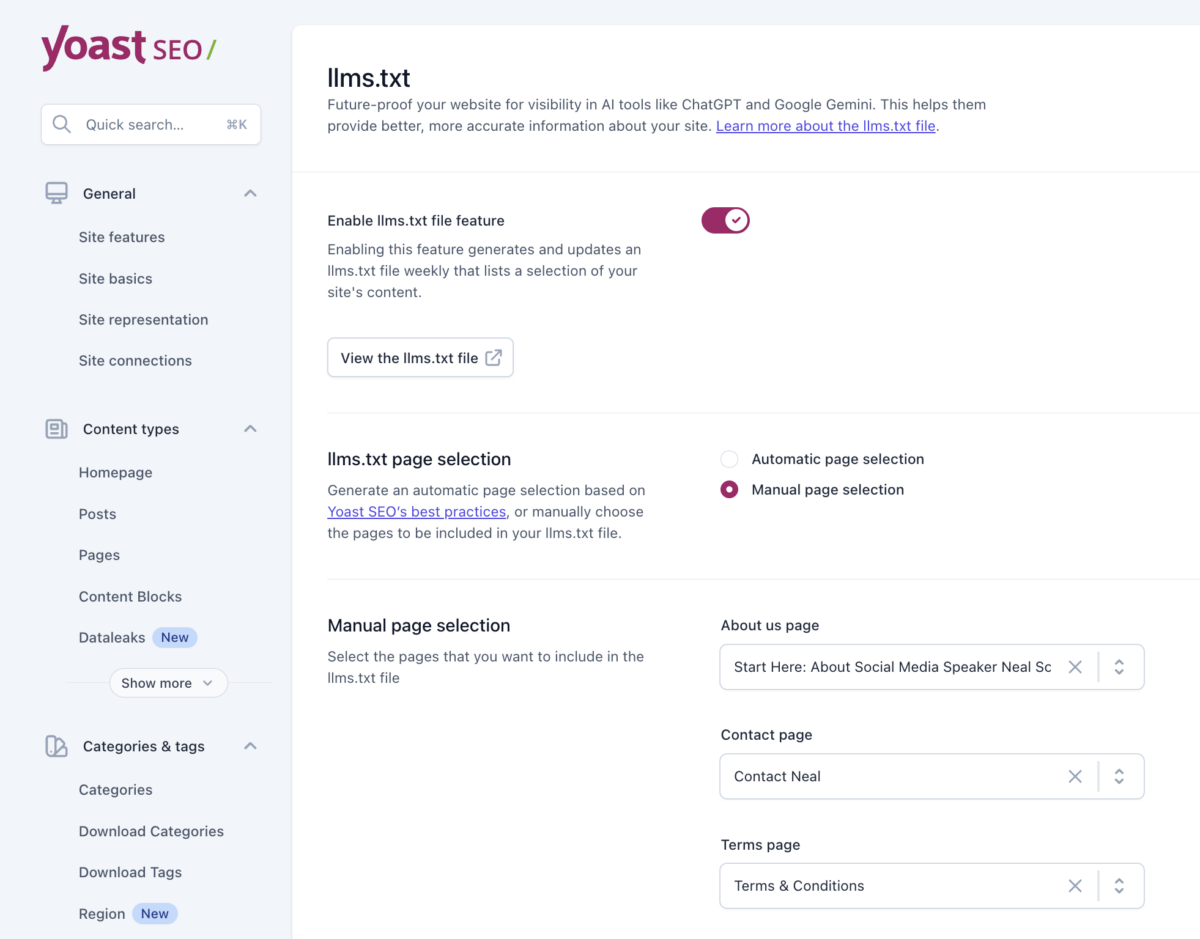
Then go and read your own file
Mine listed five blog posts when I checked it. I have published several hundred.
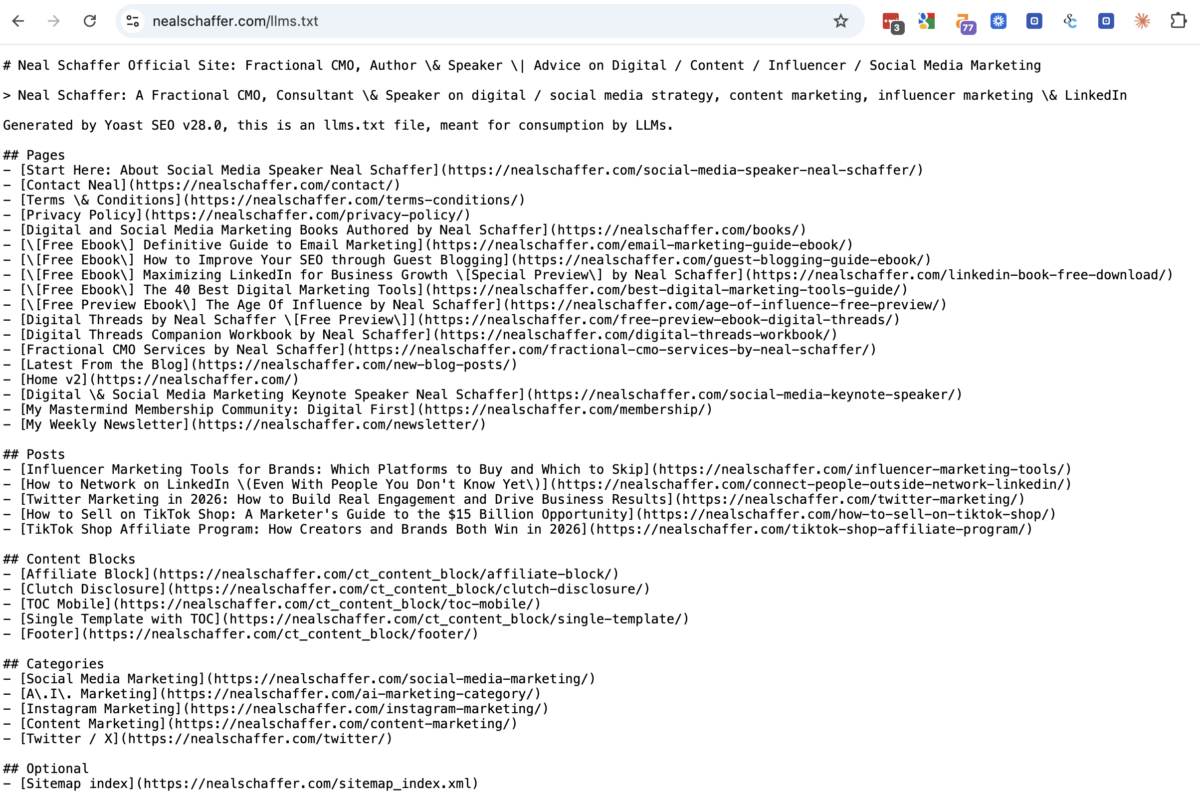
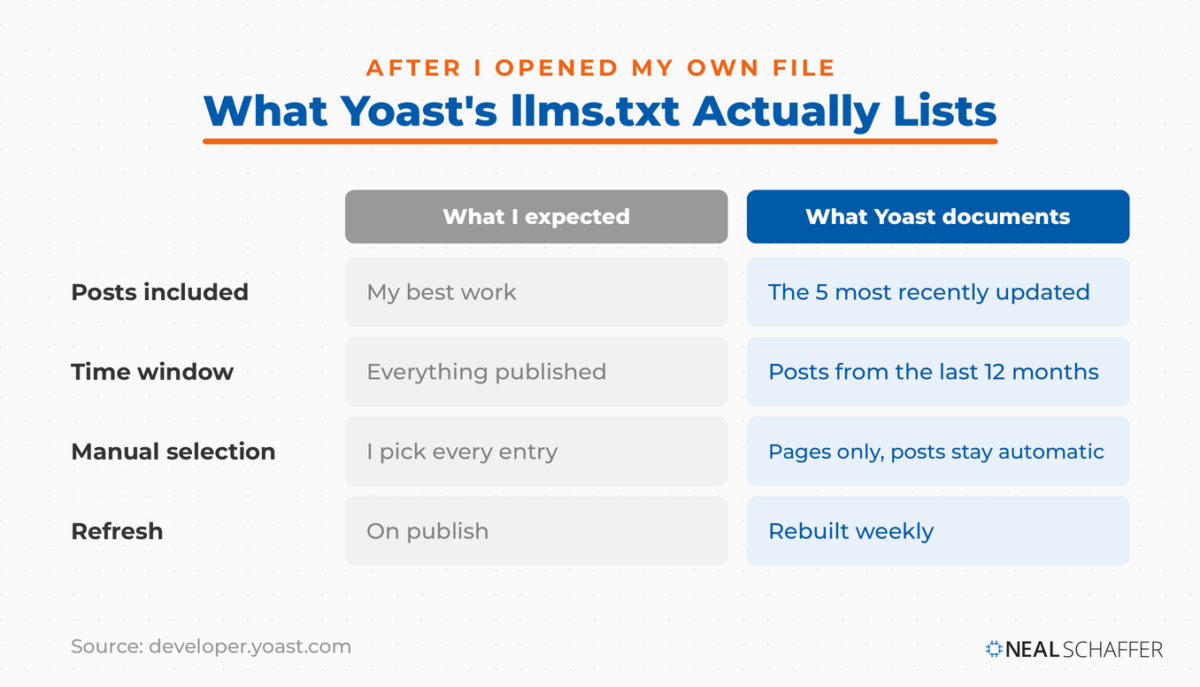
That is not a fault in my setup. Yoast’s own developer documentation says the file takes the five most recently updated posts, pages, and custom post types, and only those published in the last twelve months. The cap is five and you cannot raise it.
Switching to Manual page selection, behind the Customize llms.txt file button, buys less than it sounds like. You choose the pages. The posts stay automatic, still the five most recently updated. So whatever an assistant learns about your site from this file, it is learning from five recent posts rather than from your best work, unless your best work happens to be recent. The file also rebuilds weekly, so what you published this morning is not in it this morning.
The thing further down the file that caught me out
Mine also listed five entries under a Content Blocks heading: a footer, a mobile table of contents, an affiliate disclosure, and two templates. Those are my theme’s reusable fragments rather than articles.
They were in there because they are a custom post type set to appear in search results. Which meant WordPress had given each fragment its own live URL, put those URLs in my sitemap, and Yoast had passed them along to AI assistants as content worth reading. One of them was a page whose entire content was a single sentence of affiliate disclosure.
I found them by opening the file and reading it, which is the only reason I am telling you to do the same. They are switched off now.
If you run a block-based theme, go and look. In Yoast the fix is at Settings → Content types, then your block post type, then turn off Show in search results. That one toggle pulls those URLs out of your index, out of your sitemap, and out of your llms.txt together.
What I would expect from it
What I would not do is expect much from it yet. The plugin authors themselves are careful here: the developers of one widely used llms.txt generator state plainly that there is no guarantee any AI model will use the file, while noting that GPTBot, ClaudeBot, and PerplexityBot are already fetching it. That is a fair summary of where this sits. The bots read the file. Nobody has committed to acting on it.
So treat llms.txt as cheap insurance rather than a growth lever, and put the time you would have spent tuning it into the schema your plugin already outputs, which AI systems demonstrably do parse.
Structured data settled, the next gap on most sites is not on-page at all. It is the links between your own posts.
Which Plugins Handle Internal Linking and Schema?
These three fill gaps the all-in-one plugins leave open rather than competing with them. LinkBoss and Link Whisper both map your internal link structure and find the posts nothing links to. Schema Pro automates structured data types your SEO plugin does not output. None of the three replaces your main SEO plugin, and none of them needs to.
LinkBoss
Covered above as the tool I moved to. The short version: processing happens on LinkBoss servers rather than on yours, matching works on meaning rather than keyword overlap, and it will build links in bulk across a whole archive. It is the right shape for a site with several hundred posts or more.
Link Whisper
Best for smaller libraries and anyone who wants everything inside WordPress with no external service in the loop. Link Whisper suggests links as you write and reports inbound counts per post, and its orphan report is still the clearest one I have used.
Two things to know. Its work happens in your WordPress admin, so on a large site the editor and the scan screen slow down, and that is what eventually pushed me off it. Below about ten posts there is genuinely nothing to link between yet, so wait. Past ten, pick one of these two and begin.
Schema Pro
Best for sites that publish content types your SEO plugin has no schema for. Schema Pro is a dedicated structured data tool rather than an all-in-one plugin, so it runs next to Yoast or Rank Math instead of replacing either.
I took it off this site once I worked out that I was paying for coverage I already had. Yoast outputs Article, Person, Organization, Breadcrumb, and WebPage markup on its own, adds FAQ and How-to blocks in the editor, and Premium layers more types on top of that. For a blog plus a speaking and consulting site, that is the complete set. A second schema source on top of it is a good way to end up with two of everything.
Schema Pro earns its slot when you need types Yoast does not produce, and its own documentation lists recipes, products, courses, events, job postings, local business, reviews, books, and software applications. If you run a food blog, a store, a course, or a job board, that gap is real and worth paying to close. If you publish articles and a services page, check what your SEO plugin already outputs before you buy anything.
Picking the tool is the easy half. The part that actually moves anything is what you do with its report every month, so here is the pass I run.
How Do You Run an Internal Link Audit With LinkBoss?
Run the Links Report, filter it to the posts sitting below your inbound link floor, then work that list against your own record of which pages deserve the equity. The tool finds the under-linked pages in seconds. Deciding which of them are worth linking to is the part it cannot do for you.
Two rules make this pass work, and both are things I had to settle before the reports were any use.
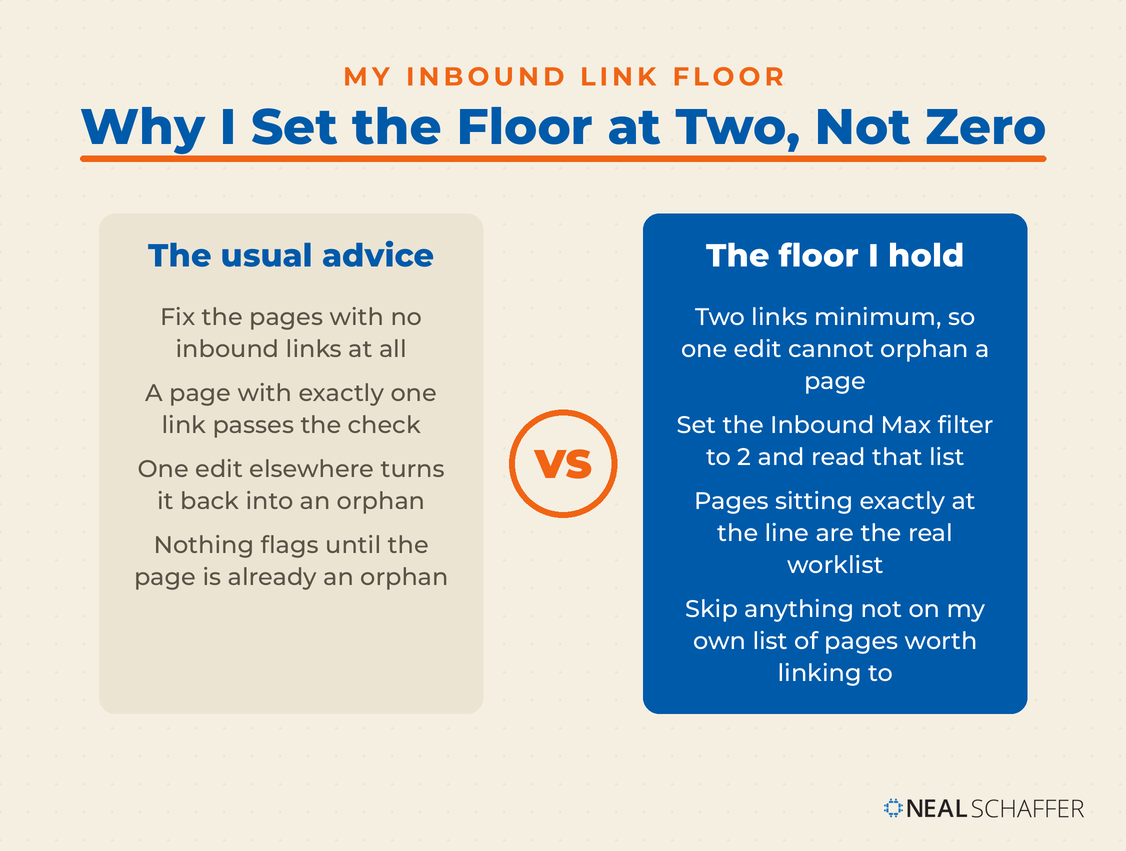
Set a floor of two inbound links, not zero
Most advice tells you to fix orphan pages, meaning pages with no internal links at all. That bar is too low. A page with exactly one inbound link is one edit away from being an orphan again, because the moment you rewrite or retire the post carrying that link, the page falls off the map. Two links is the smallest number that survives a single edit somewhere else on the site.
Keep your own list of pages that deserve links
LinkBoss will happily suggest links to anything you have published. It has no opinion about which of your pages earn money, rank, or matter to the business. I keep a separate record of the URLs that do, and a page not on that record does not get new links pointed at it however relevant the semantic score says it is.
The monthly pass
With the floor and the list settled, the pass itself takes me about an hour. Yours will differ, and three things move it: how big your library is, how much pruning and republishing you are doing, and how often you publish something new. A month where I have rewritten twenty old posts runs longer than a month where I published two.
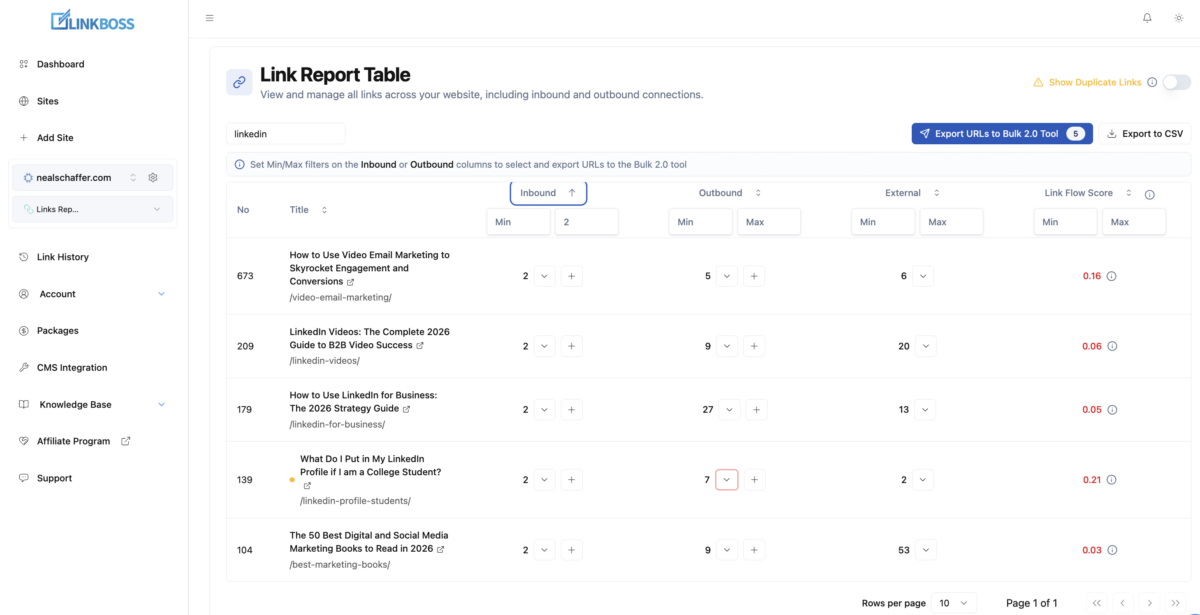
- Open the LinkBoss dashboard, select your site, and open the Links Report.
- Set the Max filter on the Inbound column to 1. That returns everything below your floor. If it comes back empty, your floor is holding and you can stop worrying about orphans this month.
- Now set the same filter to 2 and read that list instead. Those pages are sitting exactly at the line, which makes them the ones that drop below it the next time you edit or retire a post that links to them. They are the real worklist.
- Narrow it further with the title search box before you start fixing anything. Working one topic at a time, rather than straight down a site-wide list, means the source posts you link from are already about the same subject, so the links land inside a cluster instead of scattering across unrelated categories.
- Export with Export to CSV, or push the filtered set straight through Export URLs to Bulk 2.0 Tool if you want LinkBoss to propose the link pairs itself.
- Cross-check the exported URLs against your own list of pages worth linking to. Anything not on that list gets skipped this round, or gets queued for retirement instead.
- Work the survivors in batches, choosing source posts where the link genuinely belongs in the sentence rather than accepting every suggestion.
- Re-run the report next month. Numbers move on their own as you publish, and pages drop back below the floor whenever you edit an old post.
Doing it monthly rather than once a year matters for a reason that took me a while to see. Internal link structure is not a project you finish. Every post you publish and every post you rewrite changes the graph, so a site audited once and left alone drifts straight back to where it started.
Which is also the argument for starting at ten posts rather than waiting. At ten the pass takes minutes and there is almost nothing to fix, so it becomes something you do rather than something you plan to do. Leave it until the library is big enough for the problem to feel urgent and the first pass is a backlog, which is exactly the kind of job that stays at the bottom of the list for another year.
That covers structure. The remaining category is the one people put off longest, mostly because it sounds technical.
Which Plugins Fix Speed and Redirects?
Speed is worth doing because Google is unusually direct about it. Its documentation says Core Web Vitals are used by its ranking systems, and that Largest Contentful Paint should happen within 2.5 seconds of a page starting to load. Redirects will not rank you. They stop you losing what you already earned.
WP Rocket
Best for anyone whose host does not already cache at the server level and who wants the problem handled without a learning curve. WP Rocket applies most performance best practices the moment you activate it. I ran it before I moved to a host that caches for me, and on shared hosting it is still the fastest route I know to a Core Web Vitals fix without a developer. There is no free version.
LiteSpeed Cache
Best for anyone on LiteSpeed or OpenLiteSpeed hosting who wants a free performance suite. LiteSpeed Cache bundles page caching, image optimization, database cleanup, lazy loading, and CDN integration into one free plugin, and on the right server it is excellent. On other hosting it still works and stops being the obvious pick.
If you do not know what your host runs, check your hosting control panel or ask support before you install it, because that answer decides whether this plugin or WP Rocket is your pick. Your blog hosting decides more downstream than most people expect, and this is one of the places it shows up.
Perfmatters
Covered above as half of my own speed setup. It is worth repeating why it sits next to a cache rather than replacing one: caching serves a finished page faster, and the Script Manager stops the page loading assets it never needed. Those are different problems, which is why running both is not duplication.
If you buy it directly rather than getting it bundled with a host, the Script Manager is where the risk sits. Switching scripts off page by page will eventually break a form or a slider, so use the testing mode and change one thing at a time. If your host bundles and configures it, that risk belongs to somebody else, and you should let it.
Redirection
I ran Redirection for years and dropped it when I subscribed to Yoast SEO Premium, whose redirect manager is what I use now. I still miss one thing about it. Redirection counts how many times each redirect actually fires, and Yoast does not. That count tells you which old URLs still carry live traffic and links, which is exactly what you want to know before pruning content.
If you are doing a migration or a content prune and you are not on Yoast Premium, install it. It is free, and you can remove it when the migration is done.
That is every plugin here that optimizes something. The three that come next optimize nothing at all, which is exactly why nobody lists them.
Which Plugins Do the Maintenance Nobody Lists?
Three of the seven optimize nothing at all: WPCode Lite, Search Regex, and Yoast Duplicate Post. They exist because a library of several hundred posts needs upkeep, and upkeep is a different job from optimization. It is the category almost every plugin list skips, mine included until I looked at what was actually installed here.
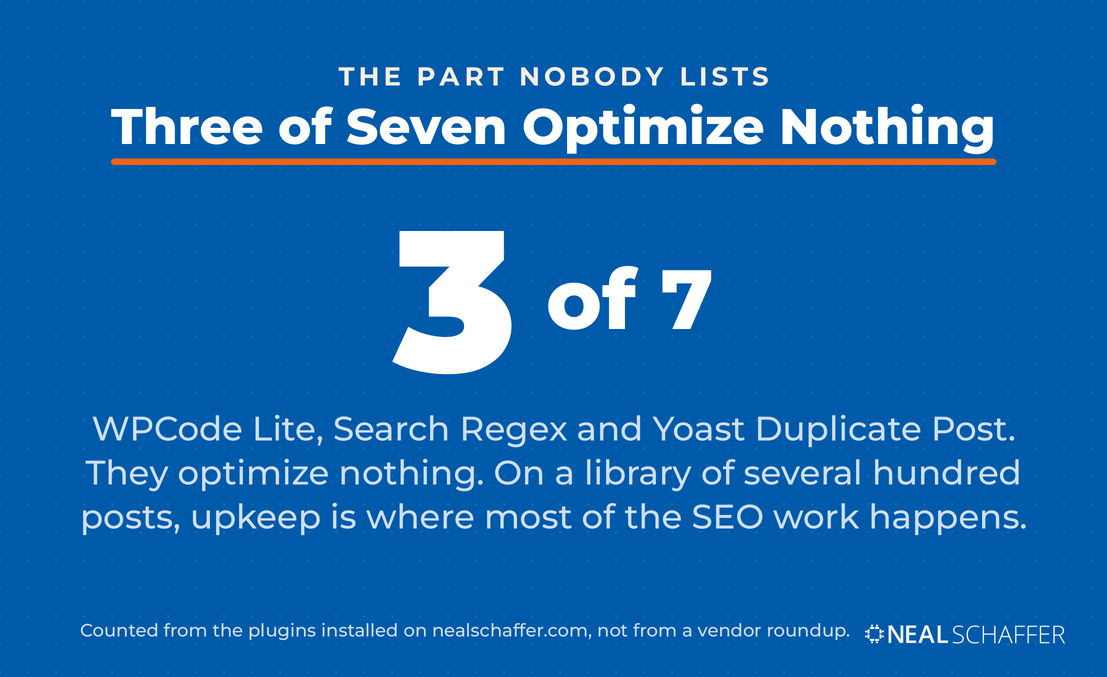
The reason to name them is that on an established site, maintenance is where most of the SEO work actually happens. You are not optimizing new posts most weeks. You are fixing, updating, redirecting, and republishing old ones, and the plugins that make that bearable are not the plugins anyone sells you.
Two of the three have also quietly changed job description. I am not a developer, but an AI assistant will now write working code for almost any site behavior I can describe in plain language. The bottleneck stopped being the code and became where to put it safely. That is what these two are for now.
WPCode Lite
WPCode is a snippet manager. It runs PHP, HTML, CSS, and JavaScript sitewide, with a testing mode and automatic deactivation of any snippet that throws an error, and without editing theme files that the next theme update will overwrite.
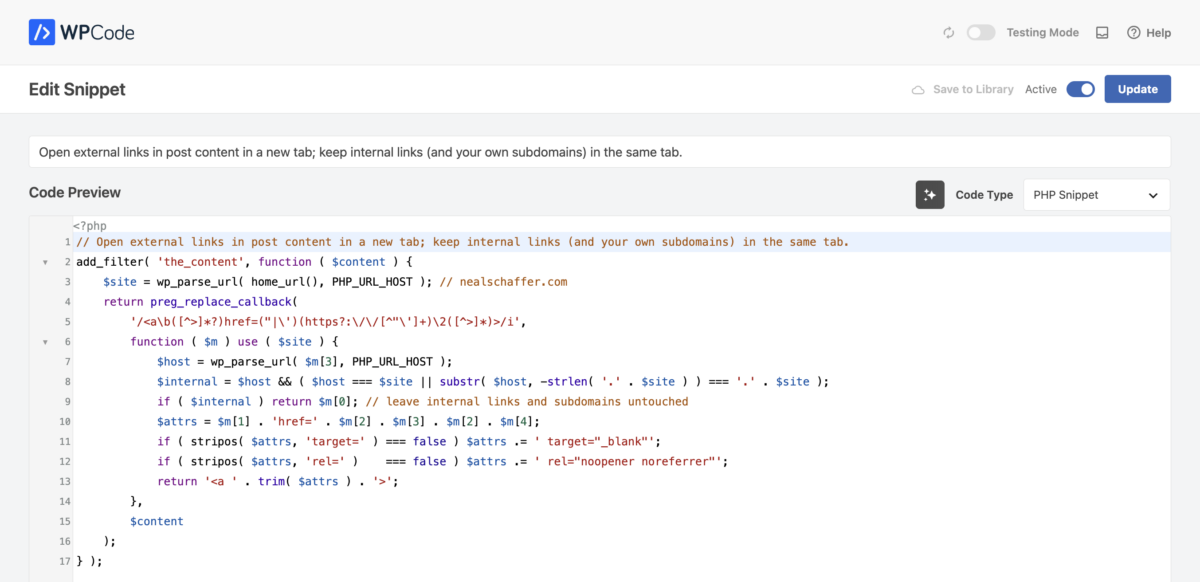
Four snippets run on this site and I hand-wrote none of them. The one I would miss most fixes something that had irritated me for years. I wanted external links to open in a new tab, and internal links, including my own subdomains, to stay in the window the reader is already in.
Setting that by hand means a decision on every link you ever place, forever, and going back to fix the ones already published is not a job anyone finishes. So I described the behaviour I wanted, got back seventeen lines of PHP, pasted it into WPCode, and have not thought about it since.
Two of the other three came the same way: custom schema, and a Googlebot-scoped noindex on a defined set of URLs. The fourth is an old table of contents tweak from a developer and predates all of this.
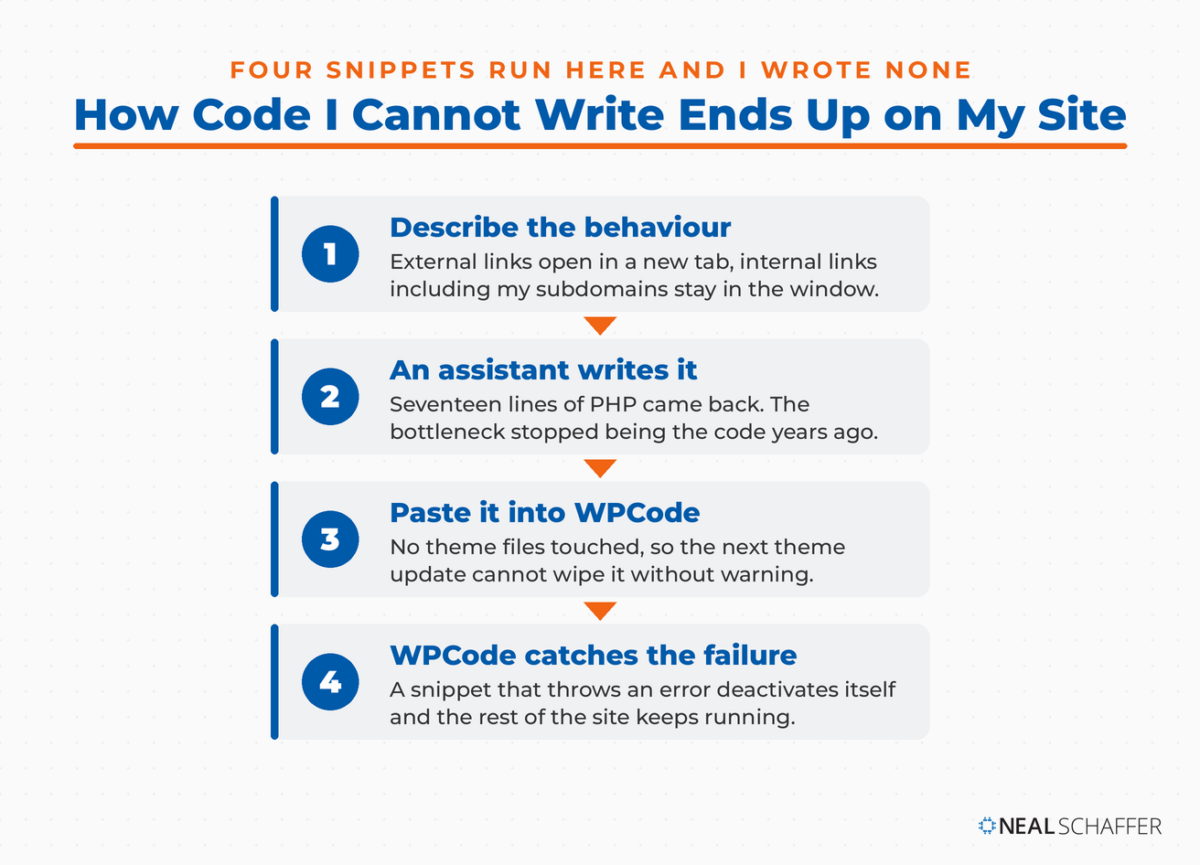
One limit worth knowing: the free version runs every snippet everywhere. Targeting particular URLs through the interface is a paid feature, so on the free tier that logic lives inside the snippet itself as a list of URLs in the code.
If you read PHP, you will spot that it parses HTML with a regular expression, which developers will tell you not to do. They are right as a general rule. On my own content it has run for months without breaking a page, and I would rather have an imperfect fix working than a perfect one I never built.
Put it here rather than in your theme’s functions.php file. An error in functions.php takes the whole site down, while WPCode deactivates the broken snippet and leaves the rest running, and a theme update wipes functions.php without warning. If you want more habits like this one, three of the WordPress tips I use on my own blog are about keeping the site from breaking.
Search Regex
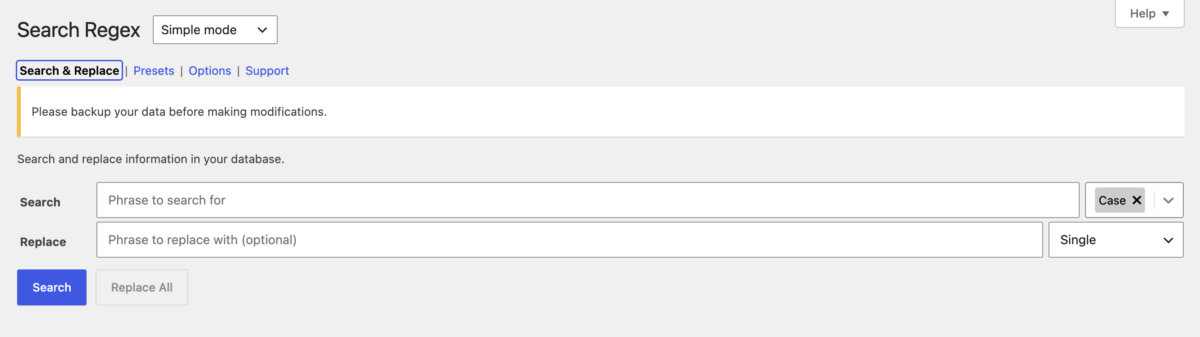
Search Regex does find and replace across posts, pages, comments, and metadata, with full regular expression support, run from inside the WordPress admin.
The job it solved for me was a subdomain move. When I put my books onto their own subdomain at books.nealschaffer.com, every link to a book across the whole library still pointed at the old nealschaffer.com URLs. Redirects would have handled the visitor. They would not have fixed the links themselves, and internal links are what search engines and AI crawlers follow to work out which of your pages matter.
Search Regex rewrote all of them in one pass. Same pattern as the snippets above: I described the problem, an AI assistant gave me the search and replace patterns, and the plugin was where I ran them.
Two rules, and neither is optional. Run Search first and read the matches before you touch Replace All, because the preview is the only chance you get to notice a pattern matching more than you meant. And back up the database before anything that touches more than a handful of rows. The plugin puts that warning at the top of its own screen, which tells you how often people skip it.
Yoast Duplicate Post
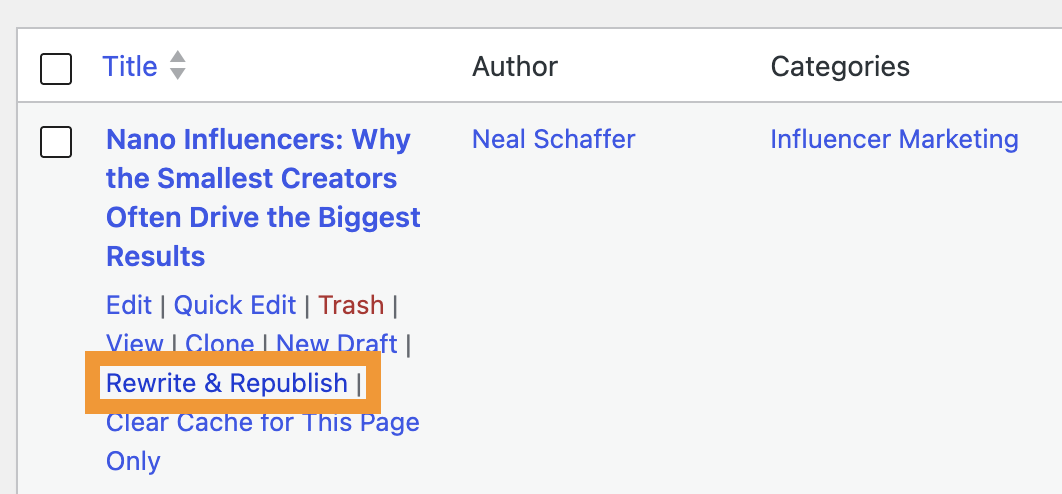
This is the plugin behind the Rewrite and Republish feature, and it is how a refreshed post on this site gets updated without the live URL going down mid-edit.
The mechanic is worth understanding, because the obvious alternative is worse. Editing a published post directly means every save is live, so a reader or a crawler can hit a half-rewritten page. Rewrite and Republish clones the post into a draft, lets you rebuild it at whatever pace you like, and then swaps the new version onto the original URL in one action when you are ready. The URL, the publish date, and the inbound links all stay put.
If you are running any kind of content refresh program, and after the helpful content update a lot of people are, this is the plugin that makes it safe to run at volume.
Those three cover upkeep. Which leaves the other half of the story, because the list of what I took off this site says as much as the list of what stayed.
What I Stopped Running, and Who Should Skip This List Entirely
Five things came off this site: Link Whisper, WP Rocket, Redirection, Schema Pro, and the Semrush writing assistant. Not one of them left because it was bad software. Three were replaced by something that fit my site better, one duplicated a job another plugin already did, and the last one I dropped on principle.
Link Whisper went because the scans ran on my own server and my library outgrew them. LinkBoss does the same job in the cloud. Redirection went because Yoast Premium’s redirect manager covers it, and two redirect managers is a genuinely bad idea. WP Rocket went when I moved to a host that caches at the server level.
Schema Pro went because Yoast’s schema output already covers what I publish. Two plugins doing one job is the most common way a WordPress install gets slow, and it is the first thing I check on a client site.
The Semrush writing assistant went for a different reason, and it is the one I would argue about. Every content scoring tool works the same way: it reads the pages already ranking and tells you how close you are to them. That was a sensible target when the job was to beat the average result on page one.
Looking back at what Google actually said with the helpful content update, it makes perfect sense to me now. Ask why anybody would still go to organic search rather than just ask an AI for the answer, and there is really only one answer left. Firsthand experience, and the insight that comes out of having done the thing yourself.
Which is what I should have been blogging all along. The update was a reminder to do more of it, and I would rather read it that way than as a punishment.
So matching the average of what already exists is closer to the profile that got pages demoted, and a scoring plugin pointed at that average is aiming at the wrong thing. I write toward the part nobody else can publish instead, and I use AI to organize my own thinking rather than to tell me what the top ten results contain.
Who should skip most of this list
If you are running a five-page brochure site with no blog, you do not need most of this page. Install one all-in-one plugin, set your titles, and go do something else. The internal linking tools do nothing on a site with nothing to link between.
If your host already handles caching at the server level, and many managed WordPress hosts do, adding WP Rocket or LiteSpeed Cache on top can make things worse rather than better. Ask your host before installing either one, then reach for a script manager instead if you still want the page lighter.
And if you are still deciding whether to start a blog at all, plugin selection is not your first problem. How to start a blog comes first, then a few dozen posts, then this page.
The last thing I would say about my own list: it is short because things kept coming off it, and the things that stayed are boring. The best WordPress plugins for a business blog run wider than SEO, and even there the pattern holds. Every plugin I removed made the site faster, and I have never once removed one and missed it after a week.
Frequently Asked Questions About WordPress SEO Plugins
What is the best SEO plugin for WordPress?
For most site owners, Yoast SEO is the best starting point, because it handles meta tags, readability, schema, and sitemaps with the least setup. Rank Math is probably the better pick if free-tier depth matters more to you than stability. Neither is best in isolation.
Do I need more than one SEO plugin?
Yes, but not more than one all-in-one plugin. A workable minimum is one all-in-one plugin, one caching setup, and one internal linking tool from about ten posts onward. Those three cover on-page, speed, and site structure, which is everything a plugin can actually help with.
Can I run Yoast and Rank Math at the same time?
No. Both write your meta titles, meta descriptions, and structured data, so you get duplicate tags and conflicting schema that make it harder for search engines to work out which is correct. If you are switching, migrate before you deactivate anything: back up the database, install the new plugin, run its importer to pull your titles and descriptions across, spot-check five posts, and only then delete the old one. Deleting first wipes years of metadata.
LinkBoss or Link Whisper: which internal linking tool should I use?
It depends on the size of your library. Link Whisper does its work inside your WordPress admin, which is fine on a few hundred posts and starts to drag past that. LinkBoss runs the analysis on its own servers and links in bulk, which is why I switched. On a small site the difference is invisible, so pick the cheaper one.
Are free SEO plugins good enough?
For most blogs and small business sites, yes. The free tiers of Yoast, Rank Math, AIOSEO, and SEOPress all cover the essentials. You usually only need to pay once you want a redirect manager, multiple focus keywords, or advanced schema, and by that point you will know which feature you are buying.
Do SEO plugins help with AI search and ChatGPT?
Partly. Structured data is the piece that demonstrably works, because clean schema is how AI systems establish what a page is about. The llms.txt generators covered earlier are worth switching on since they are free, but I would not build a strategy on a file nobody has committed to reading.
Will an SEO plugin slow down my site?
A little, and less than most people fear. One all-in-one plugin is not what makes WordPress slow. Five overlapping plugins, an unoptimized theme, and uncompressed images are, which is why <a href=”https://nealschaffer.com/technical-seo/”>technical SEO</a> work usually starts with the theme rather than the plugin list.
Pick One Per Job, Then Go Write Something
Install one all-in-one SEO plugin this week, then set your meta titles and meta descriptions on your ten highest-traffic posts. That single pass is the whole first move, and on most sites it will show up in your click-through rate inside a month, which is faster than any plugin comparison will pay you back.
Sort out speed next, once you know what your host already caches. Add an internal linking tool once you are past ten posts, which is earlier than most people will tell you and deliberately so.
Then stop shopping. The plugins are the easy part, and the blog SEO work they support is where the rankings actually come from. Before you plan your next quarter of content, my thinking on SEO strategy is the piece that decides whether any of these plugins earn their slot.
If you want the wider tool stack I recommend to clients, download my free Digital and Social Marketing Tools Buyer’s Guide. And if you would rather have someone build the search, email, and social plan around all of this, that is what I do as a Fractional CMO, and it is the framework I laid out in Digital Threads.
Actionable advice for your digital / content / influencer / social media marketing.
Join 13,000+ smart professionals who subscribe to my regular updates.