


Most people looking up how to make YouTube Shorts already know where the record button is. What they do not know is which rules decide whether YouTube treats their upload as a Short at all. They also do not know how long a Short can run in 2026, or what length keeps anyone watching.
Those are three different questions, and the answers have changed more than once.
I have published 211 Shorts on my own YouTube channel since the format launched, though only 18 of those landed in the past year. Let me be upfront about what that makes me. The creators who genuinely win at Shorts post daily for years, and I have not been doing that. These are a part-time channel’s numbers.
I am gearing up to publish daily, and I will report back when I have a year of that behind me. In the meantime, a year of viewing data across that whole library surfaced one pattern I did not expect, and it is about length. That part travels regardless of how big your channel is.
I teach social media marketing to executives at Rutgers Business School and personal branding at UCLA Extension. As a Fractional CMO, I also work with companies deciding where video belongs in their mix. So I have YouTube Studio open a lot, even when the channel it reports on is a modest one.
Key Takeaways
✅ YouTube Shorts can run up to three minutes, raised from the original 60-second cap on October 15, 2024
✅ A square or vertical video under three minutes becomes a Short automatically, with no toggle to opt in or out
✅ That rule keys off the upload date, so a vertical video you posted before October 15, 2024 is still long-form today
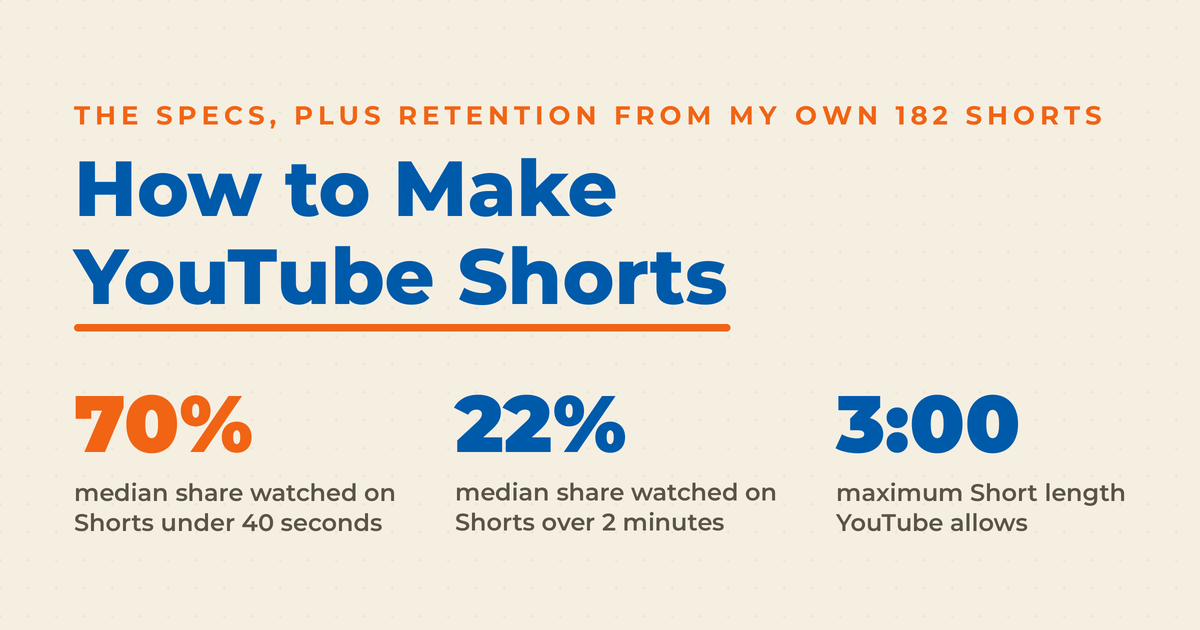
✅ Across 182 of my own Shorts, the median under 40 seconds held 70% of the video against 22% for those over two minutes
✅ My Shorts recorded 14,816 views but only 8,153 engaged views, and those two metrics mean very different things

✅ Long-form converted subscribers about twice as efficiently as Shorts on my channel, so Shorts work as discovery rather than as a growth shortcut
What Counts as a YouTube Short?
A YouTube Short is any square or vertical video up to three minutes long that YouTube places in the Shorts feed. You do not apply for the classification or tick a box anywhere. YouTube assigns it automatically from aspect ratio, duration, and upload date, and that assignment then decides which feed, algorithm, and revenue model your video enters.
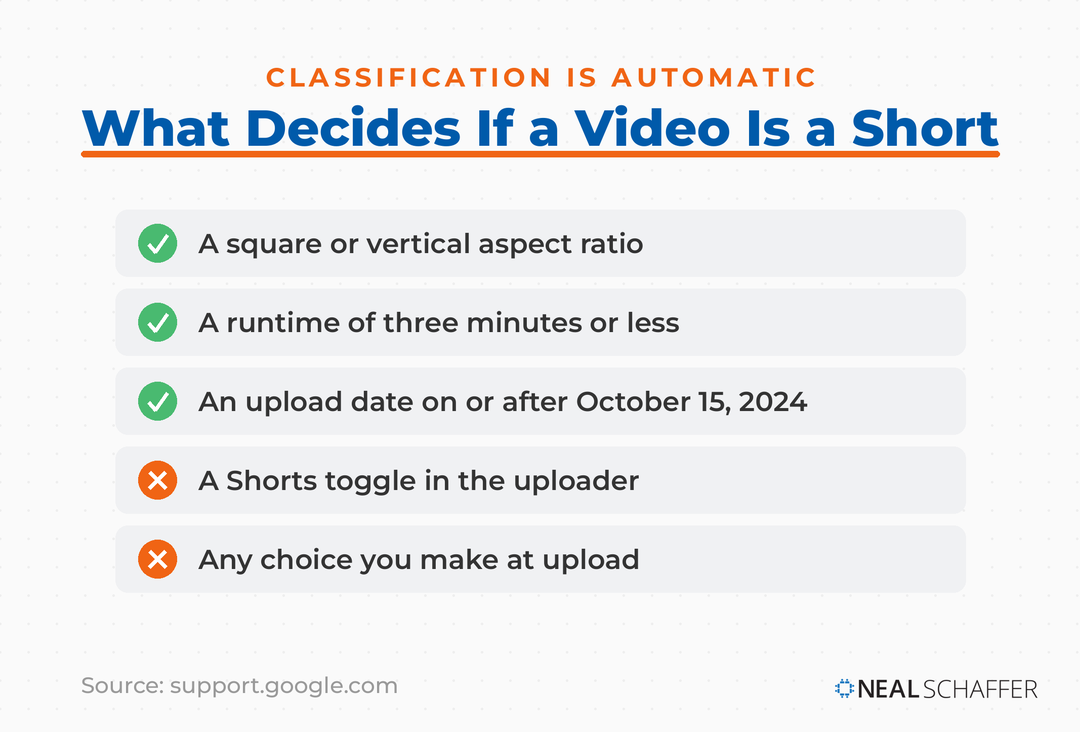
The automatic part trips people up. There is no Shorts toggle in the uploader. If your video is vertical and short enough, it becomes a Short whether you meant it to or not.
Shorts were YouTube’s answer to TikTok, and they now sit alongside Instagram Reels as the main short-form surfaces brands publish to. If you are weighing which platform deserves your effort first, the differences between TikTok and YouTube run well past video length.
One thing separates Shorts from most short-form: they do not expire. Instagram Stories and Snapchat posts vanish after 24 hours. A Short stays on your channel permanently and keeps accumulating views, which makes it a library asset rather than a disposable post.
Classification is the easy part. The rules sitting underneath it are where most creators get caught out.
What Are the Requirements for a YouTube Short?
The requirements are short. Your video needs a square or vertical aspect ratio, a runtime of three minutes or less, and a maximum upload resolution of 1080p. YouTube publishes no minimum length at all. Everything else, including hashtags, thumbnails, and music, affects performance rather than eligibility.
| Requirement | Specification |
|---|---|
| Maximum length | 3 minutes |
| Minimum length | None published by YouTube |
| Aspect ratio | Square or vertical (9:16 is standard) |
| Maximum resolution | 1080p |
| Title length | Up to 100 characters |
| Music limit | Most tracks up to 90 seconds in a 3-minute Short |
| Content ID copyright claim over 1 minute | Blocked globally |
The minimum deserves a note, because you will find confident answers online saying 15 seconds. That number is a holdover from the original Shorts camera, which defaulted to a 15-second recording. It was never a publishing requirement, and YouTube’s documentation on uploading Shorts states only the three-minute ceiling and the aspect ratio.
One rule genuinely costs people work, and it involves Content ID. That is YouTube’s automated system for scanning uploads against copyrighted material that rights holders have registered. When it finds a match, the video gets a claim. For most creators that means music.
According to YouTube’s rules for three-minute Shorts, any Short over a minute carrying an active claim is blocked globally. A blocked Short will not play, will not be recommended, and cannot be monetized. A claim is not a copyright strike and carries no channel penalty. The block lifts once the claim clears, and under a minute nothing changes.
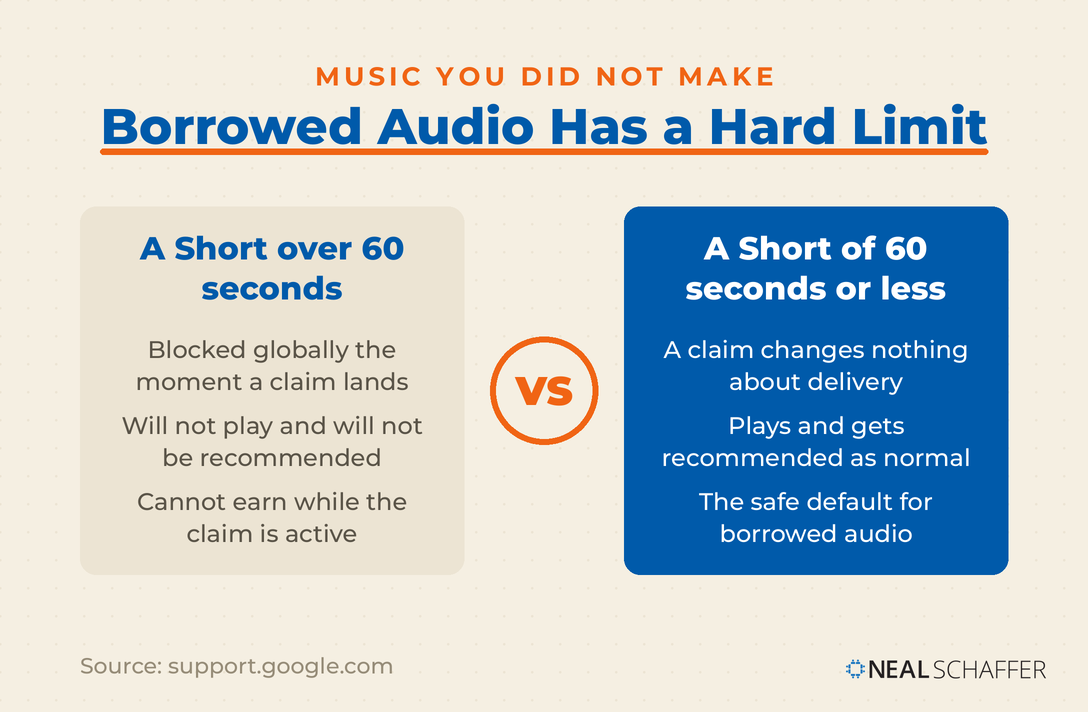
That alone is a strong argument for staying under 60 seconds if you use music you did not create. My own numbers make a second argument for the same thing.
How Long Can a YouTube Short Be?
A YouTube Short can be up to three minutes long. YouTube raised the limit from 60 seconds on October 15, 2024, applying it to videos that are square or taller in aspect ratio. Three minutes is the ceiling. The length that actually holds an audience sits nowhere near it, and my own channel data says so plainly.
YouTube framed the change in its announcement of longer Shorts as giving creators “more flexibility to tell your story.” Flexibility is the right word for it. Permission would be the wrong one.
Here is the last 365 days across my Shorts, comparing how long each one runs against how much of it people actually watch:
| Short length | Videos | Median share watched |
|---|---|---|
| Under 40 seconds | 37 | 70% |
| 40 to 59 seconds | 69 | 56% |
| 1 to 2 minutes | 64 | 55% |
| Over 2 minutes | 12 | 22% |
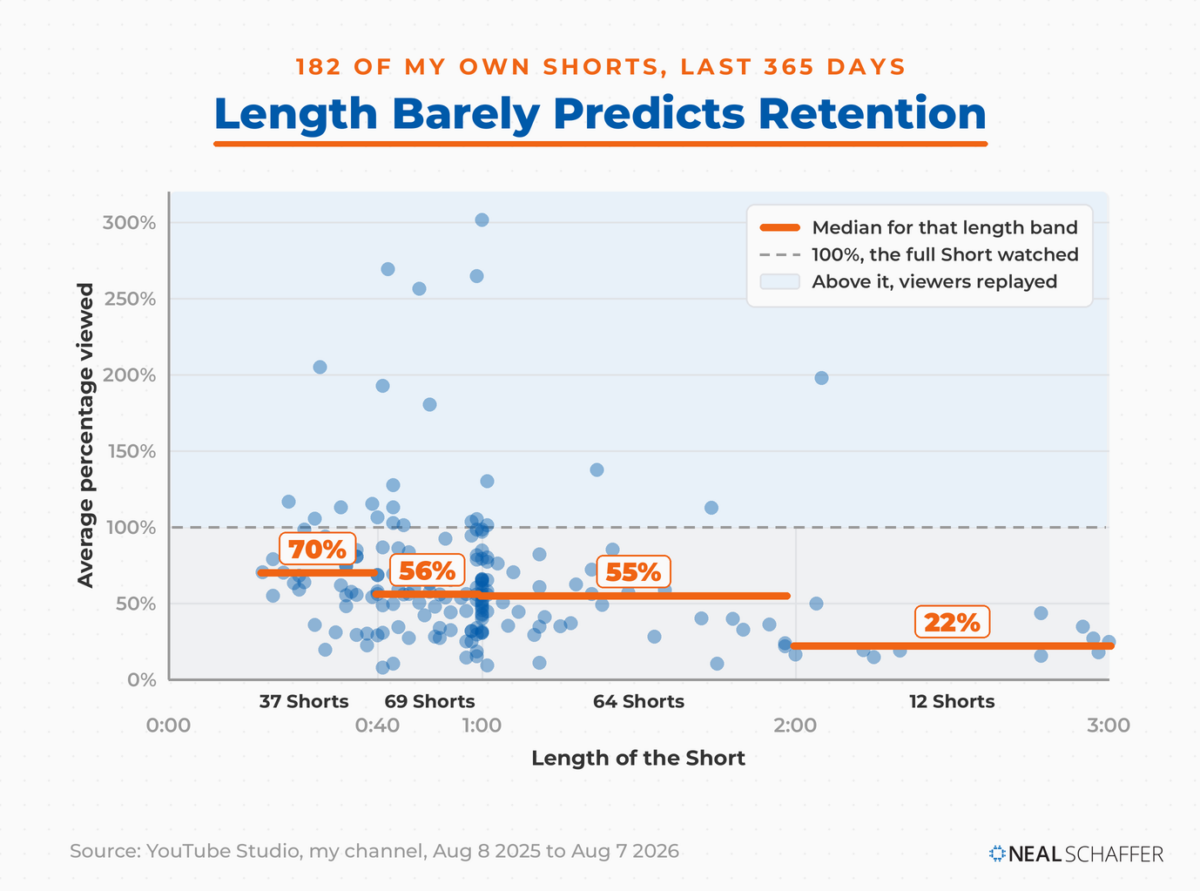
Under 40 seconds holds up best. Everything between 40 seconds and two minutes lands in the mid-fifties, barely distinguishable from itself. Past two minutes it drops to less than a third of the video.
The LinkedIn Playbook for Real Business Growth
My latest book helps professionals, entrepreneurs, and business owners turn LinkedIn from a static profile into a real source of clients and growth.
Maximizing LinkedIn for Business Growth gives you clear, practical steps to build a profile that gets noticed and a network that actually sends business your way.
Grab your copy on Amazon and put it to work this week. Click the cover or the button below to get started.

The spread inside every band is wide, and that is the honest headline. Length correlates with retention only weakly on my numbers, which means content is doing far more of the work than duration is. Shortening a weak Short will not save it. If the idea is the weak link, start from a list of YouTube Shorts ideas rather than the trim tool.
The figures above 100% are not errors. Those are replays, where viewers watched a Short more than once, and that behaviour is exactly what makes looping Shorts worth building on purpose.
This is 182 Shorts from one channel, and a part-time one at that. Treat the bands as a signal worth testing against your own analytics rather than as a rule. What convinced me is that the direction held across the whole library rather than just the videos that did well.
For a benchmark outside my own channel, Wistia analyzed over 13 million videos for its 2026 State of Video Report. It found that videos under a minute average a 52% engagement rate. My Shorts average 59.7%. Short-form holds attention well, and stretching toward the ceiling gives that advantage back.
Dane Golden, founder of the YouTube ads agency VidAction, told me on my podcast that most creators ask the wrong question. They want to know how to get more views and more subscribers. His reframe: “how do you get the right people to watch longer?”
That applies directly to length. Pick the shortest duration that finishes your idea.
How Do You Make a YouTube Short, Step by Step?
You can make a YouTube Short two ways. Record one inside the YouTube mobile app using the Shorts camera, or upload a vertical file you built elsewhere through the app or through YouTube Studio. The app route is faster for talking-head clips. The upload route is better for anything edited, branded, or repurposed from longer footage.
To record one in the app:
- Open the YouTube app and tap Create. The Shorts camera opens straight away, with Short already selected in the mode selector along the bottom.
- Set your length using the duration control on the right of the recording screen.
- Hold or tap the capture button to record, then tap again to stop. Record as many clips as you need.
- Add music, text, filters, or effects from the editing tools.
- Tap Next, add a title of up to 100 characters, then set your audience and privacy.
- Tap Upload Short, or save it as a draft.

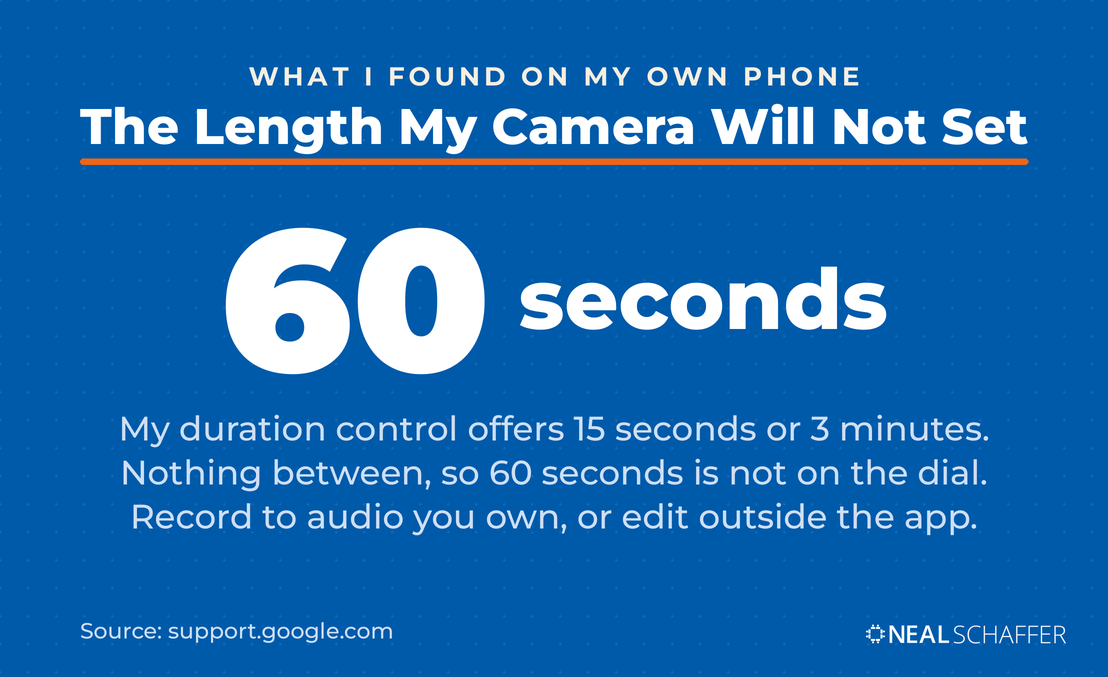
One quirk is worth knowing before you record. On my phone that duration control offers 15 seconds or 3 minutes and nothing in between, so there is no 60-second setting to stop at. That collides with the Content ID rule from earlier, where a claimed track blocks any Short over a minute. Record in-app to music you did not make and you can drift past that line without the camera ever warning you.
To upload one you made elsewhere, sign in to YouTube Studio, click Create, then Upload videos, and choose a file under three minutes with a square or vertical aspect ratio. YouTube handles the classification from there.
That second route is the one I use most, because I am usually repurposing something. Editing outside the app also leaves you with a clean master file, and any of the video editing apps worth your time will export straight to 9:16. Adobe has built a dedicated Shorts workspace into Premiere on iPhone, and I lean on Adobe Express for the same job.
I walked through the whole workflow in the video below, “I Made 10 Short Videos in Minutes Using Adobe Express,” turning one recording session into ten finished clips. Worth saying plainly: I am an Adobe Express Ambassador, and that video was made under that partnership.
Before you publish, give the title and thumbnail a moment of thought. Shorts autoplay in the feed, but they also surface in YouTube search and on your channel page, where a viewer decides whether to tap. The same thumbnail principles that apply to long-form apply here too.
Making one is straightforward. Controlling whether YouTube treats it as a Short is where the real questions start.
How Do You Turn a Video Into a Short, or Stop One From Becoming a Short?
To turn a video into a Short, make it square or vertical and under three minutes, then upload it. To stop a video from becoming a Short, export it in a wider aspect ratio such as 16:9. YouTube classifies automatically on those two attributes, so the ratio you export at is your decision point, not a setting you pick afterward.
This catches people who film vertically out of habit. A two-minute vertical clip you intended as a regular video will land in the Shorts feed. It enters the Shorts revenue model too, in front of a swiping audience rather than a searching one.
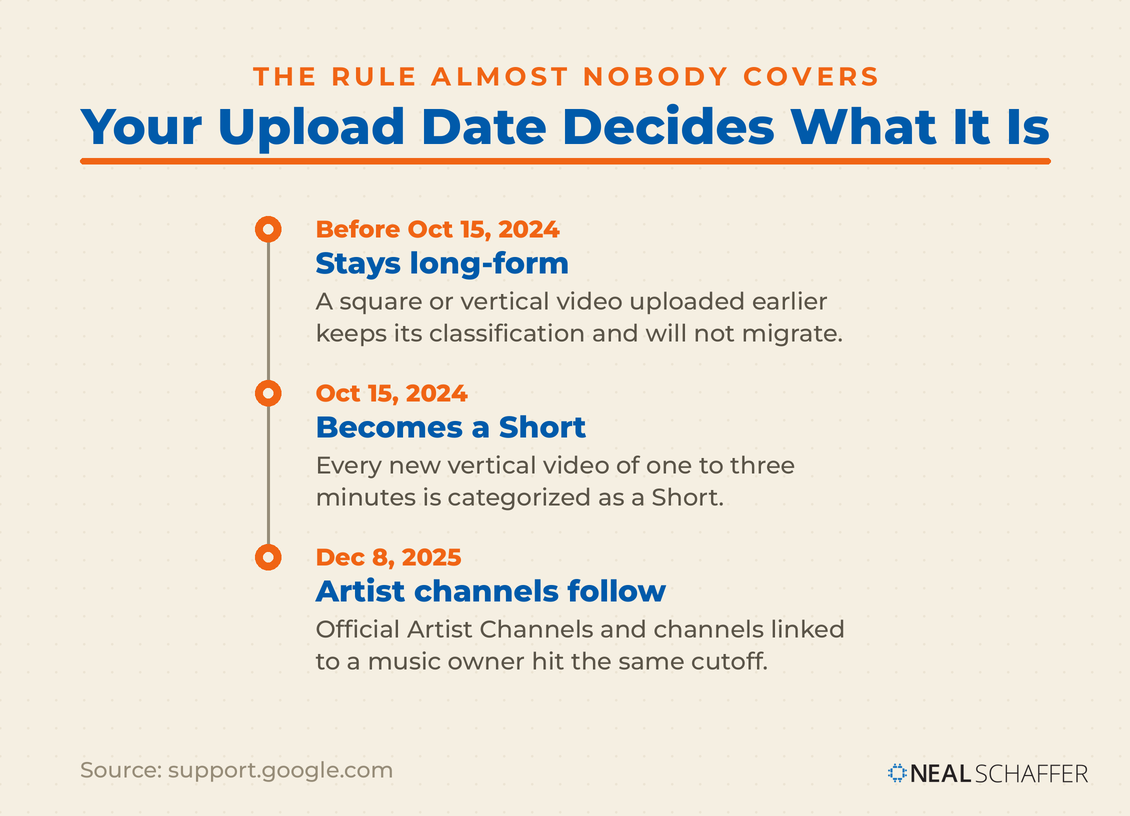
Upload date matters as well, and almost nobody covers it. Videos uploaded on or after October 15, 2024 are categorized as Shorts if they are square or vertical and run under three minutes. Anything uploaded before that date stays long-form. Official Artist Channels have their own cutoff of December 8, 2025.
So an old vertical two-minute video already sitting on your channel is still long-form, and it will not migrate to the Shorts feed on its own. Re-uploading it would reclassify it, at the cost of starting its view count from zero.
Repurposing across platforms turns this into a workflow question rather than a trivia question. Worth deciding which short-form video types suit which surface before you export anything.
Controlling the classification only pays off if the format earns its place in your marketing. Mine has, though not in the way I assumed it would.
What Do Shorts Actually Do for a Channel?
Shorts are a discovery format. They earn attention efficiently and convert subscribers inefficiently, at least on my channel. Over the last 365 days my Shorts held far more of each viewer’s attention than my long-form video did. And yet long-form turned engaged viewers into subscribers at roughly twice the rate, which was not the result I expected going in.
| Metric | Shorts | Long-form video |
|---|---|---|
| Engaged views | 8,153 | 12,483 |
| Average percentage viewed | 59.7% | 18.9% |
| Subscribers gained | 20 | 56 |
| Engaged views per subscriber | 408 | 223 |
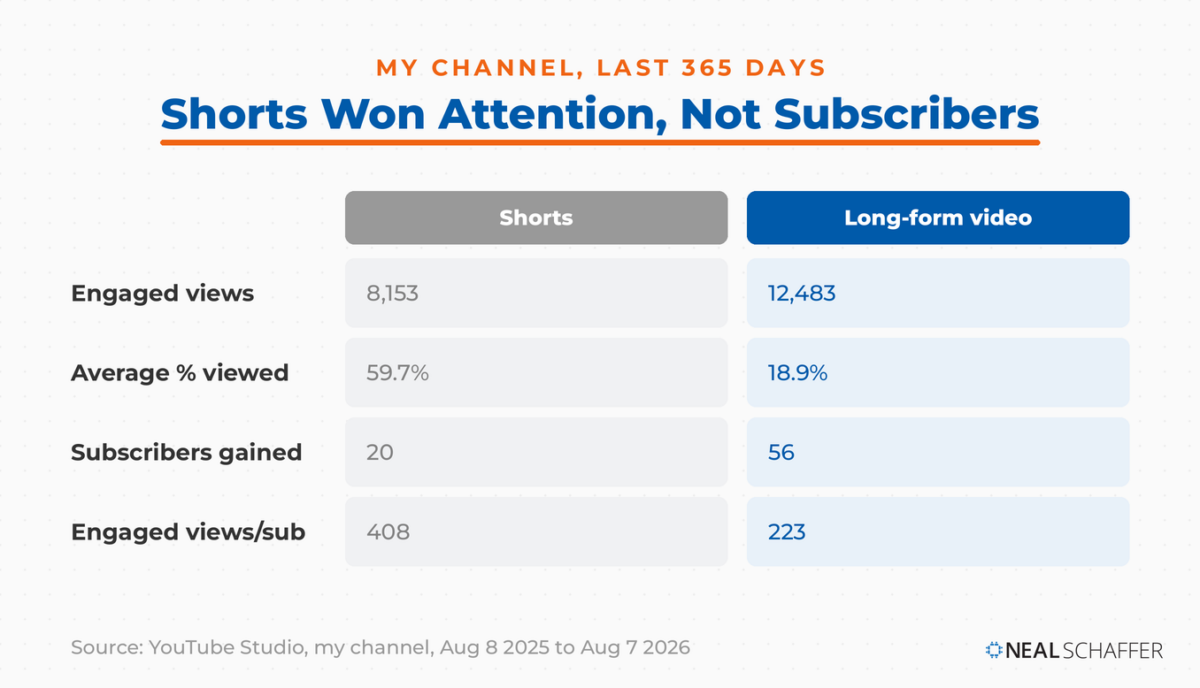
I will be honest, that second column surprised me. I went in assuming Shorts were the growth engine and long-form was the depth play. Retention says Shorts win on attention by a mile. Subscribers say the people who sit through a full long-form video are far likelier to commit.
The usual caveat applies harder here than anywhere else in this post. Twenty subscribers against fifty-six is a small gap on small numbers, from a channel posting Shorts occasionally rather than daily. A creator publishing every day would likely see a different ratio. Run the same comparison on your own channel before you plan around mine.
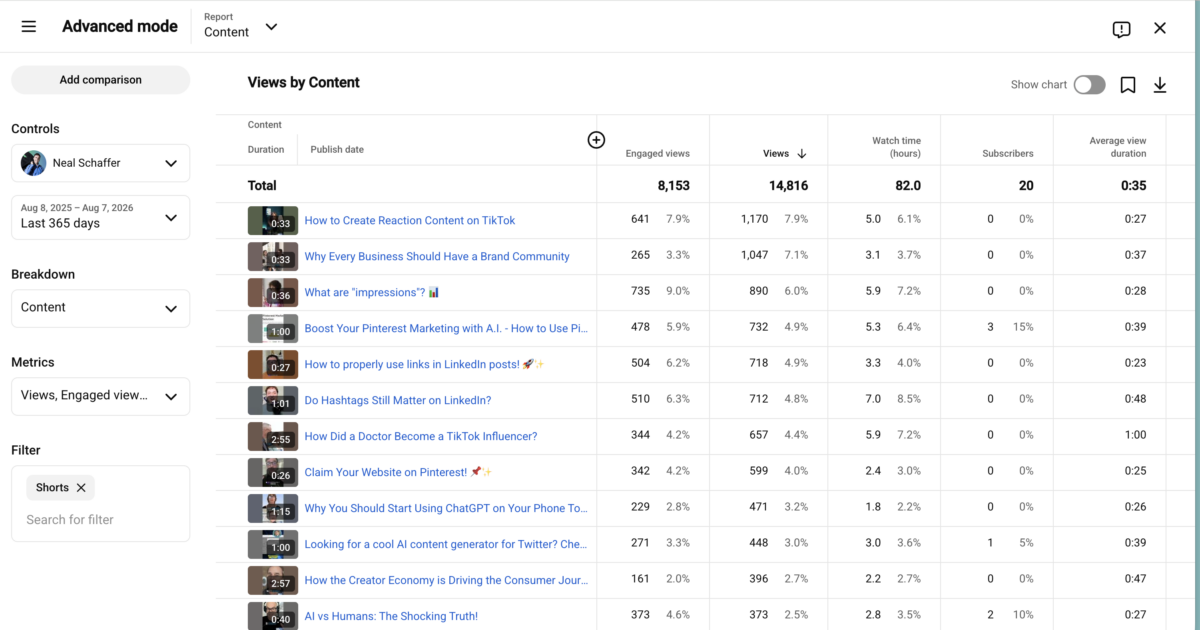
There is a metric wrinkle worth understanding before you read your own numbers. YouTube changed how Shorts views are counted on March 31, 2025, so a view now registers every time a Short starts to play or replay, with no minimum watch time. The stricter original metric survives in YouTube Analytics under the name Engaged views.
The gap between the two is large, and it is the gap I flagged at the top of this post. My 14,816 views against 8,153 engaged views works out to 45% of views that never became engaged views. If you report Shorts performance to a client or a boss, know which of the two numbers you are quoting.
None of this makes Shorts a poor investment. It makes them a top-of-funnel one, best paired with long-form video that earns the subscription. Read your own numbers against the wider video marketing benchmarks that show where short-form sits in the mix.
If that makes the format sound worth committing to properly, the next question is usually whether Shorts deserve a channel of their own.
How Do You Start a YouTube Shorts Channel?
You do not need a separate channel for Shorts. Any YouTube channel can publish them, and Shorts sit alongside long-form video, live streams, and posts on that same channel. Building a dedicated Shorts channel splits your audience and your watch-history signals across two entities, which usually costs more than it returns.
The exception is a genuine topic mismatch. If your Shorts serve a different audience from your long-form work, a second channel keeps the recommendation signals clean. Short of that, publish everything in one place.
Consistency and topic focus matter far more than channel structure. YouTube pushes videos from channels it can categorize, and a scattered channel is a hard channel to categorize. The same YouTube SEO fundamentals that govern long-form apply to Shorts: clear topics, accurate titles, relevant hashtags.
If you are earlier than that and still setting up, start with the channel-level decisions involved in becoming a YouTuber.
Frequently Asked Questions
Up to three minutes. YouTube raised the cap from 60 seconds on October 15, 2024 for videos with a square or taller aspect ratio. Videos uploaded before that date keep their original long-form classification.
YouTube does not publish one. The widely repeated 15-second minimum comes from the original Shorts camera default, not from any publishing requirement.
Because YouTube classifies square and vertical videos under three minutes as Shorts automatically. To keep a video out of the Shorts feed, export it in a wider aspect ratio such as 16:9.
Views count every play or replay with no minimum watch time. Engaged views count viewers who chose to keep watching. Engaged views is the stricter measure, and it is what YouTube Partner Program eligibility and Shorts revenue sharing run on.
Across 182 of my Shorts, the median under 40 seconds held 70% of the video, against 22% for those over two minutes. Everything in between clustered in the mid-fifties. Start short and lengthen only when the idea genuinely needs the room.
Start Publishing Shorts That People Finish
Making a Short is the easy half. The half that decides whether it works comes down to three choices. Pick a length your idea can genuinely fill. Export at the aspect ratio that gets it classified the way you intended. Then read the metric that tells you something true. Here is where to start.
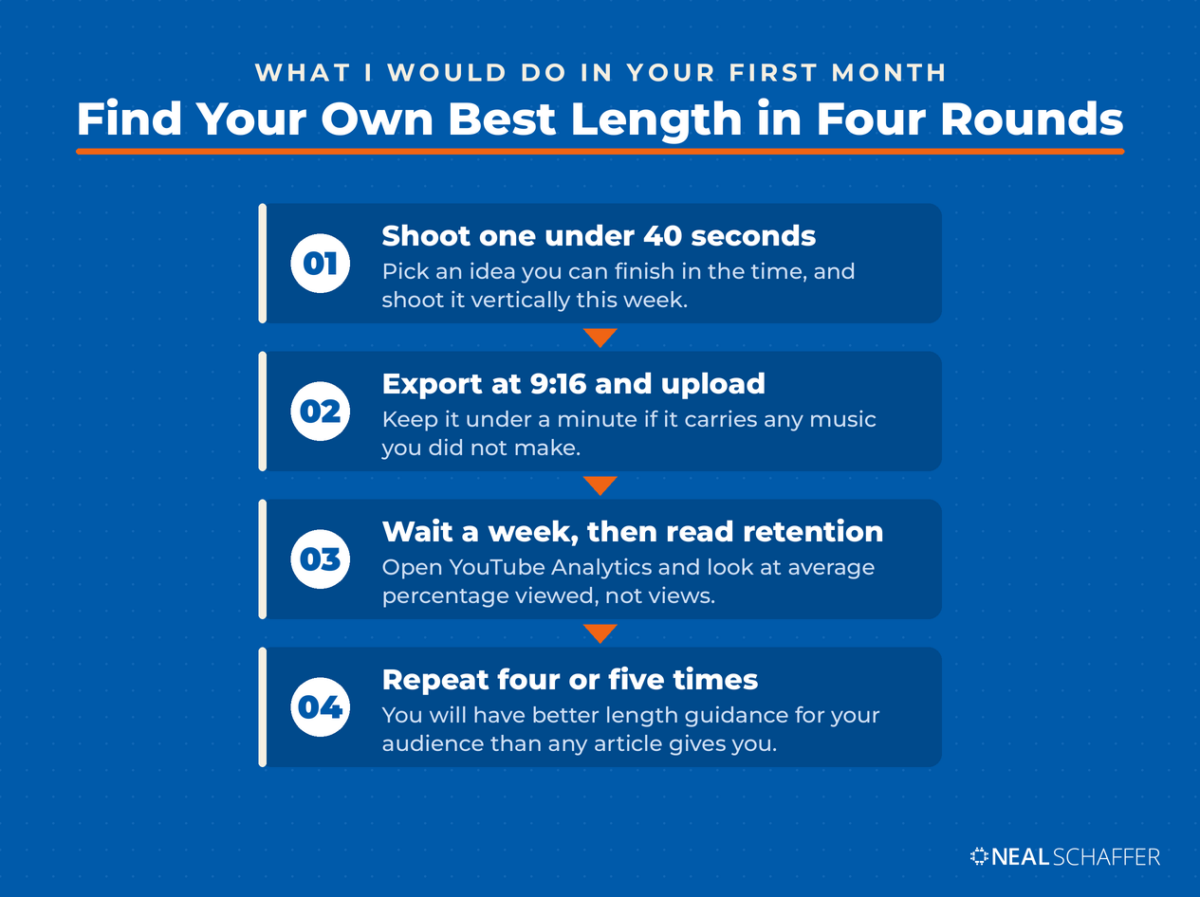
Pick one idea you can finish in under 40 seconds and shoot it vertically this week.
Export at 9:16, keep it under a minute if it carries any music you did not make, and upload it through YouTube Studio.
Wait a week, then open YouTube Analytics and look at average percentage viewed rather than views. Note which Shorts held people past the halfway mark.
Repeat that four or five times and you will have better length guidance for your specific audience than any article can give you, mine included.
If your Shorts are publishing but nobody is seeing them, the reasons Shorts fail to pick up views are worth working through before you change anything else. And if you want help fitting video into a coordinated digital strategy, grab a free preview of Digital Threads or talk to me about Fractional CMO services.





Shorts are so much harder than … longs. People these days have no idea how to be concise.
By the way, nice way to sneak in a few selfies.
Hey David, thanks for the comment! I believe that Shorts are just a completely different beast than horizontal long-form videos, both in terms of content as well audience!