


Shorts is one of the most crowded surfaces on YouTube, and short vertical video is now the default rather than the experiment. The format itself is not new, since TV commercials and other spots have run this length for decades. What is new is the behavior YouTube built into Shorts, and most creators still treat it as a quirk instead of a lever.
It used to be that YouTube videos tended to be longer since people would record about things that interested them, and there weren’t a lot of commercial concerns. Now, although we still have plenty of long videos, short-form video has also become very popular. One reason for this, of course, is TikTok. Love it or hate it, this platform is giving everybody a run for their money.
What does this have to do with YouTube Shorts looping? Quite a bit. We’ll go into the benefits of multiple video views later, but the major question is how to get people to watch the same video over and over again.
Key Takeaways
✅ YouTube Shorts loop by default. If the viewer does not swipe up, the video starts over on its own, so replays are something you design for rather than something you ask for.
✅ Replays stack watch time and audience retention, two of the biggest factors in YouTube’s algorithm, so a Short that loops well gets recommended to more people.
✅ Under 15 seconds is the sweet spot. The shorter the Short, the more likely someone watches it three or four times before realizing they are in a loop.
✅ Skip the background music unless the music is the point. Repeating audio is what tips viewers off that they have already seen this, and that is when they swipe away.
✅ Two loop strategies work, and they pull in opposite directions. Hide the seam so nobody notices the restart, or write an ending surprising enough that people rewatch on purpose.
✅ Looping is a subscriber play, not a vanity metric. People rarely subscribe after one video, so a Short that earns four views from one person is doing the work of four videos.
What are YouTube Shorts?
Short-form vertical video. Shorts can run up to three minutes, after YouTube raised the ceiling from 60 seconds for anything uploaded on or after October 15, 2024. Most still come in well under a minute, and for looping that shorter range is where you want to be. Shorts can be shot on your phone and uploaded straight to YouTube through the app.
For many content creators, shorts are a way to create teasers for longer videos. In this sense, they can be a lot like movie trailers. A lot of shorts are also repurposed from TikTok or Instagram Reels, and as I’ve mentioned before, this type of cross-platform posting can be highly effective. That shift toward short vertical video shows up across the current video marketing statistics. Another effective way to use Shorts is to pass on tips and snatches of information.
What is YouTube Shorts Looping
If you have ever watched YouTube Shorts, the chances are that you have seen this phenomenon whether you realize it or not. Simply put, YouTube shorts looping is a built-in function within YouTube that loops shorts if the user does not swipe to change the video.
The major consideration with YouTube Shorts looping is that it allows people to watch the video several times. If you do it right, people may not even realize that your video has looped, and they’ll keep watching for a long time. However, this requires a certain technique and video type. You’ll also want to create very high-quality content, or people will scroll to the next one.
It’s worth noting that when a video starts over again, there’s often a little jump. This is true even if the video itself is relatively uniform. The trick is to keep people engaged with your content long enough to watch your videos a few times. Fortunately, this is much easier with the short format.
How does YouTube Shorts Looping Increase Video Views
Besides the fact that YouTube Shorts are fun to watch, there are several reasons people will sit through the same video repeatedly. To use this behavior properly you have to understand how it works, and why it pays off for you both as a content creator and as a marketer or advertiser.
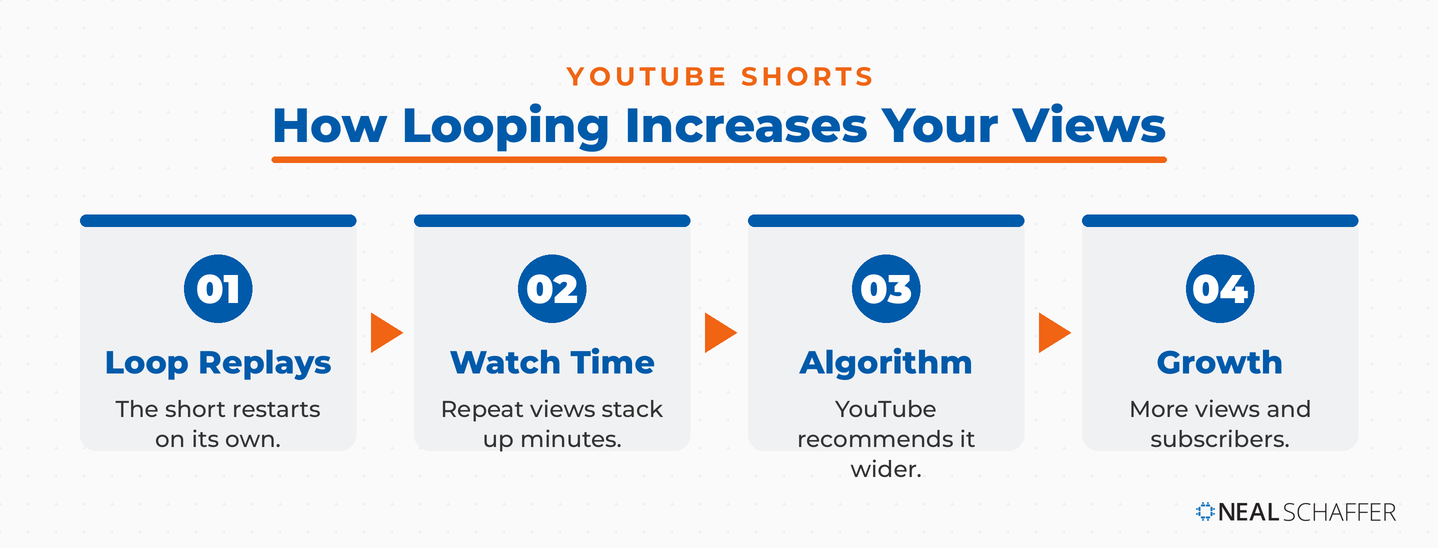
The biggest benefit of YouTube Shorts looping is that when the users do not swipe up, the shorts videos start playing again. This may lead the user to watch the shorts again and again. Often, it’ll be obvious that the video has been restarted, but in other situations where the video is well-crafted for Shorts, this may be less obvious. Of course, you may not have to make the video smooth sailing in order to keep people watching. Sometimes humor can be just as effective.
For the YouTuber, having viewers watch the same video several times means increased watch time and audience retention, both huge factors in their algorithm. In turn, your content will be recommended to more and more people who are interested in your topic and those whom YouTube thinks might enjoy it. If a Short is not being recommended to anyone yet, these reasons YouTube Shorts are not getting views are the place to start.
Therefore, looping shorts is a growth hack for creators to increase their views and subscribers. After all, people don’t subscribe to channels unless they’ve watched a few videos first. A good YouTube short is like putting your foot in the door of potential subscribers.
How to Loop YouTube Shorts?
YouTube Shorts loop by default. In that sense, YouTube is just like TikTok or Reels. That does not mean you can count on YouTube to hand you subscribers from repeated plays. For someone to stay past the end of the video, you need something compelling in it. Shorts are a lot like TV commercials that way, except that instead of deciding not to change the channel, the viewer decides not to swipe away.
5 Ways to Increase YouTube Shorts Watch Time
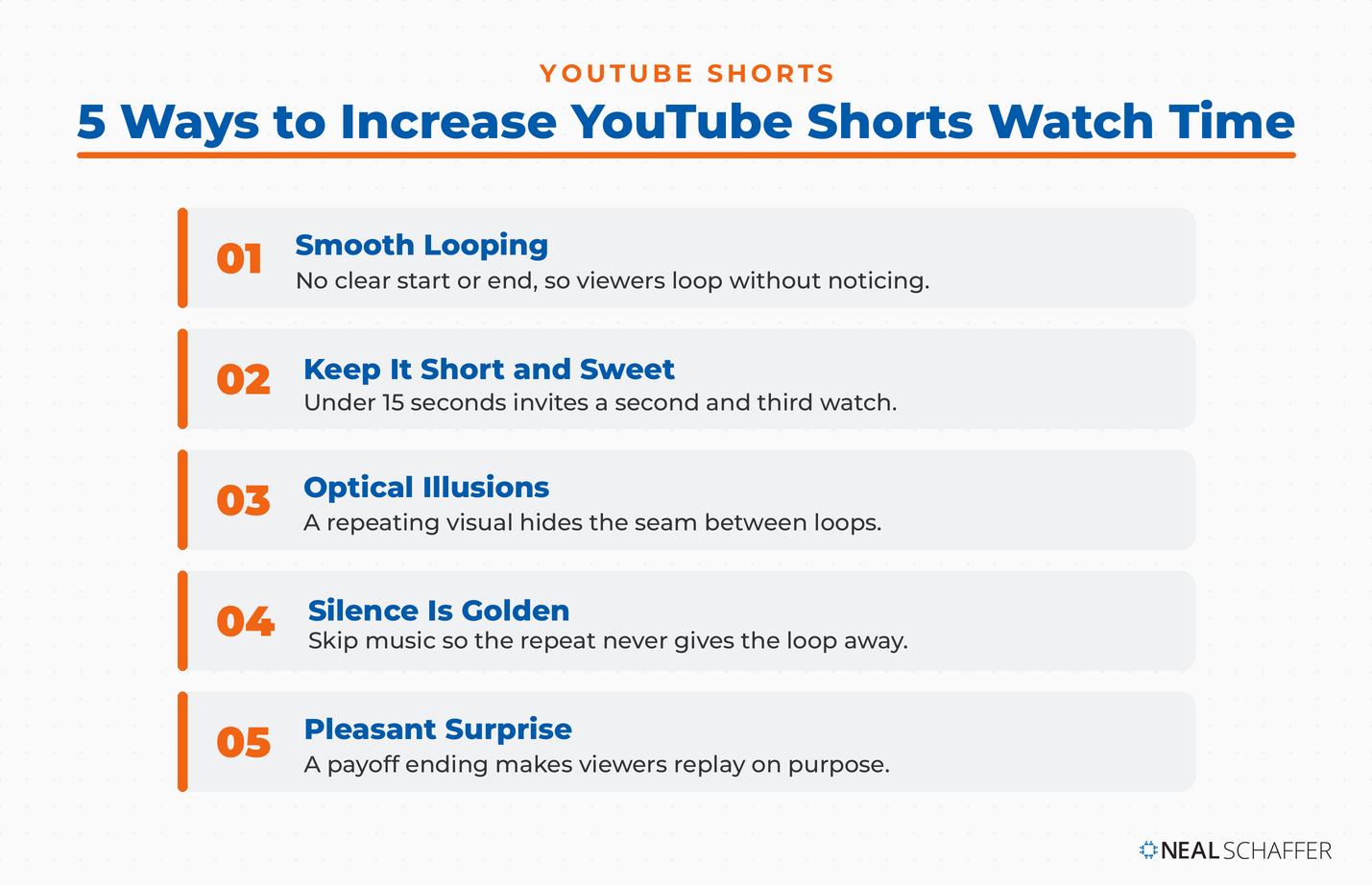
With that said, the best way to benefit from YouTube Shorts looping is by increasing your watch time. Because shorts don’t last very long, you can achieve this result primarily by having people watch the video several times. In other words, you need to achieve that effect of “trapping” the viewer in your looped video. Here are some techniques that can help.
1. Smooth Looping
Try to build a video with no well-defined beginning or ending, so the viewer never registers that they have already watched it. This will not get you 100 plays from one person, but five or ten is realistic. Because a Short runs three minutes at the very most and usually far less, those replays are how watch time accumulates at all.
Of course, this also means your views count will increase rapidly. YouTube loves to see that people watch your videos a lot, and it’s unclear to what extent YouTube considers the number of views per person. But either way, the more times somebody watches your material, the better.
2. Keep It Short and Sweet
Make the video very short, under 15 seconds. The shorter it runs, the more likely someone watches the loop without realizing it. Part of why this works is that people assume there is more coming, so they sit through it several times before they catch on. If the video is good, they will not mind the replays. They only feel cheated when the video was thin to begin with.
3. Optical Illusions don’t Hurt
Adding one still frame to the start and the end of the video will make it harder for viewers to realize they are in a loop as well. You can see a similar technique in TV commercials where the company puts a brand logo at the beginning and end of the spot. However, in their situation, the aim is merely to make an extra impression before audiences either get up and make popcorn or flip the channel.
Similarly, some footage lends itself well to going from beginning to end and back again. A good example of this might be showing the same gymnastics jump over and over again. In this case, you would have an optical illusion whereby the viewer may be unsure if the gymnast is doing one somersault after another, and that’s the entire video. It may take a while for the viewers to realize that it’s the same YouTube Shorts looping. The possibilities are endless if you have some imagination. If you need a starting point, run through these ideas for YouTube Shorts with a loop in mind.
The LinkedIn Playbook for Real Business Growth
My latest book helps professionals, entrepreneurs, and business owners turn LinkedIn from a static profile into a real source of clients and growth.
Maximizing LinkedIn for Business Growth gives you clear, practical steps to build a profile that gets noticed and a network that actually sends business your way.
Grab your copy on Amazon and put it to work this week. Click the cover or the button below to get started.

4. Silence is Golden
Skip the music. Repeating audio is the fastest way to ruin the effect, because the viewer hears the same few bars come around again and knows exactly what is happening. Most of us have had the same experience on hold with a customer service line or a medical office, where the track is a loop of a minute or two before it starts over. Leave anyone on hold long enough and the loop is the only thing they can hear.
Therefore, don’t add music unless the music itself is your theme like you would if promoting a new record album. And in this case, make it catchy so people will want to hear the riff or the chorus again and again.
5. Consider a Pleasant Surprise
This goes against the first tip, but it’s another approach: Make the ending such a surprising (and funny/shocking / etc. emotional-triggering event) one that people naturally want to rewatch and re-experience the build-up and release. In other words, don’t “dupe” people into the loop but make them want to watch your video repeatedly.
You’ll see something similar with comical YouTube shorts. For instance, I know of one YouTuber whose shorts feature their family dog. This dog supposedly carries on a funny monologue, and it’s hard to catch all jokes the first time. Many of them are outlandish!
Either way, the idea is to grab people’s attention and keep it. Those five techniques cover the mechanics of the loop. The questions below are the ones I get asked most often once creators start using them.
Frequently Asked Questions About YouTube Shorts Looping
Yes. Looping is built into YouTube and there is no setting to switch on. As long as the viewer does not swipe up to the next video, your Short restarts and plays again on its own.
Under 15 seconds is where looping works best. At that length a viewer can watch three or four times while still expecting more to come. Longer Shorts make the restart obvious, and an obvious restart is a cue to swipe away.
Usually not. Repeating audio is the fastest way for someone to notice they are watching the same clip again, and once they notice, they leave. The exception is when the music itself is the product, like a hook from a track you are promoting, where you want people replaying the riff on purpose.
Both, indirectly. Replays raise watch time and audience retention, which is what pushes YouTube to recommend your Short more widely. Almost nobody subscribes after a single video, so several views from the same person move them closer to subscribing than one view ever could.
It can, and some viewers hate it. Readers have told me on this very post that clumsy loops, the ones that start mid-sentence and end mid-sentence, make them mark the channel as one they never want recommended again. Done wrong it annoys. Done right it adds value, and that call belongs to the viewer rather than the creator.
Conclusion
Anyone who is trying to build their YouTube channel should know about YouTube Shorts looping. This automatic process on the YouTube platform is something that, if properly leveraged, can drastically improve both your view counts and your watch time. And in addition, both of these statistics help boost your position in the algorithm. It’s a classic case of the more engagement you get, the more it will help you increase your following.
Of course, as your subscriber numbers grow, and your shares are increased, you not only pick up subscribers but also improve the reach of your brand. Over time, your brand will become more visible to your target audience. Then, your reach can expand beyond the target and boost your overall sales and secondary buyer personas. What’s not to like about that?



It’s shit like this that’s ruining the internet. There’s no value in looping. It just serves to annoy.
When done wrong it can annoy. When done right it might actually add value. But it depends on the viewer and not the creator, as you suggest.
God I hate channels that do shit like this. I hope they enjoy the extra 1-2 views worth of hits that I SOMETIMES give them from this, because whenever I see a channel that does this where they start they start the video with awkward wording and then end the short mid-sentence so that it loops. I always click the “Don’t Recommend This Channel” button on those that do this, and I sometimes even catch it before it has a chance to loop for the first time. Its easy since the majority are copyright content(clips from movies or shows or podcasts). I’ve been trying to find a way to have Shorts automatically move to the next one though.
Yes, user engagement – as well as dis-engagement – is something to consider for sure. Thanks for sharing your opinion!