Facebook Ads Retargeting: A Complete Guide to Smarter, More Profitable Ads in 2026
Editorial Note: I may earn a commission when you visit links that appear on my website.
Facebook Ads retargeting shows personalized ads to people who have already interacted with your content, website, or app. These are “warm” leads. They have already shown intent, and retargeting is your chance to bring them back and convert them.
If you’re only targeting cold audiences, you’re leaving money on the table.
This guide covers how Facebook Ads retargeting works in 2026, how to set it up, which campaign types to run, how much budget to give it, and the mistakes that waste that budget.
Key Takeaways
✅ Retargeting focuses on “warm” audiences (people who already visited your site, watched your videos, or engaged with your content), so they convert far more often than first-time, cold traffic.
✅ The Meta Pixel and Conversions API (CAPI) are your tracking foundation. Running both together protects your data after iOS privacy changes and keeps your audiences accurate.
✅ Custom Audiences let you segment by behavior, from cart abandoners and product viewers to video watchers and past buyers, so each group gets the message it needs.
✅ Allocate roughly 10 to 20% of your total Facebook Ads budget to retargeting, then scale proportionally as your ROAS holds.
✅ Refresh creative every two to three weeks, exclude users who already converted, and cap frequency at three to five impressions per week to avoid ad fatigue.
What Is Facebook Ads Retargeting?
Facebook Ads retargeting (also called Facebook remarketing) shows relevant ads to people who have already interacted with your brand, whether through your website, social content, video views, lead forms, or purchases. The goal is to bring them back into your funnel.
Facebook does this using tools like the Meta Pixel, Conversions API, and Custom Audiences. These tools allow advertisers to track behaviors, build segments through audience segmentation and targeting, and retarget people across Meta’s platforms (Facebook, Instagram, Messenger, etc.).
Key Facebook Retargeting Ads Triggers:
- Website visits (via Meta Pixel or Conversions API): Tracks site visitors who have visited specific URLs on your website so you can retarget them with tailored messages based on their behavior.
- Video views: Captures users who watched part or all of your videos on Facebook or Instagram, indicating interest in your brand or content.
- Facebook/Instagram page engagement: Targets users who have liked, commented, shared, or clicked on posts from your business page or Instagram profile. These users are likely fans of your brand.
- Facebook/Instagram ad engagement: Allows you to retarget those who have interacted with previous ads, such as clicking a link, reacting, or watching a video.
- Shopping cart abandonment: Reaches people who added products to their cart but didn’t complete the checkout process.
- In-app activity: Focuses on users who have installed and interacted with your mobile app, such as browsing or searching for items on their screen.
- Customer email or phone lists: Uses your existing CRM, email, list of contacts or customer list to retarget known users by uploading their user IDs.
- Event interest or attendance: Lets you reconnect with people who showed interest in or RSVP’d to an event you promoted through Ads Manager.
Why Retargeting Matters: The ROI Multiplier
Retargeting works because it focuses on people who already know you, and most of them are still on Facebook. My roundup of the latest Facebook statistics puts a majority of American adults on the platform. Most of the people who leave your site can still be reached there.
Bringing people back also makes the rest of your ad funnel more efficient. Your spend goes to people who already know you, which tends to lift ROAS (return on ad spend) and lower cost per acquisition. That matters most for Shopify sellers and small businesses working with small ad budgets.
How Facebook Retargeting Works
Retargeting runs on tracking tools like the Meta Pixel (or the newer Conversions API, known as CAPI), which record what visitors do on your website. When someone views a product, adds to cart, or signs up for a free trial, that event is sent back to Facebook.
From there you build what Meta calls a Custom Audience, a group assembled either from your own data, such as a customer list or offline purchase records, or from Meta engagement data, such as people who visited your site or watched your videos. Meta supplies the signal and the matching, but you decide who goes into the audience. You can then show that audience highly relevant ads to remind them to come back and convert.

Meta Pixel vs. Conversions API (CAPI)
It’s worth noting that with today’s privacy updates (like iOS changes), the Meta Pixel alone doesn’t always give you complete tracking data. That’s why Facebook now recommends adding the Conversions API, which sends conversion event data directly from your server back to Facebook.
Running both together captures more of the data the Pixel alone now misses, which keeps your retargeting audiences more accurate and your spend more efficient.
Pixel-Based Retargeting vs. List-Based Retargeting
Finally, remember there are two main ways to build your retargeting audiences:
- Pixel-based: Uses the Pixel or CAPI to track website actions automatically.
- List-based: Uses email lists you upload manually. Great for re-engaging subscribers or customers who already know your brand.
Both have their place. For most marketers, pixel-based audiences backed by CAPI give the most scale with the least manual work, while lists reach known customers who rarely visit your site.
How to Set Up Facebook Retargeting Ads
Step 1: Install the Meta Pixel or Conversions API
The Meta Pixel (formerly the Facebook Pixel) is a small code snippet added to your website that tracks visitor behavior. The Conversions API sends similar data from your server instead, which holds up better since the privacy changes that arrived with iOS 14.5.
Learn how to install the Meta Pixel here.
Note that if you are a WordPress user, Meta publishes a plugin that walks you through this. It is now listed as Meta pixel for WordPress, and it supports the Conversions API alongside the Pixel. You will still see it called Facebook for WordPress in older write-ups, including plenty that are still ranking.

Step 2: Create Facebook Custom Audiences
Log in to your Facebook Ads Manager and select Audiences.
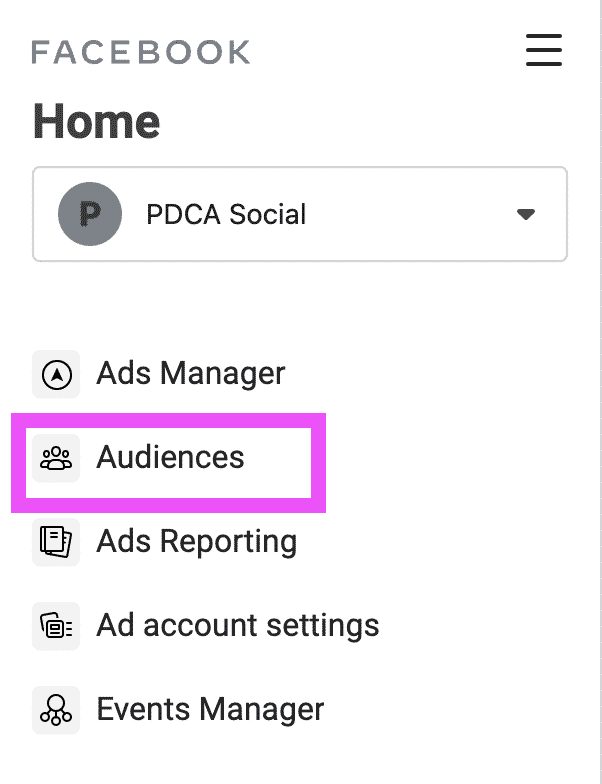
Click on Create Audience and select Custom Audiences.

Now select an option for your custom audience source:

Finally, the next screen is where you can customize your target audience:
Make LinkedIn Your Best Source of Clients
My latest book helps professionals, entrepreneurs, and business owners turn LinkedIn from a static profile into a real source of clients and growth.
Maximizing LinkedIn for Business Growth gives you clear, practical steps to build a profile that gets noticed and a network that actually sends business your way.
Grab your copy on Amazon and put it to work this week. Click the cover or the button below to get started.

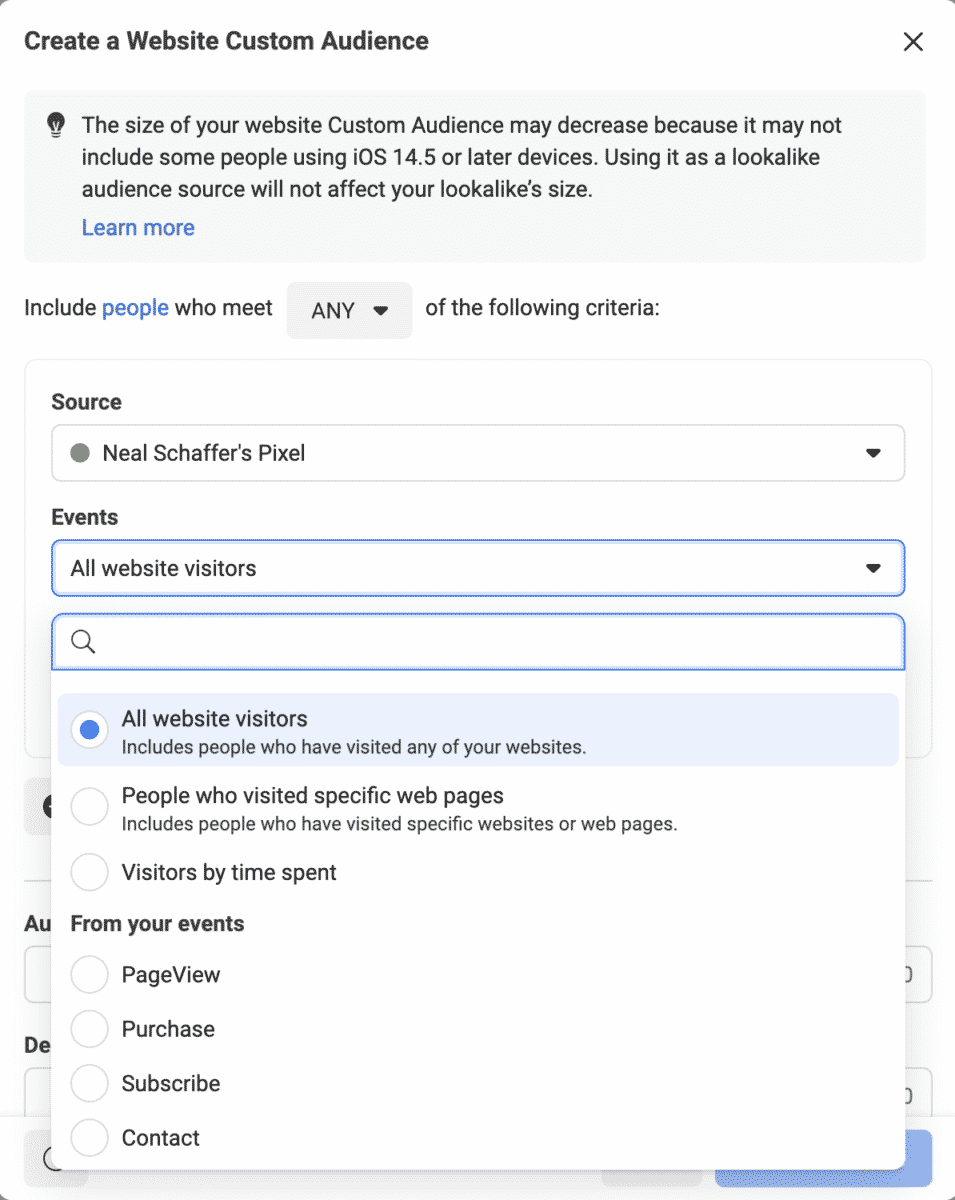
Here, you can build segmented groups like:
- People who visited your website in the last 30 days
- Users who added to cart but didn’t purchase
- Leads from your CRM or email list
- Video viewers who watched at least 50% of a specific video
- People who engaged with your Instagram profile in the last 90 days
- Facebook or Instagram event RSVPs
You can also exclude certain audiences, like users who have already purchased.
Step 3: Launch a Retargeting Campaign
Create a campaign and select a Custom Audience in the ad set level. Be sure your copy and creative match the intent of that target audience. For example:
- For cart abandoners, remind them what they left behind with a discount
- For past purchasers, offer a cross-sell or upsell
- For video viewers, show testimonials or limited-time offers
- For leads, offer case studies or demos
8 High-Impact Facebook Retargeting Campaign Types
Each campaign type below matches a specific behavior, such as viewing a product, watching a video, or abandoning a cart. That way the message fits what the person already did. Pick the types that line up with the marketing goal you are working on now.
1. Cart Abandonment Campaigns
When someone adds a product to their cart but leaves without buying, retarget them with an ad that shows the product they were interested in.
2. Product View Retargeting
These users browsed specific product pages but didn’t take further action. Show them that product again, or pair it with social proof or a time-sensitive deal.
3. Content Retargeting
Retarget users who engaged with blog posts, guides, or videos with the next step in your funnel (like signing up for a webinar or downloading a lead magnet).
Example: ClickUp opened a retargeting ad by referring back to a productivity guide the reader had already seen, then framed the software trial as the next step rather than a cold pitch. What is documented here is the ad copy itself, not the audience setup behind it.
4. App Engagement Retargeting
Encourage app users who dropped off to re-engage.
5. Cross-Sell or Upsell Ads
Show new products to customers who have already made a purchase, and tailor the offer to what they bought. The mechanic that makes this work is the exclusion rather than the targeting: build the audience from buyers of one product and exclude buyers of the product you are about to advertise, or you will pay to show a cross-sell to people who already own both items.
Timing carries as much weight as the offer. A cross-sell that lands the same day reads as a checkout upsell the customer already declined. One that lands after the first product has arrived and been used has something real to build on.
Example: Salt & Stone ran a cross-sell ad to customers who had already bought its deodorant, offering a Body Mist in the same scents. The ad works because it builds on a scent the buyer already chose, so the second product reads as an extension of the first rather than a fresh decision. No performance figures were published alongside it.
6. Loyalty Campaigns
Target your most loyal customers with early access or exclusive offers.
7. Event Retargeting
For webinars, product launches, or limited-time promotions, retarget users who clicked “Interested” but didn’t register or purchase.
8. Lead Nurturing Campaigns
Retarget people who have signed up for a lead magnet or filled out a form but haven’t taken further action. Serve them more information, testimonials, or a demo offer to move them down the funnel. An invitation into your community asks less of them than a demo does, and my guide to promoting a Facebook Group with ads covers how to run that as its own campaign.
How Much Should You Spend on Retargeting?
Because retargeting audiences are smaller, your budget should reflect that. Once you know how much Facebook Ads cost for your goals, a good rule of thumb is to allocate 10 to 20% of your total Facebook Ads budget to retargeting.
If you’re spending $100 per day on Facebook Ads:
- $5 to $10 could go to cart abandonment ads
- $5 to loyalty and cross-sell campaigns
- $5 to video viewers and content downloaders
If you’re scaling, increase proportionally. Benchmarks put retargeting in a different band from cold prospecting: MetricsWatch reports retargeting campaigns running 4.0 to 5.5 ROAS against 2.0 to 3.0 for prospecting, with dynamic product ads sitting between them. Treat the top of that band as something to aim at, not something to expect in month one.
Retargeting Best Practices for 2026
Segment Your Audiences
Don’t treat all past visitors the same. Break out your audiences based on key behavior signals like website traffic, product views, cart activity, time spent on site, video watch time, or engagement levels. This allows you to tailor messaging through greater personalization and show the right offer at the right time.
Use Dynamic Product Ads (DPAs)
For ecommerce businesses, dynamic retargeting ads automatically show each person the products they browsed or left in their cart. You don’t build an ad for every product. Facebook pulls images, prices, and descriptions from your catalog’s product feed to personalize each ad.
Refresh Your Creatives Often
Retargeting audiences are smaller, so the same people see the same creative again and again. Fatigue sets in faster than it does with cold audiences. Plan on refreshing both images and copy every two to three weeks as a starting point, and sooner if your frequency climbs. Test different formats like dynamic ads, carousels, videos, and user-generated content.
Offer Incentives
A gentle nudge like 10% off, free shipping, or a bonus gift can tip a hesitant buyer into checking out. Use time-sensitive offers to create urgency, especially around sales periods like Black Friday, but be cautious not to train your audience to expect constant discounts. Limited-use promo codes and tiered incentives can help balance urgency with profitability.
Match the Ad to the Funnel Stage
Tailor your creative and messaging based on where the user is in their journey. For top-of-funnel viewers (e.g., someone who watched a video), use content that educates or builds trust like testimonials or case studies. For bottom-funnel users (e.g., cart abandoners), use urgency-driven CTAs, countdown timers, or product benefits.
Exclude Converted Users
Always exclude the people who have already converted. At the ad set level in Ads Manager, the Audience section carries an “Exclude these custom audiences” field, and dropping your purchaser, subscriber, or download audience into it stops the ad reaching anyone already past the action you are paying for. Meta also supports an exclusion-only custom audience, a customer list type that can only ever be used to exclude, which is worth building for a suppression list you never want to target by accident. Both cut wasted spend and spare your existing customers ads for something they already bought.
Set Frequency Caps
Limit how often users see your retargeting ads to avoid overexposure. Treat three to five impressions per person over seven days as a starting ceiling rather than a rule, and let your own results move it. Watch CTR, CPM, and conversion rate alongside frequency. If performance drops while frequency rises, update your creative or adjust your targeting.

Use Lookalike Audiences Based on Retargeting Data
Once you find a high-converting retargeting segment, such as cart abandoners or email subscribers, use it as the source for a Lookalike Audience. Start at 1%, the closest match, and widen to 2% or 3% when you want more reach. That puts your ads in front of new people who resemble your best leads.
Tools to Improve Your Facebook Retargeting
The tools below cover the three jobs retargeting depends on: tracking, campaign automation, and creative testing.
Meta Pixel: Tracks user actions on your website such as page views, purchases, and sign-ups, allowing you to create detailed retargeting audiences based on specific behaviors using pixel-based retargeting.
Conversions API: A server-side tracking tool that sends data directly from your server to Facebook, making it more resilient to browser changes and iOS privacy updates while improving attribution accuracy.
Madgicx: An AI-powered platform for Meta advertisers that provides pre-built retargeting audiences, automated optimization, creative testing, and performance analytics in one dashboard.
Birch (formerly Revealbot) or AdEspresso: Automation and optimization tools that help scale Facebook campaigns through rules-based bidding, A/B testing, budget adjustments, and cross-channel reporting.
Google Analytics 4: Offers additional insights on user journeys and multi-touch attribution, which can be used to refine Facebook audience strategies and identify where retargeting fits within your broader funnel.
Facebook Creative Hub: A built-in visual tool to mock up, test, and preview Facebook ad formats and ad placements before launching, allowing your team to collaborate on high-performing creatives using a dropdown interface.
Each of these tools brings a specific strength to your stack, whether it’s audience precision, better measurement, or campaign efficiency. Using them together gives you an edge in building smarter, more scalable retargeting efforts.
Common Mistakes to Avoid
- Over-segmentation: Creating too many small, narrowly defined audiences can restrict your campaign’s reach and impact. When your audience becomes too limited, Facebook’s algorithm struggles to deliver ads efficiently, which may result in higher costs and fewer chances at conversion. Instead, aim for broader groupings based on shared intent or sales funnel stage.
- Not testing creatives: Relying on a single ad image or message is risky. What works for one segment may not work for another. A/B testing your visuals and copy can significantly improve performance by helping you learn what resonates with each group. You should consistently refresh headlines, visuals, and CTAs to keep your game strong.
- No exclusions: Failing to exclude people who have already converted leads to wasted ad spend and can also damage the user experience. You risk annoying happy customers with irrelevant ads instead of focusing on new prospects. Use exclusion lists to prevent unnecessary impressions.
- Same ad for all audiences: Not all users are at the same stage in the retargeting funnel. Someone who abandoned a cart needs a different message than someone who just liked your brand awareness ads. Segment your campaigns by behavior and deliver tailored creative to match intent. For example, use urgency-based messages for bottom-funnel users and educational content for top-funnel ones.
- Ignoring frequency: Bombarding your audience with the same ad over and over can lead to ad fatigue, causing lower engagement and higher CPMs. Monitor your frequency and rotate ad creatives regularly to keep content fresh.
- Poor landing page alignment: If your ad promotes a specific offer but the landing page is generic or mismatched, you’ll lose trust and conversions. Carry the same offer, design, tone, and CTA language from the ad through to the landing page so the click feels like one continuous step.
- Ignoring mobile optimization: With the majority of Facebook users browsing via mobile, your landing pages must load quickly, display well on all devices, and include simple navigation and clear CTAs. Poor mobile experiences drive high bounce rates and lost revenue.

Frequently Asked Questions About Facebook Ads Retargeting
What is Facebook Ads retargeting?
Facebook Ads retargeting, also called remarketing, shows ads to people who already interacted with your brand through your website, videos, lead forms, or purchases. Facebook builds these audiences using the Meta Pixel, Conversions API, and Custom Audiences. Because these users already know you, they convert at much higher rates than first-time visitors.
What is the difference between the Meta Pixel and the Conversions API?
The Meta Pixel is browser-based code that tracks actions on your website. The Conversions API (CAPI) sends that same event data server-to-server, directly to Facebook. Since iOS privacy updates limited browser tracking, running both together gives you the most complete and accurate data for retargeting.
How much of my budget should go to retargeting?
A good starting point is 10 to 20% of your total Facebook Ads budget, since retargeting audiences are smaller than cold prospecting audiences. Put that spend against your highest-intent segments first, like cart abandoners and recent product viewers. Published benchmarks put retargeting ROAS in the 4.0 to 5.5 range, well above the 2.0 to 3.0 typical of cold prospecting, though your own margins and sales cycle decide what counts as good.
How often should the same person see my retargeting ads?
Cap frequency at about three to five impressions per user within a seven-day window to avoid ad fatigue. Watch CTR, CPM, and conversion rate together. If frequency climbs while performance drops, refresh your creative or adjust your targeting.
Is Facebook retargeting still effective after iOS privacy changes?
Yes. Tracking is less automatic than it used to be, but pairing the Conversions API with the Meta Pixel restores much of the lost signal. Retargeting warm audiences still beats cold prospecting on cost per acquisition and ROAS, which is why it stays essential in 2026.
Conclusion: Retargeting Is Essential in 2026
Most people who visit your site leave without buying, and Facebook Ads retargeting gives you a second (or third) chance to win them back.
Dynamic ads, loyalty offers, and event follow-ups all work from the same principle: spend your budget on people who have already raised their hand. Done well, that lifts conversions and cuts the ad spend you waste on people who were never going to buy.
Start by installing the Pixel, building Custom Audiences, and launching a small test. Then optimize from there.
For more insights on digital advertising, check out my guide to 15 powerful and effective Facebook Ads strategies.
DIY your digital marketing with AI.
Practical advice on social, content, influencer, and search marketing, plus the AI tools that make each one easier. Join thousands of founders and business owners who read it.