
Whether you create TikTok videos for fun, as an influencer, or on behalf of a brand, chances are that you worry about your hard work getting stolen by bad actors. Add to that the increased emphasis on authenticity within the social media community, and you probably have great concerns about people not pretending to be you.
But besides sending everything to the copyright authorities and enforcing those rights, how can you protect your work? Perhaps even more crucially, how can you protect your audience from people who impersonate you?
The best way to protect yourself and others is to learn how to get verified on TikTok.
Key Takeaways
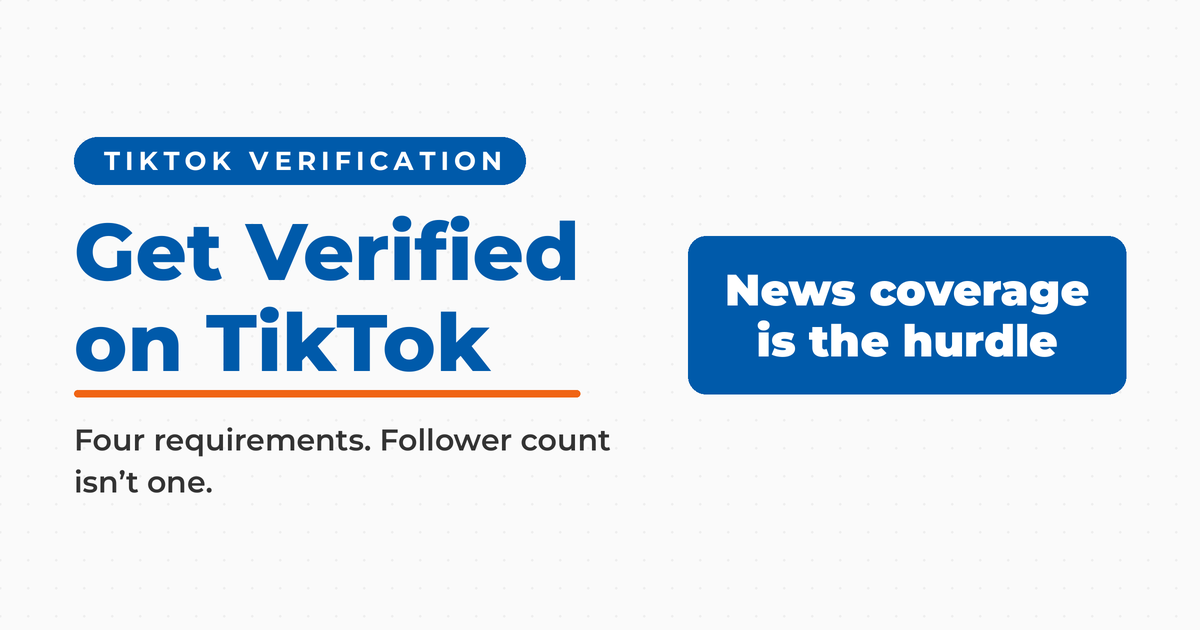
✅ Follower count is not a requirement. According to TikTok’s own documentation on verified accounts, the platform does not consider the number of followers or likes on your account when it grants a badge. A smaller account that meets the other criteria is not disqualified by size.
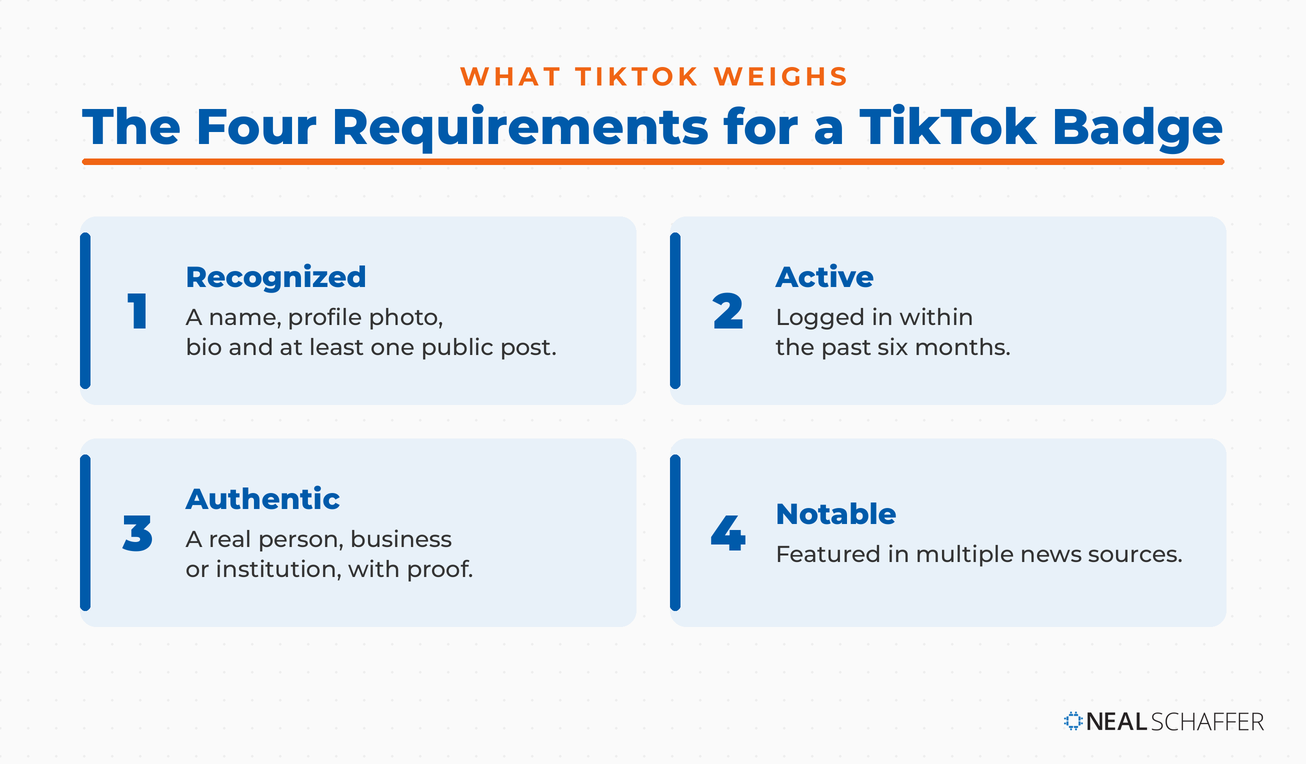
✅ TikTok weighs four account requirements: recognized, active, authentic, and notable. Recognized means a name, a profile photo, a bio, and at least one public post. Active means the account has logged in within the past six months. Authentic means it represents a real person, business, or institution, and the proof depends on which kind of verification you request.
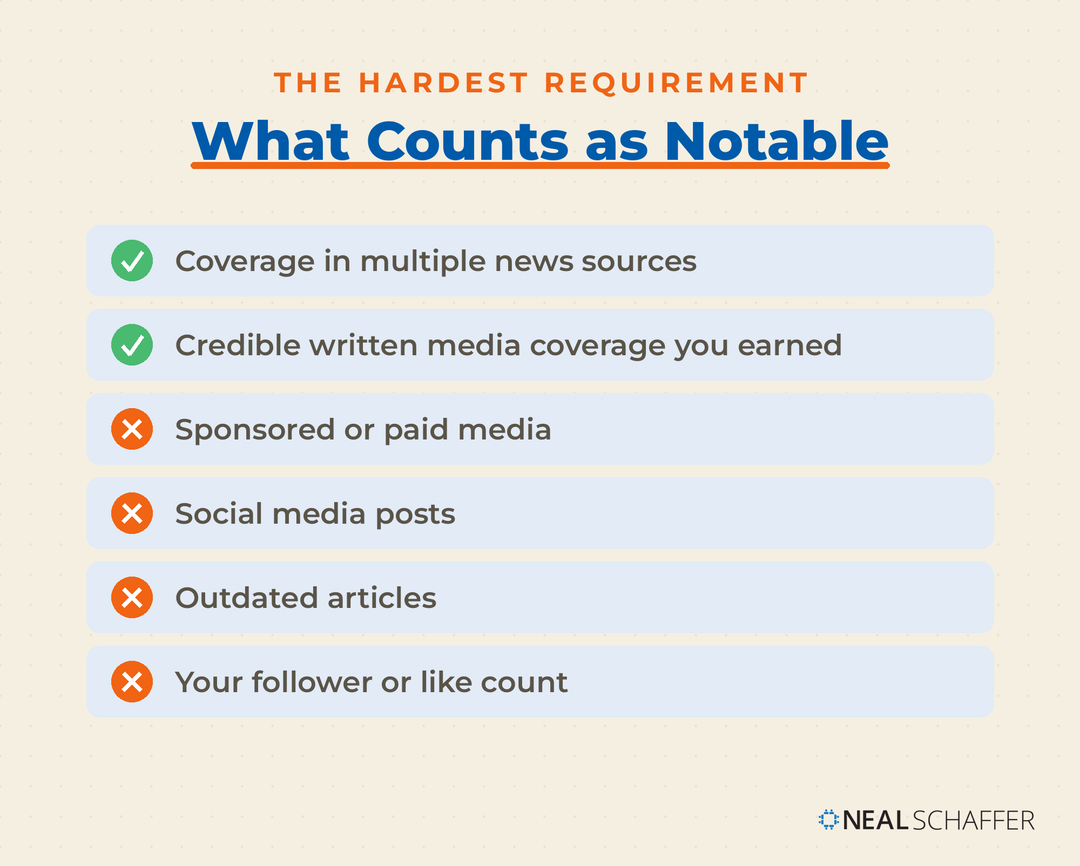
✅ Notable is the criterion most people fail. TikTok looks for accounts featured in multiple news sources, and it does not count sponsored or paid media, social media posts, or outdated articles. The emphasis falls on coverage you earned rather than coverage you bought.
✅ Verification is free. TikTok does not charge for a badge, and any service claiming to sell you one is unaffiliated with the company. Treat those offers as scams.
✅ Get your proof of ownership together before you apply. I recommend having your ID and links to news coverage of you or your brand ready first, because TikTok asks for credible written media coverage with the request. The request itself takes a few minutes, and TikTok says it will notify you of the result within 30 days.
What is TikTok verification?
TikTok verification is the process of determining the authenticity of a user’s account. It is a way for users to prove that they are who they say they are, and it also helps protect their content from being stolen or misused.
In other words, TikTok verification tells people that your channel is YOUR channel and nobody else’s. When you get verified, you’ll get a verification mark on your channel. Then, it’s easy to tell people to look for this mark before letting someone influence them in your name.
Benefits of getting verified on TikTok
Learning how to get verified on TikTok and then successfully completing the process is advantageous to both you and your audience. The benefits of having a verified account on TikTok include an increase in your channels:
- Visibility – TikTok has not confirmed any ranking boost for verified accounts, and its documentation is explicit that a badge does not imply an endorsement by the platform. What the badge does do is mark you in search results and on your profile as the real account, and people share videos more readily when they know the source is genuine.
- Credibility – If you’re verified, then people understand that you are putting your reputation on the line. For example, they are assured that your new dance challenge is something you thought of yourself.
- Trustworthiness – When you’re verified, it means that TikTok is convinced you are who you say you are. Therefore, people can weigh your trustworthiness without worrying you’re a fake.
- Protection from impersonators – People love to put up fake “mirror” channels to siphon off views and for other reasons. If viewers can check to see if something’s yours, this reduces the incentive to cheat.
It also ensures that imposters and trolls are not able to impersonate you or your brand. For example, scammers will often impersonate social media personalities to try and make money. Furthermore, trolls find it harder to make fun of you if everything is traceable to your channel.
How to get verified on TikTok?
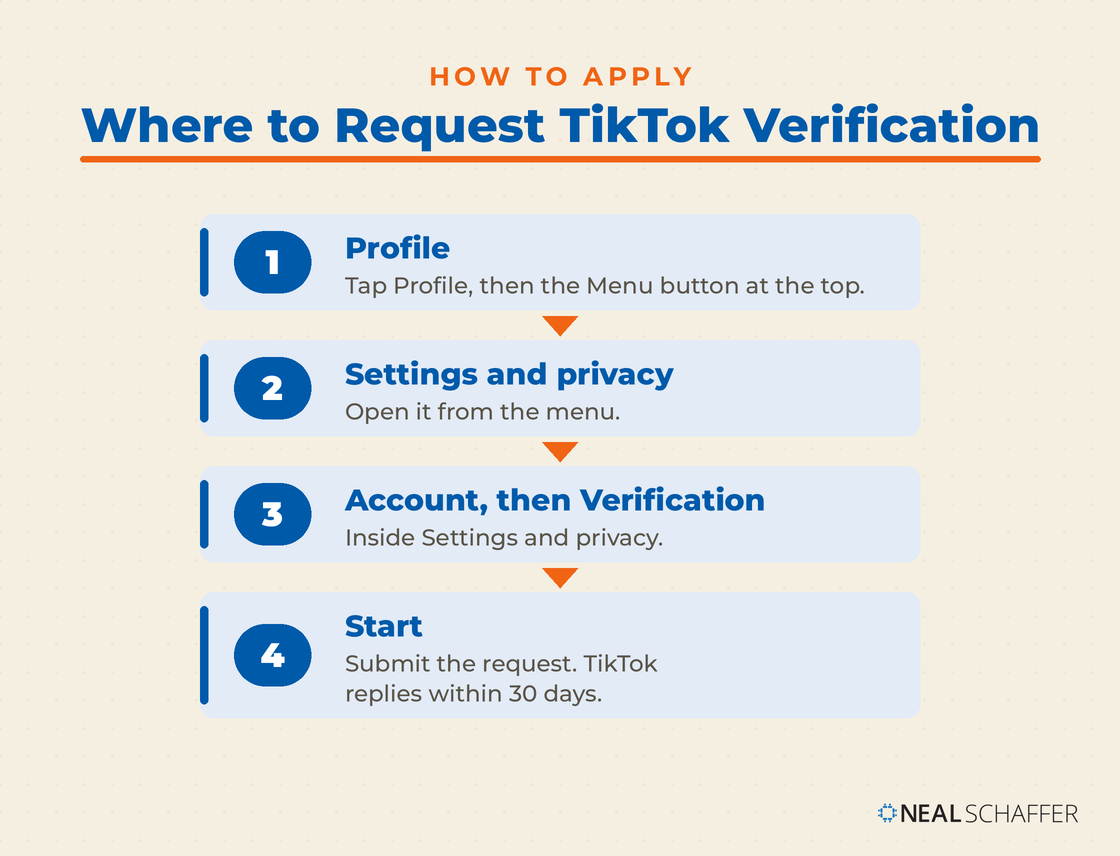
Now that you understand why getting verified is advantageous for you and your viewers, let’s talk about how to get verified on TikTok. The process for getting yourself verified is quite simple but may not be available for everyone. Here are the steps:
- In the TikTok app, tap Profile at the bottom, then tap the Menu button at the top.
- Select Settings and privacy.
- Tap Account, then tap Verification.
- Tap Start and follow the steps to submit your request. TikTok says it will notify you of the result within 30 days, and if the request is rejected you can see the reason and resubmit after the waiting period it gives you.
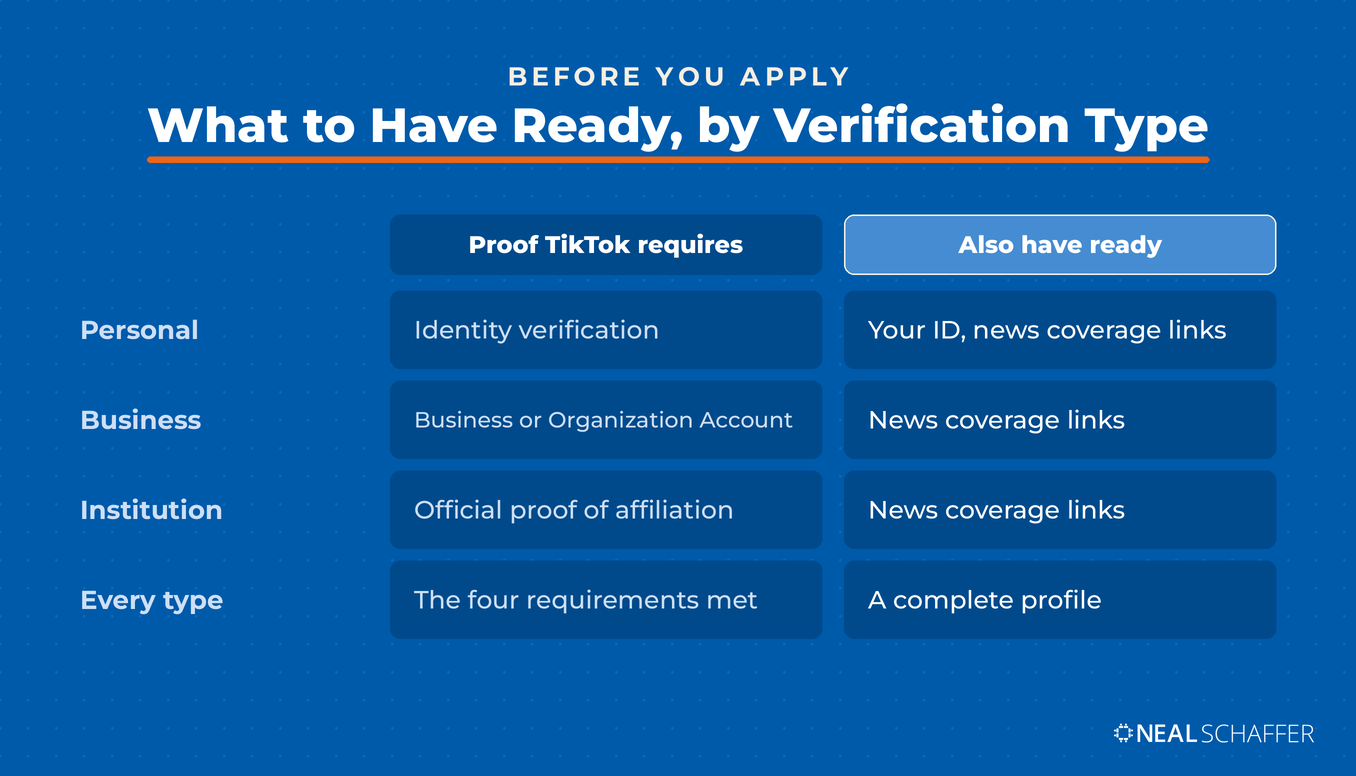
Ideally, you’ll have all your information available, so the process goes smoothly. For example, I recommend that you have your ID and links to news coverage of you or your brand ready.
What are the criteria for getting verified on TikTok?
- Active account – Your account must have logged in to TikTok within the past six months. TikTok doesn’t waste time verifying inactive accounts.
- Authenticity – Are you who you say you are? Proving your identity is one of the strongest aspects of verification because it protects everyone from fraud. Personal verification requires identity verification. Business verification requires a Verified Business Account or an Organization Account, and institution verification requires official proof of affiliation, according to TikTok’s verification page.
- Completeness of your profile – TikTok requires a name, a profile photo, a bio, and at least one public post before you can be verified. This encourages people to be honest about themselves and share themselves with the community. While you don’t have to get too personal, filling out the profile basics is essential.
- Notability matters more than follower count – TikTok does not set a follower minimum, so a smaller account is not automatically disqualified on size. What the review looks for is outside evidence that the account is worth verifying, which is why approved accounts usually have some public footprint beyond TikTok itself. That standard is the same whether you run a business or a personal account.
- Adherence to community guidelines and terms of service – This one protects TikTok and the community. They only want the good actors to be verified and enjoy all the respect that this status entails.
8 Tips for a successful TikTok verification application
As you can see, learning to get verified on TikTok is more than just showing your ID to the trust and security department. Rather, you need to make sure that your account is “verification ready.” Here are eight tips to help ensure your application is successful.
1. Ensure your profile is complete and up-to-date
Make sure all of the information on your profile is accurate and up-to-date. This includes your name, bio, profile picture, and other details. Not only does the information help build a connection between you and your audience, but profile info also builds your credibility and the authenticity of your account. Completeness includes the bio link, so if you qualify for one, my step-by-step guide to adding a link to your TikTok bio walks through who is eligible and how to set it up.
In other words, TikTok won’t verify an account that doesn’t have a real character behind it. Although you don’t need to use your real name (most individuals don’t), they need to ensure you’re a real character. Additionally, if you ever change your username, submit a username update request, because changing it without one can cost you the badge.
Not that you’ll want to change your username, though. This is your brand and, therefore, what people will know you by on TikTok. Part of the point of verification is to protect your username.
2. Create quality content
Create content that is engaging and relevant to your audience. The definition of engaging and relevant varies dramatically based on your niche and account type. For instance, for a business account, relevant content usually revolves around your company and its industry. You might also use humor and other content to engage your audience on a more personal level.
Likewise, your quality needs to be good. Because TikTok is mostly based on cell phone footage, the standards aren’t necessarily as high as some other platforms. However, you still need to create content that people love to watch and that is well put together. For example, avoid “choppy” videos that don’t fit well together. If you’re jumping from one scene to another, people might have trouble following you.
Besides doing a good job of shooting the footage, great video always involves proper planning. Just because TikTok videos are short doesn’t mean you get to skip the concept phase. It’s just shorter due to video length.
3. Use relevant hashtags
Use relevant hashtags in your posts to help increase visibility and engagement. Hashtags help your content be discovered so that your audience will grow. As people search for videos on your topics, they’ll find out that you’re making content in this area. Plus, the algorithm works in part on hashtags, so people with an interest in yours might see your videos as a suggestion.
There are a few ways to get relevant hashtags. If you’re a business account, you can make up branded tags and use them with everything you produce. However, these won’t be enough to distribute your content well. Take note of the hashtags that other creators with your niche are using. Finally, as TikTok grows, there are more hashtag discovery tools available. Some of these TikTok management tools already have that feature.
4. Post consistently
Post regularly and consistently to keep your followers engaged. Ideally, you should post several times a week or even every weekday for business accounts. This way, people look forward to your content at regular intervals, and will look for it on their FYP. Over time, as these people interact with your content, it’ll show up on even more FYP pages. Consistency counts for more when the timing is right, and my data-backed look at the best time to post on TikTok gives you a starting schedule to test against your own analytics.
However, from a TikTok verification standpoint, consistency only covers the basics: an active account with public posts. TikTok does not consider followers or likes, so the bigger hurdle is the news coverage its notable requirement asks for.
Is Your Digital Marketing All Over the Place?
My latest book helps small businesses, entrepreneurs, and marketers bring search, email, and social together into one digital marketing strategy that actually compounds.
Drawing on my work as a Fractional CMO, Digital Threads turns complicated tactics into a clear, practical plan you can follow, whatever your budget or team size.
Grab your copy on Amazon and start weaving your own digital threads. Click the cover or the button below to get started.

5. Use trending Hashtags
Using trending hashtags is a great way to get your content seen by more people. When you use popular hashtags, your content will be seen by a larger audience and can help you gain more followers. Additionally, using trending hashtags can help you get featured on the “For You” page, which is where most users discover new content.
With that said, you should avoid using irrelevant hashtags. This can easily backfire, especially with commercial accounts. Choose the most trending hashtags that are appropriate to your videos. You can also create content that’s a bit off-topic but still relevant to your audience in other ways. Appropriate humor is a good way to do this, especially in niches where people take themselves too seriously.
6. Engage with your audience
Engage with other users by liking, commenting, and sharing their content. This will help build relationships and trust with your followers. In addition, these relationships will build people’s confidence and encourage them to share your content with other people. Being an engaged content creator (even as a brand) is one of the best ways to grow your TikTok account because people prefer to interact with brands that care.
7. Get verified on other social media platforms
Getting verified on other social media platforms is a great way to increase your credibility and trustworthiness while also increasing the chances of getting verified on TikTok. After all, many people who post on TikTok have other accounts. There’s much posting material on multiple platforms, too, especially YouTube and Instagram. When TikTok can draw a clear link between the “real you” on other platforms and your TikTok account, it helps you earn verification.
Here’s another quick tip. TikTok lets you add links to your other social media accounts, just like some others do. This can help with TikTok verification and also with expanding accounts across platforms. Awesome, right?
8. Follow community guidelines
It is important to follow the community guidelines when applying for verification on TikTok. This includes not posting content that is offensive, hateful, or inappropriate. Additionally, it is important to be respectful of other users and their content. Following the community guidelines will help ensure that your application is successful and that you are seen as a trustworthy user.
Not only is following guidelines an important part of how to get verified on TikTok, but it can help protect your brand. TikTok kicks people off the platform for blatant violations, but short of this, being “edgy” can limit your following. And if you’re representing a brand, then you must think about its reputation (and your job). Always be careful about what you post online.
Frequently Asked Questions
Update the app first, then check Profile, Menu, Settings and privacy, Account, Verification again. If the option still is not there, verification has not been opened up for your account yet.
Not with the same paperwork. TikTok splits requests into personal, business, and institution verification. Personal verification requires identity verification, business verification requires a Verified Business Account or an Organization Account, and institution verification requires official proof of affiliation. Decide which type fits your brand before you apply.
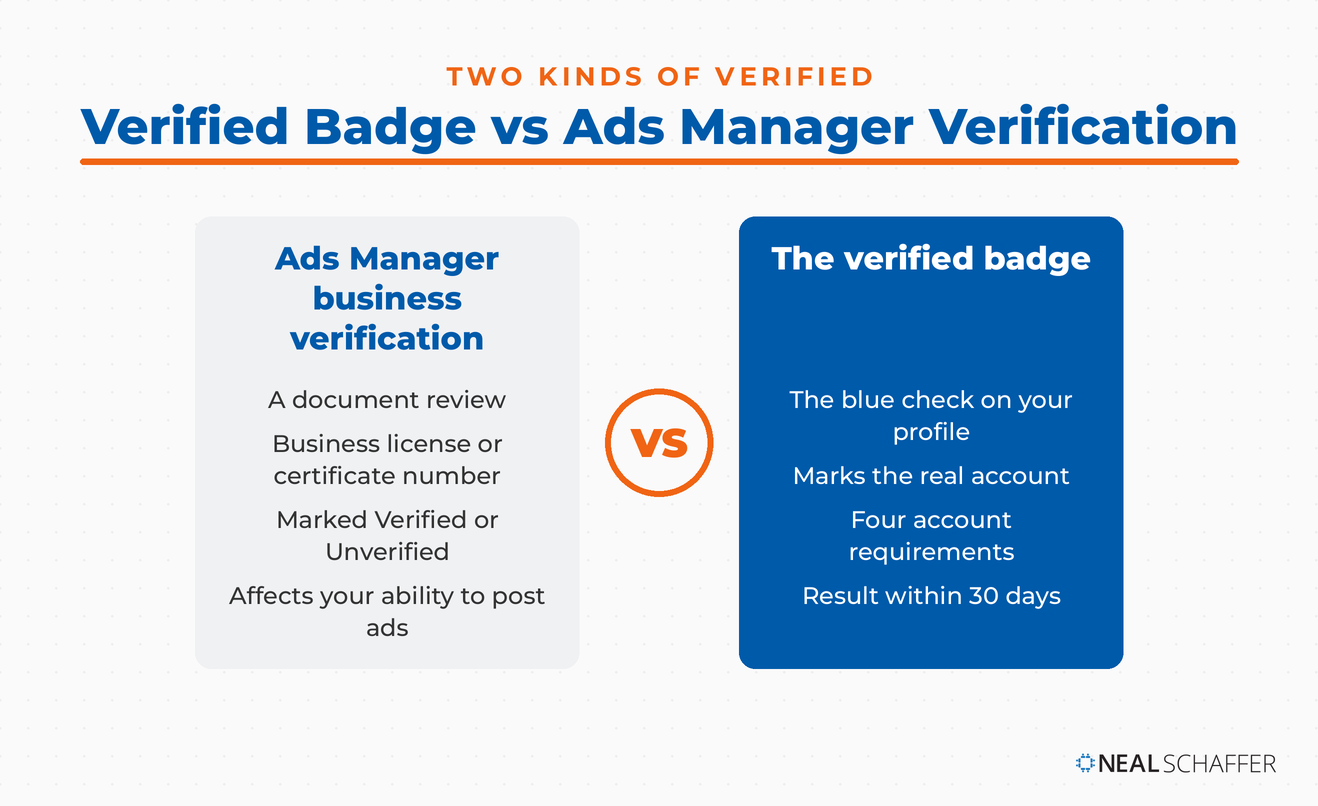
No, and the two get confused often. Advertiser verification is a document review inside TikTok Ads Manager or Business Center, where you upload a business license or certificate number and your account is marked Verified or Unverified. TikTok says that status may affect your ability to post ads, and company information review in Business Center can take up to two business days. It has nothing to do with the blue check on your profile.
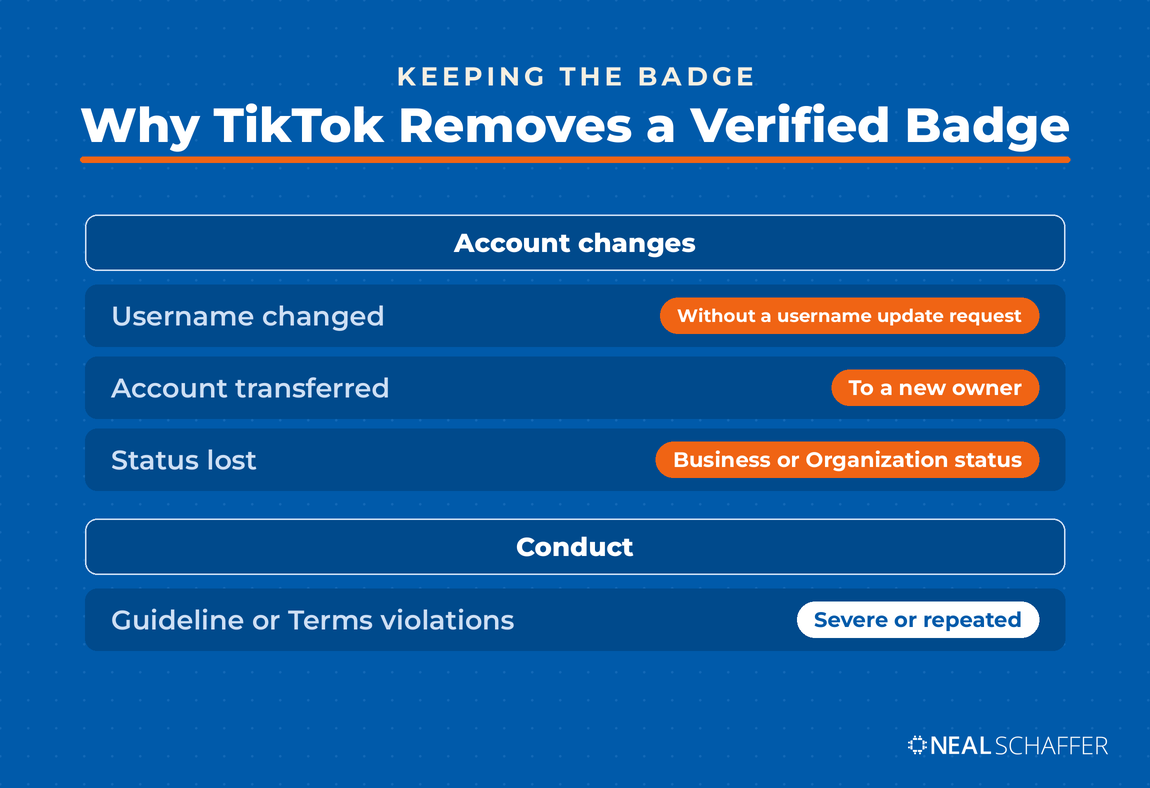
Yes. TikTok lists a username changed without a username update request, an account transferred to a new owner, and an account that no longer has Verified Business Account or Organization Account status as reasons a badge gets removed. Severe or repeated violations of the Community Guidelines or Terms of Service can also cost you the badge.
Conclusion
When you consider how to get verified on TikTok, the process of applying is relatively easy. However, before you do this, your account needs to be ready. Complete your profile, stay active, and build the kind of news coverage TikTok looks for. Make sure your videos fit community guidelines. Then, when you’re ready to apply, you’ll have a reasonable chance of success.