


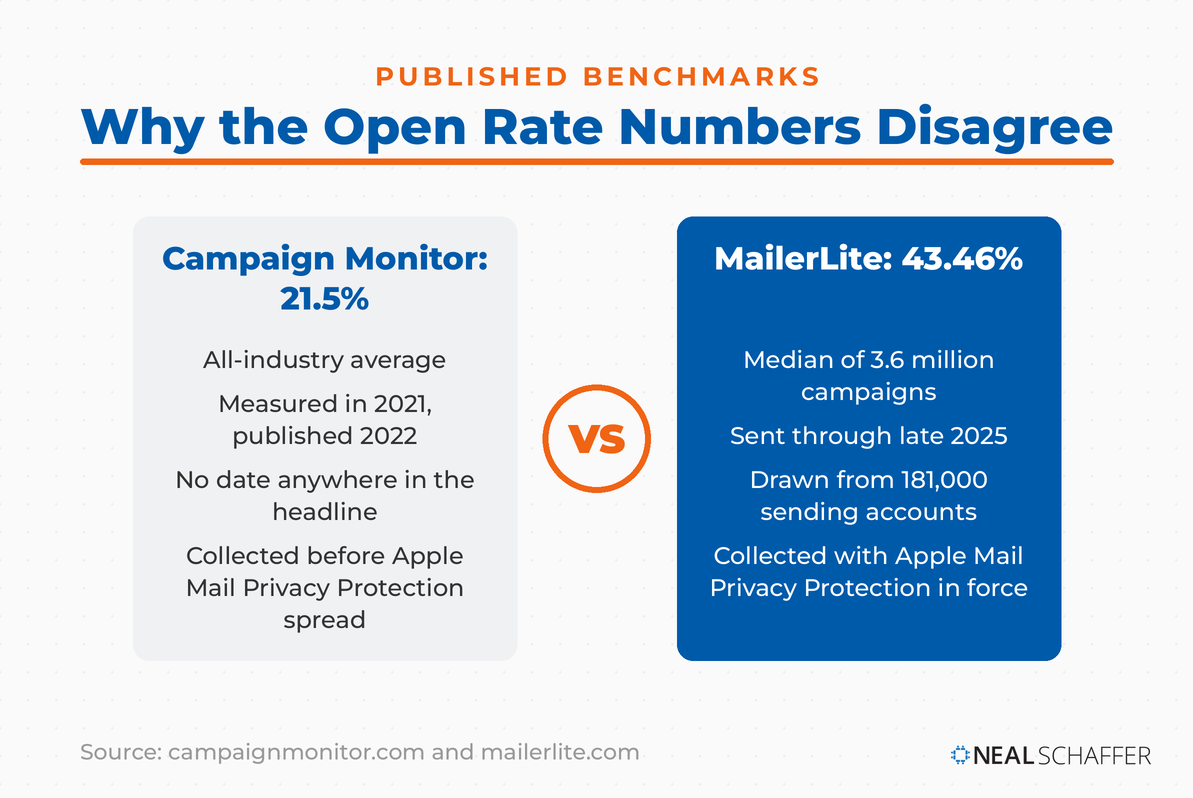
Look up the average email open rate today and you get two completely different answers depending on who you ask. MailerLite, working from 3.6 million campaigns sent through late 2025, reports a median of 43.46%. Campaign Monitor’s knowledge base puts the all-industry average at 21.5%. One is roughly double the other, and both come from companies that send email for a living.
Read the fine print on the second one and the gap starts to explain itself. That 21.5% is 2021 data, published in a 2022 report, still sitting on a live page today. The two numbers are not measuring the same era.
So before you can tell whether your own open rate is any good, you need to know which dataset the number you are measuring against came from, and when it was collected.
Email is one of the three threads I built my last book around, and dormant email lists are one of the first things I run into as a Fractional CMO. So I pulled eleven months of my own sending data to see how my number holds up. It turned out to be thoroughly average, and the interesting part was everything that average was hiding.
Key Takeaways
✅ Published open rate benchmarks disagree by more than twenty percentage points, mostly because of Apple Mail Privacy Protection and differences in how each provider builds its dataset.
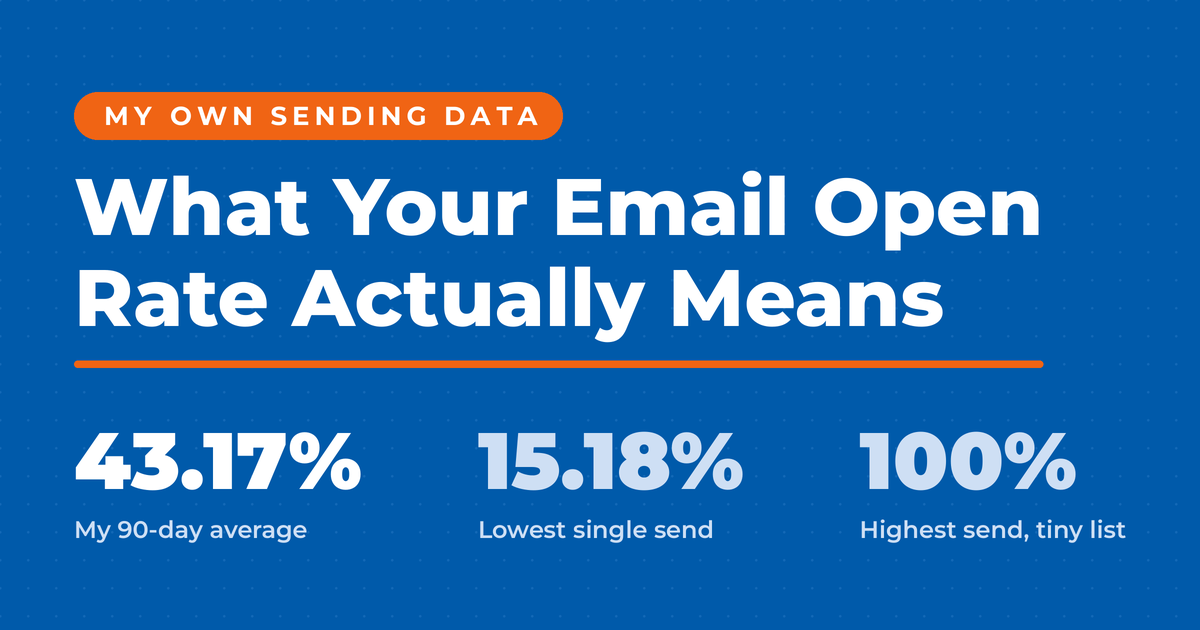
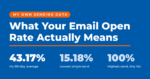
✅ My own account averaged 43.17% over the trailing 90 days, almost exactly the cross-industry median. An average number, not a trophy.
✅ Across my sends in that period, individual open rates ran from 15.18% to 100%. The account average describes almost none of them.
✅ Cleaning your list works, but strictly in proportion to the cut. Remove 10% of your list and your open rate rises by about 11%, and only if every name you removed was a genuine non-opener.
✅ Click rate is the harder number to fake, because Apple does not click your links for you.
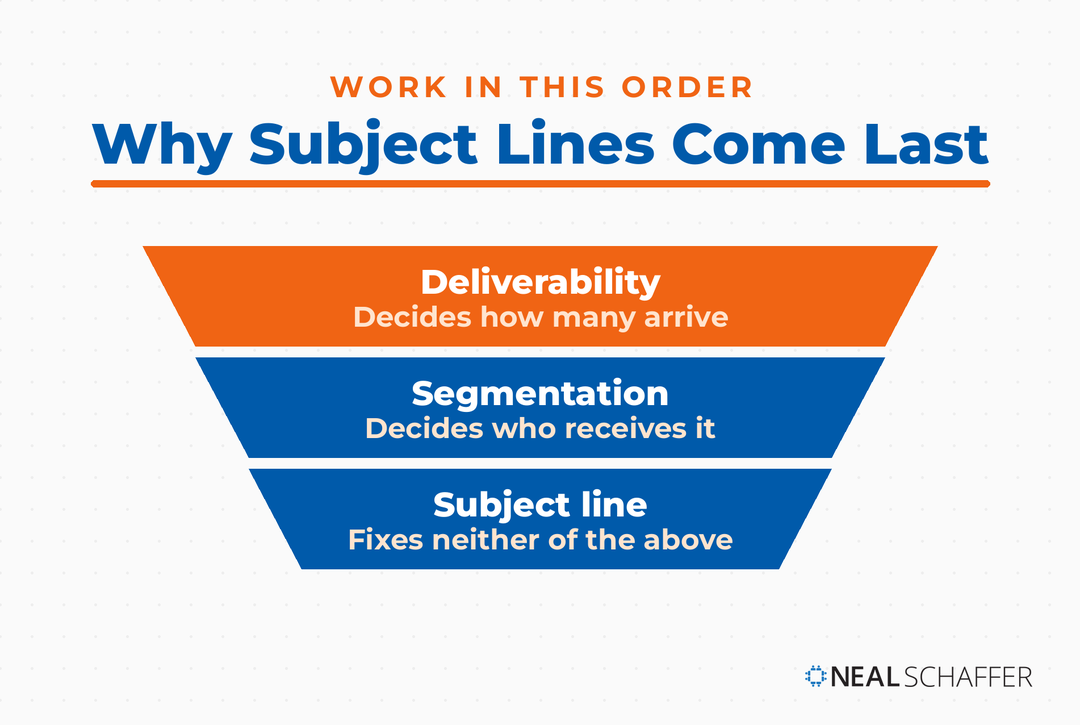
✅ Work in order: fix deliverability, then segment, then write the subject line. The first two change who is in the denominator, and subject line testing only moves people already in it.

What Is a Good Email Open Rate in 2026?
A good email open rate in 2026 is anything at or above the median for your list type, which in practice means roughly 40% to 45% for a general marketing list measured with open tracking switched on. The MailerLite figure above rests on 3.6 million campaigns from 181,000 accounts, and it is the largest current dataset published by any provider.
That median hides a wide spread, though, and the spread is what you actually need. Here is where a few industries relevant to most people reading this land in the MailerLite data:
| Your industry | Open rate | Click rate |
|---|---|---|
| Consulting | 45.96% | 2.41% |
| Author | 43.14% | 2.75% |
| Blogger | 43.03% | 3.00% |
| Software and web apps | 39.31% | 1.15% |
| Marketing and advertising | 37.23% | 1.30% |
| E-commerce | 32.67% | 1.07% |
The full range runs wider still, from 30.1% for travel and transportation up to 55.71% for religion. So a 40% open rate is slightly below par for a consultant and comfortably above it for an e-commerce brand. Find your own row before you judge your number against anything.
Note what the click column does to the story. Bloggers post the third-highest open rate on that list and the highest click rate; e-commerce sits at the bottom of both. Those two columns usually move together, which is worth remembering when someone shows you an open rate with no clicks beside it.
The number you were probably taught is much lower. Monday.com, in a guide published this year, frames a good open rate as 15% to 25% and tells readers that 30% counts as exceptional performance.
Sit those two side by side. One current source calls 30% exceptional. Another current source says the median is 43.46%. A marketer hitting 35% could walk away from either page convinced they are crushing it or falling behind, depending only on which tab they opened.
Both figures are accurate. They measure different things, in different years, with different tracking assumptions. Which is why the first useful move is not to find your benchmark. It is to work out why the benchmarks fight each other.
Why Published Open Rate Benchmarks Disagree by Twenty Points
Benchmarks disagree because Apple Mail Privacy Protection hides recipient activity and preloads message content, which registers an open whether or not anyone read the message. Every sender whose subscribers use Apple Mail absorbs that inflation, and each provider’s dataset absorbs a different amount of it.
The scale of this surprises people. In Litmus data drawn from over a billion opens in July 2026, Apple accounted for 62.26% of all email opens, with Gmail second at 27.03%. Litmus is blunt about what that means: when an Apple Mail user has the privacy feature switched on, you simply will not know whether they opened your email.
Most of the opens in your dashboard, then, arrive from the one client that will not tell you whether they were real. Three things then drive the spread between published benchmarks.
When the data was collected. Apple shipped that feature in September 2021, and the effect on reported opens was immediate and large. Omeda measured it across roughly two billion emails and found total open rates climbing from 22.6% before the rollout to 40.5% six months after. Nothing about the emails changed. The measurement did.
The detail in that study worth sitting with is what stayed still. Over the same period Omeda’s total click rate went from 2.3% to 2.4%, essentially flat, and the company concluded that click rates were unaffected by the change while open rates could no longer be trusted. Real behavior held steady. Only the number that Apple touches moved.
A dataset built on 2021 campaigns therefore reads around 21%, while one built on 2025 sending reads around 43%. Both are accurate records of what their tracking pixels counted. The trap is that the older figure is still published on a live page with no date in the headline, which is how a four-year-old number ends up quoted as this year’s benchmark.
Who is in the dataset. That industry spread shown earlier, running from travel at the bottom to religion at the top, is not just trivia about other people’s businesses. It is why a provider whose customers skew nonprofit publishes a very different median from one whose customers skew retail, even when both are reporting their data accurately.
Where the subscribers live. In that same breakdown, campaigns sent in Australia opened at 47.69% while campaigns sent in LATAM opened at 31.97%, a gap MailerLite attributes largely to differing rates of iPhone ownership and therefore differing exposure to Apple’s privacy feature.
Is Your Digital Marketing All Over the Place?
My latest book helps small businesses, entrepreneurs, and marketers bring search, email, and social together into one digital marketing strategy that actually compounds.
Drawing on my work as a Fractional CMO, Digital Threads turns complicated tactics into a clear, practical plan you can follow, whatever your budget or team size.
Grab your copy on Amazon and start weaving your own digital threads. Click the cover or the button below to get started.

Salesforce saw the same upward drift in its own reporting, with average open rates rising from 33.07% in 2023 to 36.24% in 2024.
None of that is a scandal. It does mean that quoting a single industry average as though it settles the question is misleading, and it explains how your dashboard can look healthy while your revenue sits still.
That is the theory. Here is what it looks like in an account I actually control.
What My Own Email Open Rate Looks Like
Over the trailing 90 days my account sent with both open and click tracking enabled and recorded a 43.17% open rate, a 3.06% click rate, a 0.41% unsubscribe rate, and a 0.91% bounce rate. Against the MailerLite median, my open rate is ordinary. Against its 2.09% overall click rate, my click rate runs somewhat better than typical.
That open rate is not a win. It is average, and it is worth saying so, because a number that sits right on the median tells you nothing about whether your email is working.
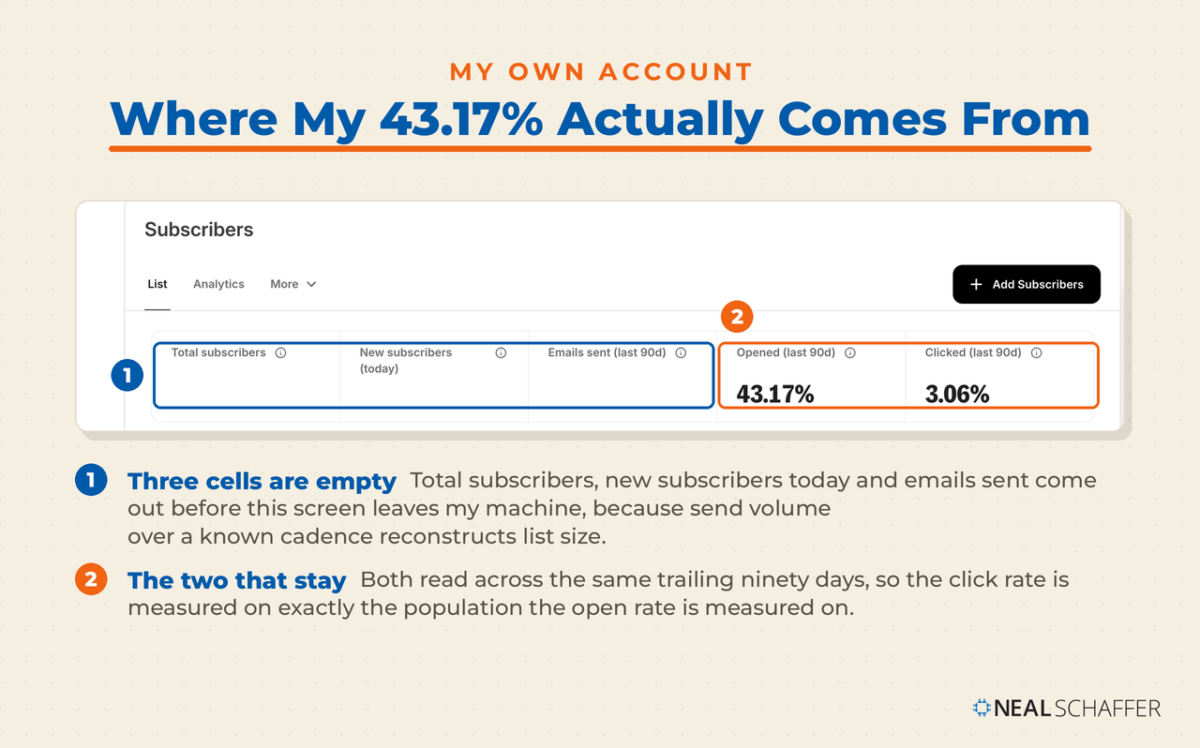
The more useful finding is what the average conceals. Across the sends I pulled from September 2025 through August 2026, individual open rates ranged from 15.18% to 100%. Grouping them by list gives a far clearer picture than any single figure:
| List | Typical size | Pooled open rate | Pooled click rate |
|---|---|---|---|
| Mastermind community | Single digits | 70% to 100% | High, on tiny volume |
| Daily new-post notifications | Several hundred | About 43% | About 1.8% |
| Weekly curated newsletter | Several thousand | 44% to 50% | 2.6% to 5.3% |
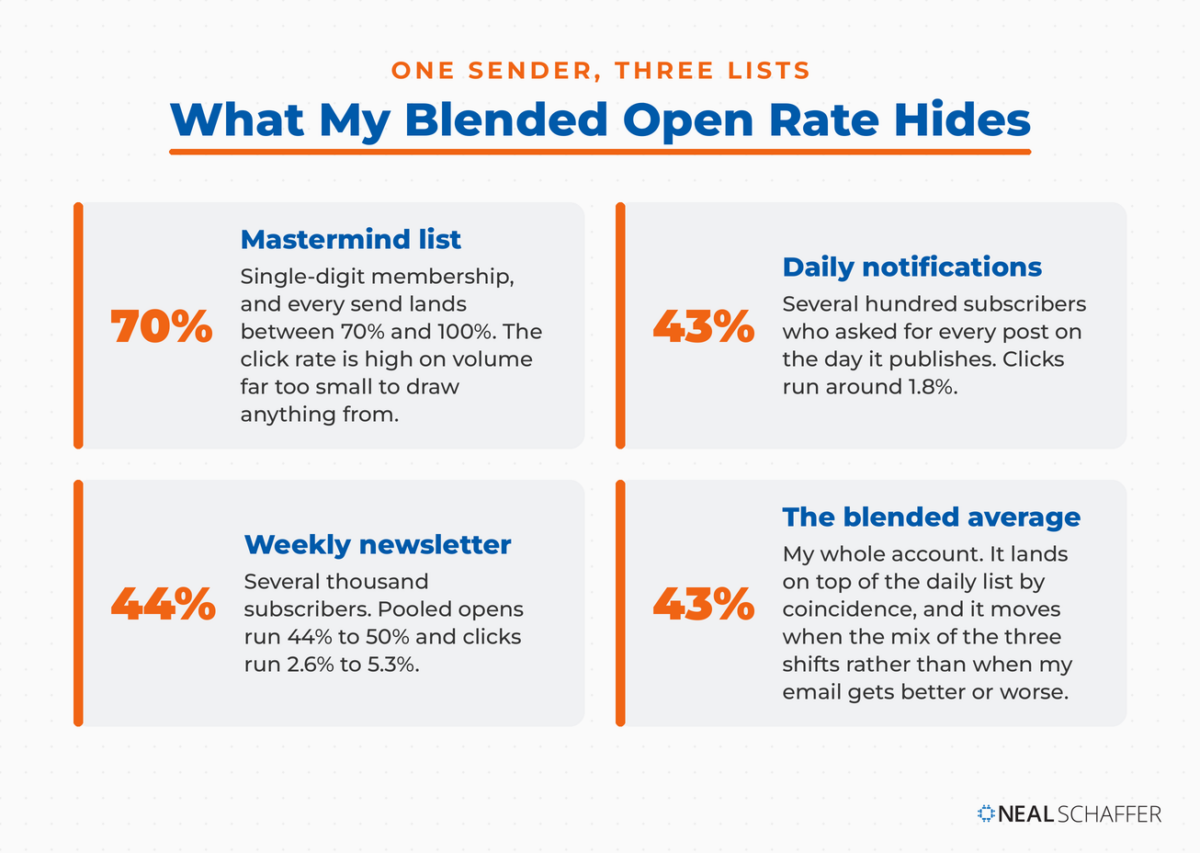
Three lists, one sender, one set of writing habits, and a spread wide enough that “my open rate” is close to meaningless as a single number. If you run more than one list and report a blended average to your boss or your client, you are reporting a figure that describes nothing.
The segmentation itself is not new for me. On episode 336 of my podcast I described the setup this way: “I offer my own subscribers the ability to receive updates of new blog posts the day they are published.” What I did not have then was the data showing how differently those tiers behave.
Which raises a question most list-cleaning advice answers far too confidently.
Does Cleaning Your Email List Actually Raise Your Open Rate?
Cleaning your list does raise your open rate, but the size of the lift is set by two things: how much of the list you cut, and how reliably you cut only people who never open. Get either of those wrong and the number barely moves, which is why so many people try this and report nothing.
What the arithmetic actually says
The arithmetic is simple enough to do on the back of an envelope. If every subscriber you remove is a confirmed non-opener, your new open rate is your old one divided by the share of the list you kept. Starting from my own 42.76%, that looks like this:
| Share of list removed | New open rate | Gain |
|---|---|---|
| 5% | 45.0% | 2.3 points |
| 10% | 47.5% | 4.8 points |
| 14% | 49.7% | 7.0 points |
| 20% | 53.4% | 10.7 points |
| 30% | 61.1% | 18.3 points |
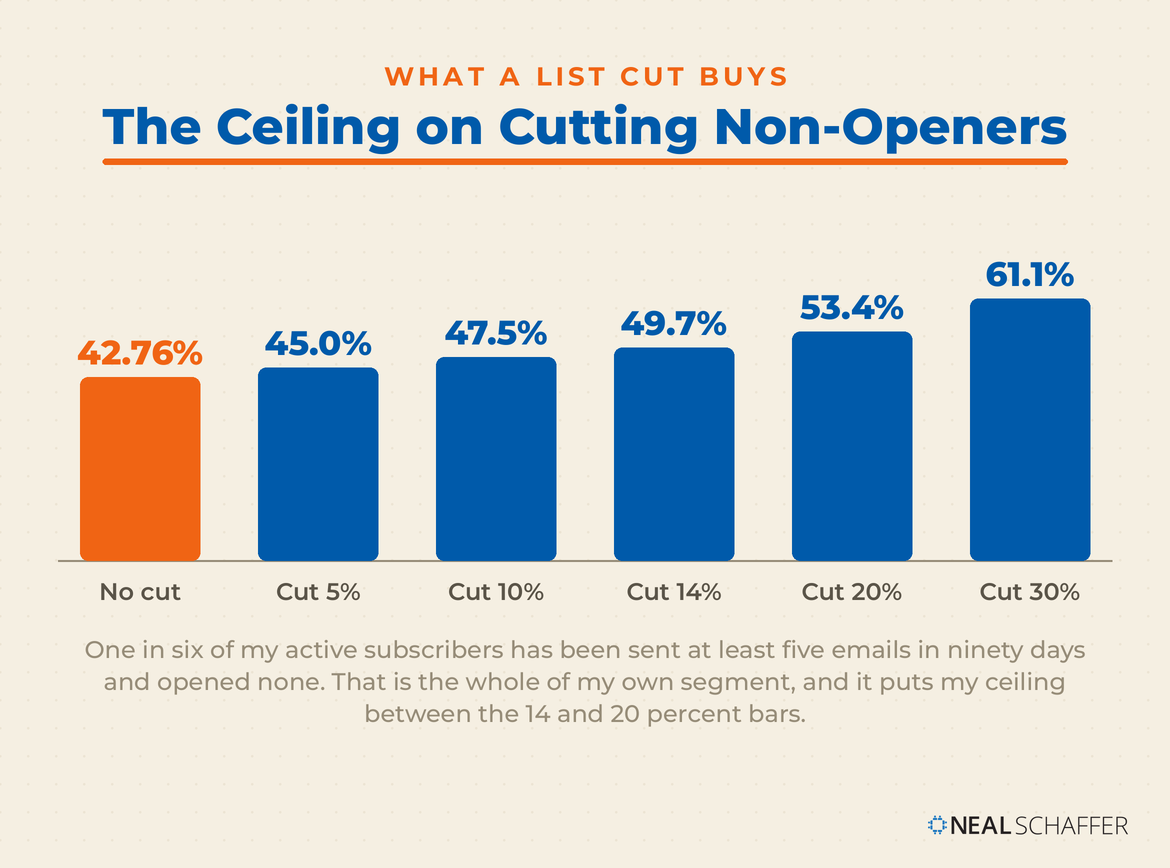
Those are ceilings, not forecasts. They assume perfect aim: every single person removed was someone who never opened anything. Miss that mark and the gain drops fast. Cut the same 14% but pick half your names at random and the lift falls from 7 points to about 3.5. Pick all of them at random and you get nothing at all, because you removed openers and non-openers in the same proportion they existed in.
That last case is not hypothetical, and it is the one I can show you. My daily notification list shrank by roughly 14% through ordinary attrition rather than any deliberate cut, and its pooled open rate moved from 42.76% to 42.75%. Attrition is blind. It takes your engaged readers at about the same rate as your dead weight, so if you have been assuming your list quietly cleans itself over time, it does not. Only a deliberate cut does that.
How to prune so the number actually moves
So if you want the number to move, you have to be deliberate in a way most advice never spells out:
- Use your platform’s built-in unengaged filter, then go and find out what it means. Most tools ship one now. Mine calls it Cold subscribers and also exposes an engagement score; other platforms use contact ratings or engagement tags. The label is the easy part. What matters is the window it measures over, because a filter defined as “has not opened in six months” is useless if you sent twice in that window and savage if you send daily. Look up the definition in your platform’s documentation before you trust the segment it hands you.
- Add a subscription-date condition so you do not cut people who never had a chance. Exclude anyone who joined during the measurement window itself. Without that guard you sweep up subscribers who signed up last week and have barely been mailed, and cutting those is how you lose readers who were about to become regulars.
- Check the size of the segment, because the size is your ceiling. On my own list I measured this directly: subscribers who had been sent at least five emails over ninety days and opened none of them came to about one in six of my active subscribers. Against the arithmetic above, cutting all of them would take my open rate from 43.17% to roughly 52%, a gain of about eight and a half points. If your own segment comes back at 4%, your ceiling is two points, and you should do it for deliverability and stop expecting more.
- Cut in one decisive pass, not in nibbles. Trimming 3% twice a year keeps you busy and moves nothing. If the filter returns 20% of your list, that is the cut worth making in one go. And remember the Apple problem from earlier: some of the people your filter counts as openers never actually opened, so your real dead weight is larger than the number on screen.
Do it anyway, even when the ceiling is low. Mailing people who never open teaches inbox providers to treat you as unwanted, which drags email deliverability down for everyone else on your list, and most platforms bill by list size so the dead weight costs you monthly.
So pruning works, and the math above says by how much. It just is not the easy win it gets sold as, because a cut small enough to feel comfortable is usually too small to show up in your reporting.
Growth is the other half of this, and it is the half people misread most often.
What Happens to Your Open Rate When Your List Grows
Growing your list can move your open rate in either direction, and the direction depends on where your new subscribers came from rather than on the growth itself. People who joined because they wanted your emails tend to open them. People who joined to grab a one-off freebie mostly do not.
This is worth stating plainly because the lazy version of this advice says growth always dilutes. It does not. A new subscriber is often the most engaged person on your list, which is precisely why welcome emails outperform everything else you send. Someone who found you last week and liked what they read is more likely to open your next campaign than someone who signed up in 2019 and forgot.
What dilutes is growth from people who never wanted the newsletter in the first place. A giveaway, a broad lead magnet, a list swap, a co-marketing push: all of these add names attached to weak intent, and they land in your denominator immediately while contributing nothing to your numerator.
My weekly newsletter grew by about 16% across the same eleven months, from late 2025 into summer 2026, and its pooled open rate fell from 49.89% to 43.79%, a drop of just over six points. I would like to tell you that settles the question. It does not, because the same window runs from late in the year into summer. Salesforce, in the analysis cited earlier, reports a seasonal decline that begins around March and corrects in late August. My drop and that seasonal dip overlap almost exactly, so I cannot separate them with the data I have.
That is the useful lesson rather than a disclaimer. A total open rate cannot tell you why it moved. To answer that you have to cut it by signup cohort: group subscribers by when and how they joined, then compare open rates across those groups. If your 2026 signups open at half the rate of your 2024 signups, you have an acquisition quality problem. If they open at the same rate, your dip is seasonal or technical, and no amount of subject line work will touch it.
Before you act on any of this, one more piece of my data shows how little a single open rate can be trusted on its own.
The Same List, the Same Week, 52% and 15%
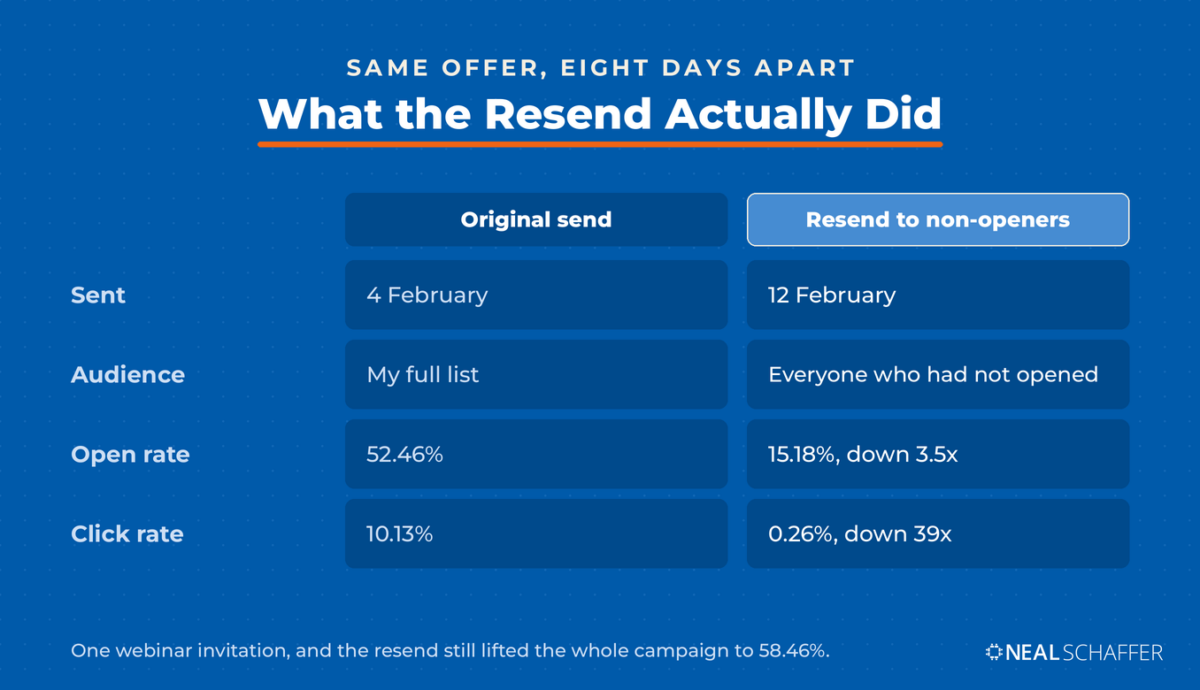
In February 2026 I sent a webinar invitation to my full list and it opened at 52.46%. Eight days later my email platform resent it automatically to everyone who had not opened the first one, and that second send opened at 15.18%. Same offer, same sender, barely a week apart.
Two things changed between those sends: the audience and the subject line. I cannot separate them cleanly and I am not going to pretend I can. But consider what that audience was. Every person receiving the second email had already been shown this exact offer and had chosen not to open it. That is close to the hardest segment you can pick, and no subject line fully rescues it.
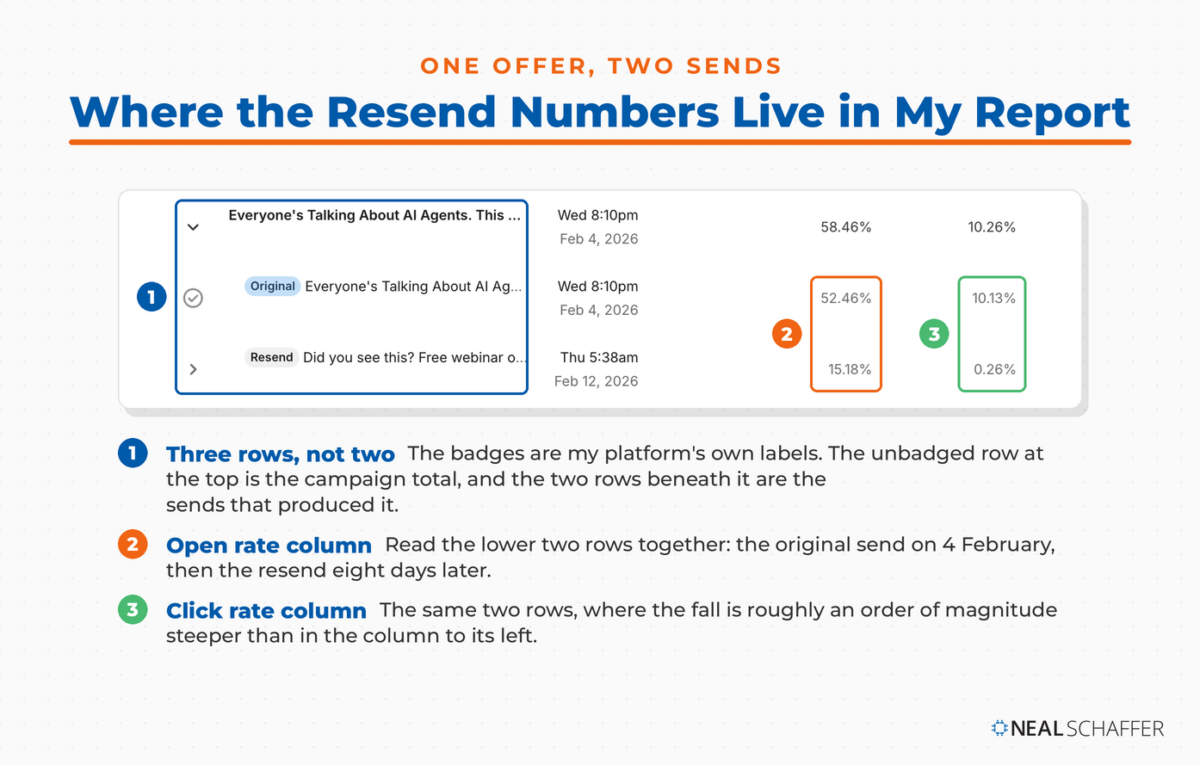
The resend was still worth sending. It pulled the campaign’s overall open rate up to 58.46%, six points higher than the original send managed on its own. If you judged that second email on its own open rate you would call it a failure, and you would be wrong.
Now look at what the click rate did over the same two sends. Clicks went from 10.13% on the original to 0.26% on the resend. The open rate fell by a factor of three and a half. The click rate fell by a factor of thirty-nine.
That gap is the whole argument for not trusting open rate on its own. Both numbers were telling me the resend audience was less interested. Only one of them was telling me how much less.
So treat open rate as a diagnostic rather than a scoreboard. It tells you a lot about who is on your list and how they were selected. It tells you much less, on its own, about whether any individual email was good, which is exactly why it should never be the only number you look at.
The Email Marketing Benchmarks That Matter More Than Open Rate
The benchmarks worth tracking alongside open rate are click rate, click-to-open rate, unsubscribe rate, and bounce rate, because between them they describe engagement that Apple cannot manufacture. MailerLite makes this point about its own dataset, noting that click rate is currently its most accurate indicator of engagement precisely because it does not depend on tracking opens.
Here is what the current cross-industry picture looks like, with my own account beside it.
| Metric | MailerLite 2025 median | My trailing 90 days |
|---|---|---|
| Open rate | 43.46% | 43.17% |
| Click rate | 2.09% | 3.06% |
| Click-to-open rate | 6.81% | About 7.1% |
| Unsubscribe rate | 0.22% | 0.41% |
My unsubscribe rate is nearly double the median, and I am not going to pretend that is a feature. Part of it is send frequency. Part of it is an industry-wide shift: since February 2024, Google has required bulk senders to support one-click unsubscribe on marketing and promotional mail, which made leaving a list dramatically easier for everyone. MailerLite saw its own median unsubscribe rate more than double year over year and pointed at the same cause.
A few notes on reading these:
- Click-to-open rate divides clicks by opens, so inflation in the denominator pushes it down. Track its direction rather than its absolute level.
- Bounce rate above roughly 2% usually signals a list quality problem rather than a content problem, and it is the first thing to check when deliverability slips.
- Unsubscribe rate rising after a frequency change is information, not failure.
None of these replace open rate. They stop you being fooled by it, which is a different and more useful job. The wider set of figures across the channel sits in my email marketing statistics roundup.
Knowing what to measure still leaves the practical question.
How to Actually Improve Your Email Open Rate
Improving your open rate starts with whether your email arrives at all, then with who receives it, and only then with what the subject line says. That order is deliberate, and it is close to the reverse of how most advice is sequenced.
The reason is arithmetic. Every step above the subject line changes who sits in the denominator, while subject line work only moves behavior within a denominator you have already fixed. Optimize the copy first and you are tuning a number whose inputs are still broken.
First, confirm you are reaching the inbox
In your email platform, open the reporting or deliverability section and check your bounce rate and spam complaint rate across the last five sends. If bounces sit above 2% or complaints above 0.1%, stop everything else and fix that first. Authentication and sender reputation are covered properly in email list management, and no subject line survives a spam folder.
Then segment before you optimize anything. Split your list by why people joined and how often they asked to hear from you. My daily and weekly lists behave differently enough that one change lands completely differently on each, and most platforms let you build these as tags or segments in a few minutes.
Then write a better subject line, because it is the one thing every reader sees
The subject line is the only part of your email that every single recipient evaluates, which makes it the most valuable sentence you will write all week. Deliverability decides whether you get a shot. The subject line decides whether you convert it.
Five things worth doing, in rough order of return:
- Say what is inside rather than teasing it. Curiosity gaps work once and train people to distrust you afterward. “The 4 email metrics that actually matter” beats “You are measuring the wrong thing.”
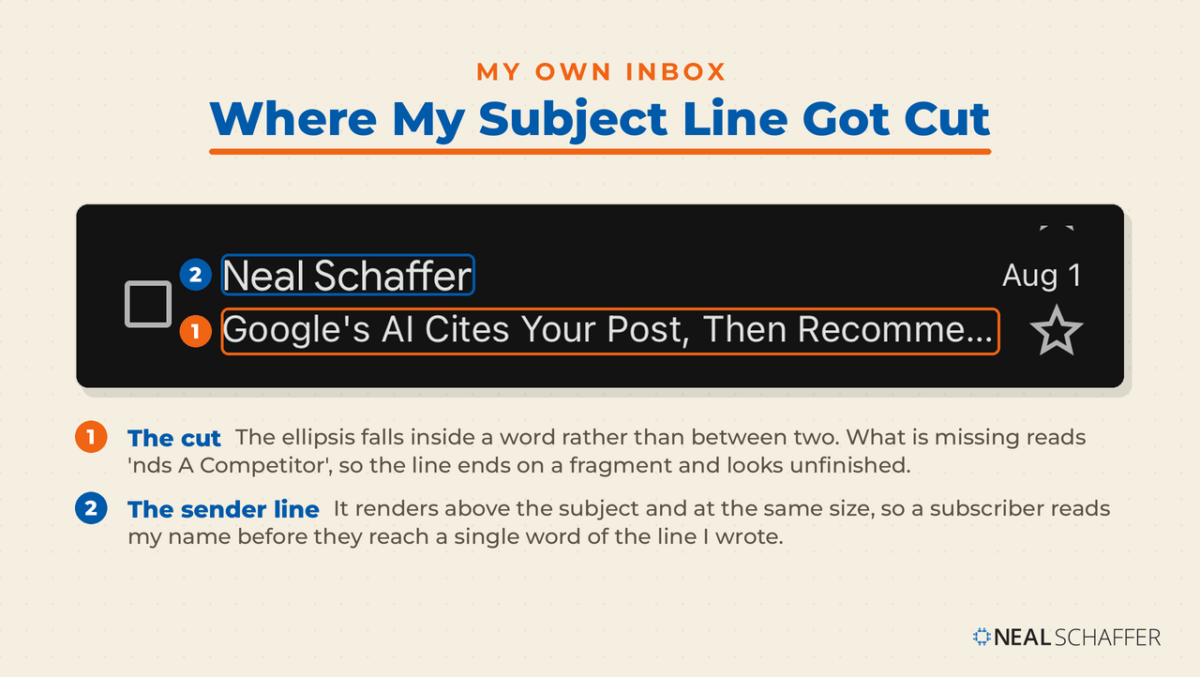
- Front-load the part that matters, because the end will be cut. In the same MailerLite benchmark report cited earlier, the most-opened campaigns were 45% more likely to use a subject line of 20 to 40 characters, 28% more likely to use segments or groups, and 23% more likely to use a custom preheader. I checked one of my own recent sends on my phone. Forty-one characters displayed and sixteen were cut, and the sixteen that vanished happened to contain the entire point of the line. Everything past roughly forty characters is written for you rather than for your reader.
- Write the preheader as a second line, not a repeat. Most senders leave it as whatever the body happens to open with, which wastes it. Treat it as support rather than rescue, though: depending on the client and the density setting, plenty of people will never see a preheader at all.
- Use the sender name as part of the subject. A personal sender name your subscribers recognize does more than any clever phrasing. Mine goes out under my own name, because that is what people signed up to receive.
- Test one variable at a time, and judge on clicks. Apple’s inflation applies about equally to both variants, so the comparison holds even though the absolute number does not. Confirm the winner on click-to-open rate so you are not optimizing for opens nobody performed.
I go deeper on the writing itself in my guide to email subject lines.
Send time matters less than you have been told
The standard advice is Tuesday or Wednesday, mid-morning. I checked my own sending against that, and on my daily notification list, across 68 campaigns sent Monday through Thursday, the gap between the best day and the worst day was 1.46 percentage points.
That is smaller than the noise between two consecutive sends. My weekly newsletter shows a wider spread, but the days are so unevenly distributed across that sample that I do not think the difference is readable, and I would rather say so than hand you a number I cannot stand behind.
Here is what I take from that. Send time optimization is real, but it is a late-stage refinement, and it is specific to your list rather than to a published day-of-week chart. If you send infrequently to a list that expects you at a certain rhythm, timing probably matters more than it does for me. Test it on your own audience after the bigger levers are done, and check whether the difference clears your own week-to-week variance before you act on it.
Do not forget the phone
Most of your list will see your email on a phone first, so send yourself a test and open it there before the real send goes out. You are checking two things beyond the subject line: whether the first screenful of the body says anything worth reading, and whether your links are large enough to hit with a thumb. This is unglamorous and it is the step most often skipped.
Then set up the emails that open best anyway
A welcome email reaches people at the exact moment their interest peaks, which is why welcome sequences consistently outperform broadcasts. Building them out is the highest-return work in email marketing automation, and it needs writing once rather than every week.
That still leaves the question of when to stop.
When to Stop Optimizing Open Rate
Stop optimizing open rate once it is stable and inside a normal band for your list type, then move your attention to clicks and conversions. Open rate is a top-of-funnel diagnostic. It cannot tell you whether anyone did anything, and past a certain point improving it costs more than it returns.
Two signs you have reached that point. Your open rate has held steady across your last ten sends, and your click-to-open rate is where you want it. At that stage the constraint is no longer getting the email opened. It is what happens inside it, which is a question about email copy and about your offer rather than about subject lines.
The other sign is business-shaped. If your open rate is fine and your revenue from email is flat, open rate is not your problem, and a sharper email marketing strategy will move the needle further than another round of subject line tests.
Frequently Asked Questions
For a general marketing list with open tracking enabled, roughly 40% to 45% is normal in 2026, matching the 43.46% median MailerLite reports across 3.6 million campaigns. Older guides citing 15% to 25% are not wrong, they are measuring data from before Apple Mail Privacy Protection landed. Compare yourself to your own trend line rather than to any single published figure.
Check four things in order: whether your bounce or complaint rate moved, whether you changed send frequency, where any recent subscriber growth came from, and what time of year it is. Open rates dip seasonally through the spring and summer, and a batch of low-intent signups from a giveaway will pull the number down on its own. Rewriting subject lines is the last thing to try, not the first.
No, but it makes it directional. Apple’s feature preloads message content and registers an open whether or not anyone read the message, so your reported opens run higher than the real ones by an amount you cannot measure precisely. Use open rate to spot changes over time, and judge actual performance on clicks.
Yes, but only in proportion to how big the cut is and how accurately you aim it. If every subscriber you remove is a confirmed non-opener, your new rate is your old rate divided by the share of the list you kept, so a 10% cut lifts your open rate by about 11% of whatever it is now. Trim 3% and nothing visible happens.
Yes, because the inflation applies roughly equally to both variants, so the comparison still holds even when the absolute number does not. Test one variable at a time and confirm the winner on click-to-open rate, so you are not optimizing for opens Apple generated on your behalf.
Start Reading Your Own Numbers Properly
Pull your last ten sends, group them by list rather than averaging them together, and write down the open rate, click rate, and bounce rate for each group. That exercise takes about twenty minutes, and it gives you the one benchmark that actually applies to you: your own.
If you want a wider checklist to run your program against, my guide to email marketing best practices covers the parts this post does not. And if email is one piece of a bigger picture you are trying to get right, Digital Threads is where I lay out how search, email, and social connect, or you can download a free preview first. Businesses that would rather have this run properly than explained can look at my Fractional CMO services.


I have used email marketing in the past but it is not effective. Luckily I read this post. After applying a few strategies, my email open rate has increased significantly. Thank you very much.
Glad to hear Andrew!
Hey,
open rates provide a good measure of engagement over time. What you want to see is a steady or increasing percentage rate. If the number of opens start to dip, it’s a sign that you need to review your sending frequency, or perhaps your content.
Amen to that brother!