
The days of carefree Tweeting, at least for brands, is over. For several years, social media marketing has been an arms race with everyone chasing customer eyeballs. And for social media managers, it’s often tough to know which Tweets are resonating with your audience. Engagements, of course, are a major clue on what works and what doesn’t. But the other indicator is top Tweets. These might not get a huge engagement percentage, but they’re making a large number of impressions.
Unfortunately, you might not know how to find my top Tweets. These are a subset of your statistics within the Twitter account. In addition, there are independent Twitter tools that help you find out what works, not just for you, but for your competitors.
Key Takeaways
✅ Your top posts live in the Content tab. Inside X’s analytics dashboard, that tab lists every post in your date range with impressions, likes, replies and reposts, and the table sorts on any of those columns, so you can rank by whichever number you treat as “top.”
✅ The account dashboard now sits behind X Premium. Without a subscription you can still open one of your own posts and choose View analytics to see that single post’s numbers, which is slower but free (Hootsuite).
✅ Link clicks are the gap worth knowing about. They do not appear in the account dashboard even on Premium, so per-post analytics is the only native place to find them.
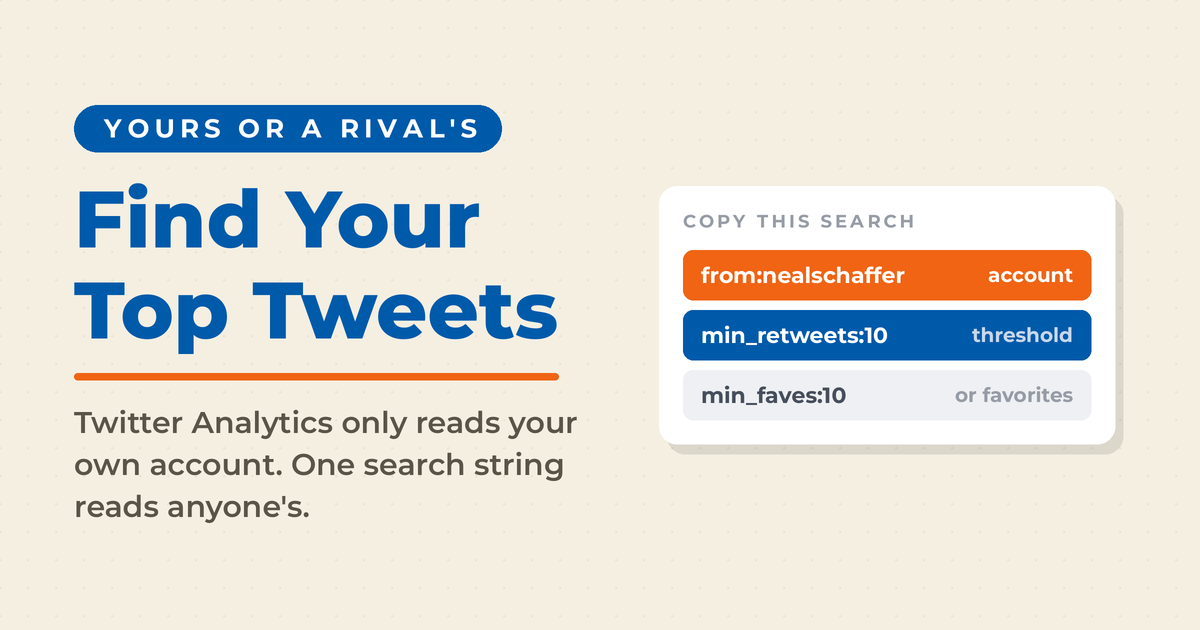
✅ The dashboard only reads your own account. For a competitor’s best posts you need search operators: from:handle min_retweets:10 or from:handle min_faves:50, raising the threshold until the list is short enough to read.
✅ Native history runs shallow. The Content tab tops out at a three month window and exports reach roughly 90 days, so anything older has to come from dated search queries or a third-party tool that keeps its own archive.
Why Is It Important to Know Your Top Tweets?
Even the best-planned Tweets can go wrong, and likewise, there are hidden gems just around the corner. Despite the overall “arms race,” spontaneous successes and failures can reveal unexpected trends. These give you opportunities for improvement. At the same time, if something falls flat it can reveal problems that you weren’t aware of. Problems can reflect on some aspect of your company, or they can show the need for adjustments in your social media strategy.
Improve your tweeting strategies
In a nutshell, you should know how to find my top Tweets if you want to improve your tweeting strategies. Checking them will let you see what tweets /content / subject matter best resonate with your audience. For instance, you might find that your audience loves it when your Tweets show a sense of humor. Life can be stressful, and humor in Tweets can relieve stress and make your brand memorable.
Let’s look at this another way. For months now, social media has been buzzing about the lawyer whose Zoom presence in court was dominated by a cat filter. There have been so many variations of this theme, and all of them have celebrated the humor in this everyday mishap. However, some of these jokes have fallen flat. And in the future the overall theme may get too old to be funny.
Find options for evergreen tweeting
Another reason you need to know how to find my top tweets is that your top posts can become evergreen Tweets. As I’ve said before in my evergreen Tweets post, you can’t repeat Tweets in exactly the same form these days. But even at that, there are strategies for reuse. If something you said in a top Tweet strikes a chord with your audience, then you have a great opportunity for reuse.
Another way you can find evergreen Tweet opportunities with top Tweets is through finding out what worries people. For example, in the early days of the pandemic everyone was buying disinfectant (seemingly) by the gallon. Within a matter of weeks, very dirty places became almost spotless. For a company that sells household and commercial cleaning chemicals, the cleaning trend on Twitter would’ve been instructive. Of course, cleanliness will likely remain an important trend here in America.
Understand which hashtags might be working on your behalf for extra visibility.
Of course, an evergreen-worthy Tweet isn’t the only measure of Twitter success. Rather, applying how to find my top tweets helps you know which hashtags are working the best. If your brand has a custom hashtag, then this isn’t the one you’re looking at. Here, the most important thing is targeting. Different hashtags reach people who are looking for specific things. If the tags and your intended audience match, then you have a winner. If not, you might fine tune your strategy.
On the other side of the coin, you might find that hashtags you’re using are ineffective. Maybe people aren’t interested in the topic (you can find this out with keyword research or social listening). Or, it could be that your brand doesn’t resonate with people looking at a particular topic. Once again, a modification of your strategy might be in order.
How to Find My Top Tweets Using Twitter Analytics
To find your top tweets in X’s own analytics, open the dashboard on desktop, click the Content tab, set your date range, and sort the table by impressions, likes, replies or reposts. The catch is access. That account-level dashboard now sits behind a paid X Premium subscription, so the free route looks different.
For years this was free, which is why so many guides still describe it that way. The account dashboard moved behind Premium; post-level analytics stayed free inside the mobile app (Hootsuite). Both routes get you to your top posts. Only one of them ranks them for you.
With a subscription, sign in on desktop and go to x.com/i/account_analytics, or click the three dots in the left sidebar and choose Creator Studio, then Analytics. The account overview opens first, showing impressions, engagement rate, profile visits and new followers for the period you pick. Click the Content tab to reach the posts themselves.
In the Content tab, every post inside your chosen window sits in a table with its impressions, likes, replies and reposts, sortable on any column, with window options running from 7 days to 3 months. Impressions is the default, which is why most people call their highest-impression post their top tweet. That default is worth arguing with. A post with fewer impressions and far more reposts told you something the impressions leader did not, because someone chose to put their own name behind it.
To rank on something the dashboard will not sort for you, use the export icon at the top right and do the sorting in a spreadsheet. Without Premium, open any of your own posts and choose View analytics to see that one post’s impressions, engagements, profile visits and link clicks. Checking a handful by hand is slower, but link clicks are worth the detour, because they never appear in the account dashboard even on a paid plan. Either way you are reading only your own account, which is where most marketers hit the wall.
How to Find Anyone’s Top Tweets Using Twitter Search
Do you want to look in on your competitors? For many of us, knowing what works for other companies and brands is a big help in shaping our own Twitter strategy. This is especially true if the other side is gaining market share at our expense. X analytics only reads your own posts, so the competitor question has to be answered somewhere else, and search operators answer it at no cost.
Go to the X search box and enter a query like this: from:nealschaffer min_retweets:10. Here “nealschaffer” is the account name, min_retweets is the metric you are looking for (likes use min_faves), and 10 is the minimum threshold. Raise that number until the results narrow to a list short enough to read. Reposts are the stronger signal of the two, since sharing a post costs more than tapping a heart, but likes catch the posts people enjoyed without wanting their own name attached.
One condition applies to all of it: you have to be signed in to an X account, because search returns nothing to logged-out visitors. The Twitter Advanced Search form at x.com/search-advanced runs the same operators through a visual builder, and adding since: and until: dates to a from: query is how you reach posts older than the analytics dashboard will show you.
How to Find Top Tweets Using Third-Party Tools
Third-party tools are the third route, and this section is shorter than it used to be. X shut off free API access in April 2023, and most of the independent tools that ranked anybody’s tweets for free went dark with it. Social Bearing was one of them. Its developer announced the shutdown that same week, citing an enterprise API tier priced at roughly $40,000 a month (Engadget).
What survived splits into two camps, and the difference decides whether a tool can answer your question at all. Most social media management platforms, Hootsuite, Buffer, Sprout Social and Later among them, report on accounts you have connected and authenticated. They will rank your own top posts, often more flexibly than X does, and several hold history well past the platform’s own limits. None of them will show you a competitor’s post data, because they cannot connect to an account you do not own.
The second camp reads public accounts you have no access to. Fedica is the clearest current example. Its account analysis runs on any connected or unconnected X handle, and when you request the engagement option it pulls that account’s posts and engagement metrics alongside audience demographics, brand affinity and follower overlap. It sits on the Grow plan or higher rather than a free tier (Fedica).
One Strategy to Connect All Your Marketing
My latest book helps small businesses, entrepreneurs, and marketers bring search, email, and social together into one digital marketing strategy that actually compounds.
Drawing on my work as a Fractional CMO, Digital Threads turns complicated tactics into a clear, practical plan you can follow, whatever your budget or team size.
Grab your copy on Amazon and start weaving your own digital threads. Click the cover or the button below to get started.

For most people asking how to find my top tweets, the honest answer is to stop before the paid tools. Your own dashboard covers your own account, and search operators cover everyone else’s for nothing. Reach for a paid tool when you need history the platform will not keep, audience data it will not show, or a report you can hand to somebody else. I keep a wider roundup of the Twitter tools worth paying for if you get to that point.
Frequently Asked Questions About Finding Your Top Tweets
Open your analytics dashboard, click the Content tab, and set the date range you care about. Every post in that window is listed with its impressions, likes, replies and reposts, and the table sorts on any of those columns. Impressions is the default view, but the post that earned the most reposts is usually the one worth studying.
Not as a ranked list. The account-level dashboard is a Premium feature now. What stays free is per-post data: open one of your own posts, choose View analytics, and you get impressions, engagements, profile visits and link clicks for that post on its own. Checking a handful by hand is slower, but it costs nothing.
With search operators, because the dashboard only reads your own account. Type from:handle min_retweets:10 into the X search box, swap in the account you want, and raise the number until the results narrow to the posts worth reading. The min_faves: operator does the same job for likes. You have to be signed in to an X account for search to return results at all.
The Content tab tops out at a three month window and exports reach roughly 90 days. Anything older has to come from search: add since: and until: dates to a from:handle query, or use a third-party tool that stores its own history instead of pulling it from X on demand.
Putting Your Top Tweets to Work
Keeping track of your top posts is common sense once you see what it tells you, though the mechanics are less generous than they used to be. Your own top posts come from the Content tab if you pay for Premium, or from per-post analytics if you do not. Anyone else’s come from search operators, which cost nothing and work on every public account. Paid tools fill the gaps in history and audience data, and not much beyond that. Start with the free routes, find the two or three posts that clearly outperformed, and ask what they had in common. That question is worth more than the dashboard that surfaced them.