
Since I have been blogging since 2008 and used it to build my career as an author, speaker, and Fractional CMO, I feel that I am uniquely qualified to provide you advice on how to write a blog post. Whether you are an absolute beginner who is still figuring out how to start a blog or someone trying to take their blog to the next level, I hope to provide you advice so that you too can see similar business results from blog marketing.
If you’ve followed my blog for a while, you know that I swear by blogging as one of the best ways to market professional services. Blogs let you show people what you know and inspire confidence in your expertise. Then, you can convert a percentage of your target audience into paying clients, through affiliate links, purchases, or another avenue entirely.
Writing a killer blog post is not rocket science, but it’s not a walk in the park, either. The process of writing blog posts takes time, effort, and persistence. Many bloggers struggle while writing blog posts because they don’t know the proper way to do it. They just write what they want to write, hit the post button, and hope for the best.
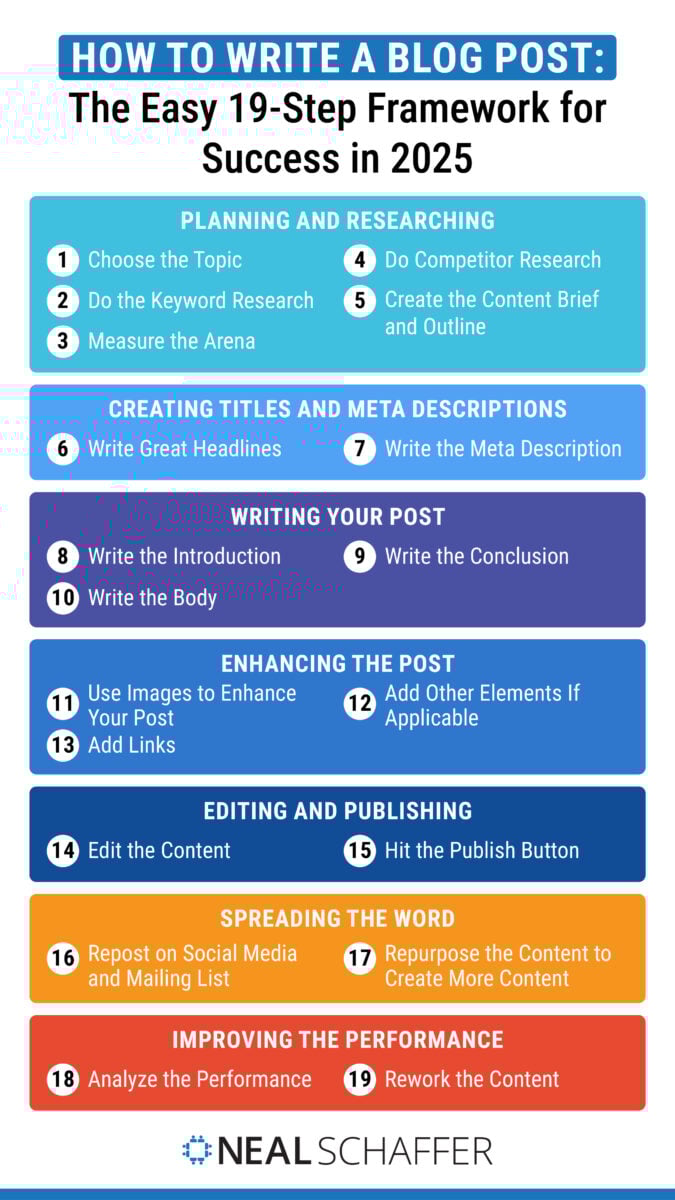
It takes more than a wish upon a star to write a successful blog post. You need a step-by-step proven system of blog writing to keep your audience coming back for more. Here are 19 simple steps to writing killer blog posts that will take away all the guesswork.
Key Takeaways
✅ Writing a blog post is a system, not a burst of inspiration. The 19 steps here move through planning, writing, enhancing, editing, publishing, and promotion, and they are the same sequence I have run on this blog since 2008.
✅ Length still separates the winners, even as the average shrinks. The average blog post is now 1,333 words, yet bloggers publishing 2,000+ word articles report strong results at 39% against a 21% benchmark, according to Orbit Media’s 12th Annual Blogger Survey.
✅ Visuals are the most underused lever in blogging. Only 4% of bloggers add seven or more visuals per post, and half of that group reports strong results, more than double the benchmark.
✅ Keyword research is the clearest dividing line. Bloggers who always research keywords report strong results at 32%, compared with 18% of those who never do, which is why steps 2 and 3 come before you write a single word.
✅ Publishing is the halfway point, not the finish line. Promotion, repurposing, and reworking underperformers are where the traffic actually comes from, and bloggers who always check analytics report strong results at 32% versus 13% of those who rarely look.
Planning and Researching
In this section: Discover how to pick the right topic, conduct smart keyword research, and analyze your competition on search engines so you can plan a blog post that actually ranks — and resonates. You’ll also learn how to build a solid content brief and outline that will make writing feel effortless, no matter the precise type of blog post you are actually writing.

1. Choose the Topic
This should be obvious but pick a topic that is relevant to your business. For example, a car repair shop could blog about preventive maintenance and how to know that a repair tech is being honest with you. After all, there are as many “dishonest mechanic” jokes as “crooked lawyer” ones. By inspiring confidence among your target audience with quality blog content, you can increase your customer base.
Next, look for ideas from competitors. Your selected competitors don’t need to be in your market, especially if you run a small business. However, you should look to competitors who cover the same topics and have the same kind of business. While you clearly don’t want to copy them, SEO competitor analysis is a great way to see what people have to say, and then choose something that can meaningfully compete with a wider audience. If you are short on angles, my running list of blog post ideas and topics is a good place to start.
2. Do the Keyword Research
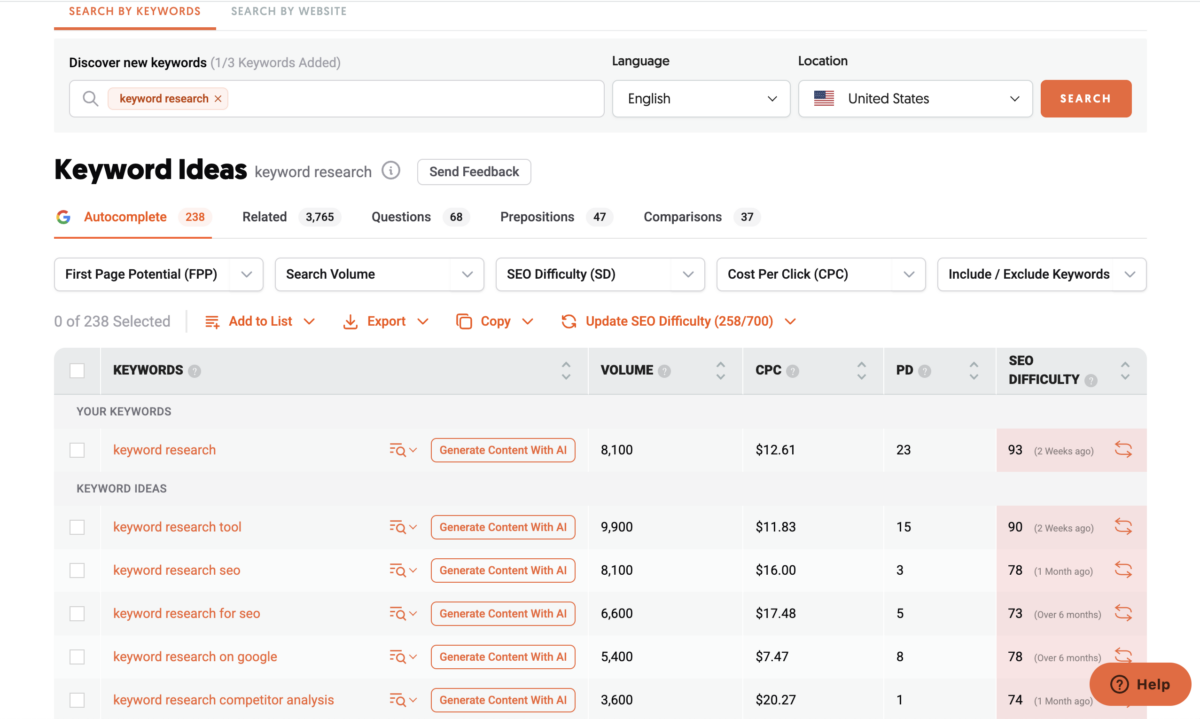
Keyword research tools continue to evolve. In 2026, the best ones combine AI-powered suggestions with real-time SERP analysis to help drive organic traffic, and the way you choose and place your SEO keywords still decides whether the post ever gets found.
Top tools to use now:
- Ahrefs – Still the gold standard for keyword difficulty and content gap analysis.
- Semrush – Excellent for competitor discovery and keyword clusters.
- Keyword Insights – AI-based topic clustering to create pillar content strategies.
- AlsoAsked – Still great for surfacing long-tail queries and “People Also Ask” data.
- ChatGPT with Web Browsing – Use advanced prompts to brainstorm search intent-based keywords.
Tip: Focus on search intent > search volume in 2026. Use clustering tools to plan supporting articles around your main blog post for topical authority and to build a catalog of blog post templates to reference.
3. Measure the Arena
Keywords are great, but sometimes the ones that “seem right” for a higher blog rank are very competitive. This is unsurprising, considering the money involved with some keywords. If the competition is too hard, find other keywords to generate a blog post idea. Generally, you can find a keyword or two that are similar to your ideal targets, but are easier to get a ranking with. This way, you can drive more traffic to your blog while ensuring that the right people visit.
It’s a balancing act!
A related thought on how to write a blog post is this: consider using long-tail keywords. These are more specific than shorter keywords, so they take a bit more work to insert properly during the writing process. They’re easier to win, however, and have clearer user intent compared to short tails.
4. Do Competitor Research
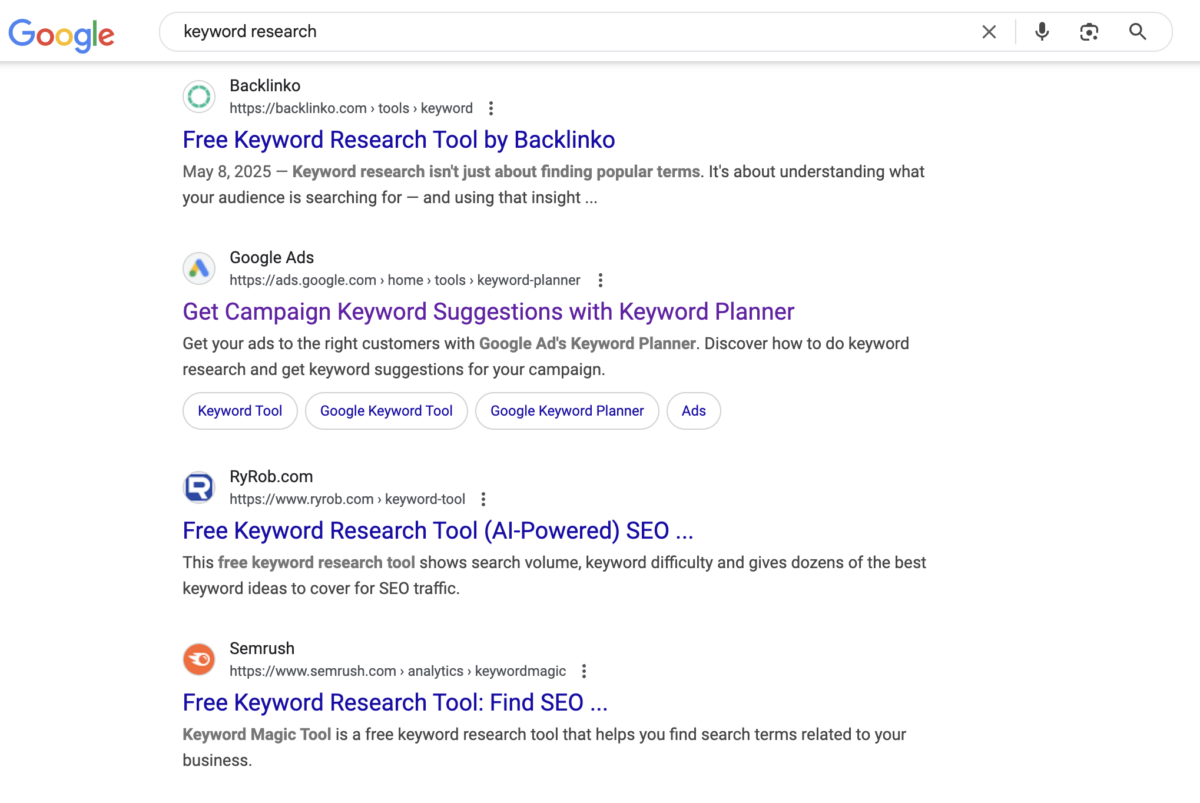
There’s an old saying: know your adversary. Or in this case, your competitor for website traffic, business, or both. Finding out what your competitors are up to is called competitor research.
The easiest way to do this is to search Google for the target keywords and consume your competitors’ content. Then, select a few of your competitors’ articles, take notes, and learn from their content to create a better article. Be sure to count the average words of your competitors’ content because your article length should be similar.
5. Create the Content Brief and Outline

Once you’ve figured out what your competitors are doing, and where you want to go, the next step in how to write a blog post is planning the content itself. First, summarize your findings in a content brief. If you conclude that manufacturer-recommended oil change intervals aren’t right for everyone, you need to summarize why this is. That way, you’ll know where you are going with the argument.
Doing this regularly helps you develop a series of basic blog post templates to make use of, no matter your blog post topic. Once you have a template per post type, the outline stage stops being a blank page.
Next, create structured headings based on your competitors’ content. Generally speaking, the competitors you read are from high in the SERPs, so there is a lot that the algorithms loved about the content. By using similar headings, you can capitalize on their success and surpass it.
Finally, make sure your outline is thorough and complete, including all of your relevant keywords and compelling content. This way, you won’t miss anything important.
Creating Titles and Meta Descriptions
In this section: Learn how to craft irresistible blog titles that earn clicks from a wider audience and write compelling meta descriptions that help your content stand out in search results — all while naturally including your target keywords.
The Digital Marketing Playbook for Small Teams
My latest book helps small businesses, entrepreneurs, and marketers bring search, email, and social together into one digital marketing strategy that actually compounds.
Drawing on my work as a Fractional CMO, Digital Threads turns complicated tactics into a clear, practical plan you can follow, whatever your budget or team size.
Grab your copy on Amazon and start weaving your own digital threads. Click the cover or the button below to get started.

6. Write Great Headlines
Coming up with a good title is like winning half the battle. After all, headlines tell readers what your blog post is about, and it’s the biggest item that entices the reader to read. You won’t always nail the title the first time, so make sure to come up with alternative titles as you create your blog from scratch.
7. Write the Meta Description
Titles and meta descriptions are the first things people will see on the SERP (Search Engine Result Page), almost like a business card or online directory result. Meta descriptions should answer the searchers’ queries but be brief (150 – 160 characters). Otherwise, Google won’t display the whole meta description, and it can also hurt your rankings–whether you have compelling content or not.
Writing Your Post
In this section: Now it’s time to write! We’ll cover how to start with a strong hook, structure your post for readability, and keep your audience engaged from the first sentence to the final line. These tips offer the ultimate guide to help you find your voice and deliver value every time you publish.
8. Write the Introduction
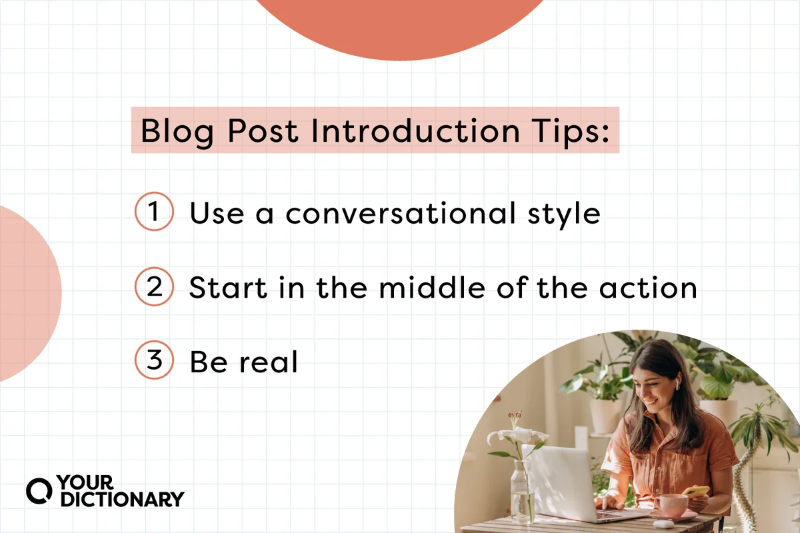
The intro should grab attention and convince readers to read more. So, start with a bang, or as literary experts call it, a “hook.” Your hook tells people what’s in your blog post without saying too much. Do it right, and people will feel like they have to finish the blog post. Remember, the longer your readers stay on your website, the better it is for your blog SEO.
9. Write the Conclusion
While it seems to be counterintuitive, coming up with the draft conclusion first will give a better goal and direction for the main content. As a general rule, you should use the outline as the guide in writing the draft conclusion, because the outline gives a step-by-step of your content or argument.
The conclusion should be motivational and make your reader believe that they can do or achieve what’s written in the body. This way, the reader feels their time is well spent, and they’ll be more likely to come back for more compelling content from your blog.
10. Write the Body
Next, it’s time to write the body, following the outline point by point. No matter what kind of content you have, the content of the body should be easy to follow. Otherwise, people can get “lost” in your text and have difficulty finding important points later.
Besides following the outline, you should generally use short paragraphs. At the same time, you’ll want to plan locations for images and videos to be added later. Because multimedia is increasingly important even for bloggers, this isn’t a step you want to miss. Besides, having plenty of “empty space” on the page makes your content seem more accessible. If you want the specifics on subheads, spacing, and skimmability, I break them down in my guide to blog post format.
Just as you plan for space in your editorial calendar, plan for space on your pages!
Enhancing the Post
In this section: Go beyond words — enhance your blog post with visuals, strategic internal links, engaging CTAs, and formatting tricks that boost readability–all without keyword stuffing. These are the subtle touches that turn good content into great content.
11. Use Images to Enhance Your Post
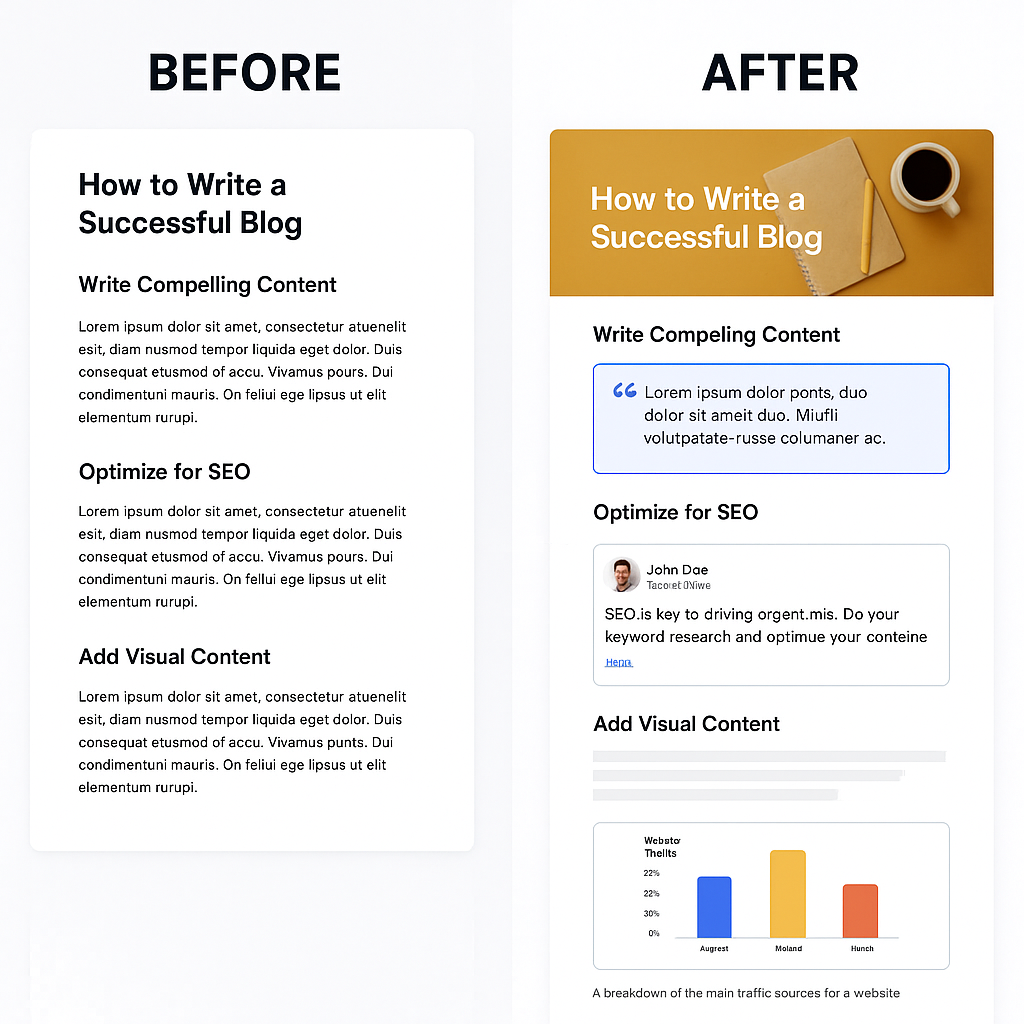
This one’s simple: add relevant images to all your blog posts. Use the images to improve the content’s flow, add humor, give breathing room to readers, explain complex topics, and more. You can see the dramatic difference in visibility with or without visuals in the above image.
If you write a fashion blog, include images of the latest trends! If your blog focuses on travel, make use of guest blogging to increase the scope of your travel images.
Make sure the images give additional value to the written content. If not, what’s the point? You’ll just waste your reader’s time with extra fluff. Since my blog is all about giving business advice, I strive to add images that add value and information gain. Whatever you add, confirm you have the right to publish it, because sourcing images is one of the fastest ways for a blogger to run into the legal side of blogging.
12. Add Other Elements If Applicable
Sometimes, it isn’t only about pictures. You can also add other elements such as videos, tables, quizzes, surveys, and more. For instance, I could run a poll about whether or not influencer marketing is worthwhile in 2026. Or, I could insert an infographic about how to increase influencer marketing ROI.
Either way, be sure that what you add increases the value of your post and sets you on your way to becoming a profitable blog.
13. Add Links
Adding links improves SEO and keeps your visitors reading about the topic at hand. First, add internal links to other relevant content on your website, including other blog post URLs. This increases your website dwell time, which is great for analytics in many categories, and it tells search engines and AI crawlers how your topics connect.
Next, add external links to relevant references and resources. Not only does this help you avoid plagiarism, but you’re doing everyone a favor by directing them to new resources. Plus, backlinks are gold to bloggers, and by giving them one, you increase the chance they’ll reciprocate, which is where most link building actually starts.
Editing and Publishing
In this section: Learn how to polish your draft to perfection with smart editing, proofreading tips, and final on-page SEO checks. Then hit “Publish” with confidence knowing you haven’t missed a thing in the process of writing blog posts.
14. Edit the Content
Especially in an era of fast content and tight publication schedules, it can be tempting to just publish your work as soon as you finish. However, basic errors like typos or advanced errors like a poor argument can seriously detract from your message and reduce the likelihood of producing amazing blog posts. The proofreading and editing picks in my guide to the best apps for bloggers catch most of the surface-level problems before a reader ever sees them.
Here’s a list of things you should always check before publishing your posts:
- Make sure your content flows nicely from one part to another.
- Check for grammatical mistakes.
- Avoid repetition.
- Read it aloud. This can help you realize when a post misses the mark or “sounds funny.”
- Ask for feedback from others. Your inner circle isn’t afraid to voice their opinions on your blog content.
- Don’t be afraid to cut the fluff and keep the meat. This way, you can keep people engaged and, if necessary, make changes that keep your post length in check. Blog readers do not always possess large attention spans, and your blog content should reflect that reality.
- Rewrite some of the parts if necessary. In other words, if something isn’t right, change it!
15. Hit the Publish Button
When everything is checked, it’s time to hit the publish button. Although it might be tempting, don’t be a perfectionist. Otherwise, you might never publish anything for fear of failure (or imperfections). Besides, you can always rework and improve the post later. It’s one of the wonders of online publishing:
Bonus: Spreading the Word
In this bonus section: Don’t let your blog post fade into the void. Discover simple, effective ways to promote your content through social media, email marketing, and outreach to maximize your reach.
16. Repost on Social Media and Mailing List
Repost your blog post on social media channels and email lists to spread the word. Use one of the blogging tools in my scheduling stack to publish your new blog post to your social channels on a regular basis. Likewise, a newsletter-style email list is great for driving traffic: send people a nice email with the cover photo and a link. There are a lot more ways to promote your blog than most bloggers ever try.
Don’t forget to tell your friends and family, either. Often, families are great at making referrals and bragging about their kin. Plus, they can post links on Facebook and other social media, increasing the value of your efforts.
17. Repurpose the Content to Create More Content
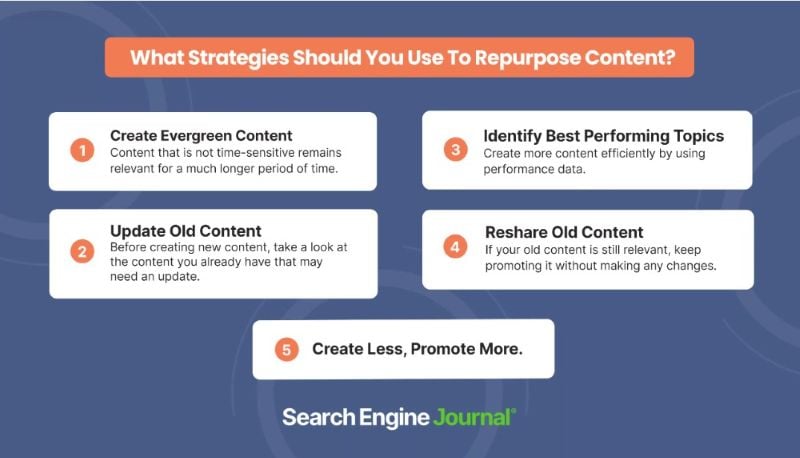
You can repurpose blog posts to create more content for social media channels. For instance, you can extract a quotation from your post and turn it into an Instagram post. Or, make an infographic to post on Facebook. In addition, you can create videos based on the content.
Tutorials and explainer videos are great formats for this. No matter what you do, don’t forget to link back to the original content, a.k.a. the killer blog post. This approach helps you fill your content calendar across social networks while increasing website traffic, and it is the cheapest way I know to make one post do the work of five. It is also why repurposing belongs inside your content strategy rather than as an afterthought.
As you create your blog posts, consider how they might be shifted into other formats. A step by step tutorial makes a great video. List posts can be great on Twitter. Behind-the-scenes can go well on Instagram. Tune into how your blog readers might prefer to see content repurposed.
Bonus: Improving the Performance
In this bonus section: Publishing isn’t the end — it’s the beginning! Find out how to monitor your post’s performance with analytics, update aging content for SEO wins, and optimize based on real-world results.
18. Analyze the Performance
After your blog post is published, analysis is where you turn data into growth. Here’s how to do it in 2026:
Modern tools to use:
- Google Search Console (GSC) – Now with more real-time indexing reports and featured snippet tracking, Google Search Console is an essential tool.
- Microsoft Clarity – Free heatmap + session recording (2026 update: now includes AI analysis summaries) can help determine areas on your site that are in need of attention.
- Plausible Analytics – A privacy-focused alternative to GA4 with easier reporting.
- Ahrefs or Semrush – Monitor backlinks, keyword rankings, and content decay to generate a list of items to address on your site.
What to track in 2026:
- Average scroll depth (attention is the new CTR)
- Featured snippet appearance
- Topic cluster performance (not just individual posts)
Combine quantitative (GSC + Clarity) and qualitative (comment feedback, social shares) for a full picture of your performance, and which pieces of content are likely to continually offer returns.
19. Rework the Content
Make your blog post even better by creating better or additional content on the underperforming keywords and queries. For instance, you can look at competitors’ content that’s performing better than yours, and see what they cover that you skipped. This is content optimization in its simplest form, and on my own blog it has produced more traffic gains than writing brand new posts ever has.
Frequently Asked Questions About How to Write a Blog Post
Write 2,000 words or more when the topic can genuinely carry it. The average blog post is now 1,333 words, but the 2,000+ word group reports strong results at nearly double the benchmark rate. Length is a proxy for depth, so write long because the topic deserves it, never to hit a word count.
The average is about three and a half hours, down from a peak of four hours and ten minutes in 2022, largely because of AI-assisted drafting. That average is not a target. The bloggers who put more hours into research, original visuals, and editing are consistently the ones reporting the strongest results. If you cannot protect that much time every week, outsourcing is the honest alternative, and I compare the blog writing services worth considering in a separate post.
Use AI as an assistant, not as the author. Orbit Media found that marketers who use AI to write complete articles are the least likely to report strong results, while the marketers who refuse to use AI at all also underperform. The pattern that works is AI for ideas, outlines, and edits, with your own experience carrying the substance, which is exactly the workflow I lay out in my guide to AI blogging.
Match search intent first, then earn depth. Keyword research is the clearest dividing line in the data: bloggers who always do it report strong results at 32%, versus 18% of those who never do. Pair that with internal links, original visuals, and a commitment to rework the post once you have real search data.
Treat publishing as the halfway mark. Promote the post on social and email, repurpose it into other formats, and check analytics so you know which posts to rework. Bloggers who always check analytics report strong results at 32%, compared with 13% of those who rarely look.
Conclusion
There you have it: a detailed step-by-step guide to creating a killer blog post. Follow each step consistently each time you create a new post, and Google will recognize your website as one of the best resources for your chosen topic and can even redirect common questions to your site.
In time, your posts will rank higher faster, you’ll get more organic traffic to your website, and you’ll see an increase in customers, all from a profitable blog with amazing blog posts! Now you know exactly what to do–the only thing left is for you to do it.
From your blog title to the keywords prospective readers will punch into their search bar, to the content formats you take on, your content creation process can make all the difference in bringing in new potential readers and seeing even your most popular posts fall to the wayside. By using the tips and ideas I have outlined here, you can make sure your pieces of content are well on their way to being seen.
If you are still setting up, start with my guide on how to start a blog, then work through my blogging tips once your first few posts are live. And if you would rather have a second set of eyes on the whole content engine, that is what I do as a Fractional CMO, or you can join the entrepreneurs and creators inside my Digital First Mastermind.