
Most businesses treat their Facebook Page like a digital bulletin board. Post something, hope someone sees it, move on. Or maybe they just see it as the minimum investment to run Facebook Ads. But here’s what they’re missing: Facebook isn’t just a social network anymore. It’s become its own search engine with over 3 billion monthly active users, and as of mid-2025, your public Facebook content can now show up directly in Google search results.
That changes everything about how you should think about your Facebook presence.
I’ve been helping businesses build their Facebook marketing strategy for well over a decade, and I’ve written about it extensively in my books Digital Threads and Maximize Your Social. As a fractional CMO who works with businesses on their digital strategy every day, I can tell you: the companies that treat Facebook SEO as part of their organic strategy are the ones that could have an edge over the competition.
And yet, most of the advice out there reads like it was written by someone who has never actually managed a Facebook Page for a real business. Let me share what actually works.
Key Takeaways
✅ Facebook SEO means optimizing your Page, posts, and Groups so they rank higher in both Facebook’s internal search and Google’s search results.
✅ Meta’s July 2025 update now allows Google to index public Facebook posts, making social content searchable like web content for the first time.
✅ Your Facebook Page name, vanity URL, and About section are the strongest on-page ranking signals you can control right now.
✅ Engagement signals (comments, shares, saves) directly influence how Facebook’s algorithm surfaces your content in search.
✅ Facebook Groups are an underused SEO asset that can rank in both Facebook search and Google for niche, long-tail topics.
✅ A consistent posting schedule with keyword-aware captions matters more for Facebook SEO than any single optimization trick.
What Is Facebook SEO and Why Should You Care?
Facebook SEO is the practice of optimizing your Facebook Page, profile, posts, and community activity so they appear more prominently in Facebook’s internal search results and, increasingly, in external search engines like Google.
Think of it this way: when someone types “best Italian restaurant near me” into Facebook’s search bar, the platform doesn’t randomly pull up results. It weighs factors like keywords in your Page name and About section, your engagement rates, your reviews, and how active your Page has been recently. The businesses that show up first have, whether intentionally or not, optimized for these signals.
According to the 2025 Sprout Social Index, roughly 90% of consumers use social media to stay connected to online culture, and over half turn to Facebook and Instagram first when discovering products. Facebook ranks as the second most popular platform for product discovery, trailing Instagram by just a single percentage point.
That’s a massive audience actively searching, not just scrolling.
And here’s the part that surprised even me: according to Meta’s Q4 2025 earnings data, Facebook now has over 3.07 billion monthly active users, with more than 2.1 billion logging in daily. I keep an updated roundup of all the latest Facebook statistics on my site, and the growth hasn’t slowed. According to Backlinko’s user analysis, 98.5% of those users access the platform via mobile, and India leads globally with over 375 million users. Those aren’t stale accounts. People are actively using Facebook to research businesses, read reviews, join communities, and yes, search.
If your Facebook Page isn’t optimized for search, you’re essentially invisible to a huge chunk of potential customers who are already looking for what you offer.
If you’re familiar with traditional website SEO, Facebook SEO will feel intuitive. The same core principles apply, just in a different environment.
| SEO Element | Traditional Website SEO | Facebook SEO Equivalent |
|---|---|---|
| Page Title | Title tag with target keyword | Page Name with brand + key descriptor |
| Meta Description | 160-character summary for SERPs | About section description |
| URL Structure | Clean, keyword-rich permalink | Vanity URL (facebook.com/yourbrand) |
| Headings (H1, H2) | Structured headers with keywords | Post captions and video titles |
| Image Alt Text | Descriptive alt attributes | Facebook image alt text field |
| Internal Linking | Links between related pages | Linking to your Page from posts, Groups, and website |
| Backlinks | External sites linking to you | Other Pages, websites, and profiles linking to your Page |
| Local SEO | Google Business Profile optimization | Complete contact info, categories, and location data |
| Content Freshness | Regular blog publishing | Consistent posting schedule (3-5x per week) |
| User Engagement | Time on page, bounce rate | Likes, comments, shares, saves |
| Reviews | Google Reviews | Facebook Page Reviews |
How Did Meta’s July 2025 Update Change Facebook SEO?
This is the biggest shift in Facebook SEO in years, and a lot of businesses still haven’t caught on.
On July 10, 2025, Meta began allowing public content from professional Facebook and Instagram accounts to be indexed by Google and other search engines, notifying users through in-app notifications and confirmed by multiple media sources. That includes captions, alt text, bios, location tags, and even historical content going back to January 2020.
Before this update, your Facebook content lived inside a walled garden. It could go viral within Facebook, but Google couldn’t really surface individual posts. Now? A well-optimized Facebook post about, say, summer roof maintenance tips can show up in Google search results for “roof maintenance summer 2026” right alongside traditional blog posts and web pages.
According to reporting from SiteGround, only posts from public professional accounts (business and creator profiles) are eligible, and the content must have been posted after January 1, 2020. You’re automatically opted in, but you can toggle this off in your privacy settings if you prefer to keep content within Facebook’s ecosystem.
The practical implications? Your Facebook captions now function more like web content. Keywords in your posts, alt text on your images, and even your hashtags serve as indexing signals for Google. This doesn’t mean you need to turn every Facebook post into a blog article, but it does mean you should be intentional about the language you use.
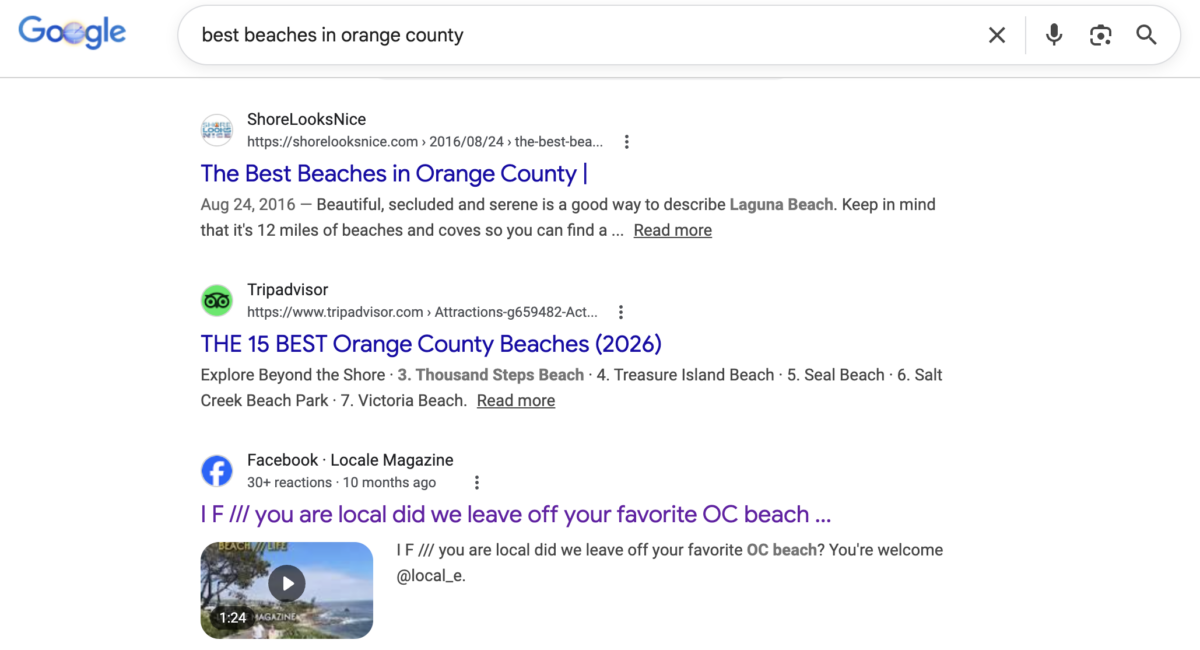
I’ll be honest: when I first heard about this update, I was skeptical about how much it would actually affect organic traffic. But after seeing more Facebook posts like the below start appearing in Google results for long-tail queries, I’m convinced this is a real opportunity, especially for local businesses and niche brands.
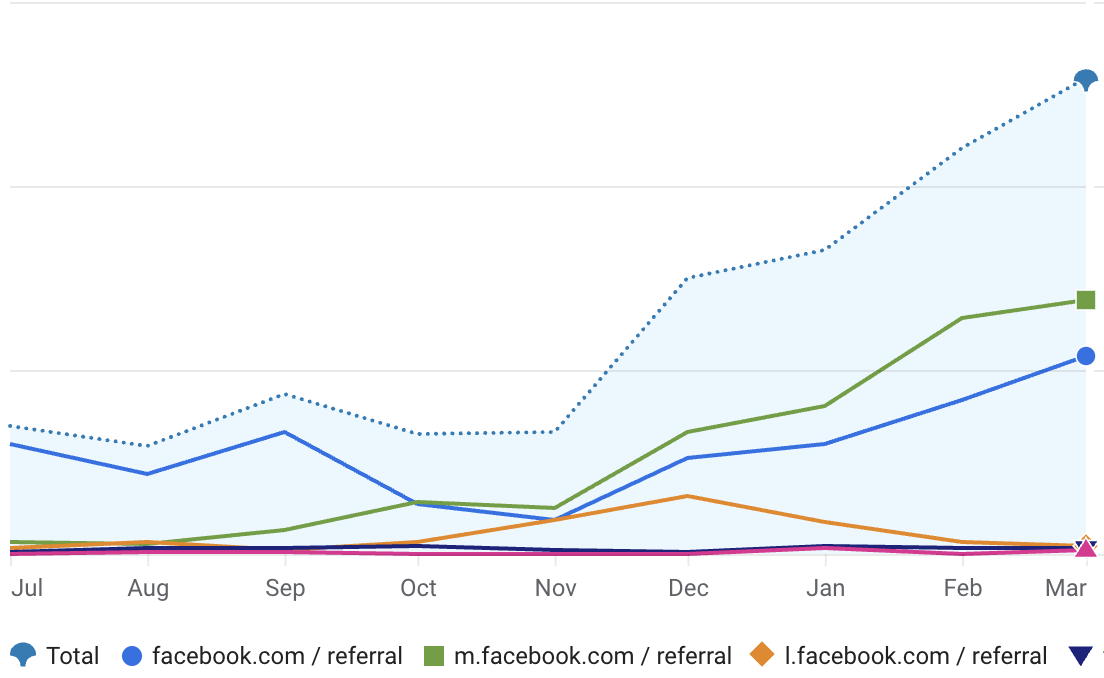
And this isn’t just theoretical. Here’s my own Facebook referral traffic from Google Analytics since July 2025, when Meta’s indexing change went into effect. The trend speaks for itself.
How Does Facebook’s Search Algorithm Actually Work?
Understanding how the Facebook algorithm handles search is essential before you start optimizing anything. Facebook’s search system is powered by a combination of keyword matching, user intent signals, engagement data, and personalization.
The LinkedIn Playbook for Real Business Growth
My latest book helps professionals, entrepreneurs, and business owners turn LinkedIn from a static profile into a real source of clients and growth.
Maximizing LinkedIn for Business Growth gives you clear, practical steps to build a profile that gets noticed and a network that actually sends business your way.
Grab your copy on Amazon and put it to work this week. Click the cover or the button below to get started.

Here’s the simplified version of what Facebook’s algorithm evaluates when someone searches:
Keyword relevance: Does your Page name, About section, post text, or Group description contain the terms the user searched for?
Engagement signals: How much interaction does your content generate? Posts with more comments, shares, and saves signal higher quality to the algorithm.
Recency and consistency: Active Pages with fresh content rank higher than dormant ones. Facebook wants to show users content from Pages that are alive and engaged with their audience.
Location proximity: For local searches (and they happen constantly on Facebook), your business location and the searcher’s location are heavily weighted.
Authority and trust: Verified Pages, Pages with positive reviews, and Pages with consistent branding tend to rank better.
One thing that’s changed significantly in 2026 is the role of AI in content distribution. Meta launched its User True Interest Survey (UTIS) model in early 2026, which directly asks users how well recommended content matches their interests, rather than relying solely on engagement metrics. According to Meta’s engineering blog, A/B testing with over 10 million users showed a 5.4% increase in high-satisfaction ratings and a 5.2% boost in total engagement.
What does this mean for your Facebook SEO? It means creating content that genuinely resonates with your audience matters more than ever. Gaming engagement with clickbait or engagement pods will backfire. The algorithm is getting smarter at distinguishing between content people mindlessly scroll past and content they actually value.
How Do You Optimize Your Facebook Page for Search?
Your Facebook Page is your foundation. If it’s incomplete or poorly structured, nothing else you do will matter much. Think of Page optimization the way you’d think about on-page SEO for a website.
Choose a Clear, Keyword-Rich Page Name
Your Page name is one of the strongest ranking signals on Facebook. It should clearly reflect your brand while providing context about what you do.
If your business name alone isn’t descriptive, consider adding a short keyword phrase. For example, “Sunrise Bakery” becomes “Sunrise Bakery | Fresh Artisan Bread & Pastries in Austin.” That extra context helps both Facebook’s search engine and Google understand what your Page is about.
But don’t go overboard. Keyword stuffing your Page name looks spammy and can actually hurt your credibility. The goal is clarity, not cramming.
Claim Your Vanity URL
This is one of those five-minute tasks that makes a real difference. Instead of facebook.com/pages/random-number-string, set your URL to facebook.com/yourbrandname. It’s cleaner, more professional, and it reinforces your brand in search results.
If you haven’t done this yet, go to your Page settings and look for the option to create a custom username. Pick something short, memorable, and consistent with your branding across other platforms.
Complete Every Section of Your About Page
Your About section is where you pack in the most SEO value. Here’s what to include:
Description: Write a natural, keyword-rich summary of your business. Don’t just list services. Tell visitors what makes you different and who you serve. Think about the phrases your ideal customers would type into Facebook’s search bar.
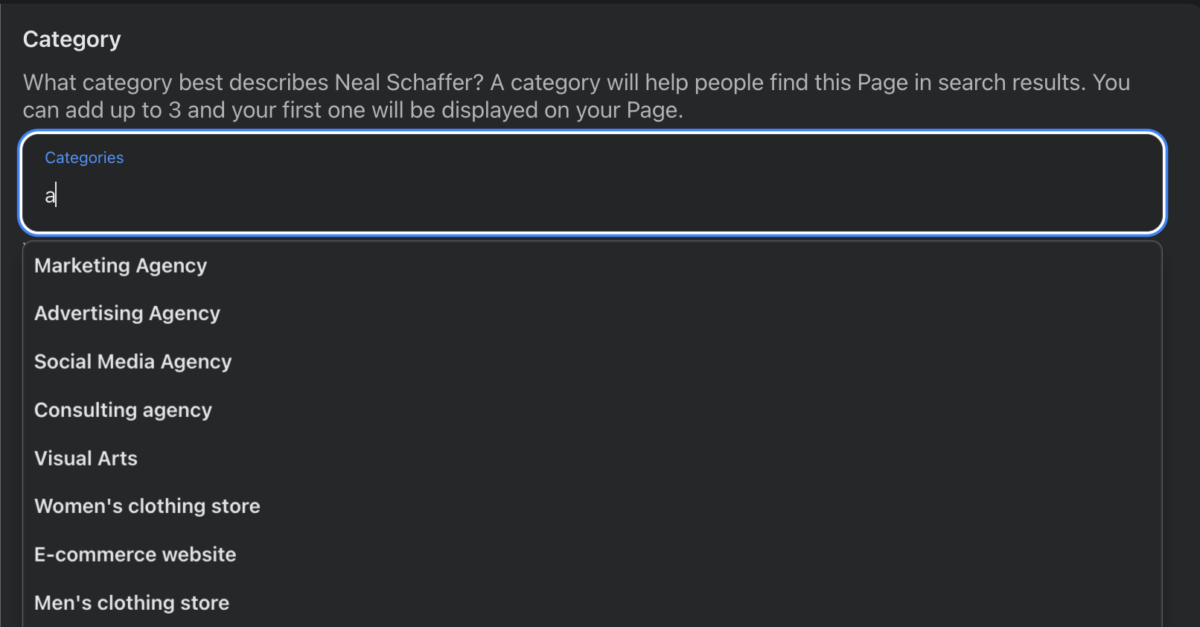
Categories: Choose the most specific categories available and all 3 that Facebook let’s you choose. If you can align these with your Google Business Profile categories, even better, it sends consistent signals to search engines.
Contact information: Fill in your phone number, email, website, and physical address. This is critical for local SEO. Facebook uses this data to surface your Page in location-based searches.
Hours of operation: Keep these accurate and up to date. Outdated hours frustrate customers and can hurt your search rankings.
Mission and Company Overview: These fields give you additional space to include relevant keywords naturally.
I recommend reviewing your About section quarterly. Industries shift, services evolve, and the keywords your customers use change over time.
Add a Strategic CTA Button
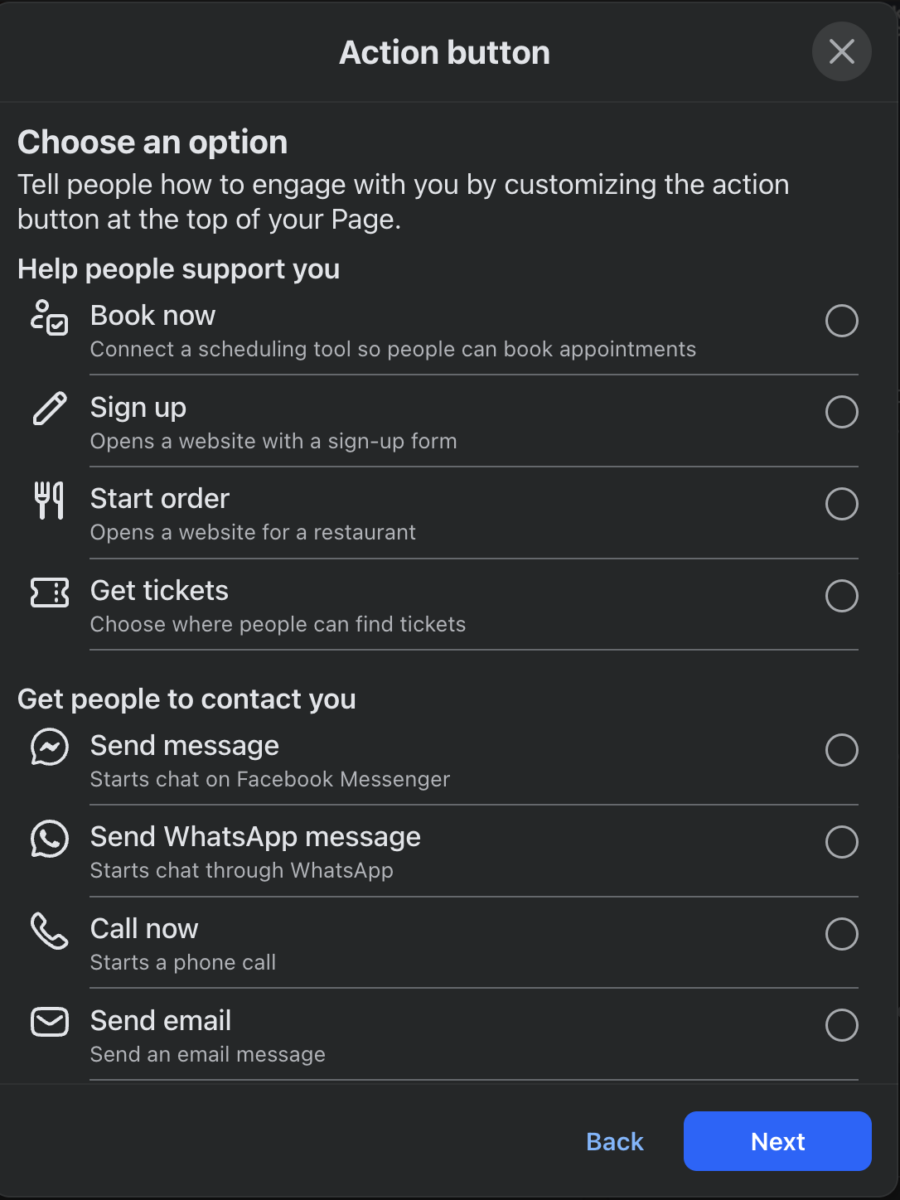
Facebook lets you add a call-to-action button right below your cover photo. Options include “Book Now,” “Contact Us,” “Shop Now,” and several others. Pick the one that aligns with your primary business goal. This button doesn’t directly affect search rankings, but it improves conversion rates once people find your Page, which is the whole point.
What Makes Facebook Content Rank Higher in Search?
Page optimization gets you into the game. Content optimization is how you win.
Use Keywords Naturally in Your Captions
Every caption you write is now a potential search result, both on Facebook and on Google. That doesn’t mean you need to write like a robot. It means being intentional about the words you choose.
If you’re a wedding photographer in Denver, don’t just post “Beautiful day for a shoot!” Instead, try something like “This fall wedding at Garden of the Gods was one of our favorites this season. The golden light in Colorado Springs is hard to beat for outdoor wedding photography.”
See the difference? The second caption naturally includes location terms and descriptive keywords without feeling forced. Someone searching “wedding photographer Colorado Springs” on Facebook or Google now has a chance of finding that post.
Not sure what to write about? I have a full list of Facebook post ideas that can get you started. And if you want to focus specifically on driving interaction, check out my guide to Facebook engagement posts for content formats that consistently spark conversation.
According to Buffer’s 2026 Facebook statistics roundup, millennials between 25 and 44 make up just over half of the platform’s audience, and the average user spends nearly 19 hours per month on Facebook. That’s not a dying platform. That’s a search engine hiding in plain sight.
Prioritize Native Video and Reels
Facebook’s algorithm heavily favors native video content, and this extends to search. Videos uploaded directly to Facebook (not shared from YouTube) get significantly better distribution. And with all Facebook videos now classified as Reels since mid-2025, short-form video has become the primary discovery format on the platform.
According to SocialPilot’s 2026 Facebook trends analysis, roughly 80% of social media recommendations are now powered by AI algorithms, and Reels consistently deliver higher engagement than static posts.
When you upload a video, optimize the title and description with relevant keywords. Add captions or subtitles, since many users watch without sound, and the text gives the algorithm more context about your content’s topic.
Add Alt Text to Every Image
Facebook allows you to add alternative text to images, just like you would on a website. Most businesses skip this completely. When uploading or editing a photo, look for the “Edit” or “Alternative Text” option and add a descriptive phrase that includes relevant keywords.
This helps both accessibility (screen readers use alt text) and search visibility. It’s a small step that compounds over time if you’re posting regularly.
Post Consistently at the Right Times
Consistency signals to the algorithm that your Page is active and worth surfacing in search results. You don’t need to post five times a day. For most businesses, three to five posts per week is a solid target. What matters is showing up reliably.
And timing matters. Check your Facebook analytics tools to see when your audience is most active, and schedule your content accordingly. I have a separate guide on the best time to post on Facebook that breaks this down by industry and audience type. Tools like Metricool also offer competitor analysis features that can help you identify keyword opportunities your rivals are missing.
Facebook has rolled out a ton of new features over the past few years. Stay current with what’s available, because the algorithm tends to reward early adopters of new content formats.
Here’s a quick reference for how to optimize each major Facebook content format for search visibility:
| Content Format | Where to Add Keywords | SEO Tip |
|---|---|---|
| Text Posts | Caption body | Lead with a question or phrase your audience would search for |
| Image Posts | Caption + alt text field | Add descriptive alt text with relevant keywords on every image |
| Reels / Video | Title, description, captions/subtitles | Include keyword-rich subtitles since the algorithm reads them for context |
| Link Posts | Caption context above the link | Provide substantial commentary, not just the URL, to boost engagement |
| Carousel (PDF) | Caption + text on each slide | Use searchable text on slides, not just graphics |
| Facebook Live | Event title, description, post-stream caption | Repurpose as a Reel with an optimized title after the broadcast |
| Group Posts | Post text and comments | Answer specific questions with detailed, keyword-rich responses |
Why Are Facebook Groups a Hidden SEO Asset?
Here’s something most Facebook SEO guides miss entirely: Groups are one of the most powerful, and most underused, SEO tools on the platform.
Facebook Groups generate some of the highest engagement rates on the platform. Members ask questions, share experiences, and have genuine conversations. All of that text, those questions, those answers, is searchable content. And since Meta’s July 2025 indexing update, public Group discussions can now appear directly in Google search results.
Here’s a real example. I searched Google for “newport beach gardener” and a post from a local Newport Beach community Group showed up on the first page, right alongside Yelp, Thumbtack, and other directory sites. The post was someone asking “Who can recommend a meticulous gardener in Newport…” with 10+ comments and recommendations. That’s a Facebook Group thread competing with established service directories for a local search query.
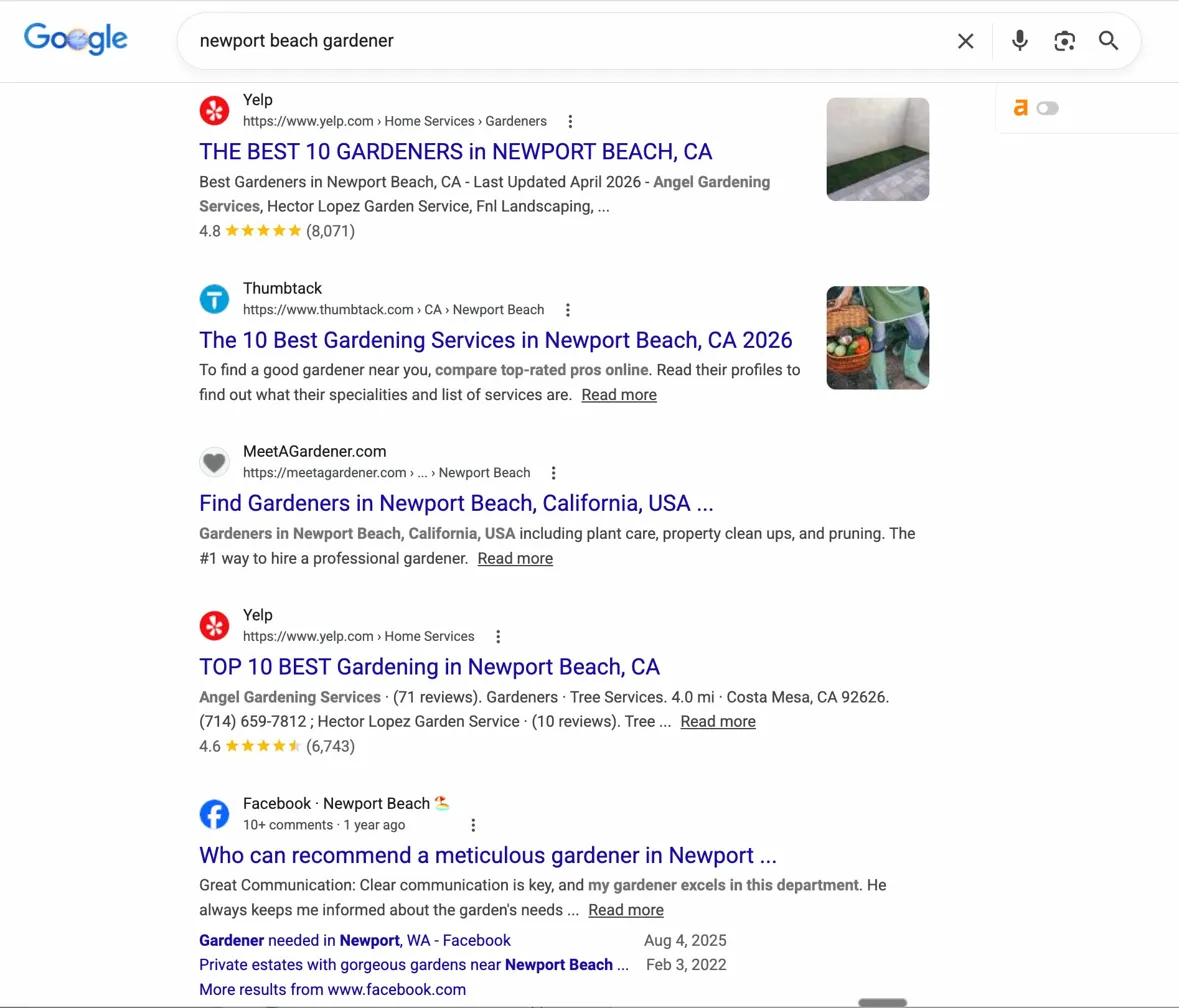
Think about what this means. If you run a local business or serve a specific community, the conversations happening in public Facebook Groups about your industry are now ranking in Google. And if you’re the one creating those Groups, moderating those discussions, or showing up consistently with helpful answers, your name gets attached to every one of those threads.
Real estate agent Cory Tanzer took this a step further. According to a Lab Coat Agents case study, he created two Facebook Groups for the specific neighborhoods he farmed, University Commons and University Village, and used them as digital town squares. He grew to over $20 million in annual sales and captured 57% market share. His neighbors started calling him “the mayor.” While his Groups were private (meaning they wouldn’t rank in Google), the principle holds: Groups build authority with exactly the people you want to reach. Make yours public, and you get the SEO benefit on top of the community benefit.
“Social media is not about the exploitation of technology but service to community.” – Simon Mainwaring, Author and Brand Strategist at We First Inc.
That quote captures the essence of why Groups work for SEO: they’re built on genuine community value, and the algorithm rewards that.
How Do Reviews and Social Proof Affect Facebook SEO?
Reviews are a ranking signal on Facebook. Pages with more positive reviews tend to appear higher in search results, especially for local queries. They also serve as powerful social proof that influences whether someone clicks on your Page or scrolls past it.
Here’s what to do:
Actively request reviews. After completing a project or transaction, ask satisfied customers to leave a review on your Facebook Page. Make it easy by sending them a direct link.
Respond to every review, positive or negative. Engagement with reviews signals to Facebook that your Page is actively managed. Professional, thoughtful responses to negative reviews can actually build more trust than a wall of five-star ratings with no replies.
Don’t ignore the keywords in reviews. You can’t control what customers write, but the terms they use in reviews contribute to your Page’s keyword relevance. If multiple customers mention “fast delivery” or “great customer service,” those phrases become part of your Page’s searchable footprint.
As SEO expert Neil Patel has noted, monitoring and responding to Facebook reviews is one of the most overlooked opportunities for improving your Page’s search visibility, per his Facebook SEO guide.
Does Facebook SEO Help Your Google Rankings?
This is a question I get all the time from clients: does Facebook activity actually help your website rank on Google?
The honest answer is: indirectly, yes. And with Meta’s 2025 indexing update, the indirect effect has become more direct.
Here’s how the connection works:
Brand search results: When someone Googles your business name, your Facebook Page almost always appears on the first page. A well-optimized Page with positive reviews, complete information, and fresh content strengthens your overall brand presence in search results.
Content indexing: With public Facebook posts now indexed by Google, your social content creates additional entry points for discovery. A Facebook post about a topic you also cover on your blog can appear alongside that blog post in search results, giving you more real estate on the page.
Social signals and backlinks: While Google has never confirmed that social signals (likes, shares) directly influence rankings, the correlation is well-documented. As Coalition Technologies points out in their 2026 analysis, social signals are increasingly perceived as credibility markers by search engines. Content that performs well on Facebook tends to generate more backlinks, more brand mentions, and more direct traffic, all of which Google does count.
Referral traffic: According to PostEverywhere’s 2026 analysis, Facebook referral traffic to external websites grew approximately 4x by March 2026, reversing its earlier trend of suppressing outbound links. That’s a significant shift, and it means sharing links to your website content on Facebook is more valuable now than it has been in years. This is what I have found as well.
If you’re deciding between investing in Facebook ads vs. Google ads, keep in mind that organic Facebook SEO can complement both. A strong organic presence makes your paid campaigns more effective, because users who see your ad and then check out your Page find a credible, well-maintained presence waiting for them.
What Are the Most Common Facebook SEO Mistakes?
After reviewing hundreds of Facebook Pages across different industries, I see the same mistakes over and over. Avoid these:
Ignoring your Page name and URL. Some businesses still have auto-generated URLs with random numbers and Page names that don’t describe what they do. Fix this today. It takes five minutes.
Posting without keywords in mind. You don’t need to keyword-stuff your captions. But completely ignoring the language your audience uses when searching is a missed opportunity. Think about what questions your customers ask, and use those phrases naturally in your content.
Letting your About section collect dust. I’ve seen Pages where the description hasn’t been updated in three years. Review it quarterly. Make sure it reflects your current services, locations, and value proposition.
Only sharing links without context. Facebook’s algorithm has historically depressed the reach of link-only posts. Even though referral traffic is recovering, you should still provide substantial context in your caption. Explain why the link matters. Give users a reason to engage before they click.
Neglecting Groups entirely. Many businesses create a Page but never consider creating or participating in Groups. If your audience is actively discussing topics related to your business in Facebook Groups, you should be there too.
Forgetting about mobile optimization. According to DemandSage’s 2026 Facebook statistics, 98.5% of Facebook users access the platform via mobile devices. If your cover photo, profile picture, or featured images look bad on a phone screen, you’re making a poor first impression on nearly everyone who visits.
Your Facebook SEO Optimization Checklist
Here’s a quick reference you can use to audit your Facebook presence. Run through this list once a quarter to keep things tight.
| Optimization Area | Action Item | Priority |
|---|---|---|
| Page Name | Include brand name + key descriptor | High |
| Vanity URL | Set custom facebook.com/yourbrand URL | High |
| About Section | Complete all fields with natural keywords | High |
| Categories | Choose most specific categories available | High |
| Contact Info | Verify phone, email, website, address | High |
| Cover Photo | Professional, mobile-optimized image | Medium |
| CTA Button | Set to match your primary business goal | Medium |
| Reviews | Request and respond to all reviews | High |
| Post Captions | Include relevant keywords naturally | High |
| Image Alt Text | Add descriptive alt text to all uploads | Medium |
| Video Optimization | Add keyword-rich titles and descriptions | Medium |
| Posting Frequency | Aim for 3-5 posts per week minimum | High |
| Groups | Create or actively participate in relevant Groups | Medium |
| Backlinks | Link to your Facebook Page from your website | Low |
FAQ
Yes. Facebook SEO involves optimizing your Page, posts, and Groups so they rank higher in Facebook’s internal search and, since Meta’s July 2025 update, in Google search results too. The principles are similar to traditional website SEO: use relevant keywords, create quality content, earn engagement, and keep your information complete and current.
Not directly. Facebook ads don’t influence ranking signals on Google or within Facebook search. But ads do boost reach and engagement, which can indirectly support your SEO by generating more profile visits, reviews, and social signals that strengthen your organic presence.
Three to five posts per week is a solid baseline for most businesses. Consistency matters more than volume. The algorithm rewards Pages that show regular activity, and each post is another opportunity to include searchable keywords and earn engagement signals.
They serve different purposes and work best together. Facebook SEO builds long-term, compounding visibility. Ads deliver immediate reach and targeting. If you can only invest in one, start with organic optimization since it’s free and creates a foundation that makes future ad spend more effective.
Expect to see improvements in Facebook search visibility within four to eight weeks of implementing consistent optimizations. Google indexing of your Facebook content may take longer, depending on how frequently Google crawls your Page. The key is consistency: Facebook SEO is a long game, not a quick fix.
Start Optimizing Your Facebook Page Today
Facebook SEO isn’t complicated. But it does require intention and consistency, two things that most businesses skip in favor of chasing the next algorithm hack.
Start with your Page. Make sure your name, URL, About section, and contact information are complete and keyword-aware. Then build the habit of posting consistently with captions that reflect how your audience actually searches. Explore Groups as a way to build authority on niche topics. And keep an eye on how Meta’s indexing changes continue to evolve, because the line between social media and search is disappearing fast.
If you want to go deeper on building a complete Facebook marketing strategy, I break down the full framework in my book Digital Threads, which covers how to integrate Facebook, SEO, and content marketing into a unified approach. You can also grab a free preview at nealschaffer.com/free-preview-ebook-digital-threads.
And if you’re a business owner or entrepreneur who wants hands-on guidance building out your digital marketing strategy, including Facebook, check out my Digital First Group Coaching Community where I help members put these strategies into practice week by week. I also cover Facebook strategy updates regularly on my podcast, Your Digital Marketing Coach, and in my newsletter.
Your Facebook Page is already sitting there. The question is whether you’re going to let it collect dust, or turn it into a search asset that works for you around the clock.