

Editorial Note: I may earn a commission when you visit links that appear on my website.
Instagram Shopping Features: A Step-by-Step Guide to Starting and Growing Your Online Store on Instagram
Instagram is one of the largest social platforms in the world and one of the better places to sell physical products, because over the years it has managed to attract influencers, brands and consumers into a single platform. For current user numbers and the demographics behind them, see these Instagram statistics.
Instagram is where a lot of people first meet a product, which is why brands keep looking for ways to sell there.
Instagram spent several years trying to own the whole transaction, testing shopping and checkout features across the app, and then reversed course. The dedicated Shop tab, Live Shopping and in-app checkout were all withdrawn between 2023 and 2025.
What survived is the part that always did the real work: a product catalog, and product tags that carry a shopper from a post, Reel or Story to a product page. The setup steps below cover building that, and the sections after them cover promoting it.
If you’re curious about the new Instagram shopping features you’re in the right place. We’ve done the research and we’re going to share a step-by-step guide to setting up your own Instagram Shop so you can sell directly to your audience. Plus, you’ll also learn our tried and tested ways to promote your Instagram Shop with Instagram Shopping Features.
Key Takeaways
✅ Instagram Shopping is a discovery layer now, not a checkout. Meta began moving US merchants off in-app checkout on June 5, 2025 and fully deprecated the in-app purchase flow that August, so product pages on Instagram send shoppers to the merchant’s own store to buy.
✅ There is no dedicated Shop tab anymore. Instagram removed it from the app’s navigation bar in February 2023, and Meta said shopping would continue across feed, Reels, Stories, Explore and ads instead of a single browse destination.
✅ Live Shopping is gone too. Tagging products inside a live broadcast stopped working on March 16, 2023, so selling during a live stream now depends on sending viewers to a link rather than an in-stream tag.
✅ Product tags are the mechanic that survived. Tags in feed posts, Reels and Stories are still the path from a piece of content to a product page, which makes the catalog sitting behind those tags the part worth getting right.
✅ The product page is doing the converting now. Because the purchase finishes off-platform, the accuracy of each product URL, how fast that page loads on a phone, and the tracking attached to it decide what Instagram traffic is actually worth.
What are Instagram Shops?
Instagram introduced Shops as an online storefront integrated with Facebook, WhatsApp and Messenger that a business could manage from one place. The storefront still exists, and it is still managed through Meta’s Commerce Manager, but its job has narrowed.
A shop today is a product gallery. It holds your catalog, groups products into collections, and gives every product a page that a tag can point at. What it no longer does is take the money.
That is the most important thing to understand before setting one up. A shopper who taps a product on Instagram lands on a product page on your own store and buys there, so the shop is a discovery surface and your website is the cash register.
Want to set up an online store and sell directly to your audience on Instagram?
Here’s a set-by-step guide to setting up a new Instagram shop to help you monetize your audience.
How To Set-up A New Instagram Shop (In Less Than 30 Minutes)
Step 1: Create a Facebook Shop
If you meet the requirements for a Facebook shop, here’s how you can set it up:
- Go to Facebook Commerce Manager and register a new Shop.
- Choose how you want to manage your shop, either directly in Commerce Manager or through an ecommerce platform such as Shopify or BigCommerce.
- Point your checkout at your own website, which is the only option Meta supports now.
- Click submit and wait for your Facebook Shop to be approved.
Note: This usually takes less than 24 hours and you’ll get a notification when your shop has been approved.
Step 2: Add products to your Facebook Shop
With your Facebook Shop ready, it’s time to list your products.
In your Commerce Manager, you can add products and organize your inventory into different collections.
The Facebook Shop dashboard allows you to preview your online store and customize the look and feel before you publish it. I found it very easy to navigate through the features and add products even as a beginner.
Just note that you need to list a minimum of 4 products in your Facebook Shop before it goes live.
Step 3: Link your Facebook Shop with your Instagram page
Next, you can choose to integrate your Facebook shop with an existing Instagram business page. This will help you to take advantage of the many shopping features Instagram has to offer and start selling your products to your audience.
Here’s how to link your Facebook Shop with your Instagram page:
- In your Instagram app go to Settings
- Tap on Business
- Click Sign Up for Instagram Shopping
- Follow the steps and click Submit to apply for Instagram Shopping
Note: The approval for Instagram Shopping may take between 1-3 days. Once you’re approved, you’ll see a new tab under Settings called Shopping. Tap on it to turn on the Instagram shopping features.
Congratulations! You now have an Instagram Shop.
Time to start selling your products with Instagram Shoppable posts!
In this next section, we’ll show you how to make the most out of these features.
How To Promote Your Store With Instagram Shopping Features
There are several ways you can promote your e-commerce shop on Instagram.
The Instagram Shopping features that still exist are:
- Product tags in feed posts
- Product tags in Reels
- Shopping stickers in Instagram Stories
- Shopping and catalog ads
Three features that older guides still describe, Instagram Checkout, Instagram Live Shopping and the Shopping tab, no longer exist. The sections below cover both what works and what was withdrawn, so you do not spend an afternoon hunting for a setting that is not there.
1. Instagram Checkout Feature
Instagram Checkout let shoppers pay inside the app without ever visiting the seller’s website. It is gone. Meta started moving US merchants off in-app checkout in June 2025 and finished that summer, which handed payment, order management, returns and dispute resolution back to the merchant. Product tags now open a product page on your own store, so that page and its checkout are the things worth your attention.
2. Instagram Live Shopping Feature
Instagram Live Shopping let brands tag products inside a live broadcast so viewers could buy while watching. It was discontinued in March 2023, and product tags in live video stopped working then. Live video itself still runs and is still good for demonstrations and launches, but the selling now happens by sending viewers to a link rather than by tagging a product in the stream.
3. Shopping Sticker on Instagram Stories
Immediately after your Instagram Shop is approved, you can start promoting your products on Stories with Shopping stickers. Shopping stickers work best when the rest of your Stories give people a reason to keep watching, so it helps to have a plan for how to use Instagram Stories before you start tagging products in them.
Here’s how to create a Shoppable Instagram Story:
- Upload a photo of your product.
- Select the Shopping sticker from the stickers library.
- Choose a product to tag it.
- Place the product tag where you’d like it to appear in your image.
- Add a link sticker pointing at the product page if you want a second, more obvious route to the same destination.
- Share your story. Viewers can tap the product tag or the link sticker to reach the product and buy it on your site.
Note: the swipe up gesture no longer exists. Instagram replaced it with the link sticker in 2021 and then opened the sticker to every account, rather than keeping it limited to businesses and high-profile creators, so any Story can carry a tappable link whatever the follower count.
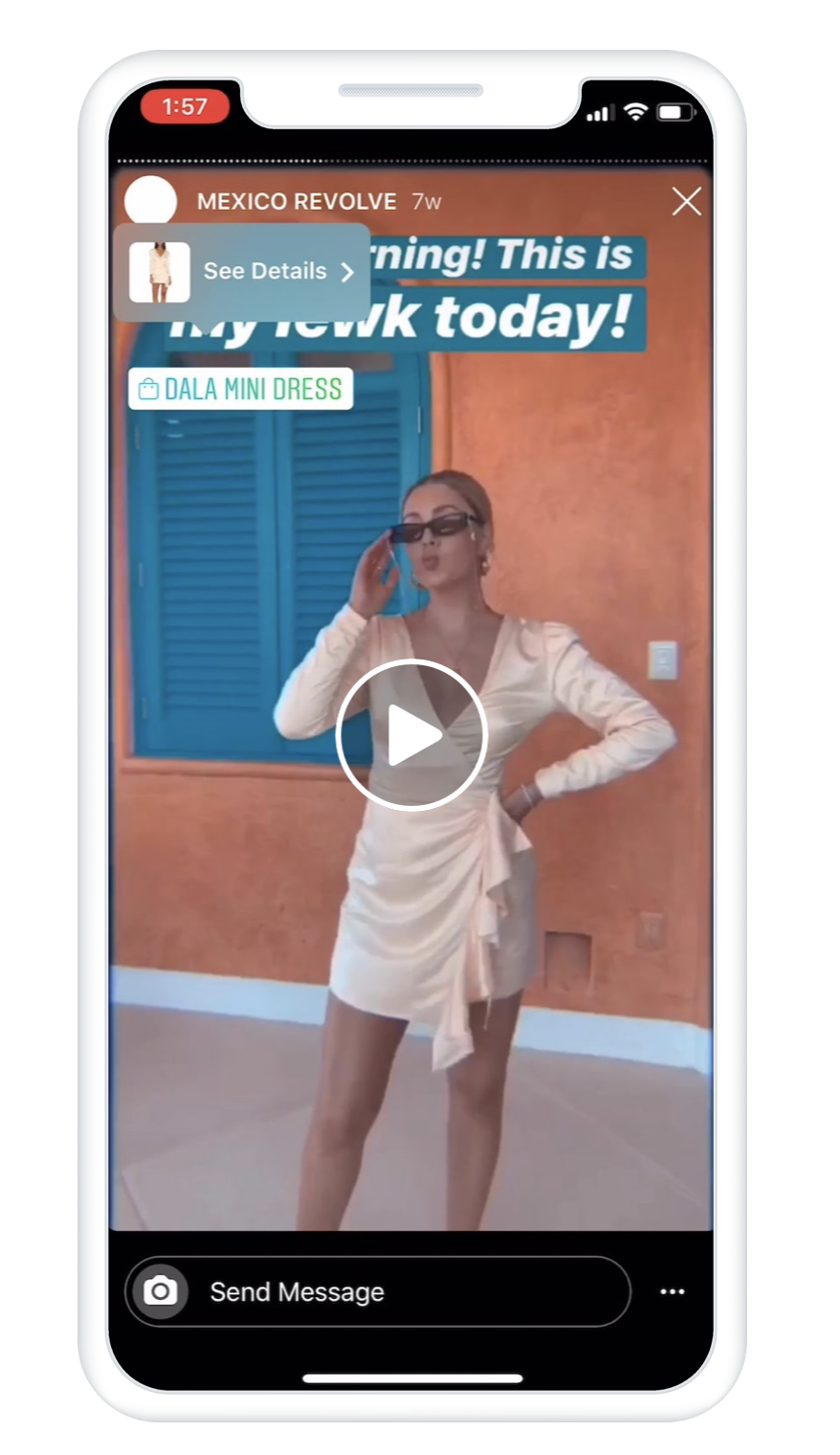
Source: Instagram
4. Product Tags in Instagram Posts
You can add product tags to your Instagram posts to make them shoppable. This helps to streamline the sales process as interested buyers can discover new products in your posts and click on them to complete a purchase without leaving the app. But before you can start tagging, make sure you’ve enabled the product tags. Just go to Settings tap on Products and click on Enable Product Tagging.
Here’s how to add Product Tags in your Instagram posts:
- Open your Instagram app.
- Tap on the “+” icon to create a new post.
- Select a photo or video from your phone showing your products.
- In the post settings, choose the Tag Products option.
- Simply tap on the area of the image to add a tag.
- Type the name of the products you want to tag and select them from the list.
- Tap Share to publish your post.
Here are some product tagging best practices to guide you:
- You can preview your posts and save them as drafts before you post.
- As soon as you’ve enabled the shopping features you can start tagging products in posts.
- Don’t forget about your old posts – you can tag them too.
- You can add between 1-5 tags in an image or video post, and not more than 20 tags in a carousel post.
- Make sure you write complete product descriptions. Users can click on a tagged post to check the product names, details and their price.
- If you’re working with influencers, ask them to tag your shop and products in their posts.
5. Instagram Shopping Tab
Instagram once had a Shopping tab in the bottom navigation bar where people browsed shops and explored featured products from brands they followed. It was removed in February 2023 and has not come back. Meta’s position at the time was that shopping would keep happening across feed, Reels, Stories, Explore and ads instead of in one destination, which is why the surfaces covered above matter more than any single storefront page.
Examples of Instagram Shops
Looking for inspiration? Here are some examples of Instagram shops we love:
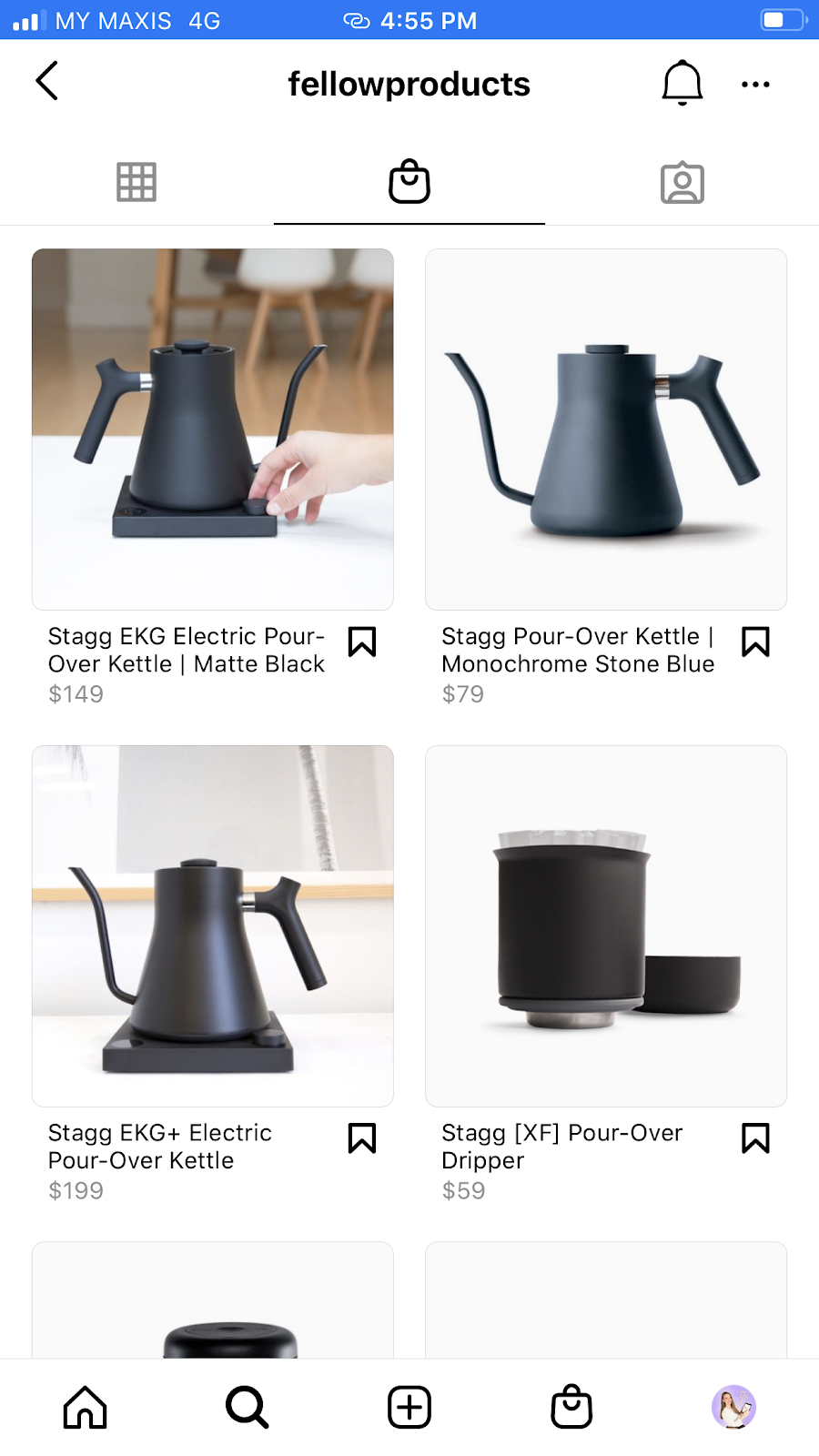
- Fellow chose to feature their best selling products in a classy and minimal black and white theme. This makes it easy for shoppers to click and learn more about the product they’re interested in.
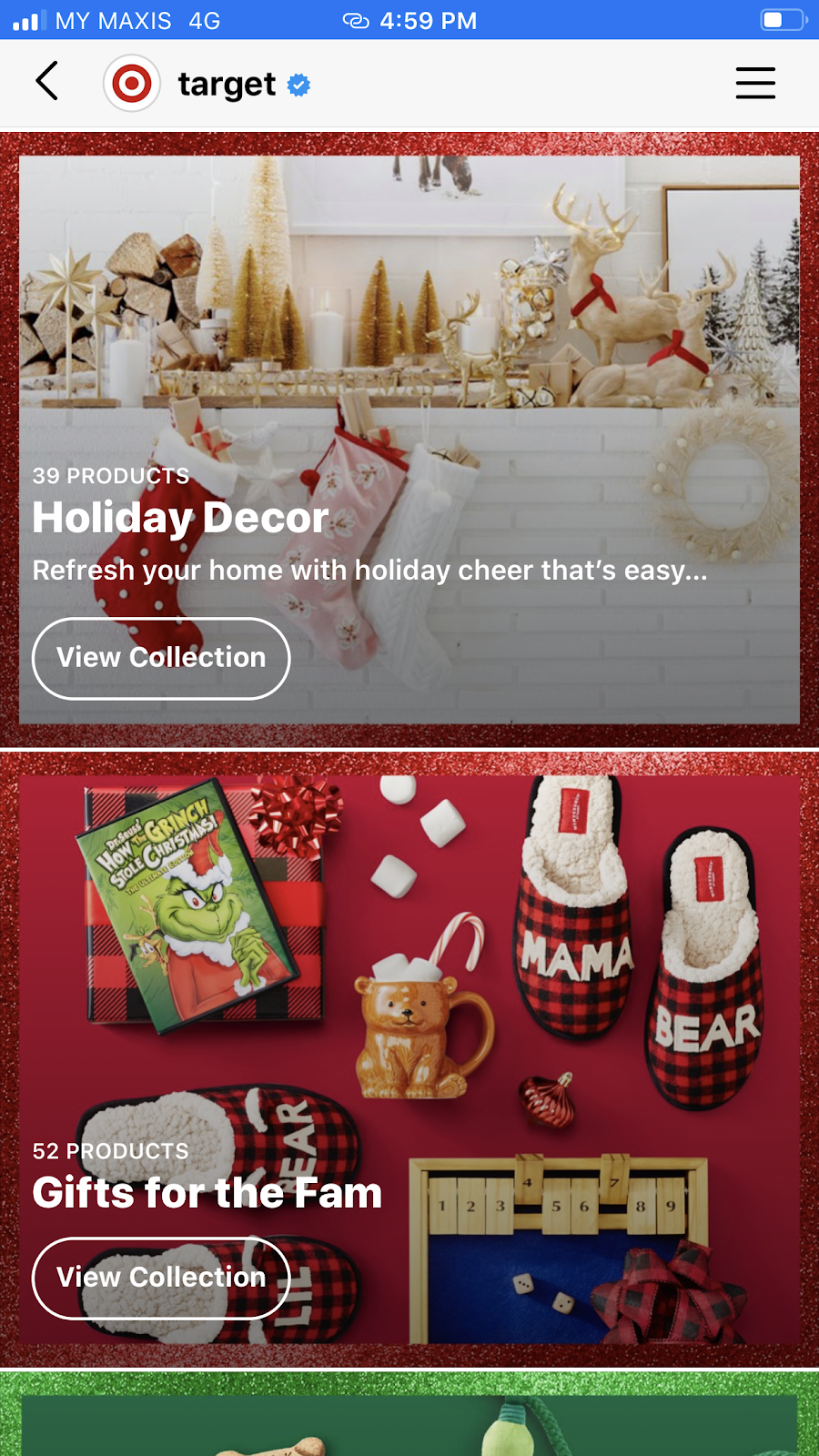
- Target designed an Instagram Shop that looks like a mini version of their website. They grouped products into different collections such as the Holiday Decor and Gifts For The Fam. This makes it easy for shoppers to browse through different categories and can click on collections to explore products.
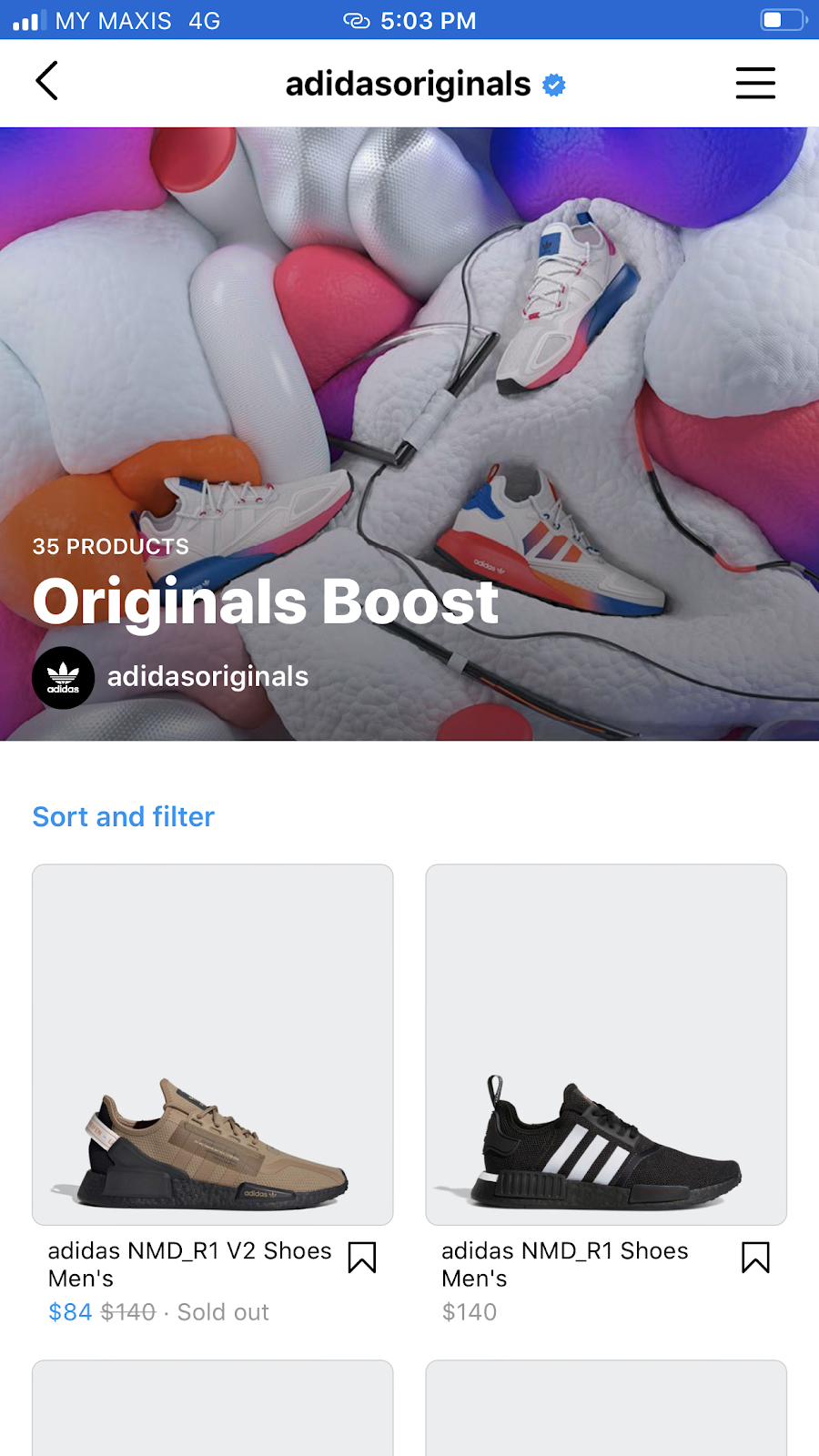
- Adidas keeps its Instagram Shop very simple, featuring only their most popular footwear collections: Boost and Classics. Their goal is simply to inspire you and capture your attention with star products. To explore their other collections, you’ll be redirected to their website.
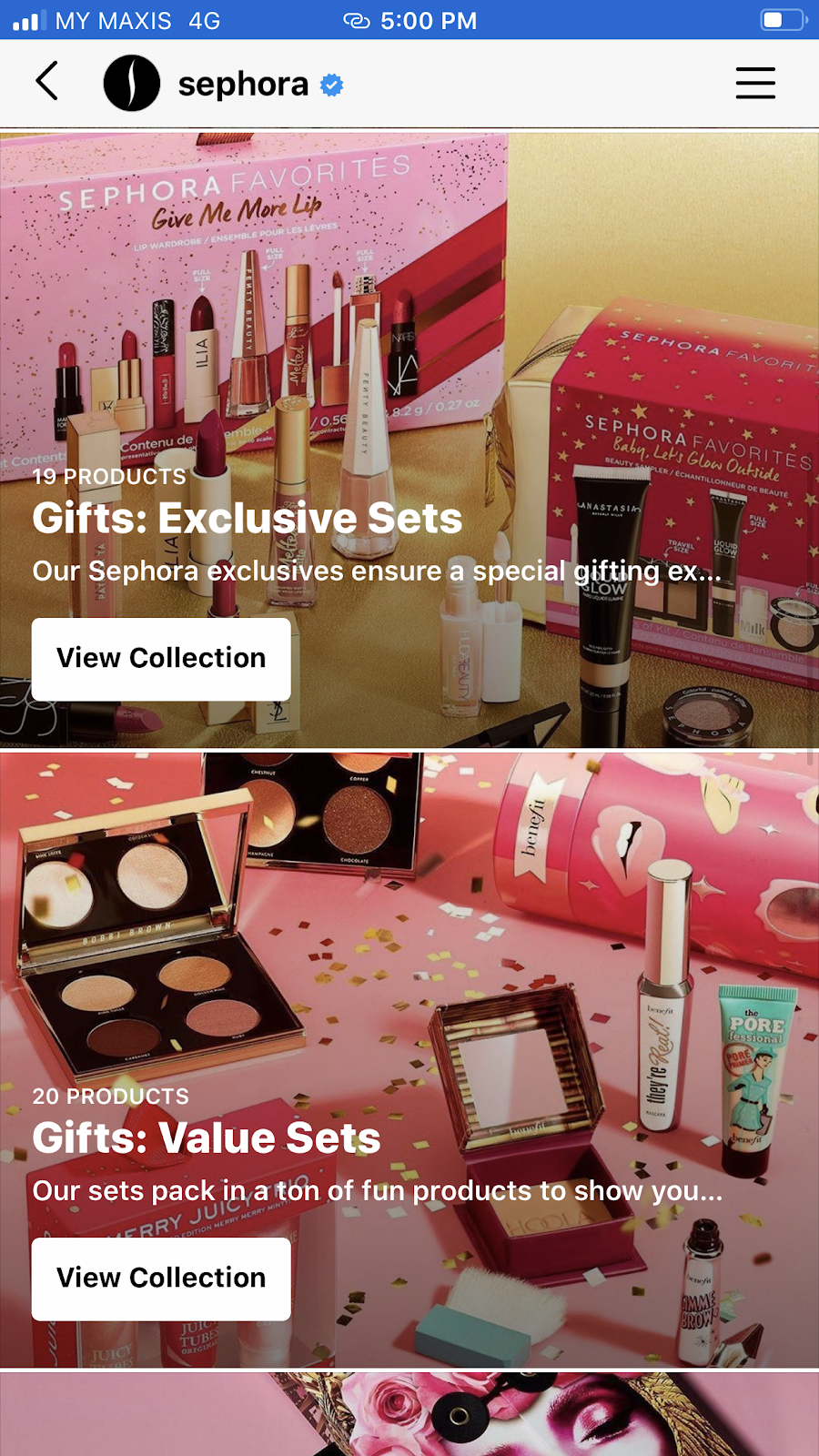
- Sephora has created its Instagram Shop to mirror their mobile app look and feel. Browsing through their Instagram shop you can feel as if you were reading a beauty magazine. Their collections are well-curated and organized into different themes that look visually appealing and you simply cannot stop scrolling.
6. Promoting your Shoppable Post with Instagram Ads
Instagram is a good platform for selling products mainly because of the number of people on it, but organic reach only carries a post so far, and a post rarely reaches every follower you have. That is why the accounts selling well treat organic and paid as one system rather than two. Promoting shoppable posts with Instagram ads puts products in front of people who do not follow you yet, and the targeting lets you decide exactly who those people are.
The most powerful way to create an ad is through Facebook Ads Manager.
Here are a few simple steps to create a new ad campaign:
- Go to Facebook Ads Manager and tap on + Create
- Under campaign objective select Catalog sales or Store traffic
- Select an existing audience or create a new one
- Choose the products you want to promote
- Edit ad placements to include Instagram feed and Stories
- Set your campaign budget and duration
- Click Publish
Alternatively, you can promote an existing post directly from Instagram. This is much easier to set up but less effective. With Instagram boosted posts, you don’t have access to a precise targeting as you would with Facebook Ads. But it’s still a good way to increase your post’s reach and get your products seen by a wider audience.
Note: Instagram allows you to track performance and measure your results for promoted posts and ad campaigns.
Measuring The Success Of Your Instagram Shopping Posts
Analytics are crucial for understanding how our shoppable posts are performing and to discover ways to improve your marketing efforts. Were your posts effective? Did they help you increase clicks, direct users to your e-commerce store and improve sales? Or maybe they completely missed the mark and you’re losing followers and sales.
There are a few ways to measure the performance of your Instagram posts:
Instagram Insights
The good news is that you can get insights about your Shoppable posts on the Instagram app itself. To check your posts’ performance you need to look at the statistics showed on your Insights page. Here you’ll find data about your content performance including a long list of metrics. If you have never read that screen closely, this walkthrough of what Instagram Insights can tell you about your audience is a good place to start.
The following metrics will tell you how posts with shoppable tags performed:
- Products views: the number of times users viewed your tagged products
- Products tag clicks: the number of times users clicked on the product button to visit your product page
- Website clicks: the number of times users clicked on the website linked in your bio
Facebook Shop Insights
To get more detailed insights into each of your products, you can check your Facebook Shop insights:
- Go to your Facebook page
- Under Publishing Tools, select Shop
- Tap on Products to see more statistics
Insights From Analytics Tools
There are also stand-alone Instagram analytics tools that measure your posts interactions and give you more detailed insights into your followers, locations and link clicks. If you’re using Stories shoppable stickers you can learn the number of taps, direct messages and clicks on the product page.
Frequently Asked Questions About Instagram Shopping
Does Instagram Shopping still work?
Yes, though not the way it worked when Shops launched. Product tags in feed posts, Reels and Stories still carry shoppers from a piece of content to a product, and the purchase itself completes on your own ecommerce store.
Can customers check out inside Instagram?
No. Meta phased out native in-app checkout for US merchants starting in June 2025 and finished the transition that August, which moved payment, order management and returns back to the merchant.
What happened to the Instagram Shop tab?
It left the app’s bottom navigation bar in February 2023 and has not returned. Shopping surfaces inside feed, Reels, Stories, Explore and ads instead of in a dedicated browse destination, so shoppers meet products in context rather than going looking for a storefront.
Do Instagram Stories still use a swipe up link?
No. Instagram replaced swipe-up with the link sticker in 2021 and then opened the sticker to every account, rather than keeping it limited to businesses and high-profile creators. Any Story can now carry a tappable link, whatever the follower count.
What replaces Live Shopping for selling in real time?
Live video still does the demonstration and audience-building work it always did. Since in-stream product tags no longer exist, the move is to send viewers to a link, whether that is a Story link sticker, the link in your bio, or a product URL sent by DM, and let the purchase finish on your site. The same routing applies when the product belongs to another company rather than to you, and this guide to Instagram affiliate marketing covers which links Instagram allows and where they can go.
Conclusion
Instagram Shopping features still create real opportunities for influencers and brands to put products in front of an engaged audience, but the finish line moved. Registering your shop and tagging products is the easy part; what turns those taps into revenue is the store they land on. Treat Instagram as the top of the funnel it has become, and build it into the rest of your Instagram marketing strategy rather than running it as a standalone storefront.
DIY your digital marketing with AI.
Practical advice on social, content, influencer, and search marketing, plus the AI tools that make each one easier. Join thousands of founders and business owners who read it.

Alle Ceambur
Articles: 42 Comments
Comments are closed.



Awesome, You explained step by step how we start and grow our online store on Instagram. Now Instagram is one of the best platforms for e-commerce marketing, it helps to grow our business quickly. You described all the steps how we set-up a new Instagram Shop which is helpful for everyone.
Hi Brack! Setting up Instagram shopping is not that complex. And from my experience, it takes no time to get approved. The only disadvantage is that currently, they don’t allow services or digital products to be listed in shops. (And doing so can get your account restricted). Have you started an Instagram shop?