


Before we think about the concept of how to create a social media calendar, let’s first reacquaint ourselves with the calendar as we should understand it.
Let’s start off with a mini-experiment: how many holidays can you think of for the month of May?
Cinco de Mayo, Mother’s Day, and Memorial Day likely pop up without much thought.
Did you know that May 4th, also known as Star Wars Day? I’ll bet you saw the phrase, “May the fourth be with you” more times than you expected. If you’d known about the event in advance, you could’ve tied this popular event into your social media strategy.
You already know that social media plays a huge role in any marketing strategy, whether you’re promoting a B2B or a B2C business. That’s because about half of U.S. adults, 53%, get news from social media at least sometimes, which makes it one of the few places your content reaches people who were not looking for you in the first place.
Plus, 84% of U.S. adults say they use YouTube and 71% use Facebook, with half on Instagram. Engaging with such an audience can do wonders for your business and brand.
There’s one not-so-tiny thing that can help with this (and improve brand relatability, overall): a social media calendar.
In this article, we’re sharing how you can create a social media calendar that can hit all of these socially-active people, along with the benefits you could see when sticking to one:
Key Takeaways
✅ A social media calendar is a planning tool, not a publishing tool. It records which post goes out on which date and on which platform, so the decision gets made weeks before the day arrives.
✅ Goals come before dates. Brand awareness, website traffic, leads, and sales each call for different posts, and a calendar built without a goal fills up with content that has no job to do.

✅ An audit tells you what belongs in the empty slots. Reviewing which past posts earned engagement, and which audience they actually reached, turns the calendar into a plan built on what already worked.
✅ Most of what you schedule should be content you did not create. Curated industry news and third-party articles keep the feed active and build authority, with your own posts and promotional content spread through the mix rather than dominating it.
✅ Holidays and events are the easiest slots to fill a year ahead. Pick only the dates that fit the brand, then write and schedule those posts in advance so nothing depends on remembering the day.
Why Use a Social Media Calendar?
A social media calendar is a tool that demonstrates your understanding of your audience’s preferences and likes.
…But why are they so important?
To put it simply, maintaining a social media profile provides the ability to interact with and relate to your audience. It’s an ideal way to infuse your company with a personality, and show that you’re not just a boring company who only posts promotional content on their social media profiles..
That results in more engagement. People who follow your feed or page will respond to content that speaks to them. You’re relating to them and positioning your company as one that “gets” them.
If you’re a huge Star Wars fan (guilty!) and a company you follow posts a Star Wars-related joke or sale on May 4th, you’re more likely to respond, right?

A tweet like the above is engaging and relevant. It hypes up a reader’s interest in your brand and generates interest not only in the holiday but in whatever content you’re sharing, too.
You can keep track of these popular days, and plan your May 4th (Star Wars Day) ahead of time. Say goodbye to only noticing on the day, and publishing the first tweet that comes to your head!
A social media calendar prevents your content from getting lost in the surge of content, too. On big, notable occasions, the vast majority of people are going to be consuming content that’s relevant to the event.
A tweet you’d share on an average day is more likely to get lost in the shuffle during something like the royal wedding, for instance. On such days, people are talking about whatever’s going on. Participating in that discussion heightens the visibility of your brand and demonstrates the relevance and relatability of your content.
How to Create (and Fill) a Social Media Calendar
Creating and filling a social media calendar is a little more complicated than researching fun, quirky, and relevant holidays and events. But don’t worry — I’m here to help!
With just a bit of effort, you can create a social media calendar that capitalizes on a variety of holidays and major events.
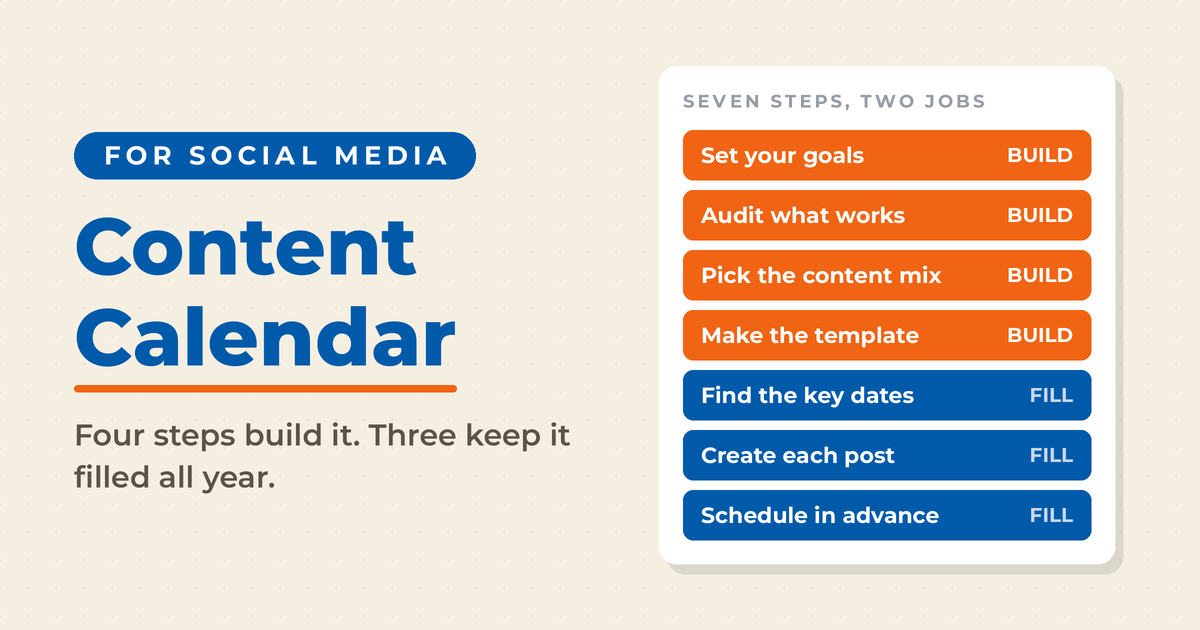
Here are seven steps to creating and filling your social media calendar:
One Strategy to Connect All Your Marketing
My latest book helps small businesses, entrepreneurs, and marketers bring search, email, and social together into one digital marketing strategy that actually compounds.
Drawing on my work as a Fractional CMO, Digital Threads turns complicated tactics into a clear, practical plan you can follow, whatever your budget or team size.
Grab your copy on Amazon and start weaving your own digital threads. Click the cover or the button below to get started.

1. Set Social Media Goals
It’s always a brilliant idea to define goals for your brand’s social media use. Incorporating some semblance of a social media strategy helps you to stay on-point. Doing so will ensure every tweet and post has a purpose and works toward your goals.
It’s also an excellent way to maximize your time and investment on a given platform. Goals help you measure the impact and overall success of your social media strategy.
Your goal decides what kind of posts belong on the calendar, so settle it before you start filling in dates.

Any of the following can work as the basis of your social media calendar:
- Raise brand awareness
- Drive website traffic
- Generate new leads
- Increase revenue
- Boost brand engagement
- Establish a community around your brand
- Enhance customer service
- Increase media mentions
But how can your brand use a social media calendar to contribute toward your goals?
Well, suppose your business sells flowers. Holidays like Mother’s Day or Teacher Appreciation Week are ideal to relate to. They’re both events where people are likely to purchase flowers as a gift. If your goal is to increase sales, acknowledging a holiday where flowers are a primary gift is a great way to do so.
You can identify how best to make use of your social media calendar by understanding your goals — and what you aim to accomplish. Posting relevant content on a specific holiday can increase your brand awareness, whereas participating in other events may translate to increased sales or conversions.
2. Conduct a Social Media Audit
If the term “audit” sends a shiver down your spine don’t worry. Social media audits are a good thing. A social media audit is a way to determine how your social media strategy is working.
During an audit, you’ll dive deep into your social media profiles to determine what content evokes the most engagement, and how close it comes to meeting the goals you’ve set. While conducting an audit, ask yourself:
- What type of social media posts work?
- Which posts fall short of my goals?
- Which opportunities am I not taking full advantage of?
(You can also use Buffer’s free 15-minute social media audit if you’re looking to save time!)
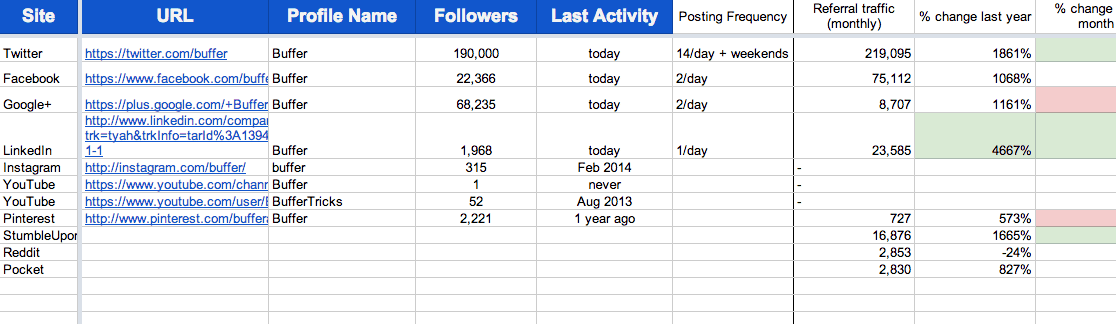
Not only will an audit reveal your most shared content, but it’ll shine a light on your demographics, as well. Are your posts reaching the right people? If they aren’t, how might a social media calendar assist in engaging your ideal audience?
You can use this newfound knowledge to tweak your social media strategy. Your social media calendar can tie into building upon what you’ve learned through your audit. A popular post might engage even more of your audience when it’s shared on certain days or during particular events.
3. Decide Your Content Mix
Just because it’s your feed, it doesn’t mean the only content you post should be yours. Part of interacting with your burgeoning social media community is sharing all sorts of relevant and interesting content.
But what’s the ideal mix? No single ratio fits every brand. A workable starting point is industry news first, company and product news second, and promotional or event posts last. Sprout Social’s 2026 Social Media Content Strategy Report, a survey of more than 2,300 consumers, found that audiences want human-generated content to be a brand’s top priority, so whatever ratio you settle on, the posts your own team makes should carry the weight.
You do not have to produce everything you post, and a feed that depends on it will run dry. Share content relevant to your niche or industry. Studies, articles, and news that relate to your brand, but aren’t about it, still earn their place in the feed.
Curating content demonstrates that you have a finger on the pulse of your niche. Curation establishes and builds your authority in a space. Incorporating curated content helps your feed stay fresh and relevant without the necessity to create a constant deluge of content. Working from a set content curation routine, with a handful of sources checked on a schedule, is what keeps that supply steady enough to fill a calendar week after week.
That’s not to say you shouldn’t be posting your own content, of course. You should sprinkle your own content throughout your feed, as well. Including your content on your social media calendar is a great way to bring extra attention to something produced by your brand.
Promotional content, like sales and product launches, should be posted sparingly — but still posted all the same. You should especially work to tie promotional content into relevant events and holidays throughout your calendar.
4. Create Your Own Social Media Calendar Template
It can be a hassle to remember which content to share on which platform. After all, Twitter has different post limitations compared to Facebook compared to LinkedIn and…well, you get the idea.
A social media calendar template provides you the ability to sort, organize, and plan your social updates. It doesn’t require much effort to set one up, either.
Use Microsoft Excel or Google Sheets to create one. Add rows for the day and month and for each social media platform you use.
(Three free templates are linked at the end of this post to help get you started.)
5. Find Key Dates
Once your template is set up, the next step is to start filling it in! How, you ask? Simple: perform a quick search using a term like, “national COUNTRY holidays.” Then enter those holidays into your template. Easy, right?
But don’t forget more fun and quirky holidays, too. The National Day Calendar is a great place to find a plethora of interesting holidays and events.
However, don’t fall into the trap of becoming overwhelmed by so many holidays. You don’t need to include each and every one of them on your social media calendar. Instead, find those that are relevant to your brand and audience. Identify the days you want to celebrate and participate in, and spread them across your calendar.
Obviously, National Bike to Work Day may not be a holiday worthy of acknowledgement by a car manufacturer. National Macaroon Day, on the other hand, would be a great opportunity for a bakery to highlight some of its sweet treats and encourage customers to come in.

Find the key dates that make sense to your brand and sprinkle them across your calendar. It’s starting to come together now, right? Perfect! Onto the next step then.
6. Create Content for Each Event
After identifying relevant events, you’ve got to create social content to coincide with it. There’s nothing wrong with a simple post acknowledging the holiday, but you should also strive to relate to it.
How can you comment on the event, or tie it into your products or services? Let’s look at something as simple and seemingly boring as World Password Day. In actuality, this is a great event for CMS businesses to post something such as, “Remember to change your password on #WorldPasswordDay!”
Here’s an example of how Trezor used this to promote their password CMS:

When you’re doing this, it’s important to ensure that your social content is optimized for each platform.
Twitter’s 280-character limitation lends itself to brief posts with accompanying and optional images. Additionally, Twitter hashtags and trends play a large role in increasing the visibility of a post.
In fact, Twitter hashtags are a great way to capitalize on current events. Consider this Mother’s Day 2018 tweet from Verizon:

Verizon has created social content that appeals to the emotions of its audience, yet still ties into the products and services offered by the company. Plenty of people forget (or almost forget) to wish their moms a happy Mother’s Day. One of the easiest ways to do so is to, well…#CallMom (ideally, Verizon wishes, using Verizon service).
It’s an effective Mother’s Day-related tweet that nearly everyone can identify with.
Since demographics differ from platform to platform, ensure your content is relevant to your platform-specific audiences. (See why a social media audit comes in handy?)
7. Schedule When Your Content Goes Live
Let’s face it — it’s easy to forget some of these lesser-known holidays and events, especially with everything else you have going on in your life and business. But that’s no excuse for your brand to ignore them.
Part of creating a social media calendar is staying ahead of the game — planning, basically. Otherwise, what point does a social media calendar serve?
You’ll notice the previous steps all focused on creating and tying in content to corresponding holidays. The final step is sharing that content with the world.
Use a social scheduling tool to schedule your content in advance.
When the holiday finally comes around, your content will be shared automatically across your social channels.
Scheduling your content to publish on specific dates spares you from forgetting which holiday is when. When the day comes, your content will publish and you’ll enjoy the rewards of increased engagement, click-throughs, leads… or whatever you’ve defined as your goals.
Social Media Calendar Templates to Get Started
Now that you know the use and effectiveness of a social media calendar, the following three templates can help you get started. Customize them to your own liking, or use them as a basis to make your own:
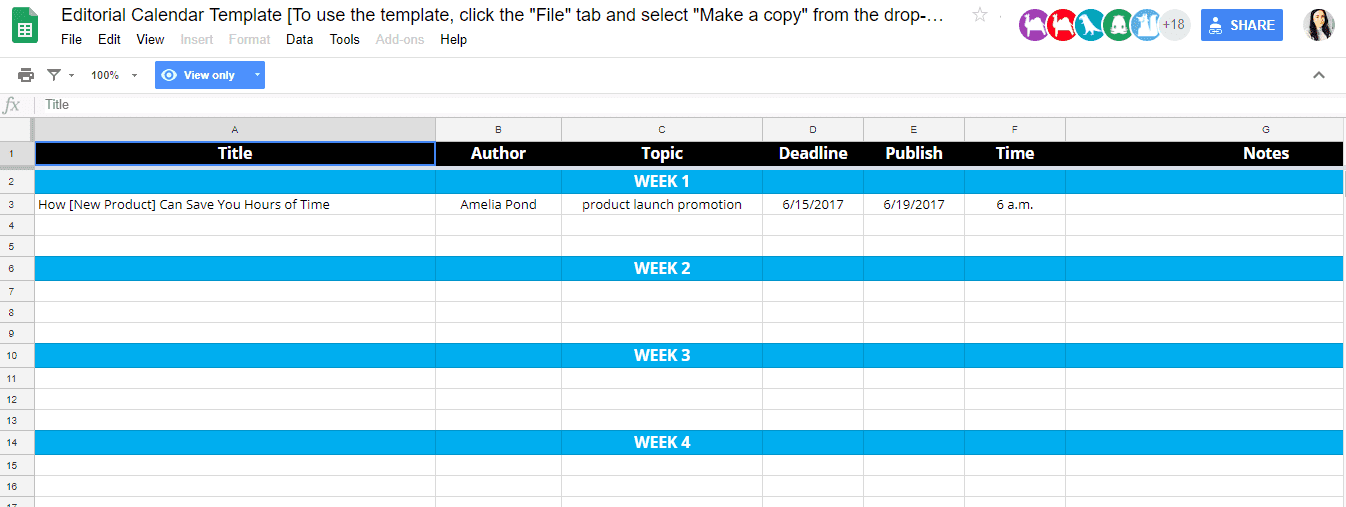
Hootsuite’s Social Media Calendar
Hootsuite’s social calendar opens in Google Docs, which brings along added functionality.
You can share it with your team and assign individuals to specific posts, dates, or platforms.
Plus, with the ability to coordinate across various departments, you’re able to develop a fully on-brand social media calendar:
Hubspot’s Free Social Media Content Calendar
Hubspot’s free social media content calendar also opens in Google Docs, providing the same advantages as Hootsuite’s.
However, Hubspot’s offering has multiple sheets, which allow for extra details and organization.
Additionally, the sheet provides an option to color-code your content to distinguish events — such as holidays, campaigns, and product launches:

SmartSheet’s Marketing Editorial Calendar
Don’t let the “marketing” term send you packing — SmartSheet’s marketing editorial calendar can be used to combine general marketing with social media strategy.
The calendar uses a separate tab for each month to help you plan out your social media content:

Frequently Asked Questions About Social Media Calendars
Put the fixed dates on the calendar a year out and write the individual posts four to six weeks out. Holidays, product launches, and industry events rarely move, so they can be slotted early, while posts that react to what is happening in your niche need a much shorter runway.
At a minimum: the date, the platform, the post copy, any image or video, and the link being shared. Adding a column for the goal each post serves makes it obvious months later which content was doing work and which was just filling a slot.
Enough to cover the posting frequency you can sustain on every platform you actively maintain. A grid with daily slots across six platforms and one person filling them gets abandoned by week three, so set a realistic frequency first and build the calendar around it.
A spreadsheet handles the planning side perfectly well, which is why the three templates above are built in Google Sheets and Excel. A scheduling tool earns its cost at the publishing step, when a year of posts has to go out automatically on dates you set months earlier.
Wrapping Up Your Social Media Calendar
It really does not matter which of the three templates you use, as long as it is the one you will actually open. Pick the format that fits how your team already works, block out the fixed dates for the next twelve months, and set aside an hour each week to fill in the next four weeks of posts. A calendar that gets opened every Monday beats a far more elaborate one that nobody touches after February.
Once the grid is full, the work shifts to making each post worth the slot it sits in. Neal Schaffer’s book Digital Threads covers how social content, email, and search feed each other, and a free preview is available here. For brands that would rather have the calendar and the strategy behind it built with them, Neal also offers fractional CMO services.

It really doesn’t matter which template you use as long as it helps with planning out your social media content.
Hii…this is use for my office..and i thanks for it.
Hi Vinay just seeing this now, but it’s really well done — the best summary of which days and times to post for greatest reach that I’ve seen. Especially interesting to me was how best times vary by platform, as my impulse is to immediately push new blog posts to all of my social media channels at once (typically around 8:00 am Eastern).